
In context of backup and recovery. DBMS is a software that stores, organized, and protects data while offering backup and recovery tools to restore information if things take a wrong turn.
Best Database Management Software for Secure Data Backup and Recovery
 Saipansab Nadaf
Updated on: Nov 13, 2025
Table of Contents
- Introduction to Database Management for Backup and Recovery
- Why Secure Data Backup and Recovery Is Essential
- Key Features of a Reliable Database Management System (DBMS)
- Top Database Management Software for Backup and Recovery
- Leading On-Premise DBMS Tools for Data Protection
- DBMS with Built-In Automated Backup Features
- Security Capabilities in Modern Database Management Tools
- Use Cases: Best DBMS for Small Businesses vs. Enterprises
- How to Choose the Right Database Management Software
- Future Trends in Database Backup and Recovery Technologies
- Frequently Asked Questions
Ever wonder what actually keeps your business data safe when things go sideways? It’s all about database management software. These tools don’t just stash your info somewhere, they protect it, make sure you can get to it fast, and help you bounce back if trouble hits.
Right now, companies crank out more data than ever. Customer details, payment histories, inventory numbers, day-to-day stats, it’s all crucial, and honestly, losing any of its just isn’t an option. That’s why you need a solid database management system. With the right setup, you get automatic backups, secure storage, and quick recovery if something blows up. Curious about which software really delivers? Stick around. We’ll break down the details and help you find the best fit.
Key Takeaways
- DBMS is essential for protecting, organizing, and recovering critical business data.
- Secure backup and recovery prevents costly downtime, ensures compliance, and maintains customer trust.
- Small businesses benefit from open-source tools like MySQL, while enterprises need advanced platforms like Oracle.
Introduction to Database Management for Backup and Recovery
So what’s database management when we’re talking about backup and recovery? At its core, it’s all about using the right software to keep your data organized, safe, and ready to bounce back if disaster hits. Lost a file? Hard drive crashed? Someone slipped up and deleted something important? A good DBMS has your back.
Here’s how it works: the system makes regular copies of your data and locks them away somewhere secure. If something goes sideways, you just reach in and pull out what you need, could be a single file, could be the whole database. You don’t lose the things that matter. It’s like having insurance, but for everything digital you care about.
Why Secure Data Backup and Recovery Is Essential
Industry reports say 93% of companies that lose a chunk of data and don’t have a recovery plan shut down within 5 years. That’s huge.
Let’s be real, nobody’s immune to data loss. Data loss happens for all sorts of reasons. Ransomware, busted servers, storms, or just someone clicking the wrong button. If you don’t have a solid backup system, bouncing back is a nightmare. It eats up money, time, and sometimes, you just can’t fix it.
That’s why, you need secure backup and recovery. It keeps your business running, helps you stay on the right side of data laws, and shows customers they can trust you with their info.
Key Features of a Reliable Database Management System (DBMS)
Not every database management system is built the same, especially when you care about backup and recovery. So, what really matters? A few things stand out:
- Automated Backup Scheduling: It saves you from babysitting the process and keeps your data safe on a regular basis.
- Point-in-Time Recovery: Point in Time recovery is a lifesaver when something goes wrong, you can actually jump back to the exact moment before trouble hit.
- Data Encryption: Locking down your information whether its moving across the network or just sitting there.
- Scalability: Scalability is a crucial part, as your business grows, your DBMS
- User Access Controls: You need to decide exactly who’s allowed to see, change, or wipe out sensitive data.
Put all these together, and you’ve got a solid backup and recovery setup that really protects what matters most.
PRO TIP
Before choosing a DBMS, test its “recovery speed”; not just its backup features. A slow restore can hurt your business more than a missing file. Always measure how fast the system can bring data back during emergencies.
Top Database Management Software for Backup and Recovery
It’s easy to get lost in all the DBMS choices out there. So, let’s cut through the noise, here are some of the best database management systems if you care about strong backup and recovery:
- Microsoft SQL Server
- Oracle Database
- MySQL
- PostgreSQL
At the end, your needs and budget shape the right pick. Figure out what matters most to you, then dive in.
Leading On-Premise DBMS Tools for Data Protection
Cloud solutions are catching on fast, but plenty of businesses still stick with on-premise database management. Honestly, it makes sense. Keeping everything in-house means you have full control, your data stays on your own turf.
Big names like Microsoft SQL server, Oracle Database, and IBM Db2. They pack in features like advanced backup scheduling, disaster recovery, and tight access controls, and you manage it all yourself. That’s a big deal for industries like healthcare and finance, where the stakes are high and regulations don’t give much wiggle room. When security and compliance matter most, on-premise wins out.
DBMS with Built-In Automated Backup Features
Manual database backups used to be a real hassle. You had to babysit the process, double-check everything, and hope nothing slipped through the cracks. Modern DBMS platforms pretty much take care of it for you.
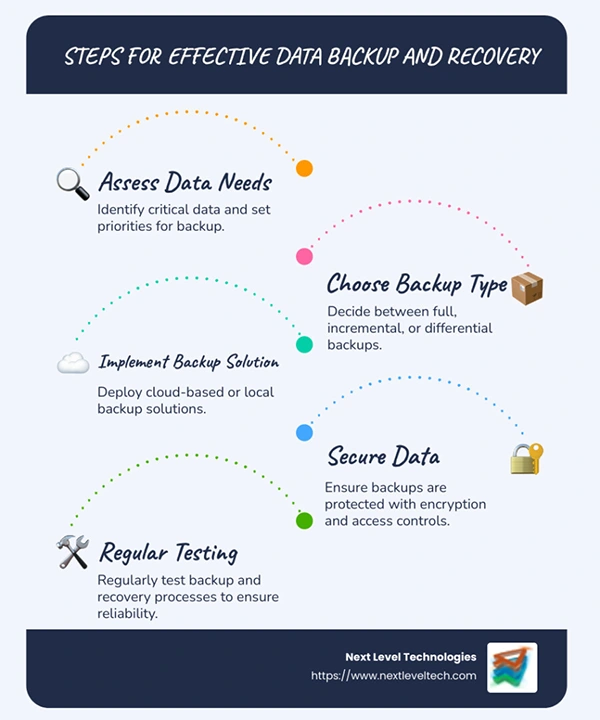
Microsoft SQL server, Amazon RDS, Oracle Database, they all come with automated backup tools. You pick how often you want backups. Hourly, daily, weekly, or whatever.
Security Capabilities in Modern Database Management Tools
Data security is not just a nice luxury, its absolutely essential. Cyber threats keep getting smarter, so today’s DBMS platforms have had to get smarter too. Now, you’ll find all sorts of built in safeguards. Encryptions, multi factor authentication, role-based access controls, even real-time threat monitoring.
All of it is there to make sure only the right people get to see sensitive data, and anything out of the ordinary gets spotted right away.
Use Cases: Best DBMS for Small Businesses vs. Enterprises
If you are running a small business, open-source databases like MySQL and PostgreSQL just make sense. They’re reliable, you get decent backup and recovery tools, and you don’t have to shell out a fortune. For startups or team watching their budget, they’re a no brainer.
But when you’re working at an enterprise level with huge data and complicated process, you need something tougher. Oracle Database or Microsoft SQL Server step in here. They’re built for security, can scale up fast, and offer real support when things get risky.
How to Choose the Right Database Management Software
So, with all these choices staring you down, how do you actually pick the right one? Let’s break it down.
First off, think about your budget. Sometimes, a free, open-source tool does the trick. Other times, paying extra features or support just makes sense. Next up, scalability. Don’t get stuck with something that’ll hold you back later, pick software that can keep up as your business grows.
Don’t ignore usability, either. You want something your team can figure out fast, not a platform that needs weeks of training. Security’s a big deal, too. Make sure you’re getting strong encryption, real access controls. And compliance options.
Future Trends in Database Backup and Recovery Technologies
AI and ML are stepping up, spotting failures before they happen and kicking off recovery without you lifting a finger. Likewise, tools such as an affiliate management platform are evolving too. Cloud native DBMS platforms? They’re not slowing down-except them to scale smoothly and keep your data safe in real time.
Honestly, as companies rely more and more on data, you can’t afford to lag behind. Future-ready database management isn’t just –a nice luxury, it keeps you in the game.
Frequently Asked Questions
What is a DBMS in terms of backup and recovery?
Why is database backup important for businesses?
Database backup is extremely important for businesses as it prevents data liss, protects against cybercrimes, reduce downtime, and help them meet compliance standards.
Which database systems are best for beginners and small businesses?
MySQL and PostgreSQL are two great options for beginners and small businesses.
Which DBMS is ideal for large enterprises?
For a large enterprise, Oracle Database and Microsoft SQL server are good choices.
Related Posts
How Poor Contract Visibility Leads to Revenue Leakage in Growing Companies
Growth is an important factor that determines the success rate of any business. When we witness new operations, partnerships and…

Managing Bitcoin Operations? Here’s How Salesforce Automation Helps
“Digital currency is here to stay, and it’s only a matter of how long before governments embrace it.” — Brad…
Why Modern Organizations Depend on Data Privacy Software
Data growth has significantly accelerated beyond what most compliance teams can manage, with personal records, financial details, contracts, and emails…

Converting Chats Into Leads While Maintaining Professionalism
The way marketing teams and businesses approach their potential clients to boost their sales has completely transformed in the last…

How to Delete iCloud Account? Complete Guide for 2026
Thinking, how can I delete iCloud or Apple account? It is not just about removing an account; it is about…

How Different Industries Use Specialized Software to Stay Competitive
In the market we have today, companies are always trying to find ways to work better and get results. The…

What Key Adjustments Enhance Visual Appeal Across Web Pages
Attractive web pages form the roots of any appealing website. For instance, imagine looking for content on Google, and you…

When is it Time to Consider IT Support Services for Your Business?
Every business needs to ensure smooth operations for a successful business. But despite trying hard to avoid barriers, technical issues…
How to Delete User Profile in Windows 10: Step-by-Step Guide
You don’t notice user profiles until one starts causing problems. A profile gets corrupted, a login error pops up, or…