
Use strong and unique passwords, turn on two-factor authentication, keep your devices updated, and avoid unknown links and downloads.
How to Protect Your Privacy Online in 2026: The Smart User Playbook
 Mahima Dave
Updated on: Mar 13, 2026
Your digital life also runs on small settings most people ignore. Think of your online life like an apartment. You lock the door but often leave the Windows open, share spare keys, and let strangers peek inside. That’s how tracking and data leaks happen.
In this guide, I will help you shut those windows. You will learn how to protect your privacy online and quick settings that block most trackers. Just practical steps that protect your email, chats, money, and digital life.
It is time to understand what truly works and how to protect your data with minimal effort.
Quick Answer: How to Protect Your Online Privacy?
- Use a strong and unique password for every account and store them in a password manager.
- Turn on two-factor authentication for email, banking, and social media.
- Keep your phone, laptop, and apps updated automatically.
- Review app permissions and remove access you don’t need.
- Limit what you share publicly on social media.
- Avoid entering sensitive data on public Wi-Fi without protection.
- Avoid feeding sensitive information to AI bots and turn off data training options.
Why Online Privacy Security Still Matters in 2026?
Cybercrime is expected to cost the world $15.63 trillion by 2029. Online privacy is no longer optional; it is basic digital hygiene. Data security matters more than ever in 2026. Your data moves across apps, websites, and devices every day. Roughly 11 data breaches happened every day in 2025.

Old passwords and reused emails from years ago still get traded and reused by attackers. That means even accounts you forgot can be used to access newer ones.
Tracking has also become smarter. Apps and websites follow behavior using cookies, device fingerprints, and ad IDs. Most of it happens quietly behind your screens. Over time, this aggregated data shapes what you see, what you are sold, and sometimes how you are targeted.
So, privacy today is not about disappearing from the internet. It is about control. The good part is that there is no need for complex tools to protect privacy online.
How to Protect Your Privacy Online: 10 Quick & Practical Steps
You do not need to be a cybersecurity expert to protect your privacy online. A few strong habits and better settings remove most real risks. Start with the basics, and you can block the majority of attacks people face.
Here’s how to protect your privacy on the internet using 10 quick steps. You should apply the following recommendations today:
Use Strong and Different Passwords
Reusing one password across sites is still the number one reason accounts get hacked. Around 90% of breaches involve identity weaknesses like stolen passwords or poor authentication.
Use long and random passwords for every account. A password manager like Apple Passwords or Google Password Manager makes this easy and removes the need to remember everything.
Turn on Two-Factor Authentication
This adds a second layer after your password. Even if someone steals your login, they cannot enter without the extra code. Turn 2FA on for email, banking, social media, and other important spaces to protect privacy online.
Share Less Than You Think You Should
Oversharing is fuel for scams. Research from Cornell University shows 99% of internet users encounter trackers during normal browsing, often within minutes.
Avoid posting your phone number, address, travel plans, or daily routines. Always skip optional fields in forms, and see a secondary email for newsletters and sign-ups.
Review Privacy Settings Once a Month
Most apps collect more data than needed. Check location access, camera, microphone, and contact permissions. Turn off anything that is not essential. Also, review what accounts and apps are connected to each other.
Delete Apps and Extensions You Do Not Use
Unused apps keep collecting data in the background. So, remove anything you rarely open. Another thing I recommend to everyone is that if you only visit a service occasionally, use the browser instead of installing a dedicated application.
Keep Devices and Apps Updated
Updates often fix known security patches. Delaying them leaves your phone or laptop open to attacks that already have solutions. Turn on auto-updates wherever possible.
Secure Your Wi-Fi and Public Browsing
Start by setting a strong router password at home. On public Wi-Fi, avoid banking or entering sensitive data. If you must use public networks, use a reliable VPN to encrypt your connection.
Reduce Tracking and Ad Data Collection
You need to understand how to secure personal data online. Companies use a lot of different data collection methods. So, try to stop accepting unnecessary cookies and regularly clear the cache and cookies. Turn off ad personalization in Google, Apple, and social media. Also, disable cross-app tracking in phone settings. This reduces the number of companies that follow your behavior.
Encrypt and Lock Your Devices
Use a strong PIN, fingerprint, or face lock, and enable device encryption. If a phone or laptop gets lost, encryption keeps your data unreadable. Plus, you should store fewer sensitive files in the cloud when possible.
Watch for Phishing and Fake Links
Most attacks still start with a simple message, urgent email, fake delivery link, and suspicious login alert. Always pause and think before clicking, and verify the source. One careless tap can expose everything.
Most people jump to advanced tools and ignore the basics. Do these ten steps well, and you can take back control of your data. You can make yourself a much harder target than the average user online.
How to Protect Online Privacy in an AI-Driven World?
AI makes life easier, but it also collects more data. According to the Cost of a Data Breach Report 2025 (IBM), about 16% of data breaches involve AI-driven attacks.
You cannot avoid using AI these days, but you should make sure that you control what it can access. Here’s how to protect digital privacy while interacting with Artificial Intelligence:
- Don’t Feed Sensitive Data to AI: Avoid sharing financial details, IDs, passwords, or private documents in AI chats or tools. Assume anything you enter could be stored.
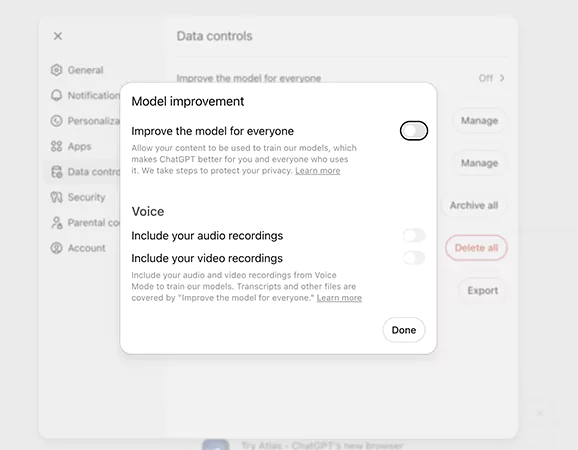
- Turn Off Data Training Options: Many AI GPTs use your inputs to improve their systems. Check settings and disable data sharing or model training if possible.
- Lock Down Your Accounts: Use a strong password, two-factor authentication, and strict app permissions. AI tools only see what your accounts allow them to see (at least that’s what they promise).
- Choose Privacy-First Platforms: Use tools that are clear about how they store and use data. If their privacy policy feels vague, don’t trust them with personal info.
- Delete Your Data: Some platforms allow you to remove chat history or stored data. Use those options regularly to remove what is not required anymore to reduce your footprint.
AI is powerful, but treat it like a smart assistant, not a diary. Share less, check settings, and stay in control of your data.
Conclusion
You now know how to protect your privacy online. However, it is important to keep in mind that online privacy is not a one-time setup; it requires regular maintenance.
Consistent small actions can offer strong security. Most risks online do not come from advanced hacking. They come from simple gaps that people ignore. So, just treat privacy like you treat health. Routine care will help you more than you think.
Frequently Asked Questions
How can you protect your privacy online ?
Can private browsing protect my privacy?
No, incognito mode only hides history on your device. Websites, trackers, and your internet provider can still see activity.
What are the best online privacy protection practices?
Strong passwords, 2FA, tracker blocking, private browser, regular updates, and careful sharing of data are some of the best security practices for digital privacy.
How to protect privacy while working or studying remotely?
Remote work can increase exposure if you are careless. Try to use secure home Wi-Fi, avoid shared devices, log out after use, lock and encrypt devices, and use trusted work accounts only.
How to check if your data was leaked?
You can use breach-check tools like “Have I Been Pwned”. Just enter your email to see if it appeared in known leaks. If exposed, change passwords and improve authentication immediately.
Related Posts

8 Best AI Presentation Makers for Business-Ready Slides
Making a presentation doesn’t just mean designing slides. It’s about defining a clear structure, using defined logic, useful visuals, and…

Queue Management Software Troubleshooting Guide: 8 Common Faults and Fixes
The long wait times and ineffective management of customer queues can have a significant impact on customer satisfaction and business…

How to Use Similarweb Website Traffic Data for Competitor Research
Competitor research without traffic data is guesswork. You can guess who your rivals are, guess how big they are, guess…

Choosing the Right Hosting Model for Scalable Digital Platforms
The performance of digital business is directly related to website speed, uptime, and scalability. Slow page performance has a negative…

How Data-Driven Performance Tools Are Transforming Employee Recognition in Tech Companies
“People work for money but go the extra mile for recognition, praise, and rewards.” — Dale Carnegie (Writer & Teacher)…

Why Businesses Struggle to Collect Reliable Data from the Web
Almost every company that depends on data runs into the same problem: although they can find the data they need,…

Why Financial Data Recovery Matters for Businesses
Financial data supports every part of a business, directly affecting cash flow, payroll, tax reports, audits, customer billing, and daily…

CMMC Compliance Is Coming for Manufacturers. Here Is What You Need to Do
“Cybersecurity is much more than a matter of IT.” — Stephane Nappo (Cybersecurity Professional) For manufacturers working within the defense…

How Data-Based Tools Influence Learning Performance
Learning has transformed in the modern age with the integration of new technologies to help students and professionals prosper in…