
Ans: Dokie AI is a solid choice for users who require a structured, editable, and business-ready PPT deck, thereby optimizing the entire workflow and allowing them to focus on other tasks.
8 Best AI Presentation Makers for Business-Ready Slides
 Reviewed By Brijesh Kumar Singh
  Saipansab Nadaf
Updated on: May 29, 2026
Making a presentation doesn’t just mean designing slides. It’s about defining a clear structure, using defined logic, useful visuals, and a format that is easy to edit and share.
This is why many users are now using AI presentation makers. These handy tools allow you to turn rough ideas, documents, notes, or business content into presentation drafts. Every tool focuses on specific aspects of the whole workflow.
In this guide, we will review the eight best AI presentation makers for business reports, pitch decks, marketing plans, and professional presentations.
Key Takeaways
- AI presentation makers are massively useful for business reports, pitch decks, product updates, sales decks, monthly reviews, and strategy presentations
- They are especially useful if your team already has templates, brand rules, or a presentation process inside Google Slides or PowerPoint
- Some tools are helpful for consultants, marketers, educators, business teams, and agencies that require the support of AI without changing their entire workflow
- AI presentation makers can save a lot of time, but the best tool depends on your real workflow
1. Dokie AI
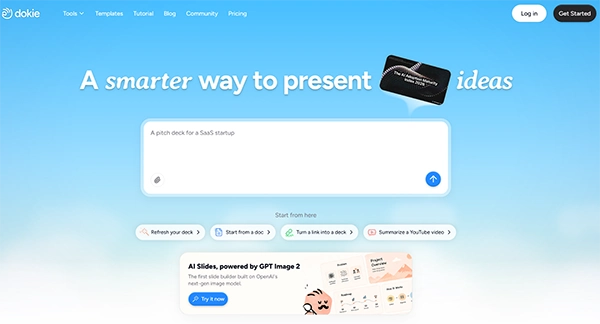
Dokie AI is one of the best AI presentation makers for users who want structured, editable, and business-ready PPT decks.
The biggest strength of Dokie AI is that it focuses on real presentation workflows. It is not only about creating pretty slides. It helps users turn rough ideas, notes, documents, or existing content into a clear PowerPoint-style deck that can be edited and used for work.
This makes Dokie AI massively useful for business reports, pitch decks, marketing plans, product updates, sales decks, monthly reviews, and strategy presentations.
For example, if you require a business report, Dokie AI can help organize the deck around summary, challenges, recommendations, and next steps. If you need a pitch deck, it can help structure the content around problem, solution, product, business model, team, and ask.
Dokie AI also supports GPT Image 2, which makes the generated slide visuals much better. The images look more relevant to the slide topic, more polished, and less like generic placeholders. This is useful because weak visuals are one of the biggest problems with many AI-generated presentations.
Dokie AI also offers PPT templates for different scenarios, including Business, Education, Marketing, Medical, Technology, Pitch Deck, About Me, and Infographics. It also provides free PPT tools such as PDF to PPT, Word to PPT, Text to PPT, Excel to PPT, JPG to PPT, PNG to PPT, HTML to PPT, and DOC to PPT.
Best for: Business-ready PPTs, pitch decks, marketing decks, client proposals, reports, and structured presentations.
Pros:
- Strong business-ready PPT workflow
- Good for reports, proposals, pitch decks, and strategy decks
- Supports GPT Image 2 for better slide visuals
- Useful PPT templates for different business scenarios
- Free PPT tools for converting existing content into slides
Cons:
- Important decks still need manual review
- Users should add real data and polish high-stakes presentations
2. Gamma
Gamma is a strong AI presentation maker for users who want modern, web-style presentations.
Unlike traditional PowerPoint-style tools, Gamma feels more like a mix between a presentation, a webpage, and a visual document. Users can start with a prompt and quickly create a polished deck that is easy to share online.
Gamma is useful for async reports, startup updates, product explainers, internal documentation, and online-first presentations. Its output usually looks clean and modern, which makes it a good option for teams that want a more flexible presentation format.
The main limitation is that Gamma may not always be ideal for traditional PPT workflows. If you need a formal business deck for a client meeting, investor pitch, or internal report, you might need to alter the format and structure after generation.
Best for: Web-style presentations, async updates, product explainers, and shareable decks.
Pros:
- Modern visual style
- Easy to create from prompts
- Good for online sharing
- Useful for visual documents and startup updates
Cons:
- May need editing for traditional PPT use
- Not always the best fit for formal business presentations
3. Plus AI
Plus AI is a good option for users who already work in Google Slides or PowerPoint.
Instead of forcing users into a new platform, Plus AI brings AI slide generation and editing into familiar presentation tools. This makes it useful for teams that already create, edit, and share decks in Google Slides or PowerPoint.
Users can use Plus AI to generate slides, create outlines, rewrite content, and improve existing decks. This is helpful for consultants, marketers, educators, business teams, and agencies that require the support of AI without drastically changing their entire workflow.
Plus, AI is especially useful if your team already has templates, brand rules, or a presentation process inside Google Slides or PowerPoint.
Best for: Google Slides and PowerPoint users.
Pros:
- Works inside familiar slide editors
- Good for editing existing decks
- Useful for teams using Google Workspace or Microsoft workflows
- Helps with outlines, rewrites, and slide generation
Cons:
- Less useful if you do not use Google Slides or PowerPoint
- Design quality depends on your base template and editing
4. Canva AI Presentation Maker
Canva AI Presentation Maker is a good choice for users who care about templates, visuals, and easy design editing.
Canva is already popular for design work, and its AI presentation features make slide creation faster. Users can generate a presentation draft, then customize it with Canva’s templates, images, icons, charts, fonts, videos, animations, and brand assets.
This makes Canva useful for marketing slides, social media presentations, education decks, event decks, creator content, and visual storytelling.
The main limitation is structure. Canva is great for visual editing, but users may still need to organize the presentation logic and business story themselves. For formal reports, client proposals, or pitch decks, the deck may need extra planning and editing.
Best for: Visual presentations, marketing slides, education decks, and template-based editing.
Pros:
- Large template library
- Easy for non-designers
- Strong visual editing tools
- Useful beyond presentations
Cons:
- Business structure may need manual work
- Not always ideal for traditional PPT workflows
5. Beautiful.ai

Beautiful.ai is a design-focused AI presentation maker for users who want polished slides with less manual formatting.
Its smart layout system helps keep slides visually clean and consistent. This makes it useful for sales decks, business reports, investor updates, internal presentations, and company decks.
Beautiful.ai is a good option if your main problem is slide design. It can help users avoid messy layouts and create a more professional-looking presentation without spending too much time adjusting every element.
However, users may still need to plan the deck story and structure themselves. Beautiful.ai is strong for design polish, but it may not be the best option if your main requirement is transforming messy notes or business documents into a structured PPT-style deck.
Best for: Polished business decks, sales presentations, and design-first slides.
Pros:
- Strong visual consistency
- Smart slide layouts
- Good for sales and company decks
- Helps reduce manual formatting
Cons:
- Less focused on file-to-PPT workflows
- Content structure may still need manual planning
Bonus Tip
If you hate one specific slide generated by the AI, you don’t have to regenerate the entire deck. You can simply command the AI to focus on and recreate that single page.
6. Pitch
Pitch is a modern presentation platform built for teams.
It is useful for startups, product teams, sales teams, and marketing teams that need to collaborate on decks. Pitch supports team workflows, branded presentations, sharing, and modern slide creation.
Pitch can be used for pitch decks, sales decks, product updates, investor updates, internal reports, and team presentations. It works well when multiple people need to create, review, and edit a deck together.
Compared with simple AI slide generators, Pitch feels more like a full presentation workspace. This is useful for teams, but it may be more than needed for users who only want to generate a quick PPT draft.
Best for: Team presentations, startup decks, product updates, and collaborative workflows.
Pros:
- Good for team collaboration
- Modern presentation workspace
- Useful for startups and business teams
- Good for branded decks
Cons:
- May feel too heavy for simple slide generation
- Not focused only on AI PPT creation
7. Presentations.ai
Presentations.ai is an AI-first presentation maker designed to help users create professional decks quickly.
It is useful for business presentations, sales decks, internal reports, proposals, and team updates. Users can start with a prompt and generate a presentation draft without building every slide manually.
Presentations.ai is a good option if you want a straightforward AI deck generation workflow. It can help reduce the time spent starting from a blank page.
Like most AI presentation tools, the final deck still needs review. Users should check the content, facts, slide order, tone, and design before using it in an important business setting.
Best for: AI-generated business decks and quick first drafts.
Pros:
- AI-first presentation workflow
- Good for business deck creation
- Useful for quick drafts
- Suitable for reports and proposals
Cons:
- Output may still need polishing
- May not fit every advanced PPT workflow
8. Visme
Visme is a visual content platform that supports presentations, infographics, reports, charts, and branded visual materials.
It is useful for users who need more than slide decks. Marketers, educators, small businesses, and content teams can use Visme to create presentations, visual reports, infographics, training materials, and marketing assets.
Visme is especially useful when a presentation includes charts, timelines, data summaries, process visuals, or infographic-style content.
The main drawback is that Visme is broader than a dedicated AI PPT maker. If your aim is to create a structured business-ready PowerPoint deck quickly, a more focused presentation tool may be more efficient.
Best for: Visual reports, infographics, branded presentations, and marketing content.
Pros:
- Good for visual storytelling
- Strong infographic and report features
- Useful for marketing and education
- Supports many visual content formats
Cons:
- Broader than a dedicated presentation maker
- May require more manual editing for PPT-style decks
How to Choose the Best AI Presentation Maker

The choice of the AI tool depends entirely on your business requirements. Here is a quick rundown of which tool is best for specific needs:
- Choose Dokie AI if you want structured, editable, business-ready PPT decks for reports, pitch decks, proposals, marketing plans, and product presentations.
- Choose Gamma if you want modern web-style presentations and online sharing.
- Choose Plus AI if your team already works in Google Slides or PowerPoint.
- Choose Canva if you want easy visual editing and many templates.
- Choose Beautiful.ai if you care most about polished slide design.
- Choose Pitch if your team needs a collaborative presentation workspace.
- Choose Presentations.ai if you want a simple AI-first deck generator.
- Choose Visme if you need presentations plus infographics, reports, and visual content.
Final Verdict
AI presentation makers can save a lot of time, but the best tool depends on your real workflow.
For business users, Dokie AI is the strongest option as it prioritizes structured, editable, and business-ready PPT creation. It is especially useful for reports, proposals, pitch decks, marketing decks, and client-facing slides.
GPT Image 2 supports the creation of better visuals, making the first draft feel more polished and less generic.
Gamma is a strong second choice for web-style presentations. Plus AI is useful for Google Slides and PowerPoint users. Canva and Beautiful.ai are good for visual design. Pitch is strong for collaboration. Presentations.ai and Visme are also worth considering, depending on your needs.
If your goal is to create a professional deck faster, start with the tool that matches your actual task: business report, pitch deck, proposal, sales deck, product roadmap, or marketing presentation.
Frequently Asked Questions
Q1. What is the best AI presentation maker?
Q2. Can AI presentation makers create full presentations?
Ans: Yes, many AI presentation maker tools create full decks from prompts, notes, documents, or existing content. However, users should still review and polish the generated drafts.
Q3. Which AI presentation maker is best for Google Slides?
Ans: Plus AI is a good option for users who want AI presentation features inside Google Slides.
Q4. Which AI presentation maker is best for visual design?
Ans: Canva, Beautiful.ai, and Visme are strong options for visual design. Gamma is good for modern web-style decks, while Dokie AI is better for structured business-ready PPT creation.
Related Posts

Queue Management Software Troubleshooting Guide: 8 Common Faults and Fixes
The long wait times and ineffective management of customer queues can have a significant impact on customer satisfaction and business…

How to Use Similarweb Website Traffic Data for Competitor Research
Competitor research without traffic data is guesswork. You can guess who your rivals are, guess how big they are, guess…

Choosing the Right Hosting Model for Scalable Digital Platforms
The performance of digital business is directly related to website speed, uptime, and scalability. Slow page performance has a negative…

How Data-Driven Performance Tools Are Transforming Employee Recognition in Tech Companies
“People work for money but go the extra mile for recognition, praise, and rewards.” — Dale Carnegie (Writer & Teacher)…

Why Businesses Struggle to Collect Reliable Data from the Web
Almost every company that depends on data runs into the same problem: although they can find the data they need,…

Why Financial Data Recovery Matters for Businesses
Financial data supports every part of a business, directly affecting cash flow, payroll, tax reports, audits, customer billing, and daily…

CMMC Compliance Is Coming for Manufacturers. Here Is What You Need to Do
“Cybersecurity is much more than a matter of IT.” — Stephane Nappo (Cybersecurity Professional) For manufacturers working within the defense…

How Data-Based Tools Influence Learning Performance
Learning has transformed in the modern age with the integration of new technologies to help students and professionals prosper in…

Why Offline Communication Tools Still Matter in a Digital-First Business World
Marketing teams and other professionals feel like SEO, reels and digital ads are the only way to do marketing. This…