
It helps protect personal information from cybercriminals, scams, and unauthorized access.
How to Protect Your Personal Data and Privacy Online
 Reviewed By Brijesh Kumar Singh
  Mahima Dave
Updated on: Apr 22, 2026
Table of Contents
- Why Personal Data Protection Matters in the Digital Age
- Common Online Threats That Put Personal Information at Risk
- Best Practices for Keeping Your Personal Data Secure Online
- The Role of Passwords, Encryption, and Multi-Factor Authentication
- How Backup and Recovery Solutions Help Protect Important Data
- Safe Browsing and Data Sharing Habits for Everyday Users
- Final Thoughts
- Frequently Asked Questions
Whether it’s for doing online shopping, checking the bank account, or posting on social media, there is always some data personalization that can be accessed by a cybercriminal. Digital services are growing and online privacy is a rising concern for people worldwide. According to Statista, this is projected to lead to a massive increase in global damages from cybercrime in the coming years, impacting millions of internet users, as well as businesses.
Personal information, including passwords, financial data, phone numbers and browsing habits, is very useful to hackers, advertisers, and fraudsters. If they are not followed with proper security practices, users face the risk of identity theft, phishing attacks, data loss, and account compromise.
Knowing about the typical dangers lurking online and making smarter online choices can help people better keep their online life private and guard against the misuse of sensitive data.
Key Takeaways
- Personal data protection is a measure taken to prevent identity theft and fraud.
- Some of the biggest threats online are phishing, malware, and weak passwords.
- Using strong passwords and MFA increases the security of accounts.
- Backups help protect against accidental data loss and ransomware.
- Safe web-browsing decreases exposure to cyber threats.
Why Personal Data Protection Matters in the Digital Age
Businesses compile data a bout the customers to better serve them, and scammers do it to defraud or steal identities. With the growing use of online platforms, safeguarding data is crucial for financial and personal security.
Data protection is important because it prevents identity theft, protects financial information, reduces fraud risks, safeguards personal communication, improves online privacy, and ensures that no unauthorized access is made to the account(s).
Basic details like phone numbers or email addresses can be used as means to spam, scams, or phishing attacks if revealed online. Effective data privacy safeguards allow users to better manage their online identity.
It also helps to know where exposed details actually travel. Once credentials or identity records leak, they get bought and resold on the deep web, across forums and databases that never surface in search results. Those listings stay in circulation long after the original breach, which is why the damage from a single exposure often shows up months or even years later.
Common Online Threats That Put Personal Information at Risk
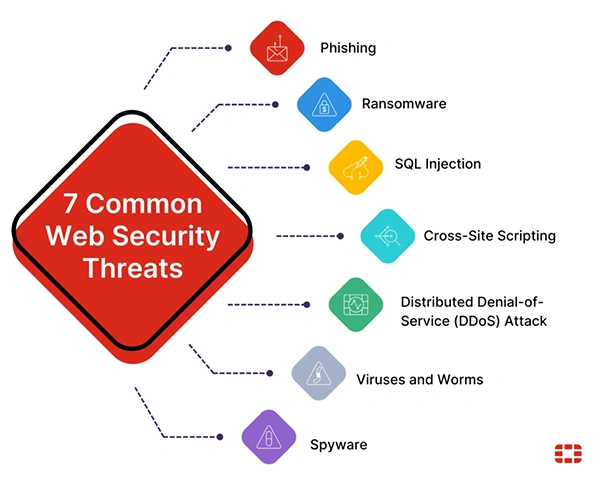
As the world changes, cyber threats are evolving, too, with new strategies available to attackers for stealing information and taking over online accounts. By comprehending common risks, users can become more aware of suspicious activity and prevent unsafe online practices. Common online threats are:
- Phishing e-mail and fake websites
- Malware and spyware
- Poor password or password reuse
- Public Wi-Fi vulnerabilities
- Social engineering scams
Hackers also target users and trick them into entering their personal data into fake login sites, fake downloads, or through false messages that elicit personal information.
However, plenty of users unknowingly share personal information on social media or on unsecured sites.
On that last point — unsecured networks are the threat people most often underestimate. On café, airport, or hotel Wi-Fi, everyone shares the same connection, which means someone on the same network can potentially watch unencrypted traffic, including logins and banking sessions. The standard fix is a VPN, which encrypts everything leaving your device. If you’re unsure whether you can trust one with your data, this guide explains are VPNs safe, covering no-logs policies and the independent audits that separate reputable providers from the rest.
Best Practices for Keeping Your Personal Data Secure Online
There are a number of smart habits, secure tools, and cautious online behaviors that can be used to protect personal data. Any type of security enhancement, no matter how tiny, can stay away from cyberattacks or information exposure.
To keep your personal information safe:
- Do not use the same password for everything; create strong and unique ones.
- Do not click on any unusual links
- Regularly update devices and apps
- Only download software from trusted sources
- Avoid sharing too much personal information
- Make a regular checkup of privacy settings
There are also users who like using temporary communications like Gettempnumber.com, not to enter personal cell phone numbers on websites, new sites, or online services that may be unfamiliar.
The Role of Passwords, Encryption, and Multi-Factor Authentication
Robust authentication mechanics are crucial in safeguarding online accounts and personal data. In many cases, users create weak passwords or do not secure their accounts adequately, making it easy for cyberattackers to carry out their plans.
This is why you must create and use strong passwords. Try to keep them unique; use letters, numbers, and symbols. Also, do not use information about yourself or a common word.
Some people even trust a password manager to conveniently store and manage a longer password.
Next, wondering how encryption protects data? Well, encryption is the process of transforming data into an unreadable format that can only be read by people with the proper keys, and it is commonly used to secure emails, financial transactions, cloud storage, and messaging apps.
Coming to Multi-Factor Authentication (MFA), it introduces an additional layer of security through extra authentication, such as one-time codes, authentication apps, and biometric verification. MFA also makes it significantly more difficult for anyone to gain access to an account, even if the password is compromised.
How Backup and Recovery Solutions Help Protect Important Data
Loss can happen due to malware or accidental deletion, hardware problems, or software corruption. Backup and recovery systems protect users from unforeseen events and enable them to recover critical data in a timely fashion.
It saves from the permanent loss of your files, has critical paperwork recovered on time, ensures security against ransomware attacks, and optimizes divide recovery following failures. Some recommended backup methods are cloud backups, external hard drives, automated backup software, and encrypted storage systems.
It is advisable to build up critical photos, documents, passwords, and financial records regularly and store them in secure places. Remember that multiple copies of data heighten the level of long-term data protection.
INTERESTING FACT
The earliest computer password system was established at LIT in the early 1960’s to protect access to common computer resources.
Safe Browsing and Data Sharing Habits for Everyday Users
Every day, our online actions vary and significantly affect our online privacy. Lots of data leaks occur because the user unleashes the information or visits a website that is not safe. Some effective steps you can follow every day are:
- Check the website URL before inputting data
- Avoid suspicious downloads
- Only surf the internet on secure (HTTPS) sites
- When you have accounts you aren’t using, log them out
- Regularly clear cookies from the browser
- Identify and practice good data sharing habits.
Sharing is not allowed with users because of publicly sensitive financial information, personal identification numbers, real-time location information, and private account credentials.
Taking precautions about what you post can significantly minimize your chances of falling victim to theft and scams.
Familiar cyber hygiene practices offer significant defense against many common cyber attacks.
Final Thoughts
With the growing digitization of everyday life, safeguarding personal information and online privacy is becoming increasingly critical. Internet users should take a proactive approach to security because cybercriminals keep targeting people via phishing, malware, weak passwords, and data breaches.
People can minimize their online security risks by utilizing robust passwords, multi-factor authentication, keeping backups, and exercising caution with their online interactions. When users are aware and take advantage of reliable security tools, they can better manage their personal information and digital identity.
With the internet being the way it is, online privacy is not strictly a luxury, but a mandatory safety measure to take to ensure your safety online.
Frequently Asked Questions
Why is online privacy important?
What is multi-factor authentication?
It is an additional security step that requires extra verification beyond a password.
How often should I back up my data?
Important files should ideally be backed up weekly or automatically through cloud services.
Is public wi-fi safe for banking?
Public Wi-Fi is risky for sensitive transactions unless protected with secure connections or VPNs.
Related Posts

8 Best AI Presentation Makers for Business-Ready Slides
Making a presentation doesn’t just mean designing slides. It’s about defining a clear structure, using defined logic, useful visuals, and…

Queue Management Software Troubleshooting Guide: 8 Common Faults and Fixes
The long wait times and ineffective management of customer queues can have a significant impact on customer satisfaction and business…

How to Use Similarweb Website Traffic Data for Competitor Research
Competitor research without traffic data is guesswork. You can guess who your rivals are, guess how big they are, guess…

Choosing the Right Hosting Model for Scalable Digital Platforms
The performance of digital business is directly related to website speed, uptime, and scalability. Slow page performance has a negative…

How Data-Driven Performance Tools Are Transforming Employee Recognition in Tech Companies
“People work for money but go the extra mile for recognition, praise, and rewards.” — Dale Carnegie (Writer & Teacher)…

Why Businesses Struggle to Collect Reliable Data from the Web
Almost every company that depends on data runs into the same problem: although they can find the data they need,…

Why Financial Data Recovery Matters for Businesses
Financial data supports every part of a business, directly affecting cash flow, payroll, tax reports, audits, customer billing, and daily…

CMMC Compliance Is Coming for Manufacturers. Here Is What You Need to Do
“Cybersecurity is much more than a matter of IT.” — Stephane Nappo (Cybersecurity Professional) For manufacturers working within the defense…

How Data-Based Tools Influence Learning Performance
Learning has transformed in the modern age with the integration of new technologies to help students and professionals prosper in…