Have you ever wondered what would happen if a single corrupted file brought your operations to a halt or if critical customer data was quietly altered? Well, this is not just some hypothetical situation but a reality for many organizations. Two out of three organizations experienced significant data loss in the past few years. (Source:Infrascale)
These statistics are concerning. After all, cyber attacks do not announce themselves before crashing a system, underscoring how easily data integrity can be compromised.
Fortunately, to prevent such scenarios and recover data when it’s compromised, we do have some reliable tools.
This is where the best antivirus software becomes more than just a background security tool; it plays an important role in preserving data integrity and strengthening long-term resilience. How? In this post, we will discover the answer to this, and more such questions. O state tuned till the end.
Key Takeaways
Antivirus software helps protect data, not just devices.
Early detection of potential attacks prevents silent data corruption.
Quarantine features stop threats from spreading throughout the systems Antivirus works best alongside backup and recovery tools.
Updating the systems regularly is essential for keeping the data safe.
The Role of Antivirus Software in Data Protection
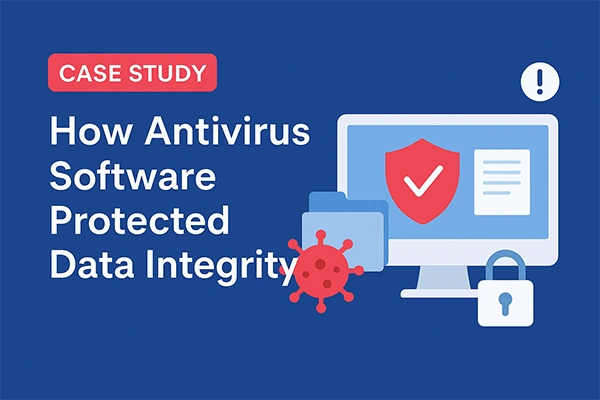
CASE STUDY How Antivirus Protects Data Integrity In a mid-sized financial service firm, an employee unknowingly opened a malicious attachment disguised as an invoice. The malware tried to disrupt the workflows by modifying spreadsheets and accessing shared folders, putting the customer data at risk. Luckily, the company’s antivirus came to the rescue and immediately flagged abnormal file behavior. It blocked any unauthorized changes and quarantined infected files, saving the brand’s image and preventing data loss. The outcomes? Core databases remained safe and untouched, with no operational downtime, and data integrity was preserved through early detection and containment.
From the case study above, you might have understood how antivirus software acts as a first line of defense against malicious programs that threaten data accuracy, consistency, and reliability.
It continuously monitors files, applications, and system activity to prevent unauthorized changes that can compromise data integrity.
Apart from that, it also contributes to securing the data environment by detecting anomalies early, limiting the spread of infections, and preserving system stability.
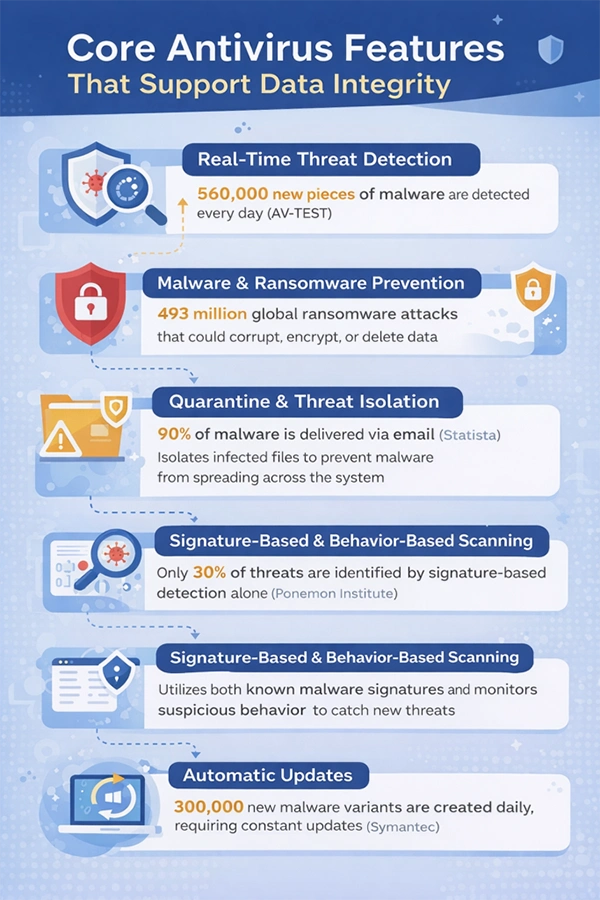
Core Antivirus Features That Support Data Integrity
Modern antivirus platforms offer a series of features that are specifically designed to protect data from corruption and loss:
Real-Time Threat Detection
These tools are active 24/7, continuously scanning monitors system activity, files, and downloads to identify threats as they emerge and eliminate them before they turn into a bigger headache.
Malware and Ransomware Prevention
Malware and ransomware are two major concerns today, but fortunately, advanced antivirus solutions are capable of detecting and blocking these attacks that encrypt, delete, or manipulate data.
Quarantine and Threat Isolation
It doesn’t take long for a virus to spread in your system, and that is why antivirus tools isolate the infected files in a secure quarantine environment as soon as they are detected. This prevents the malware from spreading into the other files or systems, preventing the risk of widespread data corruption.
Signature-Based and Behavior-Based Scanning
Signature-based scanning uses predefined patterns to identify known threats, and behavior-based scanning detects suspicious activities that deviate from the usual system behavior. Both ensure known and emerging threats are addressed before data integrity is affected.
Automatic Updates
An antivirus software must stay updated with the latest threat intelligence, and automatic updates make sure of that. It allows the system to recognize new malware variants quickly and reduce the exposure to evolving threats that could compromise data reliability.
The infographic below explains the need for these features in an antivirus, providing reliable statistics:
How Antivirus Software Supports Data Recovery After Attacks
Antivirus software is more like a precautionary effort that prevents attacks from happening, but it is extremely useful for recovering the data compromised in attacks as well. After a breach, it identifies the source of the infection, removes malicious code, and verifies that restored files are clean and safe to use.
It eliminates the malware completely from the systems before the restoration begins. This way, the risk of reinfection is reduced and organizations are able to recover the data with confidence.
Not only that, but some situations also provide a detailed incident log to help IT teams understand the cause and scope of damage and to make better defenses for the future.
Integration of Antivirus Tools with Backup and Disaster Recovery Systems
To get the best of it and create a system secured from all sides, it is best to integrate the antivirus tools with backup and disaster recovery systems. For seamless integration, modern systems are designed to easily coexist with other systems like automated backups, cloud storage, and recovery environments.
This creates a safe environment where backups are scanned for threats and, after restoration, prevent infected files from re-entering the system.
PRO TIP Schedule antivirus scans just before automated backups, as it helps ensure that clean and uncompromised data gets backed up and restored if needed, not some hidden malware.
Limitations of Antivirus Software in Data Integrity Protection
So far, we have discussed all the positives of Antivirus software in data integrity protection. However, on the flip side, there are some limitations as well.
Some systems are not capable of detecting highly sophisticated attacks, insider threats and zero-day vulnerabilities
These cannot recover data that was never backed up
No protection against accidental deletions or configuration errors.
Even with these vulnerabilities, antivirus software can prove to be extremely useful, if only rightly layered with other tools and made a part of a broader strategy that includes backups, access controls, encryption, employee awareness training, and incident response planning.
Final Take
Antivirus software is one of the most helpful tools you can integrate into your IT systems. These protect data integrity by preventing threats, supporting recovery, and enhancing overall cyber resilience.
Yes, it has its own limitations as well, but if you select a reliable antivirus solution and integrate it with the right backup and disaster recovery systems, it can significantly reduce data-related risks. So, a layered security approach is what you should leverage to maintain a trustworthy, resilient, and recoverable data environment.
Frequently Asked Questions
Will antivirus software help if the data is already corrupted?
Usually, the antivirus software do not fix already damaged data on its own, but it can help remove malware first, so recovery or restoration can happen safely without reinfecting systems.
Is antivirus software still useful if I already use backups or cloud storage?
Yes, integrating antivirus tools with backups or cloud storage can make your systems more secure and reliable as backups protect copies of data while antivirus help make sure the data backed up, and restored is clean in the first place.
Do automatic updates really matter?
Yes, they do. New threats make their way daily and outdated antivirus software might not be capable enough to detect them. Hence, updated software ensures your protection keeps up with the pace of evolving attacks.
Can an antivirus stop ransomware completely?
Not really, no tool promises 100% protection, but modern antivirus solutions significantly reduce the risk by detecting suspicious behavior early and blocking known attack methods.
Data growth has significantly accelerated beyond what most compliance teams can manage, with personal records, financial details, contracts, and emails…

 Saipansab Nadaf