
A playbook is a step-by-step guide to outline processes and best practices. These help teams to work efficiently.
Building Playbooks for Internal Teams Using Ad Makers
 Saipansab Nadaf
Updated on: Sep 22, 2025
Table of Contents
- 1) Start With a Single Outcome per Playbook
- 2) Map the Steps—And Who Does What
- 3) Give People the Exact Building Blocks
- 4) Document Guardrails, Not Walls
- 5) Bake in Lightweight Testing & Automation
- 6) Create Naming, Filing, and Version Rules
- 7) Define the Metrics That Matter (And Who Reads Them)
- 8) Close the Loop With a One‑Slide Debrief
- Playbook Skeleton You Can Copy‑Paste
- Rollout Plan (30 Days)
- Final Thought: Documentation That Moves, Not Dusts
- Frequently Asked Questions
Tired of using the same tribal knowledge, like AKA “ask Priya”, that slows your team down? In this growing marketing world, relying on weak practices that lead to inconsistent results is not worth it.
Instead, learn to build playbooks for internal teams using Ad makers that can easily turn slow campaigns into a predictable and repeatable process. These playbooks provide clear, easy-to-understand steps, rules, and roles that can be used by your team to produce high-quality campaigns faster.
Wondering how to build them? Read this guide to playbook building that your team will actually use. It is especially written for teams that require quick results and prefer doing over documenting.
Key Takeaways
- Keep your playbook user-focused for a single goal to build perfect workflows and improve the results.
- Keep the steps and roles very clear so that everyone who reads it can understand it clearly.
- Define budget rules according to the AI and data-driven rules to ensure fast working of the campaigns.
- Consistent and standard naming conventions and folder structures should be used for easy access to version control.
1) Start With a Single Outcome per Playbook
Give each playbook one job. Not “Everything Ads”—that’s a wiki. Think: “Retargeting with AI Ads Maker,” “Seasonal Flash Sale Build,” or “Mid‑Funnel Video Test.” The narrower the scope, the easier it is to follow and improve.
What to include up top
- Goal: one sentence, measurable (e.g., “Drive trial sign‑ups at ≤ $12 CPA”).
- Owner: the name that breaks ties.
- Inputs: audience list, brand kit, offer, deadlines.
- Outputs: ad formats, launch date, where files live.
Keep it on one screen; if you need more space, you’re writing a manual, not a playbook.
2) Map the Steps—And Who Does What
Great process is choreography. Spell out the sequence and the hand‑offs so tools and humans dance together.
Simple flow
- Brief → marketing lead fills a one‑page template.
- Generate → AI ad maker produces variants (copy + visuals).
- Curate → creative reviews, trims to a short‑list.
- QA → policy/brand/spec checks.
- Launch → paid media uploads with naming rules.
- Optimize → rules pause losers, boost winners.
- Report → snapshot and learnings to the team folder.
Role clarity
- Marketing lead: sets goal & offer, signs off.
- Creative: polishes winners, fixes brand details.
- Media buyer: launches, sets budgets, and rules.
- Analyst: reads the data, updates the playbook.
If a step takes more than 15 minutes to explain, link to a micro‑SOP—not inside the playbook.
3) Give People the Exact Building Blocks
Playbooks fail when teammates go hunting across drives. Put everything a run needs inside (or linked from) the doc:
- Brand kit: hex codes, logo lockups, fonts, voice do/don’t list.
- Offer pack: coupon code, dates, fine print, approved price language.
- Audience pack: CRM segments, exclusions, LTV notes.
- Reference ads: 3–5 past top performers with why they worked.
This is where your AI ads maker shines: it can pull the kit, read the offer, and output on‑brand variants automatically.
4) Document Guardrails, Not Walls
You need consistency without smothering creativity. Set the lines, then let the team (and AI) play.
Guardrails to include
- Tone: “friendly‑expert, no hype words, no exclamation spam.”
- Compliance: claims allowed/banned; industry caveats.
- Specs: platform ratios, character limits, safe‑area notes.
- Visual rules: primary/secondary colors, logo placement, image do/don’t.
These go in a short checklist that the media buyer/creative must tick before launch.
Interesting Fact
Playbooks made with AI ad makers can build campaigns 3x faster, while maintaining brand flow and reducing errors.
5) Bake in Lightweight Testing & Automation
Your playbook should decide how testing happens, not if. Use small, reusable rules so nobody argues with the data.
Default testing plan
- Launch 3–5 copy angles × 2 visuals per audience.
- Run until each variant hits ≥ 500 impressions (or your minimum viable threshold).
- Auto‑pause any variant with CTR < 0.5 %.
- Boost +20 % budget on any combo with CTR ≥ 1.5 % or CPC ≤ target.
Most AI ad generators (and platforms) can enforce this without spreadsheets. The playbook just states the rules and where to turn them on.
6) Create Naming, Filing, and Version Rules
Future‑you will thank present‑you for clean names.
Naming pattern
Brand_Campaign_Objective_Audience_Format_Angle_V1
Example: Acme_SummerSale_Purchases_LLA1_IGStory_FOMO_V2
Folder structure
/Ads/2025/Seasonal/Summer_Sale/
├─ Brief.pdf
├─ Exports/
├─ Prompts/
├─ Reports/
└─ Winners/
Versions bump only when the asset changes meaningfully (copy or visual), not when you fix a typo.
7) Define the Metrics That Matter (And Who Reads Them)
Dashboards can look like Times Square. Pick the few numbers that prove your playbook worked, and assign an owner.
Typical set
- Primary: CPA or ROAS tied to the goal.
- Secondary: CTR, CPC, CVR by copy‑visual combo.
- Quality: landing‑page bounce, add‑to‑cart rate.
- Cadence: daily scan during tests, weekly summary once stable.
Call out where to find the report and the exact chart to screenshot. Your AI ad maker’s analytics module can auto‑compile this; just link it.
8) Close the Loop With a One‑Slide Debrief
Every run should leave the next one smarter. Build a short template that your team can fill in five minutes.
Debrief slide
- Goal vs. result (win/loss, headline number).
- Top combo (copy + visual) and why it won.
- What to retire (angles or images that under‑performed).
- Next iteration (1–2 tests to try) and owner.
Save it in the playbook’s Reports folder and paste the highlights back into the playbook under a “What We’ve Learned” section.
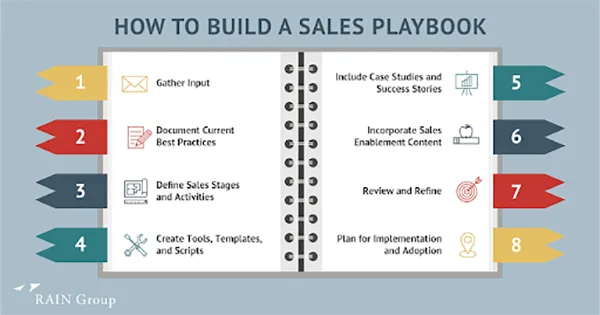
Playbook Skeleton You Can Copy‑Paste
Use this block as your starting template for any new workflow.
Title: [Playbook name]
Scope: [Channel/Audience/Use case]
Owner: [Name]
Goal: [One measurable outcome]
Inputs
– Brand kit: [link]
– Offer pack: [link]
– Audience pack: [link]
– References: [links]
Steps & Roles
1) Brief – [role]
2) Generate (AI ad maker) – [role]
3) Curate (short‑list) – [role]
4) QA – [role]
5) Launch – [role]
6) Optimize (rules) – [role]
7) Report – [role]
Guardrails
– Tone & claims
– Specs & ratios
– Visual rules
Testing & Automation
– Variant plan: [# angles × # visuals]
– Thresholds: [impressions, CTR/CPC rules]
– Budget rules: [pause/boost]
Naming & Filing
– Pattern: Brand_Campaign_Objective_Audience_Format_Angle_V#
– Folder: /Ads/YYYY/Campaign/
Metrics
– Primary: [CPA/ROAS]
– Secondary: [CTR/CPC/CVR]
– Cadence: [daily/weekly]
Debrief
– Result vs. goal
– Top combo (copy + visual)
– Retire list
– Next tests & owners
Rollout Plan (30 Days)
Here is a complete rollout plan for 4 weeks:
- Week 1: Pick one high‑impact workflow (e.g., Retargeting). Build the playbook v1 and run a single campaign through it.
- Week 2: Fix friction (missing assets, unclear steps). Add the testing and budget rules inside your AI ads maker or ad platform.
- Week 3: Clone the playbook for a second workflow (e.g., Seasonal Sale). Keep the structure identical; only change inputs and rules where needed.
- Week 4: Hold a 30‑minute retro: what sped us up, what slowed us down, what to standardize. Update both playbooks.
Final Thought: Documentation That Moves, Not Dusts
Your team doesn’t need a binder; it needs a reliable routine. A good playbook makes collaboration obvious, turns your AI ad maker into a predictable partner, and captures learnings so you compound wins. Keep it short, keep it current, and keep it where everyone can find it. Do that, and you’ll ship faster with fewer meetings—and far better ads.
Keywords to keep your SEO happy (used naturally above): AI ad maker, AI ads maker, AI ad generator, AI advertising generator, free AI ad maker.
Frequently Asked Questions
What is a playbook?
Can playbooks save time for my team?
Yes, going through with a playbook reduces the trial-and-error method and can guide teams without nagging them.
What is the need to combine playbooks and Ad makers?
A combination of both results in better, faster, and more efficient campaigns, even when many team members are involved.
How often should the playbook be updated?
Generally, once everyone has gone through the playbook, revise it every month. The main purpose is to provide the best, not everything.
Related Posts
How Poor Contract Visibility Leads to Revenue Leakage in Growing Companies
Growth is an important factor that determines the success rate of any business. When we witness new operations, partnerships and…

Managing Bitcoin Operations? Here’s How Salesforce Automation Helps
“Digital currency is here to stay, and it’s only a matter of how long before governments embrace it.” — Brad…

Why Modern Organizations Depend on Data Privacy Software
Data growth has significantly accelerated beyond what most compliance teams can manage, with personal records, financial details, contracts, and emails…

Converting Chats Into Leads While Maintaining Professionalism
The way marketing teams and businesses approach their potential clients to boost their sales has completely transformed in the last…

How to Delete iCloud Account? Complete Guide for 2026
Thinking, how can I delete iCloud or Apple account? It is not just about removing an account; it is about…

How Different Industries Use Specialized Software to Stay Competitive
In the market we have today, companies are always trying to find ways to work better and get results. The…

What Key Adjustments Enhance Visual Appeal Across Web Pages
Attractive web pages form the roots of any appealing website. For instance, imagine looking for content on Google, and you…

When is it Time to Consider IT Support Services for Your Business?
Every business needs to ensure smooth operations for a successful business. But despite trying hard to avoid barriers, technical issues…
How to Delete User Profile in Windows 10: Step-by-Step Guide
You don’t notice user profiles until one starts causing problems. A profile gets corrupted, a login error pops up, or…