It often kicks off with a little hiccup. Your laptop suddenly freezes, a folder takes its sweet time to open, or that annoying spinning wheel pops up and sticks around longer than it should.
You brush it off, thinking it’s just a minor glitch. But then it hits you—the dreaded error message. Your hard drive has crashed.
That sinking feeling in your stomach isn’t just anxiety; it’s the gut-wrenching realization that everything on that device—your documents, photos, client files, tax info—is just gone.
In that moment, the importance of data backup and recovery shifts from something you might think about later to something you need right now.
Through this blog post, you will get to know how you can protect your data effortlessly, just stick till the end.
Let’s begin!
Key Takeaways
Understanding the real costs of data loss
Discovering why using a single device is a bit risky
Exploring the 321 strategy
Taking a look at the role of data discovery loss
Understanding the True Cost of Data Loss
Many people underestimate the actual cost of data loss until it happens to them. For businesses, a data loss event can mean lost revenue, compliance violations, reputational damage, and operational paralysis. For individuals, it often means irreplaceable family memories or years of creative work vanishing in a blink.
Even if recovery is possible, the cost of specialized data retrieval services can be overwhelming, and there’s never a guarantee of full recovery, making Data Loss Prevention Software an essential safeguard. This is why proactive data backup strategies are no longer optional—they are essential.
Interesting Facts A significant number of companies (around 35%) experience irrecoverable data loss after a disruption, according to TeleData Select.
Why Relying on a Single Device is a Risky Game
One of the most dangerous myths is that a single device—your laptop, desktop, or even a mobile phone—is a secure vault. Hard drives fail. SSDs can become corrupted. Devices get stolen, dropped, or damaged in natural disasters.
The truth is, every physical device has an expiration date. Without a second location for your files, you’re putting all your digital eggs in one very fragile basket. This is exactly why redundancy and diversification in your backup strategy matter more than ever.
Intriguing Insights
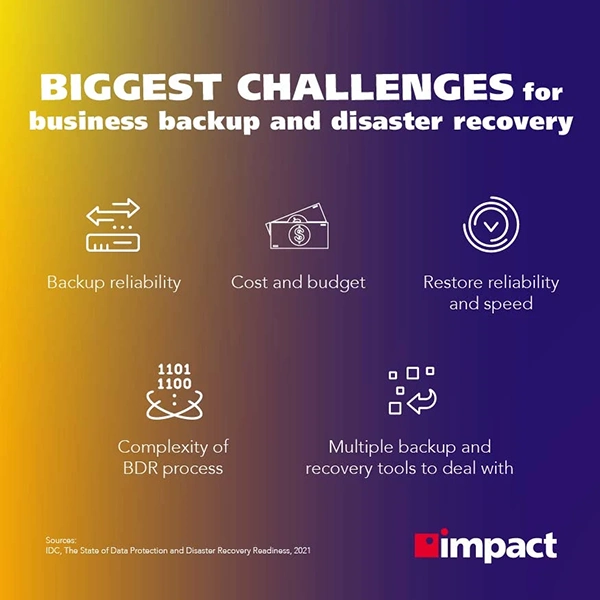
This infographic shows the biggest challenges for data recovery
The 3-2-1 Backup Strategy That Works
Professionals in the IT field have long preached the 3-2-1 backup rule: keep three copies of your data, two on different types of media, and one offsite.
This simple approach offers strong protection against most scenarios, including device failure, accidental deletion, and natural disasters. Combining local backups on external drives with cloud storage solutions helps ensure that even if one method fails, your data remains intact and retrievable.
Automated Backups: Your Digital Safety Net
One of the easiest ways to protect yourself is to set up automated backup systems. Manually saving files is prone to human error, especially when life gets busy. Automation ensures that your data is backed up on a consistent and accurate basis without requiring daily attention. Many modern systems allow you to schedule daily or weekly backups, sync data across devices, and receive alerts if something goes wrong. With the right setup, your digital safety net operates quietly in the background, ready to catch you when disaster strikes.
The Role of Data Recovery Services
When a backup isn’t available—or fails—data recovery services step in as the last resort. These specialized companies employ cutting-edge technology to recover data from damaged, corrupted, or otherwise inaccessible storage devices.
While they can often perform miracles, recovery can take time and come at a steep cost. More importantly, it’s never guaranteed. That’s why prevention—through consistent backups—is always the smarter path. But when you need them, recovery services can mean the difference between starting over and getting your data back.
The moment your hard drive dies is the moment you realize how critical your data truly is. Waiting until disaster strikes is no longer an option. A well-thought-out data backup and recovery plan isn’t just smart—it’s a necessity in today’s digital-first world.
Whether you’re a business protecting vital client information or an individual safeguarding personal memory, having a secure, automated system in place offers peace of mind you can’t afford to ignore. For expert solutions tailored to your needs, visit networksix.net and take the first step toward protecting what matters most.
Frequently Asked Questions
What are the statistics of data backup?
In our survey, 37% of them admitted they don’t back up at all. Compare that to users who have experienced data loss – only 16% in that group still skip backups.
What is the primary goal of data recovery?
The main purpose of data recovery is to restore lost, deleted, or corrupted data to its original state, allowing users to regain access to important information.
Is recovery a goal of security?
There are two primary states in Security – deploying proactive measures to prevent an incident and effectively recovering from an incident
Data growth has significantly accelerated beyond what most compliance teams can manage, with personal records, financial details, contracts, and emails…

 Mahima Dave