
It means using AI tools to design, build, peraonalize and optimize websites automatically. Instead of doing everything manually, AI assists with layouts, content, testing, and user experience improvements based on real data.
Creating Dynamic Websites with Next-Gen Builder Technologies
 Saipansab Nadaf
Updated on: Dec 10, 2025
Table of Contents
- Understanding the Role of AI and Data in Modern Website Building
- How AI Is Changing Website Design and Development
- AI-Driven UX Enhancements in Website Builders
- Data Privacy and Security Considerations in AI-Driven Websites
- Best Practices for Building Secure, User-Centric Websites With AI
- Final Thoughts
- Frequently Asked Questions
A few years ago, building a website required a specific skill set: writing HTML, CSS, and JavaScript by hand; designing layouts using graphic tools; manually fixing bugs; and so on. However, today, AI and digital technologies have changed the picture. They have transformed websites from digital brochures into intelligent experiences that learn, adapt, and improve with every user interaction.
This is the reason why organizations today are turning to this modern, and not so surprisingly,over 20 million websites worldwide are estimated to be built using AI based website builder.
Curious to know more? This post uncovers how exactly AI and data tools help build websites and enhance user experience.
Key Takeaways
- AI turns websites from static pages into living, learning experiences.
- Good UX today is driven by data, not guesswork.
- Personalization works best when it’s behavior-based, not generic.
- AI speeds up design, development, and optimization without removing the human touch.
- Secure, user-first AI websites build trust and long-term engagement.
Understanding the Role of AI and Data in Modern Website Building
Ever wondered how you just search for something once, and suddenly all the recommendations on your e-commerce platforms start showing you that? Well, the credit for this goes to AI and data.
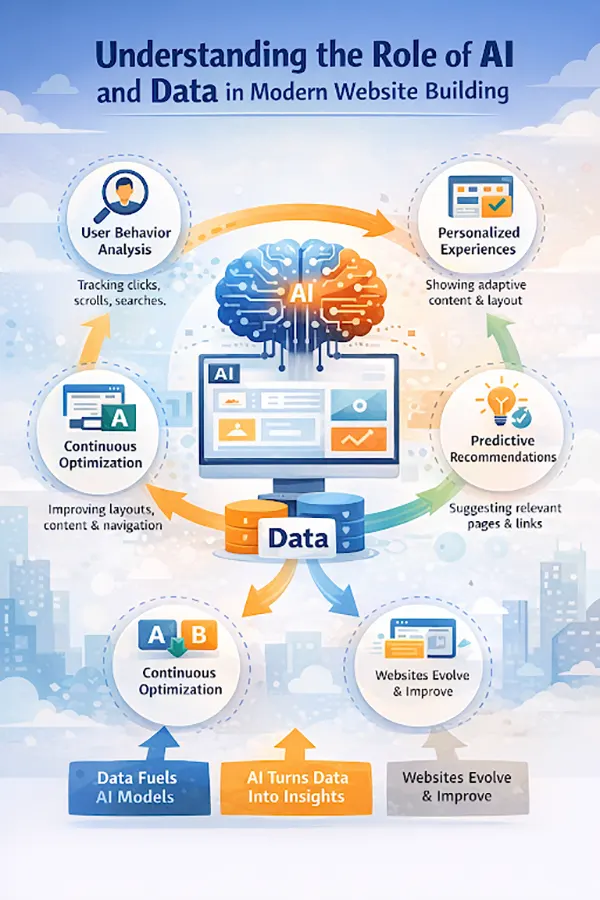
Your every interaction, including clicks, scrolls, time spent, and navigation paths, creates data, and AI utilizes that data to identify patterns and make changes that improve usability, performance, and engagement.
In short, in modern websites, AI analyzes user behavior to automate designs and development decisions. With it, it predicts user intent to optimize the journey and provide a more personalized experience and layouts in real time.
The infographic below further explains the role of AI and data in modern website building:
How AI Is Changing Website Design and Development
AI has brought various changes in website design and development. It significantly reduces manual effort and increases speed, accuracy, and adaptability with automation.
AI-Powered Layout and Design Generation
AI-designed competition website builder like Design Hero allows users to generate layouts that align with their business types, goals, content structure, and industry benchmarks. These systems analyze the requirements on their own and recommend a layout accordingly. To this, designers can then just make improvements rather than starting from scratch.
Automated Content Creation and Optimization
Advanced tools not only generate content but also help optimize it by suggesting improvements that go well with user intent, helping websites communicate more effectively with their target audience.
Intelligent Code Assistance and Testing Tools
AI autocompletes code, identifies bugs, and automates testing across devices and browsers, meaning you don’t manually need to code everything and search for bugs. This reduces development time and site stability.
All these things make the process much easier, beginner-friendly, and simultaneously improve the overall quality.
AI-Driven UX Enhancements in Website Builders
AI surely helps the developers a lot in the whole development process, but it also improves the user experience to a great degree.
Personalized Content and Layout Adjustments
By analyzing user data, the systems personalize the user experience and show the visitors exactly what they want to see by adjusting content recommendations, layout elements, and call-to-actions.
Chatbots and AI Assistants for User Support
Human support can’t be available 24/7, and this is where chatbots and virtual assistants step in. They provide instant support by answering common questions, guiding users through complex situations, and handing over complex issues to human agents. Instant response makes the customers feel valued and adds to the brand reputation, which helps build a loyal fan base and reduces friction while supporting users at every stage of their journey.
Predictive Navigation and Search
By predicting what the user might be looking for, these systems suggest relevant pages or products to them, helping them find information faster and reducing abandonment caused by confusion or poor site structure.
Automated A/B Testing and Optimization
Automated testing continuously tests variations of layouts, headlines, buttons, and CTAs to identify any flaws in the systems. If required, it applies changes in real time, leading to constant UX improvements without manual intervention.
DO YOU KNOW?
Visitors form an opinion about a website n less than 0.5 seconds, faster than a blink.
Data Privacy and Security Considerations in AI-Driven Websites
AI heavily relies on data, and this is why data privacy becomes a top consideration for people relying on digital systems with their information. This is why websites should build:
- Clear data collection and storage practices
- User consent mechanism
- Compliance with data protection regulations.
Important security consideration:
- Minimizing data collection to essential information
- Anonymizing or pseudonymizing user data
- Securing data storage and transmission
Keeping data privacy and security as the topmost priority makes it easier for customers to trust a brand and engage with it.
Best Practices for Building Secure, User-Centric Websites With AI
To build a secure, user-centric website with AI, keep the following points in account:
- Use AI to support real user needs rather than blindly using it for automation
- Do not sideline manual effort; combine AI insights with human judgment
- Transparently communicate how the AI features work
- Prioritize privacy and embed security and consent into every layer
- Always monitor performance using data insights to refine UX over time
These best practices help leverage AI in website building, making it a powerful ally in creating websites that are adaptive, secure, and genuinely user-centric.
Final Thoughts
Building a website is no longer a task that completely relies on manual skills. AI has transformed the way things work by automating processes and making them more data-driven than ever. This approach enables businesses to deliver enhanced UX, streamline the development process, and stay ahead in an increasingly competitive digital landscape.
Frequently Asked Questions
What does “website building with AI” actually mean?
Do AI website builders replace designers and developers?
Not really. AI speeds up repetitive tasks and suggests improvements, but humans still make creative, strategic, and business decisions. Think of AI as a smart assistant, not a replacement.
How does AI improve user experience (UX)?
AI improves UX by learning from how users behave. It personalizes content, predicts what users might need next, improves navigation, and continuously tests what works best, all without waiting months for manual updates.
Are AI-built websites good for SEO?
Yes. Many AI website builders optimize page structure, content readability, loading speed, and metadata automatically. When used correctly, AI can actually strengthen SEO efforts, not hurt them.
Related Posts
How Poor Contract Visibility Leads to Revenue Leakage in Growing Companies
Growth is an important factor that determines the success rate of any business. When we witness new operations, partnerships and…

Managing Bitcoin Operations? Here’s How Salesforce Automation Helps
“Digital currency is here to stay, and it’s only a matter of how long before governments embrace it.” — Brad…

Why Modern Organizations Depend on Data Privacy Software
Data growth has significantly accelerated beyond what most compliance teams can manage, with personal records, financial details, contracts, and emails…

Converting Chats Into Leads While Maintaining Professionalism
The way marketing teams and businesses approach their potential clients to boost their sales has completely transformed in the last…

How to Delete iCloud Account? Complete Guide for 2026
Thinking, how can I delete iCloud or Apple account? It is not just about removing an account; it is about…

How Different Industries Use Specialized Software to Stay Competitive
In the market we have today, companies are always trying to find ways to work better and get results. The…

What Key Adjustments Enhance Visual Appeal Across Web Pages
Attractive web pages form the roots of any appealing website. For instance, imagine looking for content on Google, and you…

When is it Time to Consider IT Support Services for Your Business?
Every business needs to ensure smooth operations for a successful business. But despite trying hard to avoid barriers, technical issues…

How to Delete User Profile in Windows 10: Step-by-Step Guide
You don’t notice user profiles until one starts causing problems. A profile gets corrupted, a login error pops up, or…