Education is no longer limited to those four-walled traditional classrooms; it has moved online and is more accessible than ever. Students can now attend lectures, submit assignments, collaborate with peers, and access course materials from anywhere in the world.
And to make this process more structured, students rely on Learning Management Systems (LMS) that act as a centralized digital hub to create, deliver, manage, and track the training process.
However, with this convenience comes a price to pay. LMS platforms store sensitive student data, making them a priority target for cyber attackers. According to reports,education organizations face an average of 4,356 weekly cyberattacks, highlighting the need to build a secure and patched learning framework for students.
This guide offers exactly that. Read on to learn student-friendly solutions to protect LMS data and recover it when something goes wrong.
Key Takeaways
LMS accounts store personal, academic, and sometimes financial information.
Data breaches in education are increasing, making student awareness more important than ever.
Weak passwords and shared logins are some common causes of compromised accounts.
Understanding how the LMS works can help you respond faster to technical issues.
Protecting your LMS data is part of protecting your academic future.
What is a Learning Management System (LMS)?
A learning management system (LMS) is a software platform that helps schools, universities, and even corporate organizations manage their digital learning activities. These systems allow students to access lecture materials, submit assignments, participate in discussions, take exams, and track grades all at a single platform, making the whole process easier by acting as a one-stop solution for all.
In the simplest words, it is like a digital classroom you can access anytime and from anywhere, and your academic data lives here.
Importance of Data Privacy in Online Learning Platforms
Today, more students trust online platforms with their academics than ever before; correspondingly, more cyberattackers are on the lookout for just one slip-up to infiltrate accounts online.
Research indicates that around 91% of higher education institutions experienced a security breach in the past year. This raises alarms and emphasizes the importance of data privacy in learning platforms.
Now, it is not just about protected passwords, but one must also safeguard identification details, academic transcripts, communication records, and, in some cases, even financial information. If such information gets compromised, it can lead to identity theft, academic misconduct issues, or even reputational harm. On top of that, losing coursework can create unnecessary stress and academic setbacks for students.
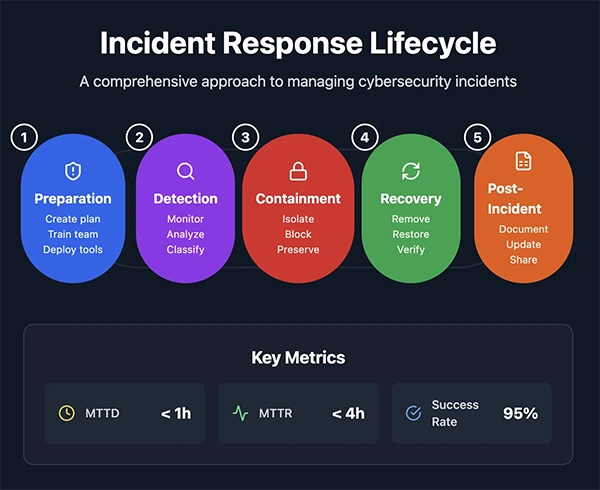
INTRIGUING INSIGHTS Data privacy has become an important component in online learning. One must follow certain precautions in order to avoid any incidents. However, no system is 100% secure. So, in case accounts get compromised. Here is an incident response plan to manage cybersecurity incidents.
Common Ways Students Lose Access to Learning Management System Data
To prevent risks, you must understand them first. So here are some common ways students lose access to LMS data:
Apart from these, learners must also be careful when browsing for academic help online and only trust reliable services like pay someone to do my online class from MyAssignmentHelp. Even accidentally clicking the wrong service link can introduce account-sharing risks and increase vulnerability to unauthorized access and data misuse.
Essential Practices Students Should Follow to Protect LMS Data
Here are some best practices for students to fortify all access points against cyber threats to protect their LMS data.
Strong Password Habits
The password is the first layer of defense. However, even the most secure LMS cannot protect an account compromised by weak credentials. So, always use a unique password for your accounts and enable multi-factor authentication (MFA) whenever available. Avoid using the same password multiple times or utilizing personal information like birthdays, as they are quite easy to decode.
Secure Device Usage
The device you use is an entry point to your academic data. Keep operating systems and browsers updated, install antivirus software, avoid logging in from public computers or using public Wi-Fi, and log out after each session on shared devices.
Backup Awareness
LMS platforms do not automatically back up everything forever, and many students remain unaware of this. So, download copies of submitted assignments, save drafts locally before uploading, use personal cloud storage as a secondary backup, and keep email confirmations of submissions. These small steps will help prevent major loss, acting as academic insurance.
How LMS Platforms Store and Manage Student Data
Understanding how LMS platforms store and manage student data can reduce confusion during technical issues.
Cloud Storage
Generally, LMS platforms rely on cloud infrastructure, meaning that the data is stored on remote servers and managed by secure data centers rather than a single campus computer. It ensures redundancy, scalability, automatic system backups, and remote access anywhere.
Version History
Some LMS platforms maintain version histories of all the documents submitted, which allows instructors and sometimes students to review earlier drafts or restore previous versions.
Access Control Mechanisms
Unauthorized access can lead to severe consequences. Hence, most LMSs use structured permission systems and allow role-based access, encrypted login credentials, session timeouts, and activity logs.
Steps Students Can Take to Recover Lost Files
Even after precautions, data loss can happen. And in such cases, you should:
Check the LMS version history to look for some previously saved drafts.
Review email confirmations, as some systems send submission copies.
Check local device folders, downloads, documents, and other temporary files.
Contact your instructor immediately, as they might know how to reverse the data loss.
Reach out to institutional IT support.
If these things do not work, you can take help from third-party service providers like DataRecovee, which offer expertise in data backups and can handle such cases.
PRO TIP If you find yourself in a situation where your data is compromised, remember that the faster you act, the better your chances of restoring it are. So, report the issue sooner for higher recovery chances.
Conclusion: Data Management for Academic Continuity
Education has shifted online, and no doubt, it offers unmatched flexibility and access, but at the same time, it also demands digital responsibility. Protecting LMS data is not just a technical task but a part of maintaining academic continuity and personal accountability.
By practicing strong password hygiene, maintaining secure devices, keeping backup copies, and understanding how LMS platforms manage data, students can reduce the risks to a significant degree.
And even if data loss occurs, you can restore it by following the best practices mentioned above. Or else, you can contact DataRecovee to help you navigate such situations.
Frequently Asked Questions
What kind of data does an LMS store about students?
An LMS typically stores personal information, login credentials, assignment submissions, grades, discussion posts, attendance records, and sometimes, payment details.
Can my assignments be recovered if I accidentally deleted them?
In many cases, yes. Some LMS platforms keep version histories or system backups. You should immediately check your account, look for saved drafts, and contact your instructor or IT support.
Is it safe to log into my LMS from public Wi-Fi?
It is not recommended. Public networks can expose your login session to cyber risks. If you must use one, enable multi-factor authentication and avoid saving passwords on shared devices.
How often should I back up my academic files?
Ideally, after every major update or submission. Keep copies stored locally and in a secure cloud storage service for added protection.

 Kartik Wadhwa