
Organizations that do not prepare properly can suffer catastrophic data loss, legal troubles, unplanned operational downtime, and it can lead to issues of non-compliance.
Fast Data Recovery and IT Response: The Backbone of Digital Business
 Saipansab Nadaf
Updated on: Jul 15, 2025
KEY TAKEAWAYS
- Fast data recovery prevents downtime and protects business continuity.
- IT response teams act quickly to restore systems and reassure stakeholders.
- Proactive strategies to reduce data loss and ensure regulatory compliance.
- Automation speeds up recovery while minimizing human error.
IT sector is exposed to a lot of cyber threats. That’s because as we are advancing, cyber criminals are also coming up with new ways to fulfil their agenda. It has also been recorded that cybercriminals are earning over $1.5 trillion by committing unethical actions.
Data is crucial and is also vulnerable to cyberattacks. Nobody wants to get their data stolen, as it can lead to financial and legal troubles. Another key thing to keep in mind is data recovery.
In this article, I’ll mention why fast data recovery matters and how it is the backbone of the IT sector and digital businesses. Let’s get started.
Why Speed Matters in Data Recovery
In a digital-first world, delays in data recovery can impede operations, harm customer trust, and result in significant loss of revenue. The amount of data held by businesses today is tremendous, and downtime is costly.
The recovery of data quickly and efficiently keeps business continuity, as teams can get back to operations with as little disruption as possible. In such cases, services provided by Perth IT support or any such entity are quite helpful. Faster recovery is important to get productivity back, and regardless of what caused the loss, whether it be a technical fault, human error, cybercrime, or a critical incident.
Companies that decide to use fast recovery tools and procedures also have a competitive advantage over slower colleagues when speed matters, especially for time-sensitive industries such as finance, healthcare, and e-commerce.
The Role of IT Response Teams in Crisis Management
IT response teams are the first responders when something goes wrong, such as when systems become unavailable or threats emerge. These trained professionals respond to incidents with speed, whether a data breach occurs, hardware fails, or service is impacted for whatever reason.
Their ability to assess, isolate, and remediate gets a business back up and running again as quickly as possible. In addition, a successful coordinated IT response will restore functionality and also serve to assure that issues are being addressed with urgency to stakeholders.
In certain situations requiring immediate response, such as ransomware, speed of action can mean the difference between a business recovering from an attack and being permanently without its data.
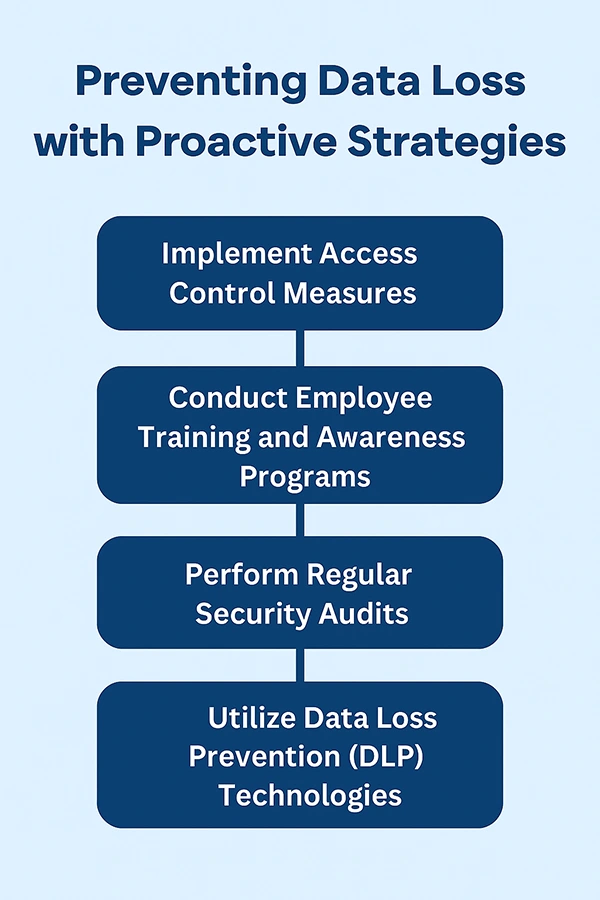
Preventing Data Loss with Proactive Strategies
Quick recovery is needed, but being proactive is even better. Businesses need to adopt a proactive approach to mitigate the risk of critical data loss in the first place. Having systems regularly backed up and monitoring systems with real-time reporting.
Cloud-based solutions, as well as automated backup solutions, will reduce reliance on manual processes and minimize the response team. Building protections in advance will allow for the identification of vulnerability prior to it turning into a crisis.
These proactive approaches will mitigate data risk but also maintain regulation compliance, such as GDPR or HIPAA, where the law requires proper data protection and data recovery readiness. Below, you can see some other good strategies.
Benefits of Automation in Recovery and IT Response
Automation is essential to improving recovery time objectives for data recovery and IT incident response times. Automated systems enable businesses to identify deviations from normal functioning, invoke alerts, and even initiate the recovery process without the involvement of an individual operator.
Automated methods of backup scheduling, scripted file restoration, and incident response workflows can significantly improve reaction times while limiting human error. Automation can reduce staff from repeatedly performing a significant number of steps on each recovery, which will allow IT staff to focus on other strategic work.
This benefit is particularly notable and useful within organizations managing high volumes of data, as well as in environments of high traffic. For organizations managing enormous amounts of data or operating in highly frequent transactions.
Future Trends Shaping Recovery and IT Readiness
As cyber threats become omnipresent and digital environments more complex, the future of recovery and IT response will be centered on AI, machine learning and predictive analytics.
These technologies promise faster detection of threats, better allocation of resources, and near-immediate response activities. Hybrid cloud environments and edge computing, as well as zero-trust security frameworks, will also change the way that organizations prepare for and respond to incidents.
Businesses able to fully leverage these innovations will enjoy more agile and secure operations. In the world of digital business, it is important to be prepared and to constantly be improving your recovery potential.
PRO TIP : Regularly test your backup and recovery systems to ensure they function effectively during crises!
Final Words
Speed of data recovery and the speed of IT response are no longer optional; these are significant to the survival and growth of the business. As the threat landscape changes and systems become complex, speed, automation, and a proactive stance are the keys to reducing disruption.
Companies must be proactive and reactive to threats, but therefore can only do this if they’re implementing the latest technologies like AI and cloud to keep pace while being resilient at the same time.
Investing today in the smarter way to recover today will ensure you receive long-term viability, trust from customers, and stay competitive in the digital marketplace of tomorrow.
Frequently Asked Questions
What happens if organizations ignore protecting their data?
In what ways can automation allow IT teams to react to incidents much more quickly?
Automation facilitates identification of incidents immediately, notifies the appropriate stakeholders, and initiates recovery plans, which is considerably faster than a manual process.
Why is it important that organizations prioritize investment in a future-friendly IT infrastructure?
It supports agility, increases security and keeps pace with rapidly evolving threats in a world that constantly changes and focuses on digital and data.
Related Posts
How Poor Contract Visibility Leads to Revenue Leakage in Growing Companies
Growth is an important factor that determines the success rate of any business. When we witness new operations, partnerships and…

Managing Bitcoin Operations? Here’s How Salesforce Automation Helps
“Digital currency is here to stay, and it’s only a matter of how long before governments embrace it.” — Brad…
Why Modern Organizations Depend on Data Privacy Software
Data growth has significantly accelerated beyond what most compliance teams can manage, with personal records, financial details, contracts, and emails…

Converting Chats Into Leads While Maintaining Professionalism
The way marketing teams and businesses approach their potential clients to boost their sales has completely transformed in the last…

How to Delete iCloud Account? Complete Guide for 2026
Thinking, how can I delete iCloud or Apple account? It is not just about removing an account; it is about…

How Different Industries Use Specialized Software to Stay Competitive
In the market we have today, companies are always trying to find ways to work better and get results. The…

What Key Adjustments Enhance Visual Appeal Across Web Pages
Attractive web pages form the roots of any appealing website. For instance, imagine looking for content on Google, and you…

When is it Time to Consider IT Support Services for Your Business?
Every business needs to ensure smooth operations for a successful business. But despite trying hard to avoid barriers, technical issues…

How to Delete User Profile in Windows 10: Step-by-Step Guide
You don’t notice user profiles until one starts causing problems. A profile gets corrupted, a login error pops up, or…