
If you operate in one country with light regulations, maybe not. But if audits, cross-border rules, or customer trust matter to your business, this quickly becomes a need, not a luxury.
Advanced Data Residency in Microsoft 365 Enterprise: A Buyer’s Guide
 Saipansab Nadaf
Updated on: Dec 19, 2025
Where does your company’s data actually live? Has this thought ever crossed your mind? Not in theory, but physically, geographically, somewhere on a server rack across the globe. Well, for most people, data residency only becomes a concern when something goes wrong.
That’s where Advanced Data Residency in Microsoft 365 Enterprise comes into the picture. It is about control, confidence and sleeping a little better at night knowing your data is exactly where it is supposed to be.
So, if you are planning to buy Microsoft 365 E3, especially through a trusted Microsoft licensing partner, understanding advanced data residency can save you from costly missteps later. So to help you out, this guide will break down what exactly it is, why it matters, and how to decide if it’s right for your business before you commit.
Key Takeaways
- Data residency is about control, not just compliance.
- Planning it earlier can save you from headaches later.
- Licensing choices directly affect where your data can live.
- One-size-fits-all doesn’t work for global businesses.
- A good licensing partner saves time, money and confusion.
Overview of Advanced Data Residency in Microsoft 365 Enterprise
Advanced data residency is the ability to control where certain types of customer data are stored, processed, and managed with Microsoft’s cloud infrastructure. It basically gives businesses more control over which country or region their emails, files, and other important data are stored in when using Microsoft 365.
Even though Microsoft 365 is already secure and compliant by default. But for some organizations, this isn’t enough; they need to be sure that their data stays within specific geographic borders because of laws, regulations, or internal policies.
For instance, a business running in regions where strict data rules are followed, like the EU under GDPR, will need proof that its data doesn’t leave the region. Advanced data residency works on this and makes it all possible.
DO YOU KNOW?
A survey of over 3,000 IT leaders across multiple countries found that 38% are required to process data in the same region they operate in, and another 35% must process it in the same country, highlighting how common data residency rules have become. (Source: Withsecure)
Business and Compliance Drivers Behind Advanced Data Residency
Understanding why advanced data residency matters is key to making the right purchase decision. The most common drivers are:
Regulatory Requirements
Different countries follow different rules and regulations. Some work on extremely strict laws, while others may not. Many countries and regions now require that certain categories of data be stored within their borders.
The laws around personal data protection, privacy, and cross-border transfer restrictions make data residency a legal necessity for organizations operating in regulated industries. Ensuring compliance with these regulations can save businesses from legal troubles and expensive fines.
Industry Standards
Industries also follow a certain set of standards when it comes to data handling. Fields that deal with sensitive data, such as healthcare, financial services, and government agencies, often have internal or industry-mandated rules that require strong control over the data location and access.
Risk Management Needs
Dealing with data means dealing with numerous risks that come with it. Data leaks, breaches, and unauthorized access are some examples of it that pose serious financial and reputational threats.
So, implementing geographic data controils help organizations reduce surface area for potential exposure, align with internal risk frameworks, and maintain trust with customers, partners, and stakeholders.
Key Factors to Evaluate Before Buying Advanced Data Residency
Before committing to advanced data residency with Microsoft 365, consider these key factors to understand if it is even worth your investment:
- Legal and compliance obligations: Knowing which laws and regulations apply to your business, and if data residency is a must-have requirement or just a recommended practice.
- Data types and sensitivity: All data is not the same, and hence it does not require the same level of control. So to make the right decision, evaluate which data categories are sensitive, subject to jurisdictional control, or tied to compliance obligations.
- Geographic scope and boundaries: Be sure of where you need data stored and whether Microsoft’s advanced residency options can meet those geographic-specific requirements or not.
- Integration with existing systems: Whether the advanced data residency complements your existing applications, workflows, and data governance processes or not.
- Licensing and cost implications: There might be implications on how you purchase Microsoft 365 licenses, and Microsoft licensing partners can help you navigate through those and identify the most cost-effective approach to achieve your goals.
- Vendor support and SLAs: To make sure the solution fits your operational needs, evaluate the support structure, response times, and service level agreements (SLAs) offered by Microsoft and your licensing partners to ensure the solution fits your operational needs.
PRO TIP: Before you buy Microsoft 365 E3, list the following three things
- Countries you operate in
- Data types you store (email, customer info, IP)
- Regulations that apply today and might apply next year
If advanced data residency helps with any of these, it’s worth serious consideration.
Conclusion: Making the Right Microsoft 365 Enterprise Buying Decision
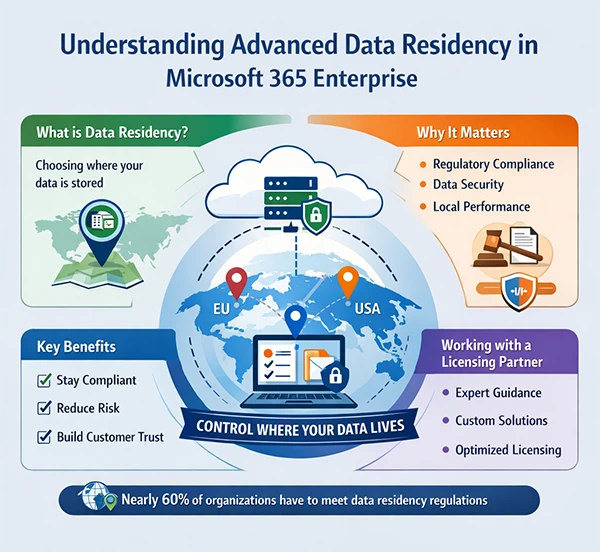
At the end of the day, advanced data residency is not just about being overly cautious but about being prepared for what you might deal with in the future. Businesses that think ahead do not scramble later. The infographic below summarizes the whole concept of Advanced Data Residency in Microsoft 365 Enterprise. Have a look!
If your organization operates across regions, handles sensitive information, or simply wants tighter controls over its digital footprint, advanced data residency in Microsoft 365 Enterprise can be a smart and future-proof move.
Frequently Asked Questions
Do I really need advanced data residency, or is it just a “nice to have” thing?
Will this slow down Microsoft 365 performance?
Absolutely not, if anything, keeping data closer to users can improve the overall performance. The real challenge here is planning, not speed.
Is advanced data residency somethingI can “add later”?
Technically, yes, but practically, it’s harder. Data movement after rollout can be complex and disruptive; planning early is far easier.
Does this cover all Microsoft 365 data automatically?
Not always. Some workloads and services have different residency rules, which is why reading the fine print matters.
Related Posts
How Poor Contract Visibility Leads to Revenue Leakage in Growing Companies
Growth is an important factor that determines the success rate of any business. When we witness new operations, partnerships and…

Managing Bitcoin Operations? Here’s How Salesforce Automation Helps
“Digital currency is here to stay, and it’s only a matter of how long before governments embrace it.” — Brad…

Why Modern Organizations Depend on Data Privacy Software
Data growth has significantly accelerated beyond what most compliance teams can manage, with personal records, financial details, contracts, and emails…

Converting Chats Into Leads While Maintaining Professionalism
The way marketing teams and businesses approach their potential clients to boost their sales has completely transformed in the last…

How to Delete iCloud Account? Complete Guide for 2026
Thinking, how can I delete iCloud or Apple account? It is not just about removing an account; it is about…

How Different Industries Use Specialized Software to Stay Competitive
In the market we have today, companies are always trying to find ways to work better and get results. The…

What Key Adjustments Enhance Visual Appeal Across Web Pages
Attractive web pages form the roots of any appealing website. For instance, imagine looking for content on Google, and you…

When is it Time to Consider IT Support Services for Your Business?
Every business needs to ensure smooth operations for a successful business. But despite trying hard to avoid barriers, technical issues…
How to Delete User Profile in Windows 10: Step-by-Step Guide
You don’t notice user profiles until one starts causing problems. A profile gets corrupted, a login error pops up, or…