
Improper training and unskilled humans are the major causes of data breaches. Automating these tasks can reduce errors to a greater extent.
First Wall of Defense: Using Online Quizzes to Train Employees Against Data Breaches
 Upasna Deewan
Updated on: Feb 17, 2026
Table of Contents
- Why Employees Are the First Line of Cybersecurity Defense
- How Human Error Leads to Data Breaches
- What Is a Data Breach Prevention Quiz?
- Benefits of Using Quizzes in Security Awareness Training
- Key Topics Every Employee Security Training Quiz Should Cover
- How to Create an Effective Cybersecurity Awareness Quiz
- Measuring Training Effectiveness With Quiz Analytics
- Best Practices for Rolling Out Quizzes Across the Organization
- Conclusion: Turning Employees Into Security Assets
- Frequently Asked Questions

“Your employees are your biggest risk—and your greatest defense.”
― Theresa Payton (Former White House CIO)
When the system is technically insulated, hackers often target employees for social engineering. But employees trained against cyberthreats are the best defence, even better than automated systems, as they not only avoid getting duped but educated others about suspicious cyber activities as well.
An untrained and unaware employee can get busy and confident. And, with just his one click, your data security is breached.
Online quizzes are becoming very popular in security training. They put your employees in real-world, dynamic, and confusing situations around cybersecurity, so when a cyberattack actually happens, they can take action on the spot.
Quizzes also allow refining of the training methodology by training personnel. They can clearly see which risks employees understand and which they misread, which workflows need clearer rules or simpler processes.
Key Takeaways
- Training the employees is the most crucial aspect for a growing business.
- Quizzes can train staff enough to predict the misplacement before it takes place.
- Passwords, phishing attacks, and file encryption are the crucial topics that every training should cover.
Why Employees Are the First Line of Cybersecurity Defense
Employees are right there at the entry gates where attackers target.
They open email, approve access, share files, and respond to urgent requests. Security tools reduce risk, but they can’t stop someone from trusting the wrong sender or sharing the wrong link. Training has to shape the choices employees make at those moments.
How Human Error Leads to Data Breaches
Employees getting trapped by phishing attacks might seem a people issue, but in actuality, its a systems issue.
People multitask, move fast, and rely on patterns. Attackers design messages that match those patterns, using urgency and authority to shortcut verification.
Common triggers include.
- Clicking a realistic “shared file” link.
- Approving access without checking context.
- Sharing documents with the wrong permissions.
- Reusing passwords across tools.
What Is a Data Breach Prevention Quiz?
A data breach prevention quiz is a short assessment built around real-life workplace scenarios to gauge the level of awareness among employees regarding cyber threats and how to handle them.
It does not ask employees to define phishing. It asks what they would do when a vendor requests files, a login alert appears, or a teammate shares a public link to internal data. The best quizzes are also role-aware, because finance, support, and IT face different risks.
Benefits of Using Quizzes in Security Awareness Training
Quizzes make the training process more engaging and entertaining by gamifying it.
1. Turn Passive Training Into Decisions
A learner can complete a module and still make the wrong call under pressure. A quiz forces a choice that shows whether the lesson translated into action.
2. Surface Blind Spots Before Incidents
Employees often feel confident about security basics. Quizzes reveal where confidence is misplaced, so coaching happens before an incident.
3. Reinforce Safer Habits Through Repetition
Short quizzes spaced throughout the year strengthen habits like verifying senders, checking URLs, and reporting quickly.
4. Create One Standard Across Teams
Without checkpoints, training drifts by manager and location. Quizzes make expectations measurable and uniform.
5. Improve Training Using Evidence
When many people miss the same scenario, you’ve found a training gap. Quiz results show what needs clearer explanation or better examples.
Key Topics Every Employee Security Training Quiz Should Cover
Security quizzes should focus on potential data-leak areas in the day-to-day workings of employees.
1. Phishing That Looks Legit
Use lookalike domains, fake file-share messages, and “reply-in-thread” tricks. Ask what to verify first, not just whether it looks suspicious.
2. Passwords and MFA Behavior
Include unexpected MFA prompts, password reset requests, and login alerts. Employees need to know the safest next action, not just the policy statement.
3. File Sharing and Permissions
Check whether employees understand internal vs. external sharing, public links, and least-privilege access. These are common breach pathways in normal work.
4. Reporting and Escalation
A lot of damage happens in the delay. Employees should know exactly how to report suspicious activity and what details to include.
5. Device and Download Hygiene
Cover updates, unknown USB devices, and unverified downloads. Small choices here can create bigger downstream problems.
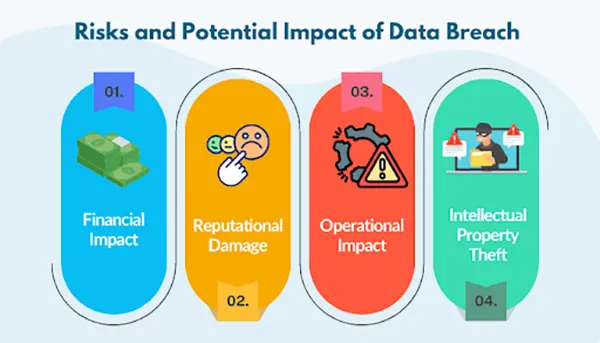
The employee should be aware of the impacts that a data breach can have. The following infographic lists them:
How to Create an Effective Cybersecurity Awareness Quiz
The quiz shouldn’t feel like an exam, because then the employees would just memorize the answers and write them. This won’t make them learn anything, and they would freeze if anything went wrong in real life.
Around the middle of your program, it helps to create a quiz for each high-risk workflow so you can confirm people can apply the rule, not just repeat it.
1. Build Scenarios From Real Incidents
Use incidents, near misses, or helpdesk patterns. If your team has seen fake invoices or suspicious access requests, turn those into questions.
2. Keep Each Question Focused on One Decision
Avoid long prompts with multiple ideas. If someone gets it wrong, you should know exactly what they misunderstood.
3. Write Plausible Wrong Options
Bad answers should reflect common mistakes, not obvious throwaways. Realistic choices make the quiz more predictive.
4. Add Brief Feedback That Teaches
One or two lines is enough. Explain why the correct option is safer and what risk the wrong choice introduces.
5. Update Questions When Workflows Change
If reporting steps, tools, or permission rules change, the quiz must change too. Otherwise you train outdated behavior.
Measuring Training Effectiveness With Quiz Analytics
It doesn’t end with the surveying of employees and recording results. You also need to assess the effectiveness of your mechanism.
Look past average scores. The most useful insight is pattern-based: which scenario types are missed, which teams struggle with the same decision, and which topics don’t improve after coaching.
1. Track Miss Patterns by Topic
High misses on phishing scenarios often mean examples are outdated. High misses on permissions often mean the process is unclear.
2. Segment Results by Role
One department struggling with access approval is a fixable signal. Role-based reporting prevents overgeneralized changes.
3. Watch Improvement Over Time
First attempts show baseline risk. Retakes with feedback show learning. Trendlines matter more than one-time scores.
4. Use Analytics to Improve Content
Treat quiz results as a diagnostic tool. The goal is fewer incidents, not perfect test scores.
Best Practices for Rolling Out Quizzes Across the Organization
Nothing matters if the quizzes are not rolled out properly. So, you should keep some things in mind.
1. Start With a Baseline, Then Go Role-Based
A generic quiz is only a starting point. Different roles face different threats, so scenario sets should differ.
2. Keep Quizzes Short and Frequent
A five-minute checkpoint after key modules works better than one long annual assessment.
3. Make Expectations Clear
If employees think quizzes are “gotcha” tests, they guess. If they expect coaching, they engage and learn.
4. Bake Quizzes Into Workflow Moments
Place quizzes after onboarding milestones, policy updates, and tool changes, right before employees perform tasks independently.
5. Refresh Scenarios With Real Consequences
Security choices should directly lead to operational pain that employees recognize. For example, risks like file corruption are tied to unsafe downloads and mishandled data.
Conclusion: Turning Employees Into Security Assets
Security awareness is not determined by how much the employee knows, but by how they would actually react if an attack happens. The real test happens when an email looks normal, a request feels urgent, and the day is busy. That is when habits take over.
Quizzes help because they force realistic choices, surface weak spots early, and reinforce safer behavior through repetition. They also give you evidence to improve training without guessing what went wrong.
When online quizzes become short checkpoints throughout the year, employees stop being an easy entry point. They become a steadier layer of defense against the mistakes that often trigger data breaches.
Frequently Asked Questions
What is the major cause of data breaches?
Why are online quizzes important?
They are crucial to effective businesses, as they neither take too much time nor ask employees to be physically present at the moment. Just skills and efficiency.
When is the right time to update a quiz?
Whenever there is a change in the policy, guidelines, or some advanced concept is introduced in the workflow, the quizzes demand change.
Related Posts

How to Transfer Contacts from Android to iPhone: 4 Easy Methods
Switching from Android to iPhone should not feel like rebuilding your life from scratch. Restoring contacts on iPhone should be…
White Label Ad Server vs Development From Scratch: What to Choose
Even though the DSP segment is the largest market within AdTech at the moment, an ad server remains a crucial…
How Data Infrastructure Powers Next-Gen Mobile Recognition Apps
Modern digital applications have evolved with time, offering various functionalities to users that weren’t possible or even imaginable before. But…
How Poor Contract Visibility Leads to Revenue Leakage in Growing Companies
Growth is an important factor that determines the success rate of any business. When we witness new operations, partnerships and…

Managing Bitcoin Operations? Here’s How Salesforce Automation Helps
“Digital currency is here to stay, and it’s only a matter of how long before governments embrace it.” — Brad…

Why Modern Organizations Depend on Data Privacy Software
Data growth has significantly accelerated beyond what most compliance teams can manage, with personal records, financial details, contracts, and emails…

Converting Chats Into Leads While Maintaining Professionalism
The way marketing teams and businesses approach their potential clients to boost their sales has completely transformed in the last…

How to Delete iCloud Account? Complete Guide for 2026
Thinking, how can I delete iCloud or Apple account? It is not just about removing an account; it is about…

How Different Industries Use Specialized Software to Stay Competitive
In the market we have today, companies are always trying to find ways to work better and get results. The…