
Online data recovery tools help restore lost, deleted, corrupted, or inaccessible files.
How Smart Online Data Recovery Tools Improve Content Quality and Data Efficiency
 Saipansab Nadaf
Updated on: Oct 03, 2025
Table of Contents
- The Overlooked Link Between Data Recovery and Content Quality
- How Online Data Recovery Tools Enhance Workflow Efficiency
- AI-Powered File Restoration: Smarter, Faster, and More Accurate
- Protecting Creative Assets Through Cloud Integration
- Preventing Data Loss to Maintain Content Quality
- Boosting Team Productivity with Automated Data Recovery
- The Future of Content Security and Efficiency in the Digital Era
- Frequently Asked Questions
Have you ever unintentionally lost a digital file? Well, there are considerable chances that you might have. According to reports, 74% of the people who own a computer have accidentally deleted important data.
These are no small numbers; you might have guessed that this is not a minor issue. Today, millions of people, be it content creators, marketers, or businesses, rely heavily on digital files. But these can go missing, become corrupted, and get deleted accidentally, with just a wrong click or any internal issue in your system. And, it can be extremely frustrating, cause stress and affect the quality of your work, and overall productivity.
Fortunately, now we have a variety of modern online data recovery tools to bridge this gap and help retrieve your lost files. Want to know how it works? You’ve landed on the right page, this post uncovers the role of smart online data recovery tools and explains how they improve the content quality and data efficiency.
KEY TAKEAWAYS
- Data is directly tied to content accuracy, consistency, and professionalism.
- Online data recovery tools can save you from unexpected downtimes and enhance workflow efficiency.
- AI-powered tools can be a smarter, faster, and more accurate solution to restore files.
- Preventing data loss is the best form of data recovery.
- Automated data recovery helps boost team productivity.
The Overlooked Link Between Data Recovery and Content Quality
Data recovery is about retrieving lost files; so, how is it related to content quality? Let’s understand this with an example, suppose there is a writer who uses tools like GPTZero to ensure its originality, they rely on clean and complete files. Even a single missing paragraph or corrupted document can affect the clarity and overall message of the content.
This means the data is directly tied to content accuracy, consistency, and professionalism. Smart recovery tools help ensure that the drafts aren’t lost or corrupted mid-way and stay intact, assisting individuals make sure that the quality of their work is not compromised in any way due to technical failures and the content stays strong.
FUN FACT
When you delete a file, most systems just remove the pointer to it; the actual data stays on the drive until it’s overwritten.
How Online Data Recovery Tools Enhance Workflow Efficiency
Imagine working for hours on a file and then it is suddenly no longer on your computer. Did you press the wrong key, or did it just vanish on its own? No idea, but one thing’s certain that with that file, your time and effort are also gone. This could slow down everything and take a direct hit on your productivity.
Online recovery tools can come to your rescue in such unexpected times and save you from downtimes by retrieving the documents instantly, preventing unnecessary rewrites and corrupted files, and helping creators in maintaining professionalism even during such irregularities.
AI-Powered File Restoration: Smarter, Faster, and More Accurate
We’ve moved past the times when recovery methods were slow and often required you to wait for hours and hours to get your files back. Now AI has taken this game up a notch. AI-powered tools can:
- Analyze damaged files in real time.
- Recover missing sections.
- Rebuild corrupted formats.
- Restore multiple versions of the same file.
- Recover data from cloud, local drives, and external storage.
And this does not end here; machine learning tools can even predict file structures and restore them without compromising the accuracy of the content.
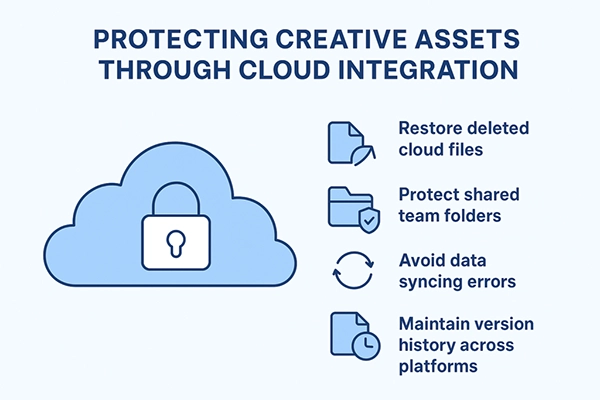
Protecting Creative Assets Through Cloud Integration
Cloud-based integration is another innovation that has now changed how teams store and protect their content. Modern recovery tools, mixed with the abilities of cloud services, can help in the following ways
Preventing Data Loss to Maintain Content Quality
“Prevention is better than a cure.”
You might have heard this famous saying, and it holds true in the case of data too. The best way you can recover your data is by preventing it from getting deleted. By using advanced tools, you can scan docs in real time, monitor file health, get alerts for potential corruption, and have recovery points that preserve earlier versions.
Remember that Strong protection = stronger content. This strategy can save you from the headache that comes with data loss.
Boosting Team Productivity with Automated Data Recovery
Since data recovery with AI-powered tools has become so much simpler compared to traditional ways, it has transformed the way content teams work. Smart recovery systems help restore files, eliminating the manual steps once needed. It has reduced IT dependence and keeps teams moving even during technical glitches. It also allows multiple team members to restore files independently.
All these lead to faster content production, fewer interruptions, and ultimately, the productivity rises because the workflow isn’t completely disrupted when the files disappear.
The Future of Content Security and Efficiency in the Digital Era
Already, the data recovery tools have evolved a lot. Content that once required hours to be retrieved can now be restored in minutes with the help of advanced AI tools. But this is not it, in the future, we can expect even stronger AI-based reconstruction, predictive data protection, smarter cloud syncing, enhanced encryption, and better file integrity tracking. These features will help creators to never lose their work and businesses to always stay efficient, secure, and productive.
Frequently Asked Questions
What exactly do online data recovery tools do?
How do data recovery tools improve content quality?
Data recovery tools help improve content quality by preventing loss of drafts, media files, research documents, and final copies. This helps ensure that creators don’t have to rebuild work from scratch.
Are AI-powered tools more accurate?
Absolutely, AI tools are much more accurate as they help identify recoverable data faster, improve precision during restoration, and reduce the risk of file corruption.
Do I need technical skills to use online data recovery tools?
No, most of the data recovery tools are automated and does not require any certain set of skills for you to use them.
Related Posts
How Poor Contract Visibility Leads to Revenue Leakage in Growing Companies
Growth is an important factor that determines the success rate of any business. When we witness new operations, partnerships and…

Managing Bitcoin Operations? Here’s How Salesforce Automation Helps
“Digital currency is here to stay, and it’s only a matter of how long before governments embrace it.” — Brad…

Why Modern Organizations Depend on Data Privacy Software
Data growth has significantly accelerated beyond what most compliance teams can manage, with personal records, financial details, contracts, and emails…

Converting Chats Into Leads While Maintaining Professionalism
The way marketing teams and businesses approach their potential clients to boost their sales has completely transformed in the last…

How to Delete iCloud Account? Complete Guide for 2026
Thinking, how can I delete iCloud or Apple account? It is not just about removing an account; it is about…

How Different Industries Use Specialized Software to Stay Competitive
In the market we have today, companies are always trying to find ways to work better and get results. The…

What Key Adjustments Enhance Visual Appeal Across Web Pages
Attractive web pages form the roots of any appealing website. For instance, imagine looking for content on Google, and you…

When is it Time to Consider IT Support Services for Your Business?
Every business needs to ensure smooth operations for a successful business. But despite trying hard to avoid barriers, technical issues…

How to Delete User Profile in Windows 10: Step-by-Step Guide
You don’t notice user profiles until one starts causing problems. A profile gets corrupted, a login error pops up, or…