
Anonymization permanently removes identifiable information, making it impossible to trace data.
Anonymized Data: Meaning, Techniques, and Best Practices for Secure Data Management
 Upasna Deewan
Updated on: Nov 18, 2025
Table of Contents
- Introduction to Anonymized Data
- What Is Anonymized Data?
- Why Anonymization Matters in Data Management
- Core Techniques for Data Anonymization
- Advanced AI-Driven Anonymization Methods
- Best Practices for Effective Data Anonymization
- Tools and Technologies for Data Anonymization
- Use Cases of Anonymized Data in Modern Enterprises
- Future Trends in Data Anonymization & Privacy Protection
- Frequently Asked Questions
Ever think about what happens to your personal data after you click “accept” on a privacy policy? Companies gather piles of information, your shopping habits, where you go, and even your health details. But they can’t just use it however they want. Laws like GDPR and CCPA force them to protect your privacy.
That’s where data anonymization steps in. It lets businesses dig into data, spot trends, and build better services, all without exposing anyone’s identity. With anonymized data, your story blends into the crowd, useful for companies, safe for you.
Curious how this actually works, or why it’s such a big deal? Let’s break it down.
Key Takeaways
- Anonymized data strips out anything that could identify, so organizations can work with information without compromising anyone’s privacy.
- This process lowers the risk of data breaches, keeps companies in line with regulations.
- To protect privacy, organizations rely on core techniques like data masking, generalization, suppression, and perturbation.
Introduction to Anonymized Data
What is anonymized data, and why does everyone keep talking about it? At its core, anonymized data means we’ve removed or changed anything that could identify a specific person, but the data still works for analysis.
Every time you go online, you leave a digital footprint, including your medical records, a bank transfer, and even a quick scroll through social media. All that information is gold for researchers and businesses, but sharing it raw puts your privacy at risk. That is why it matters so much right now: it lets companies learn and grow, while your privacy stays intact.
What Is Anonymized Data?
Anonymized data means stripping away anything that can directly identify someone, names, addresses, social security numbers, Temporary phone number, that sort of thing. The idea is simple: once the data is anonymized, you cannot connect it to any one person. Take a healthcare dataset, for example, you might see patient age ranges and diagnosis codes, but you won’t find exact birthdates or names. This way, researchers can dig into health trends while keeping patient privacy intact.
What really sets anonymisation apart is that it’s a one-way street. Done right, it is permanent. No tracing the information. That is different from pseudonymization, where you swap our identifiers. But, with the right key, you could still re-identify someone. With anonymization, there’s no going back.
Why Anonymization Matters in Data Management
Data breaches pop up in the news all the time now, and the fallout can be brutal.
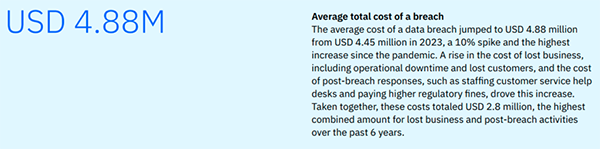
Reports put the average cost of a data breach at $4.45 million.
Anonymization steps in here as a lifesaver. When companies strip out identifiable details, they slash the risks tied to storing or sharing data. If someone does manage to get their hands on anonymized data, it goes nowhere – you can’t tie it back to real people. That keeps both the company and its customer safer.
Core Techniques for Data Anonymization
So how do organizations really go about anonymizing data? They rely on a handful of solid methods that keep sensitive information safe.
- Data Masking: Data masking swaps out private details for fake but believable ones. Think of a credit card number turned into a random string that looks real.
- Generalization: It works a bit differently. Instead of showing an exact age, for example. It groups people into age brackets, making the data less precise but harder to trace someone.
- Data Swapping: Organizations jumble up values between records, breaking that one-to-one link with real identities.
- Suppression: It takes a more drastic route. If a particular field makes it too easy to identify someone, they just delete it together.
- Perturbation: Lastly, here they add a bit of randomness or noise to numbers, so trends stick around, but no one can pinpoint individuals.
Advanced AI-Driven Anonymization Methods
AI-driven anonymization leans on ML to scan data, spot sensitive details, and shield them from exposure. With differential privacy, you get a mathematical safeguard; no one can trace individual data points, even if they throw serious computing power at the problem.
Then there’s synthetic data generation. Here, AI does not just mask or scramble information; it builds brand-new datasets from scratch. These synthetic sets look and behave like the real thing, matching the original’s statistical patterns, but they never include actual personal data.
Best Practices for Effective Data Anonymization
Anonymization isn’t just about picking the right tools. If you want your approach to hold up over time, you need to stick to a few crucial habits. First, always check for re-identification risks-don’t assume your dataset is safe after one pass.
Use a mix of anonymization methods, not just one, to keep data better protected. Only gather and anonymize what you actually need.
Keep detailed records of everything you do, from the methods you choose to the reasons behind each decision.
PRO TIP Before anonymizing any dataset, run a re-identification test; if someone can still guess who a person is using indirect clues, the data isn’t truly anonymous.
Tools and Technologies for Data Anonymization
Anonymization runs deeper than picking the right tools; what matters is how you actually put it into practice and keep it effective over time. Here’s what organizations need to do:
Start with risk assessments. Don’t just do this once; keep checking your anonymized data for any chance someone could identify the individual again. Use a mix of anonymization techniques, not just one, to build up stronger protections. Only gather the data you genuinely need. If it doesn’t serve your purpose, leave it out. Document everything. Track your decisions and methods so you always know what you did and why.
Use Cases of Anonymized Data in Modern Enterprises
Hospitals dig into anonymized patient records, push medical research forward, spot disease trends, and sharpen their treatment strategies, all without breaking HIPAA rules. Banks turn to anonymized transaction data to catch fraud and gauge credit risk, keeping customer identities safe.
In retail, anonymized shopping habits help stores manage inventory and fine-tune recommendations. Tech companies lean on anonymized user data to train AI models and roll out better features.
Future Trends in Data Anonymization & Privacy Protection
Data anonymization keeps getting smarter, and we’re really just getting started. As tech races ahead and people worry more about privacy, new, creative ways to keep personal data safe will pop up. Quantum computing is on the horizon, ready to shake up everything we know about anonymization. Organizations need to step up and build methods that can handle these breakthroughs.
Frequently Asked Questions
What is the difference between anonymization and pseudonymization?
Is anonymized data 100% secure?
While properly anonymized data significantly reduces privacy risks, no method is completely foolproof.
What tools can I use for data anonymization?
Popular tools include ARX DATA ANONYMIZATION TOOL, Microsoft Presidio, Google Cloud DLP, and IBM InfoSphere Optim.
Related Posts
Simple Ways to Clean Audio Data for Better Model Performance
Most of the machine learning teams do not struggle because their processing systems are not capable—they struggle because their audio…

How to Check for Malware on Mac in 2026?
Can Mac computers get viruses? Macs are not as safe as people think. Yes, macOS has built-in tools like XProtect…

10 Best Lightroom Preset Alternatives in 2026
“Photography is the story I fail to put into words.” — Destin Sparks (Landscape Photographer) For years, Lightroom presets have…
Elementor Hosting vs SiteGround: Which is Faster in 2026?
A website’s performance is mainly determined by its Speed. Even a slight delay can reduce conversions by a significant margin.…

10 Best Visual UGC Platforms for eCommerce Brands in 2026
“People influence people. Nothing influences people more than a recommendation from a trusted friend.” — Mark Zuckerberg (Meta CEO) That…

The Data Models Powering the Next Creative Revolution in Video Generation
Artificial intelligence has evolved from a mere tool to the cornerstone of advancements in the new era. Over the years,…

Solar Software Companies: How Platforms Improve Cross Team Collaboration
“If everyone is moving forward together, then success takes care of itself.” — Henry Ford (Industrialist & Business Magnate) Handoffs…

What Healthcare Leaders Expect From Digital Tools
Healthcare executives are under pressure to protect patient safety, clinician time, and data privacy while modernizing the delivery of care.…

How to Reset Android Phone When Locked? (Safe Factory Reset Methods)
Locked out of your Android phone or stuck on the screen? It happens more than you think. A forgotten PIN,…