
A microphone must be present to capture the speakers’ audio. Participant recruitment: Humans are needed to do the speaking! Script preparation: If it is a scripted training, then a script must be prepared.
Speech Data Basics: What to Capture, Store, and Analyse (Without the Headache)
 Kartik Wadhwa
Updated on: Feb 18, 2026
Are you wondering what speech basics are and what you capture, how to store it and analyse the same without putting a lot of effort? The answer is here.
According to Statista, the natural language processing (NLP) market has grown consistently worldwide since 2017. Currently, the projected value of the industry sits at around $43 billion by 2025, creating a market almost 14 times larger than it was in 2017.
Thus, this article aims to discover the basics of speech data, what to capture, and how, learning about transcription software, Voice Technologies, and more!
Key Takeaways
- Start with the real question: what decision will this data support?
- What to capture: the minimum viable speech dataset
- Transcription software as the intake layer
- Workflow software as an action layer
- What to analyse: focus on patterns, not perfection
- How to keep it simple long term
Start With the Real Question: What Decision Will This Data Support?
Before you hit record, decide what type of speech data is meant to do for you.
Most businesses want one (or more) of these outcomes: operational clarity (faster note-taking and handovers), customer insight (recurring issues and feedback), or performance improvement (coaching opportunities and process bottlenecks).
Once you know the purpose, you can define a minimum dataset and stop capturing recordings just in case.
What to Capture: The Minimum Viable Speech Dataset
You do not need everything. You need the smallest set of inputs that still produces reliable outputs and links each recording to a real piece of work.
As a practical baseline, capture:
- Audio source and context (call, meeting, voicemail, field note, letter dictation).
- Speaker labels (even if it is just agent and customer).
- Basic metadata (date/time, team, case ID or ticket ID).
- Consent and recording status (and where that evidence lives).
- Outcome tag (resolved, escalated, follow-up needed).
That baseline is enough to make transcripts searchable and to connect them to your CRM, case management system, or service desk without turning your storage into a dumping ground.
Fun Fact 75% of people suffer from speech anxiety prior to giving a presentation or public speech.
A Quick Warning About Capturing Everything
Longer recordings are not automatically more valuable. They are harder to review, harder to govern, and more expensive to process.
Note: Tools like turning customer speech into insight can get you value without hoarding audio.
Transcription Software as the Intake Layer
Transcription software is most useful when it behaves like a reliable intake form, and not a novelty feature. Your goal is repeatable outputs that your teams trust.
You can :
- Keep it clean by agreeing on vocabulary upfront (product names and acronyms)
- Setting simple speaker rules
- Running a light QA loop (spot-check a sample weekly),
- And defining what good enough looks like.
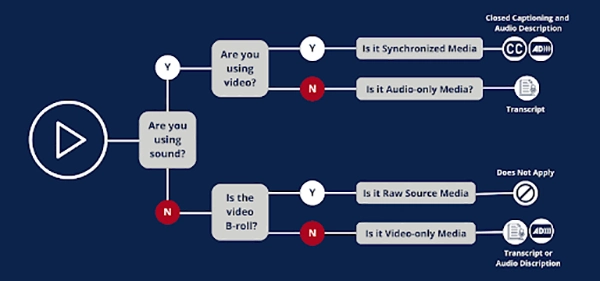
The infographic further shows a transcription software as depicted :
Workflow Software as an Action Layer
The difference between speech data and speech outcomes is routing. Instead of transcripts living in a folder, they become triggers that create work in the systems that you already run.
For example, a transcript can create a ticket when someone mentions cancellation. The steps you should follow are:
- Route a compliance flag for review,
- Add a call summary to the CRM record,
- Draft a follow-up email for approval.
- Or populate case notes with structured fields such as issue and resolution.
This also prevents the common failure mode: you transcribe everything, and nobody uses it. Speech becomes valuable only when it changes what happens next.
What to Analyze: Focus on Patterns, Not Perfection
Once your intake and action layers are stable, analysis becomes much simpler.
- Start with trends that drive decisions: top reasons for contact (mapped to real processes),
- Repeat contacts where the first interaction did not resolve the issue,
- Compliance checks for required statements,
Early on, you will often get better results by combining structured tags with human review.
The aim is practical change, not vanity dashboards, which is why actions that reduce friction remain the north star when you decide what to measure next.
How to Keep It Simple Long Term
The simplest speech data system is not the one with the most features. It is the one with the fewest moving parts and the clearest standards.
A straightforward blueprint is: capture with purpose, transcribe consistently, store safely, route into workflow software with owners and deadlines, and analyse outcomes that lead to process improvements.
Pick one use case, standardise the outputs, and build the routing before you scale. When you do, speech stops being a headache and becomes just another business dataset you can search, measure, and improve.
Frequently Asked Questions
How will you collect data for a speech?
What are the disadvantages of text-to-speech software?
Text-to-speech (TTS) has some potential disadvantages, including: Quality: Synthesised speech can vary depending on the language, the specific voice used, and the text being read.
What are the techniques of speech analysis?
The techniques for speech analysis can be divided into three major categories: signal-based, production-based, and perception-based.
What are the disadvantages of speech recognition devices?
Speech recognition struggles with accuracy in noisy environments or with diverse accents and dialects. Background noise, overlapping speech, or low-quality microphones can degrade performance.
Related Posts

How to Check for Malware on Mac in 2026?
Can Mac computers get viruses? Macs are not as safe as people think. Yes, macOS has built-in tools like XProtect…
10 Best Lightroom Preset Alternatives in 2026
“Photography is the story I fail to put into words.” — Destin Sparks (Landscape Photographer) For years, Lightroom presets have…
Elementor Hosting vs SiteGround: Which is Faster in 2026?
A website’s performance is mainly determined by its Speed. Even a slight delay can reduce conversions by a significant margin.…
10 Best Visual UGC Platforms for eCommerce Brands in 2026
“People influence people. Nothing influences people more than a recommendation from a trusted friend.” — Mark Zuckerberg (Meta CEO) That…

The Data Models Powering the Next Creative Revolution in Video Generation
Artificial intelligence has evolved from a mere tool to the cornerstone of advancements in the new era. Over the years,…
Solar Software Companies: How Platforms Improve Cross Team Collaboration
“If everyone is moving forward together, then success takes care of itself.” — Henry Ford (Industrialist & Business Magnate) Handoffs…

What Healthcare Leaders Expect From Digital Tools
Healthcare executives are under pressure to protect patient safety, clinician time, and data privacy while modernizing the delivery of care.…

How to Reset Android Phone When Locked? (Safe Factory Reset Methods)
Locked out of your Android phone or stuck on the screen? It happens more than you think. A forgotten PIN,…
How to Transfer Contacts from Android to iPhone: 4 Easy Methods
Switching from Android to iPhone should not feel like rebuilding your life from scratch. Restoring contacts on iPhone should be…