Imagine you finish an important project, save it on your laptop, and when the “big presentation day” arrives, your device just refuses to turn on. Sounds like a grave situation. Yes, this is not ideal, but also not uncommon.
Data loss due to device failure is no joke. According to Backblaze research, around 1.45% of hard drives fail every year on average. This is why data backups and recovery tools become a ‘non-negotiable’ in 2026.
Discover the best tools and methods that will help you keep your data safe and secure!
Key Takeways
Hardware failure, cyberattacks, and human error are common causes of data loss.
Using both local and cloud backups offers the best protection.
Modern backup tools provide automation, encryption, and fast recovery options.
Choosing the right backup strategy depends on how much data you manage.
Regular backups turn potential disasters into minor inconveniences.
Why Backing Up Your Data Still Matters in 2026
Devices can be unpredictable; one moment, your data is safe and visible on your laptop, the next moment, there’s some glitch, and everything vanishes into thin air. And the risks are not just technical. A report from IBM Security notes that ransomware attacks have increased dramatically over the past few years.
This is precisely why backing up data still matters in 2026, especially when most of us rely on digital systems for different purposes, be it studies or work. O, even if your data is compromised, having a reliable data backup system in place can help you start from exactly where you left off.
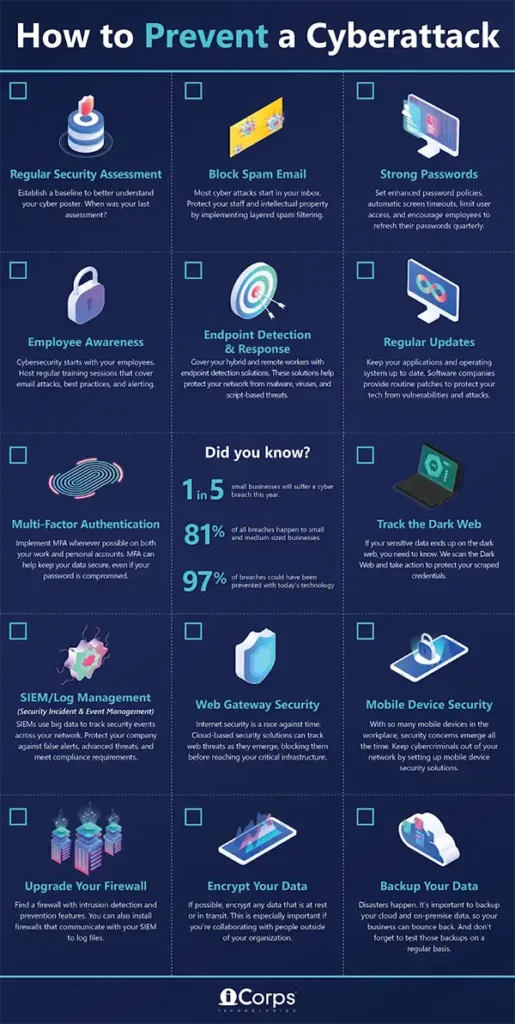
USEFUL INSIGHTS Here is a comprehensive checklist of how to prevent a cyberattack. Have a look and take notes!
Different Ways to Back Up Your Data
All data backup ways are certainly not the same. In 2026, people use a mixture of solutions depending on their data type and how important it is. Some common ways are:
Local Backups on External Drives
Hard drives, SSDs, or network storage devices. Most people would be familiar with these, as they have been one of the most straightforward options for a long time. You can just copy your files into these, and voila, the work is done.
Another advantage is speed. Restoring files from a local device usually takes a few minutes, and this can be significantly useful when recovering large files like videos, design projects, or software builds.
However, there’s a downside too. Local backups should not be your only option, as they can be lost during theft, fire, or hardware damage.
Cloud-Based Backup Services
Cloud services automatically upload your files to remote servers and make sure that the data stays accessible even if your device is damaged or lost. Because of thos convenience, it has become a go-to solution for many businesses and individuals.
Many platforms even allow you to test features through a free trial, making it easier for you to evaluate reliability before committing to a subscription.
Hybrid Backup (Cloud + Local)
If you wish for a combination of both, hybrid backup is the way. Files can be stored locally for quick recovery and also uploaded to the cloud for disaster protection. A highly recommended option by IT professionals because it balances speed, security, and redundancy.
Many companies also integrate it into their disaster recovery solutions, ensuring that entire systems can be restored quickly in case something unfortunate happens.
Popular Backup and Recovery Tools in 2026
Since there are many backup and recovery tools available, choosing one that aligns with your goals perfectly can be a bit confusing. So here is a comprehensive comparison of the top data tools in 2026.
Agentless backups Fast incremental backups Automated VM verificationFlexible recovery optionsAdvanced security measuresLow maintenance administrationEffortless scalability
Starting at $2.90/month. Free trial available.
Blackblaze
Unlimited automatic file backups Enterprise management with SSO support Flexible restore options
Starts at $99 per year per device.
DataRecovee
Economical data recovery software Optimized for speed Industry experience Easy to scale
Free download available.
IDrive
Centralized backup for multiple devices Zero downtime for SQLPhysical data transfer with IDrive Express
Starts from $69.65 per year.
Crashplan
Continuous file backup every 15 minutes Endpoint server & SaaS backups for Microsoft 365 Role-based access controls for restores.
Custom pricing
Choosing a Backup Setup That Works for You
Different backup setups are suitable for different needs. To choose one that supports your workflows, consider the following:
Personal Use vs. Business Needs
Individual and business needs both differ significantly. A simple combination of cloud storage and an external drive is often enough for individuals, as they can back up photos, documents, and creative projects automatically with minimal effort.
But for businesses, this is not the case. You must think about downtime, compliance, and operational continuity. They require advanced backup systems that include automation, monitoring, and disaster recovery planning.
Storage Capacity and Cost Considerations
Generally, the cost depends on how much data you need to store and how frequently it changes. Cloud subscriptions scale with usage, while local drives involve a one-time hardware purchase.
When dealing with large datasets, organizations often combine both methods to optimize costs while maintaining protection.
Ease of Recovery and Automation
Backup providers are only useful if recovery is quick and simple. For that, modern tools automate the processes, schedule backup runs in the background, and complete recovery through a simple dashboard interface. This makes the whole process easier, quicker, and also reduces the chances of human error, which is one of the most common reasons for failed backups.
FUN FACT Your phone likely holds more data than early NASA computers. Yet a single accidental reset or device failure could erase it all, unless it is backed up properly.
Smart Habits for Faster Data Recovery
The technology matters, but how you use it is equally important to achieve the desired results. So, here are some best practices that might seem small but can make a huge difference:
Regularly back up important files
Keep multiple backup copies in different locations
Test recovery occasionally to make sure your system actually works
Use encryption to protect sensitive data
Organize files so they are easier to restore
Final Take
Nowadays, almost everything has shifted online, be it studies or businesses. And in all this, data plays a crucial role, and that is the reason why it is constantly at risk. From accidental deletion to hardware failure risks or cyberattacks, there are a variety of ways you can lose your data.
Fortunately, you can recover it all if you act in the right way and at the right time. As a precaution, you should also make sure that important data always has a second home, which can be in the form of an external drive, cloud storage, or a hybrid system.
Remember that data loss rarely announces itself. One small backup today can save years of work tomorrow.
Frequently Asked Questions
How often should I back up my data?
To be on the safer side, back up the important documents daily or automatically. Many modern tools run continuous backups in the background.
Is cloud backup safer than local backup?
Both offer unique advantages. Cloud backups protect against device loss, whereas local ones allow faster recovery. So, a combination of both works the best.
What is the easiest backup solution for beginners?
Cloud backup services are often the simplest because they automate most of the processes.
Can backups protect against ransomware?
Yes. They can protect against ransomware, especially if you maintain offline or immutable backups that ransomware cannot modify.

 Upasna Deewan