
Emailing PDFs without protection makes them easier to intercept, edit, or misuse. Secure tools add encryption, identity checks, and proof of signing.
Top 10 Tools to Sign PDFs for Educators and Students in 2026
 Kartik Wadhwa
Updated on: Dec 11, 2025
Table of Contents
- Why Secure PDF Sharing and Signing Matter for Data Protection
- Common Risks When Sharing and Signing PDFs Online
- Core Security Features to Look for in PDF Sharing Tools
- Top Tools for Safely Sharing and Signing PDFs
- Choosing the Right PDF Sharing and Signing Tool for Long-Term Data Safety
- Frequently Asked Questions
Do you remember the last time you shared or signed a PDF? There are high chances that it might have been for an important agreement, contract, or some approval that couldn’t afford mistakes. But here is a fact: PDFs make a frequent vector for a significant percentage of attacks. (Source:ETCISO)
Sounds scary, right? But this doesn’t mean that you cannot safely share or sign PDF. With the right approach and tool, you can ensure smooth collaboration and eliminate serious data risks. And in this post, we will dive deeper into this topic and uncover the top tools and best practices for safely sharing and signing PDFs in 2026. Stay tuned!
Key Takeaways
- PDFs can be trusted, but only when shared securely.
- Signing PDFs digitally saves time and reduces risk.
- Security features matter more than convenience alone.
- Different tools suit different needs; there’s no one-size-fits-all when it comes to this.
- Safe PDF sharing is now a basic part of digital work.
Why Secure PDF Sharing and Signing Matter for Data Protection
If we were to share data across various sources, chances are that the majority of us would go for a Portable Document Format, aka PDFs. According to reports, 98% of businesses think the same and use them for external communication. Not only that, even88% of academic journals and e-books have adopted this format.
Can you guess what it signifies? Well, this makes it a common target for cyber attackers and this is why secure PDF sharing and signing is extremely important. Just one wrong move and your doc can fall into the wrong hands. To tackle this issue, secure PDF tools ensure that only authorized users access the document, signatures are legally valid and verifiable, and the document integrity remains intact from the sender to the signer.
Common Risks When Sharing and Signing PDFs Online
As hinted before, PDFs remain at a risk if the right safeguards are not in place. Some common risks it brings are:
- Unauthorized access: Weak sharing links or open permissions are the main cause for it.
- Document tampering: The content is altered after being signed and could lead to extreme consequences.
- Phishing and impersonation: This is especially common during email-based signing. Attackers can pretend to be someone else to get a PDF signed from you.
- Lack of traceability: It makes it harder to prove who signed what and when.
These risks highlight the need for dedicated tools instead of basic email attachments when working with PDFs.
INTRIGUING INSIGHTS
The infographic below shares some safety tips for signing and sharing PDF files securely. Have a look!
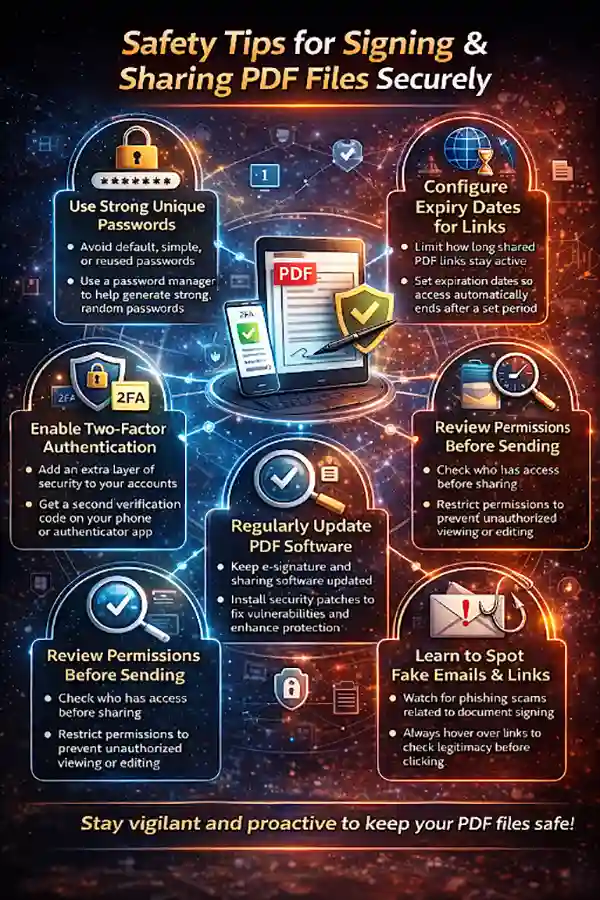
Core Security Features to Look for in PDF Sharing Tools
You will find dozens of tools available, but which one to choose and which is the safest? To find that out, look for the following features in the PDF sharing tools:
End-to-End Encryption
End-to-end encryption is important for preventing accidental or unauthorized changes. It ensures that your data is protected while being sent or stored, saving it from falling into the wrong hands.
Secure Access Controls and Permissions
Not anyone should be able to access and make changes in your file, and good tools make sure of that by letting you decide who can view, edit, comment on, or sign the PDF.
Audit Trails and Activity Logs
Every action made on the file is documented in audit trail records, be it views, edits, or signatures. This boosts transparency and legal proof.
Tamper Detection and Document Integrity Checks
Tamper detection alerts the user of any activity that happens in the document and lets them know if the content in it has been modified after signing, protecting the validity of agreements.
Compliance With Data Protection Regulations
Data protection regulations like GDPR ensure that your data remains safe. Hence, always choose a tool that complies with the standard and other regional data protection laws. It wouldn’t just protect the data but also help avoid legal issues.
These are the features that truly matter when choosing a tool, as they add more layers of security to the document.
PRO TIP
Many data leaks do not happen because of hackers but because the document shared with “anyone with the link.” So, to prevent this, always double-check sharing permissions before sending a PDF.
Top Tools for Safely Sharing and Signing PDFs
Now that you know the key features that make a tool reliable and safe for work, we have curated a list of tools that check all those boxes and are a good choice for 2026:
Adobe Acrobat Sign
The classic, Adobe Acrobat Sign is widely used and is trusted by thousands of users for its strong security features and seamless integration with other Adobe tools, meaning that for organizations that already use Adobe PDFs in their daily workflows, it can be the final finishing touch and make the whole process much smoother.
DocuSign
Another popular choice, DocuSign, is a leader in digital agreements as it offers robust authentication options, compliance support, and enterprise-grade security for signing PDFs at scale, proving to be a great option for large organizations.
Dropbox Sign (HelloSign)
Dropbox Sign (HelloSign) is known for its simplicity. Its easy interface makes it ideal for teams that are looking for an easy way to sign PDFs while keeping them safely stored and tracked.
PandaDoc
PandaDoc is a one-stop solution; it combines document creation, sharing, and signing all in one place. It is one of the favorite tools for sales and HR teams, as it helps them manage contacts securely and efficiently.
Smallpdf eSign
For organizations looking for a straightforward, no-frills approach to PDF signing, Smallpdf eSign is the one. It is like a practical choice for individuals and small teams who need quick and secure signing without any additional complex features.
These are the top 5 tools you can trust in 2026 with your sensitive credentials without having to worry about their safety.
Choosing the Right PDF Sharing and Signing Tool for Long-Term Data Safety
Different organizations have different needs. Therefore, they require a platform that fits their needs. Suppose a large firm prioritizes compliance and advanced tools; it is not necessary that the small teams would crave the same; they might value simplicity and affordability.
That is why one should first know their priorities and requirements before picking any tool.
And above all, the right platform should make it easy to securely share documents, track activity, and confidently sign PDF files without compromising data safety.
By keeping the above-mentioned considerations in mind, you can choose and invest in a PDF sharing platform that helps protect sensitive information, build trust with clients and partners, and prepare your workflows for the future.
Frequently Asked Questions
Why should I use a tool to sign PDFs instead of emailing them?
Are e-signatures on PDFs legally valid?
Yes, most trusted PDF signing tools provide legally binding e-signatures that meet international compliance standards.
Can small businesses benefit from PDF signing tools?
Yes, both small and large businesses can benefit from these tools. Also, many tools are specifically designed for individuals or small teams to help them save time and avoid paperwork without complex setup.
Is it safe to share sensitive documents like contracts as PDFs?
If you are using secure sharing tools with encryption, access controls, and audit trails, it’s fine. However, some tools can possess risk as well.
Related Posts
How to Check for Malware on Mac in 2026?
Can Mac computers get viruses? Macs are not as safe as people think. Yes, macOS has built-in tools like XProtect…
10 Best Lightroom Preset Alternatives in 2026
“Photography is the story I fail to put into words.” — Destin Sparks (Landscape Photographer) For years, Lightroom presets have…
Elementor Hosting vs SiteGround: Which is Faster in 2026?
A website’s performance is mainly determined by its Speed. Even a slight delay can reduce conversions by a significant margin.…
10 Best Visual UGC Platforms for eCommerce Brands in 2026
“People influence people. Nothing influences people more than a recommendation from a trusted friend.” — Mark Zuckerberg (Meta CEO) That…

The Data Models Powering the Next Creative Revolution in Video Generation
Artificial intelligence has evolved from a mere tool to the cornerstone of advancements in the new era. Over the years,…
Solar Software Companies: How Platforms Improve Cross Team Collaboration
“If everyone is moving forward together, then success takes care of itself.” — Henry Ford (Industrialist & Business Magnate) Handoffs…

What Healthcare Leaders Expect From Digital Tools
Healthcare executives are under pressure to protect patient safety, clinician time, and data privacy while modernizing the delivery of care.…

How to Reset Android Phone When Locked? (Safe Factory Reset Methods)
Locked out of your Android phone or stuck on the screen? It happens more than you think. A forgotten PIN,…
How to Transfer Contacts from Android to iPhone: 4 Easy Methods
Switching from Android to iPhone should not feel like rebuilding your life from scratch. Restoring contacts on iPhone should be…