“Breached don’t happen because attackers are smart; they happen because we trust too easily.”
2025 hasn’t even ended yet, and according to reports, data breaches remained frequent this year, and their average costs were around $4.4M globally. Seeing data breach news headlines is not something new now.
Remember the 2020 Twitter Insider breach, where the insiders with legitimate administrative access were bribed by the attacked and unfortunately, they caved in and compromised dozens of high-profile accounts, including those of Apple, Barack Obama, Jeff Bezos and Elon Musk.
This case left everyone shocked because the reason for the data breach lay right in the company. And this incident became the ultimate example of why enterprises must implement Zero Trust Data Protection. It is a framework that assumes no user, device, or workload is inherently trustworthy.
In this post, we’ll dive deeper into the subject and understand why ZTDP has become a foundational topic in modern cybersecurity programs, including those offered through an online master of science in cybersecurity.
So, let’s get started!
What Does Zero Trust Data Protection (ZTDP) Mean for Enterprise?
Zero Trust Data Protect is all about one simple philosophy: Never trust. Always verify. Continuously enforce. Which means it is a security approach that applies zero-trust principles to safeguard data. Unlike the traditional Zero Trust models, this one ensures that data, whether transit, at rest, or in use, remains secure through continuous verification, strict action control, and immutable backups. \
FUN FACT Zero trust was introduced by Forrester analyst John Kindervag in 2010.
Eliminating Implicit Trust Across Networks, Users, and Devices
Earlier, the systems used assumed that once inside the network, everything was trustworthy, and this is what made it easier for cyberattackers to move forward with their plan and reflect maximum damage.
However, this is not the case for Zero Trust. Every request made, be it from an employee’s network, a cloud instance, or an API, must be verified, authenticated, and authorized. This way, the enterprises can stop stackers at an early stage before the damage is inflicted, and block their lateral movements and credentials.
Identity Verification, MFA, and Least-Privilege Access Controls
Identity verification at every step is the core mantra followed by zero trust systems. It requires continuous identity assurance, and it is accomplished with the help of Multi-factor authentication, passwordless authentication, context-aware access, and behavioral analytics.
Which means, even if cybercriminals crack your passwords, they won’t be able to log in completely or access any sensitive data.
Additionally, the least privilege access controls add another layer of protection as they require users to access data only when it is absolutely necessary, reducing internal misuse, limiting the blast radius of compromised credentials, and preventing unauthorized data access.
Reducing Insider Threats Through Segmentation and Monitoring
As can be inferred from the 2020 Twitter breach example, no one is trustworthy, not even the employees who work in your organization. That is why ZTDP uses micro-segmentation to break networks into different parts and isolated zones.
So, even if an insider decides to harm an organization using their credentials, segmented networks will prevent their lateral access, real-time monitoring will flag anomalous behavior, and privileged activity will continuously be logged.
All this significantly lowers the risks associated with negligent and malicious employees.
Zero Trust Backups: Ensuring Uncompromised Recovery Points
Conventional systems overlooked backup protection, and this was their biggest failure. And, this became the attacker’s strength as they often targeted backup, tampering with it, encrypting backup repositories, and deleting snapshots before launching ransomware. This left no options for the enterprises but to give in to the stackers’ demands.
But then entered the game-changer, zero-trust backups. They ensure:
Immutable storage: backup data cannot be altered.
Air-gapped or isolated recovery zones.
Credential separation by requiring different credentials and MFA for backup access.
Continuous verification to prevent unauthorized backup manipulation.
These factors took the whole data security system up a notch, making it much more reliable and stronger.
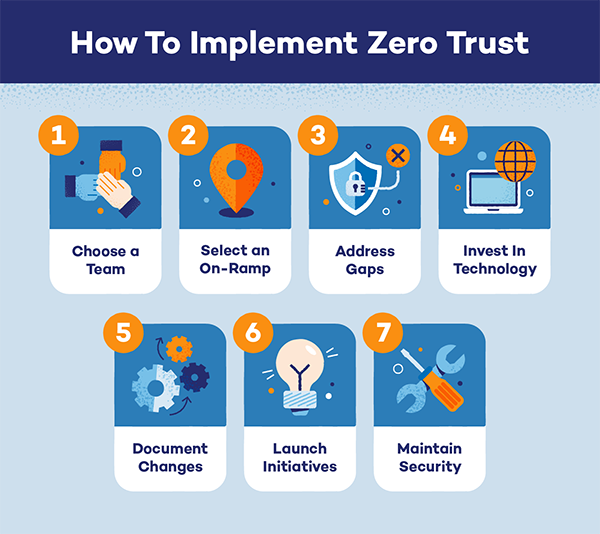
INTRIGUING INSIGHTS The infographic below explains how to implement Zero Trust in an organization. Have a look!
Building a Recovery-Ready Architecture Aligned With Zero Trust Principles
To build a recovery-ready architecture that aligns with Zero Trust Principles, an enterprise should include:
Authentication & Authorization at Each Step: Verification should be a must at each step, as no system, user, or API can be automatically trusted.
End-to-End Encryption: Data stays encrypted during access, transfer, and storage, making it difficult for anyone to tamper with it.
Micro-Segmented Networks: This limits the attackers’ mobility, making it difficult for them to execute their plans completely, minimizing the damage.
Continuous Monitoring and Automated Response: AI-powered systems detect suspicious behavior early, reducing breach impact.
Policy Enforcement Access Cloud, on-Perm, and Hybrid Environment: No matter how the operations are performed, ZTDP applies consistently everywhere data moves.
Including all these into the security systems will make an organization’s data almost untouchable and save it from becoming one of the data breaches’ news headlines.
In conclusion, Zero Trust Data Protection (ZTDP) offers enterprises the resilience needed to withstand the threats lurking around today. It provides enterprises with a future-ready path for protecting the most valuable asset: data.
Frequently Asked Questions
What is Zero Trust Data Protection (ZTDP)?
Zero Trust Data Protection is a security framework that follows the principle of Never trust. Always verify. Continuously enforce.
How is ZTDP different from traditional Zero trust?
Unlike the traditional Zero trust, ZTDP does not focus only on network devices and user access. Instead, it extends these principles specifically to data, ensuring data access, movement, storage, and recovery are constantly verified and protected with strong controls.
Can ZTDP be implemented in hybrid or multi-cloud environments?
Yes, ZTDP can work across all environments, be it on-premises, cloud, hybrid, or multi-cloud.
What are Zero Trust backups?
Zero-trust backups apply zero-trust principles to backup infrastructure. They require authentication for every action, enforce least-privilege access, use immutable or isolated storage, and continuously monitor backup interactions.

 Kartik Wadhwa