
Old software systems can feel boring to employees, stopping them from reaching peak productivity.
Modernizing Enterprise Software with Specialized UI/UX Design Agency
 Upasna Deewan
Updated on: Feb 25, 2026

Most enterprise software still being used in the corporate world was developed years ago. According to Stefanini’s industry analysis, 60% of enterprise applications are legacy systems.
Yes, they get updated occasionally, but that is mostly to keep them away from exploits and vulnerabilities. Some features are also added, but they look like a small renovated area in an old house. Just out of place, piercing the eyes.
These sporadic additions also make the system heavier over time compared to what it delivers in terms of output.
Specialized UX designers integrate these systems with modern tools and capabilities with a better visual experience. Resultingly, the productivity improves. According to research, every dollar invested in improving UX gives back 100.
In this article, I’ll tell you all about modernizing legacy enterprise systems by hiring a specialized UI/UX design firm. This will improve the overall productivity as the workforce gets a better user experience.
KEY TAKEAWAYS
- Old software systems can feel boring to employees, stopping them from reaching their peak work speed.
- New UI/UX can give your legacy system a breath of fresh air.
- The overhaul simplifies the interface, boosting overall workforce productivity.
Modernization is Not Just a New Interface
When firms contact design agencies for a system overhaul, they are just thinking about aesthetics. They just want a cleaner layout and updated visuals for the dashboard. However, you can’t change the look and feel of the software by just repainting it; the entire infrastructure beneath the system needs renovation for that.
Enterprise systems usually handle complex processes such as approvals, reporting, compliance, and internal tracking. If users need to jump between five screens to complete one task, the issue is structural.
A UX design agency in USA looks at how work actually happens inside the system. Where do users pause or click back and forth? The area where most of the mistakes happen? That’s where modernization begins.
Legacy Systems Still Work, But They Feel Heavy
If it’s just about being functional, the legacy systems work perfectly well. Yes, there might not be the latest tool integrations, or its aesthetics may align with Windows 98. Still, it gets the work done.
But we have to accept that experience matters, not just for its sake but for productivity as well.
For example, an internal reporting tool might display 30 metrics on one screen. Technically useful. Practically overwhelming. Most users only need a few numbers to make a decision, but the interface doesn’t reflect that.
So users scan longer. They hesitate. They sometimes export data into spreadsheets just to simplify what they’re seeing. Modern UX doesn’t remove complexity. It organizes it.
Reducing Steps Without Breaking the System
Fully replacing an enterprise system is never an option. First, you can’t stop all your business operations for a software renovation. Second, the redesign from scratch would cost a fortune. That’s why most modernizations happen in phases.
A specialized UX team studies existing flows and simplifies what can be simplified. Maybe approvals can be handled from one unified screen. Possibly, search can replace deep navigation layers, or repetitive confirmations can be removed.
A UX design agency in the USA doesn’t change business rules randomly. It works with product owners and developers to adjust the structure without breaking logic.
Small changes often make the biggest of differences.
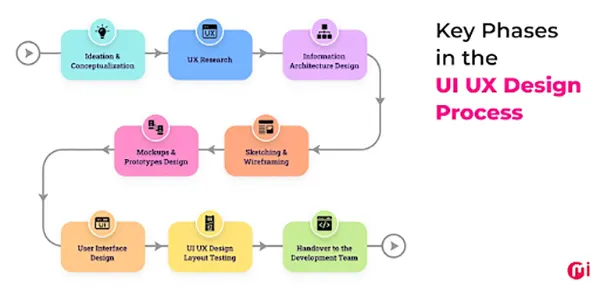
A typical UI/UX design involves the following steps, as stated in the infographic:
Lowering Cognitive Load in Daily Work
Enterprise tools are used for hours as they help fulfill our work tasks. But if the interface is itself confusing, it adds to the mental fatigue on top of the actual work being done.
Your employees might not complain loudly, but that old system is definitely hindering their speed.
Clear grouping, predictable navigation, and role-based dashboards reduce that load. A finance manager doesn’t need the same view as a logistics coordinator. Showing everyone everything usually creates confusion. Modern UX helps align the interface with the role. That’s not about beauty. It’s about clarity.
Preparing for What Comes Next
AI and automation are buzzwords, so every company wants them integrated into their Internet Explorer-era enterprise system. But adding advanced tools to a cluttered interface makes things worse.
Modern UX creates space for growth. When the structure is clear and the navigation is stable, new capabilities can be introduced without overwhelming users. That’s how legacy systems stay relevant without full replacement.
Why Specialization Matters
Businesses and employees don’t use software the same way consumers do. Hence the distinction. Enterprise environments involve permissions, compliance rules, and layered approvals. So, if you’re implementing changes in it, better tread carefully.
A UX design agency in the USA that understands enterprise systems knows how to work within those limits. It balances usability improvements with operational stability.
Modernization is not about starting over. It’s about making what already exists easier to use.
The Takeaway
The mammoth world of business is connected; hence, change is slow. Upgrading software takes years, even decades, due to new system risks, capital and training requirements, etc. So, most enterprise applications being legacy makes sense.
But UI/UX modernizations can greatly help without making major upheavals. It just involves restructuring workflows, reducing mental friction, and clarifying how tasks move through the system. A UX design firm in the USA helps improve experience without tearing down the entire technology stack.
When the interface supports users instead of slowing them down, the same system suddenly feels more capable. And that’s often enough to move the business forward.
Frequently Asked Questions
What is the problem with continuing to use legacy enterprise software?
How does a UI/UX redesign help with modernizing a legacy enterprise system?
The new UI/UX gives a repaint to the old house of the enterprise system.
What does UI/UX redesign, modernizing a legacy enterprise system, involve?
That involves a complete overhaul at the infrastructure level. This simplifies the interface along with logic, boosting overall workforce productivity.
Related Posts
The Data Models Powering the Next Creative Revolution in Video Generation
Artificial intelligence has evolved from a mere tool to the cornerstone of advancements in the new era. Over the years,…
Solar Software Companies: How Platforms Improve Cross Team Collaboration
“If everyone is moving forward together, then success takes care of itself.” — Henry Ford (Industrialist & Business Magnate) Handoffs…
What Healthcare Leaders Expect From Digital Tools
Healthcare executives are under pressure to protect patient safety, clinician time, and data privacy while modernizing the delivery of care.…

How to Reset Android Phone When Locked? (Safe Factory Reset Methods)
Locked out of your Android phone or stuck on the screen? It happens more than you think. A forgotten PIN,…
How to Transfer Contacts from Android to iPhone: 4 Easy Methods
Switching from Android to iPhone should not feel like rebuilding your life from scratch. Restoring contacts on iPhone should be…

White Label Ad Server vs Development From Scratch: What to Choose
Even though the DSP segment is the largest market within AdTech at the moment, an ad server remains a crucial…
How Data Infrastructure Powers Next-Gen Mobile Recognition Apps
Modern digital applications have evolved with time, offering various functionalities to users that weren’t possible or even imaginable before. But…

How Poor Contract Visibility Leads to Revenue Leakage in Growing Companies
Growth is an important factor that determines the success rate of any business. When we witness new operations, partnerships and…

Managing Bitcoin Operations? Here’s How Salesforce Automation Helps
“Digital currency is here to stay, and it’s only a matter of how long before governments embrace it.” — Brad…