Payroll is one of those things everyone notices only when it goes wrong. A missing digit, a delayed payment, or a tax error can instantly turn payday into a panic day. And because payrolltouches bank details, personal IDs, and salary data, even a small mistake can snowball into a serious bank risk.
According to reports, approximately 40% of employees have experienced a payroll error in the past year, causing significant distress and mistrust.
Managing Payroll can be seriously stressful, especially if you are doing it all manually. Perfect payroll automation changes the story. With modern payroll software, businesses can remove guesswork, lock down sensitive data, and turn payroll into a smooth, predictable process; one that runs accurately in the background while teams focus on growing the business.
Key Takeaways
Payroll stress is usually a system problem, not a people problem
Repetition is where errors love to hide
Automation protects data without slowing teams down
Consistency matters more than speed in payrollTrust in payroll buildstrust in the company
Why Payroll Data Errors Are High-Risk to Business Security
CASE STUDY
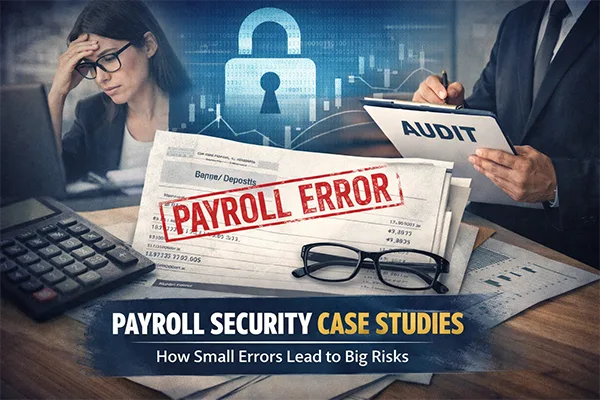
A mid-sized company accidentally reported incorrect payroll tax figures due to a manual data entry mistake. The issue seemed harmless at first; just a few mismatched numbers across two reporting periods, what harm could they possibly cause, right? But then came the repercussions, when auditors reviewed the records, the inconsistencies raised concerns about data integrity. What started as a simple payroll error quickly escalated into a deeper compliance review, costing the company weeks of back-and-forth explanations, corrections, and legal consultations. Lesson: Payroll errors can invite scrutiny, and once regulators start looking, everything else is examined too.
Payroll systems deal with some of the most sensitive data in an organization, including employee identities, bank details, tax information, and compensation records. It is quite understandable that any kind of error in this data would not just cause delays but also expose the business to serious financial and legal risks, as depicted in the case study above.
So, for companies working with a high-risk merchant account provider, the stakes remain even higher. Inaccurate payroll data can raise red flags during audits, disrupt cash flow planning, and impact trust with financial partners.
In short, payroll errors are not just operational problems but security risks.
Core Elements of a Reliable Payroll Automation System
The core elements of a strong payroll automation system include the following to eliminate risk:
Data Standardization
Structure standardization makes it easier to process data accurately and reduces the chances of mismatched calculations or reporting. Standardized data formats ensure consistency across payroll imports; hours worked, tax codes, benefits, and deductions, saving you from any complications in the future.
System Integration
Payroll does not work in isolation; it is integrated with various systems, including HR management, tracking tools, accounting platforms, and banking systems, to ensure that the data flows manually throughout the system without needing external manual help.
Automated Validation
Automated validation checks payroll data even before processing begins. It looks out for missing fields, unusual values, or conflicts with predefined rules, catching issues early before they turn into something bigger and more costly to fix.
These elements form the foundation of the payroll automation systems, making them more reliable and efficient.
How Automation Eliminates Manual Payroll Error Points
Human makes errors, and it is no surprise to find errors in manual workflows. Fortunately, automation removes the most common sources of payroll mistakes by replacing manual steps with smarter and more intelligent processing:
Real-Time Calculations
Modern tools are capable of calculating wages, taxes, and deductions in real time, without any errors. This also eliminates the chances of mistakes caused by outdated tax tables, miscalculations, or last-minute adjustments.
Rule-Based Processing
This implies consistent payroll rules across all employees. Whether it is overtime, bonuses, or deductions, automation ensures that every case is handled the same way, every time, with the help of rule-based processing.
Exception Handling
Things do not necessarily remain the same on each and every occasion. Instead of letting unusual cases slip through unnoticed. Automation highlights exceptions that need human review. This keeps payroll teams focused only where judgment is required, not on routine tasks.
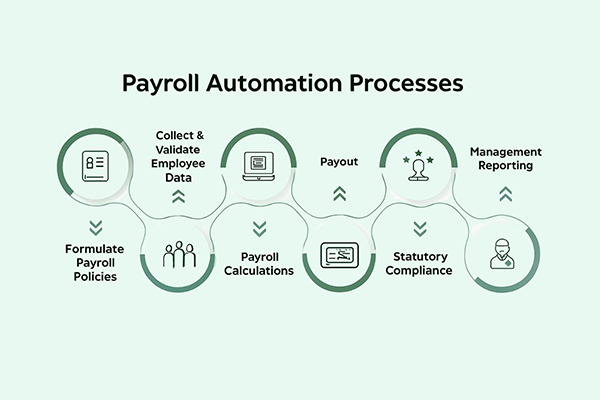
INTRIGUING INSIGHTS The infographic below shows the complete payroll automation processes. Have a look to understand better!
Tips to Ensure Continuous Improvement of Payroll Automation
Payroll automation isn’t a “set it and forget it” process. To ensure that the error rates remain low and security is high:
Review payroll rules as regulations change
Audit system integrations to ensure data accuracy
Monitor exception reports for recurring patterns
Train teams to understand automation outputs, not override them blindly
Treat payroll data with the same care as other sensitive data assets.
Continuous improvement keeps payroll systems resilient, compliant, and reliable over time.
PRO TIP Before automating payroll, ask: “Where do we pause, panic, or recheck every cycle?”That’s exactly where automation delivers the biggest win.
Final Thoughts
At its core, payroll automation is not only about chasing perfection but about peace of mind. When high-risk data errors are removed from the process, payroll stops being a constant source of stress and becomes something you can trust.
For businesses handling sensitive information or working with a highrisk mechant account provider, accuracy and security aren’t optional; they are essential. The right automation tools reduce exposure, strengthen compliance, and ensure employees are paid correctly and on time, every time.
Because when payroll works quietly and flawlessly, everyone wins and nobody has to worry when payday comes around.
Frequently Asked Questions
Is “zero payroll errors” actually realistic?
Human-free payroll errors? Yes. People still review exceptions, but automation removes the repetitive mistakes that cause most problems.
What is the biggest hidden payroll risk companies ignore?
The biggest hidden payroll risk that companies often ignore is last-minute manual changes. They are well-intentioned and responsible for a lot of errors.
Will automation lock us into rigid processes?
Not if it’s set up properly. Good payroll systems are strict where they should be and flexible where they must be.
How do we know if our payroll process is already risky?
If your teams double-check numbers out of fear instead of confidence, then that’s your sign that your payroll process stands on thin ice.
Can automation really help with compliance?
Yes, automation helps with compliance. It applies rules consistently, even when regulations change or staff turnover happens.

 Mahima Dave