
Generic IT is not great because it slows your growth, it will create integration issues, it will cause delays in onboarding new employees, and it will not support the changes in business and workflows at team level.
Why Growing Teams Are Ditching Generic IT Support for Purpose-Built Solutions
 Mahima Dave
Updated on: Jun 23, 2025
Table of Contents
- Generic IT support often fails to keep up with the pace of team growth
- Tailored systems reduce friction and improve long-term reliability
- Local providers can offer faster response and deeper business alignment
- Strategic IT design allows businesses to scale without constant disruption

According to a 2024 Gartner study, 64% of mid-sized companies said that tech issues directly negatively impacted their revenue growth and/or customer satisfaction. As companies grow, outdated or generic support models can turn from being a simple asset to a serious liability.
Why Growing Teams are Leaving One-Size-Fits-All IT Support Behind and Adopting Purpose-Built Solutions describes how generic/one-size-fits-all IT services simply cannot keep up with the complex, ever-changing needs of grow-and-shrink teams today. Instead of being the backbone of operations, generic IT turns into a bottleneck that slows everything down.
In the article, you’ll learn why growing companies are seeking customized IT support, what to look for in a purpose-built solution, and how it can enable long-term scalability and success.
The Cracks Start Small but Widen Quickly
You’ll often notice the signs before they escalate. A new hire waits three days for login access. A software update breaks a critical tool. An IT request disappears into a ticket queue with no ETA. These aren’t just annoyances—they’re early signs that your systems aren’t scaling with your team.
Generic support models often rely on templated processes and rigid service-level agreements (SLAs). That might keep the lights on, but it won’t fix the root issues that growing teams face. The moment your operations need more than basic password resets or hardware swaps, the cracks begin to appear. Systems grow harder to integrate. Vendor responsibilities blur. And when no one understands how your tools, people, and workflows connect, troubleshooting becomes a game of guesswork.
Over time, this patchwork method slows productivity. You lose track of who has access to what. You start spending more to fix problems that could have been prevented. And eventually, tech stops being a quiet enabler in the background—it becomes a daily source of friction.
Why Growing Teams in Texas Are Looking Local for Tailored IT Support
There’s a reason more companies are moving from remote helpdesks to local specialised service providers nearby. It’s not just about proximity—it’s about having someone who understands the pace and pressure of local business growth. Face-to-face support remains crucial, particularly when onboarding new staff or deploying infrastructure across multiple sites.
What many teams want now is continuity. They need IT that scales with them, not against them. That means proactive support, not reactive. When systems align with how your team works—on-site, remote, or hybrid, operations flow much more smoothly. Security risks drop. Onboarding gets faster. And there’s far less scrambling when something breaks.
For businesses expanding across Central Texas, secure IT solutions in San Antonio have become a reliable alternative to the impersonal, one-size-fits-all support model. Partnering with a team that brings both tech skills and local insight matters, especially when aiming for long-term strength over short-term fixes.
Purpose-Built IT Isn’t Just About Custom Software
It’s easy to assume that a “custom” IT setup means expensive tools or bespoke platforms. But for most growing teams, purpose-built support has less to do with flashy software and more to do with innovative design. It begins by grasping how your teams operate, the tools they use, the pain points they face, and how they share data and devices.
That insight translates into infrastructure that feels invisible because it works. Things like network configurations that match the real layout of your office. User permissions that align with role changes.Backup protocols that maintain performance and aren’t overlooked. It’s moving from reacting to issues to designing systems that stop them early.
What separates purpose-built support is that it’s hands-on and continuous. It doesn’t stop at installation or setup. It evolves as your team does, adjusting for new hires, new tools, and new risks. And since it’s based on your team’s tools, not generic templates, it’s more stable, efficient, and much less likely to fail unexpectedly.
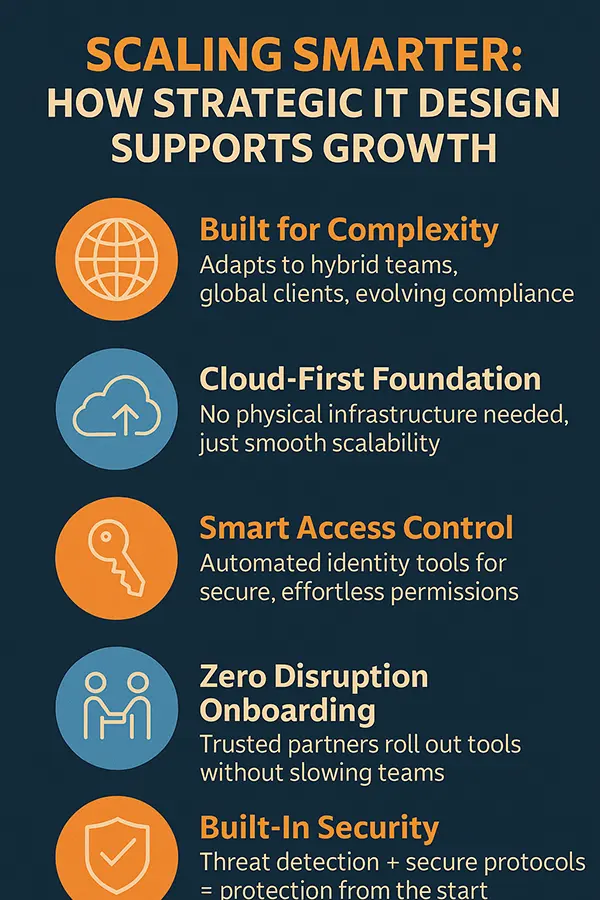
Scaling Smarter: How Strategic IT Design Supports Growth
Growth doesn’t just mean more people—it usually means more complexity. New offices, hybrid schedules, international clients, evolving compliance requirements. All of these stretch the limits of a system that wasn’t designed with flexibility in mind. That’s when strategic IT design proves its worth. Growth feels less like chasing problems and more like a deliberate, planned evolution.
Instead of rewriting your approach every time you hit a new milestone, you’re building on a stable foundation. That could mean cloud-first systems with no need for physical infrastructure. Or identity tools managing access automatically, without constant manual intervention. Or simply having a partner who knows your team well enough to roll out new tools with zero disruption.
Strategic design also makes growth safer. As data privacy laws tighten and cyber risks increase, having secure access protocols and automated threat detection built in from the start can protect your business from severe exposure. These aren’t add-ons, they’re core elements of an IT setup that enables scale, rather than merely enduring it. Below you can see how strategic IT design supports growth.
Why Settling for Generic IT Support Isn’t Just a Budget Risk
There’s a point in every team’s growth where doing nothing becomes more expensive than doing it right. Generic support might seem cost-effective at first, but as your systems, staff, and risks multiply, that choice quietly erodes your time and performance. What’s often missed is how much more fluid operations are when IT aligns with how your team actually works.
The most resilient businesses don’t just have better tools—they have more innovative systems supporting them behind the scenes. Systems that are maintained by people who know how to keep pace with growth. If your current support feels more like a barrier than a boost, consider whether it was ever designed for the team you have today.
Frequently Asked Questions
What are the limitations of using generic IT support for scaling teams?
What value do local IT support providers have on scaling companies?
Local articulates a clear understanding of growth at a regional level, they are able to provide support faster, and provide consistency, as well as will be able to develop IT systems that follow the workflow of your onsite, remote or hybrid subject matter experts.
What makes purpose-built IT better than traditional IT tailored according to a teams use case example?
Purpose-built IT will evolve with teams, it will provide a pro-active solution to avoid problems, it will improve efficiency, it will provide increased security, as well as provide an IT infrastructure to reflect “real” workflows and future requirements.
Related Posts

How to Check for Malware on Mac in 2026?
Can Mac computers get viruses? Macs are not as safe as people think. Yes, macOS has built-in tools like XProtect…
10 Best Lightroom Preset Alternatives in 2026
“Photography is the story I fail to put into words.” — Destin Sparks (Landscape Photographer) For years, Lightroom presets have…
Elementor Hosting vs SiteGround: Which is Faster in 2026?
A website’s performance is mainly determined by its Speed. Even a slight delay can reduce conversions by a significant margin.…
10 Best Visual UGC Platforms for eCommerce Brands in 2026
“People influence people. Nothing influences people more than a recommendation from a trusted friend.” — Mark Zuckerberg (Meta CEO) That…

The Data Models Powering the Next Creative Revolution in Video Generation
Artificial intelligence has evolved from a mere tool to the cornerstone of advancements in the new era. Over the years,…
Solar Software Companies: How Platforms Improve Cross Team Collaboration
“If everyone is moving forward together, then success takes care of itself.” — Henry Ford (Industrialist & Business Magnate) Handoffs…

What Healthcare Leaders Expect From Digital Tools
Healthcare executives are under pressure to protect patient safety, clinician time, and data privacy while modernizing the delivery of care.…

How to Reset Android Phone When Locked? (Safe Factory Reset Methods)
Locked out of your Android phone or stuck on the screen? It happens more than you think. A forgotten PIN,…
How to Transfer Contacts from Android to iPhone: 4 Easy Methods
Switching from Android to iPhone should not feel like rebuilding your life from scratch. Restoring contacts on iPhone should be…