
Yes, WordPress is a safe platform for business website building.
WordPress Data Security Analysis 2026: What Makes WordPress a Reliable Platform for Websites
 Reviewed By Brijesh Kumar Singh
  Mahima Dave
Updated on: Mar 09, 2026
Table of Contents
- Why WordPress Remains a Trusted Platform in 2026
- Core Security Features of WordPress
- How WordPress Handles Backups for Website Data Protection
- Best Practices to Strengthen WordPress Site Security
- Role of Plugins in WordPress Data Security
- Conclusion: WordPress vs Other CMS Platforms
- Frequently Asked Questions
Cybersecurity threats are evolving and becoming more advanced with each passing year, and hence, website security has now become a top priority for businesses and online stores as even a small leak can cause severe reputational or financial damage.
Despite these concerns, WordPress powers more than 40% of websites globally, making it one of the most widely trusted content management systems in the world.
It is a top choice due to its flexibility, ease of use, evolving security infrastructure, regular updates, and strong developer ecosystems. In this post, we will shed some more light on this and uncover what makes it a reliable platform for websites.
Key Takeaways
- In 2026, WordPress is still one of the most trusted CMS platforms
- Platform updates are robust, and community support enhances platform security
- Backups are crucial to safeguard your website data and minimise downtime
- Security plugins aid in tracking and thwarting cyber attacks
- Good maintenance practices can greatly enhance WordPress Security
Why WordPress Remains a Trusted Platform in 2026
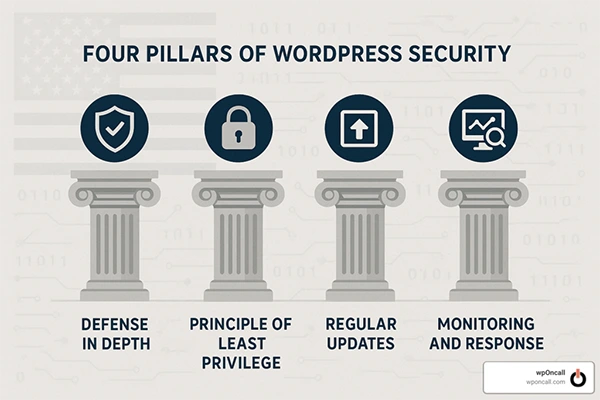
WordPress has been continuously developed over the years to meet the needs of website security and performance in modern times. Open source, active community, and frequent updates ensure reliability on millions of sites around the world.
It can be used for websites of all sizes, ranging from personal blogs to enterprise-level platforms, making it a trusted choice for businesses. One shouldn’t just dive into its security features without understanding the reasons behind WordPress being the most popular CMS.
Here are the reasons why WordPress is so Popular:
- Regular security updates
- A large global developer community
- Flexible customization options
- Websites that expand over time
- Strong plugin ecosystem
- SEO-friendly structure
Another great benefit is having access to expert services such as white label WordPress development service, which can assist agencies and businesses in constructing safe and secure, tailored websites successfully. WordPress is a reliable platform in 2026, thanks to its constant innovation and flexibility.
INTERESTING FACT
WordPress was created on May 27, 2003 as a blogging platform, but has since grown into a CMS platform that powers millions of websites around the world, from business sites and news sites to eCommerce sites.
Core Security Features of WordPress
WordPress has several built-in security features that help safeguard websites from current online threats. They can help website owners mitigate risks and enhance platform security.
- Automatic Security Updates: WordPress regularly publishes updates to patch vulnerabilities and to enhance system protection. Users stay protected from newly discovered threats with the help of automatic updates.
- User Role Management: Administrators can set different permissions on the platform, which helps minimize the risk of unauthorized access.
- Secure Authentication: WordPress offers a secure log-in system, including a two-factor authentication system, which can be implemented via plugins and integrations.
- Support for HTTPS and SSL: WordPress can effortlessly integrate with SSL certificates, guaranteeing secure communication among visitors and websites.
- Security Monitoring: With many hosting companies and WordPress security solutions providing their customers with suspicious activity monitoring, malware scanning, and firewall protection, you can have all three of these functions available to you.
These features combine to ensure that WordPress websites remain very protected.
How WordPress Handles Backups for Website Data Protection
Website backups are essential for safeguarding business information against cyber attacks, accidental data loss, and server outages. WordPress offers a variety of backup options that enable the user to quickly restore the website if there are any issues.
Prior to checkup systems, businesses need to be aware that regular backups are important. Website backups offer a lot of advantages, like faster disaster recovery, ransomware attacks prevention, reduced downtime, handling accidental mistakes, safer website updates, and many more.
WordPress also has several backup options, some of which are hosting provider backups, cloud storage backups, plugin-based automated backups, and manual database exports. Automated backup plugins are used by many businesses to schedule their backups and ensure that they don’t lose any data.
Regular backups are one of the best ways to make websites safer and more secure, and to ensure that they run smoothly.
Best Practices to Strengthen WordPress Site Security
Improving WordPress site security is a must-do for every site. While some have built-in security measures, website owners must also take steps to ensure that there are as few risks as possible. By implementing a proactive security strategy, you can work to minimize vulnerabilities and increase the reliability of your websites. Here are some essential security practices:
- Use strong passwords
- Enable two-factor authentication
- Regularly update themes and plugins
- Install SSL certificates
- Limit login attempts
- Any unused plugins or themes are removed
- Selecting reliable web hosting companies that offer malware scanning, firewall protection, server monitoring, and DDoS protection.
It is important for businesses to monitor login access, file modification, and suspicious activity on a regular basis to detect threats early. With the addition of the WordPress security features and appropriate maintenance, businesses can make their online presence far more secure.
Role of Plugins in WordPress Data Security
Plugins play an important role in WordPress data security. Security plugins are valuable tools for businesses to track threats, block malicious traffic, and enhance website security. Site owners should be aware of the advantages and disadvantages of the plugins before installing them
Security plugins offer the following advantages:
- Malware scanning
- Firewall protection
- Spam prevention
- Login security
- Backup automation
- Real-time threat alerts
The poor management of plugins can lead to issues. If they are outdated, they may have vulnerabilities. The improper loading of plugins can make websites vulnerable to attacks, and too many plugins can slow down your computer.
Therefore, only use trusted plugins and regularly update them. Many popular security plugins offer advanced security capabilities, including activity monitoring, brute force protection, and automatic threat detection.
Conclusion: WordPress vs Other CMS Platforms
In 2026, WordPress remains one of the most secure and reliable CMS platforms, thanks to its flexibility, vibrant developer community, and robust security ecosystem. It offers extensive plugin options, security features, regular updates, and backup support, making it suitable for businesses of all sizes.
WordPress is a far more customizable, scalable, and community-supported platform than many other CMS platforms. Although no platform is entirely invulnerable to cyber attacks, with the right security measures and trusted hosting, WordPress can be used to create secure websites for businesses.
In an era defined by constantly shifting cyber threats, businesses can feel confident in WordPress’ ability to manage their websites and protect their data for years to come by focusing on regular updates, secure plugins, robust authentication methods, and regular backups.
Frequently Asked Questions
Is WordPress a safe platform for building websites for businesses?
Why is WordPress so popular?
It is flexible, scalable, customizable, and has a strong community support.
Are WordPress plugins safe?
Plugin software is usually safe, as long as it’s downloaded from a reputable developer and updated frequently.
What is the frequency of updating WordPress Websites?
Automated backups on a daily or weekly basis are ideal, depending on the frequency of website activity.
Related Posts

8 Best AI Presentation Makers for Business-Ready Slides
Making a presentation doesn’t just mean designing slides. It’s about defining a clear structure, using defined logic, useful visuals, and…

Queue Management Software Troubleshooting Guide: 8 Common Faults and Fixes
The long wait times and ineffective management of customer queues can have a significant impact on customer satisfaction and business…

How to Use Similarweb Website Traffic Data for Competitor Research
Competitor research without traffic data is guesswork. You can guess who your rivals are, guess how big they are, guess…

Choosing the Right Hosting Model for Scalable Digital Platforms
The performance of digital business is directly related to website speed, uptime, and scalability. Slow page performance has a negative…

How Data-Driven Performance Tools Are Transforming Employee Recognition in Tech Companies
“People work for money but go the extra mile for recognition, praise, and rewards.” — Dale Carnegie (Writer & Teacher)…

Why Businesses Struggle to Collect Reliable Data from the Web
Almost every company that depends on data runs into the same problem: although they can find the data they need,…

Why Financial Data Recovery Matters for Businesses
Financial data supports every part of a business, directly affecting cash flow, payroll, tax reports, audits, customer billing, and daily…

CMMC Compliance Is Coming for Manufacturers. Here Is What You Need to Do
“Cybersecurity is much more than a matter of IT.” — Stephane Nappo (Cybersecurity Professional) For manufacturers working within the defense…

How Data-Based Tools Influence Learning Performance
Learning has transformed in the modern age with the integration of new technologies to help students and professionals prosper in…