
Yes, but mostly for quick edits or beginners. AI tools offer far better flexibility and consistency.
10 Best Lightroom Preset Alternatives in 2026
 Saipansab Nadaf
Updated on: Apr 08, 2026
“Photography is the story I fail to put into words.”
— Destin Sparks (Landscape Photographer)
For years, Lightroom presets have been the go-to shortcut for photographers chasing speed and consistency. One click, and your photos get a polished look. Simple. Efficient. Predictable.
But that predictability is also the problem. Presets apply the same edits to every image, regardless of lighting, exposure, or mood. A preset that shines during golden hour can fall flat in indoor or low-light shots.
That’s where intelligent editing tools step in. Instead of forcing uniform edits, these tools adapt. They learn your style, adjust each photo individually, and still maintain consistency across your gallery.
If presets feel like copy-paste, these tools feel like having a smart assistant who actually understands your work. Below are the top smart editing tools replacing Lightroom presets in 2026 that are redefining photo editing.
KEY TAKEAWAYS
- AI tools adapt edits to each photo instead of applying uniform settings.
- Imagen AI and Aftershoot excel at style-based automation.
- Tools like Evoto and Retouch4me handle advanced retouching beyond presets.
- Combining multiple smart tools creates a faster, end-to-end workflow.
Beyond Presets: 10 Best AI Editing Tools for Lightroom in 2026
Let’s discuss the top 10 advanced editing Lightroom tools in detail.
1. Imagen AI
Imagen AI is the best lightroom preset alternatives 2026 for photographers looking for consistent editing without manual adjustments. Contrary to presets, which apply predefined settings, Imagen learns your unique editing style by analyzing your Lightroom catalog.
Upload 2,000 or more of the images you have previously edited for the system to create the Personal Profile that mimics your exposure decisions, color grading, as well as tone curves.
Once you’ve uploaded a fresh wedding photo gallery, Imagen processes each image in a separate manner, applying your personal design while taking into account variations in composition and lighting.
An event with 2,000 images that could require several hours in manual tweaking with preset processes in less than an hour. It’s the result of consistent color throughout the gallery and skin tones that look natural under any lighting situation. If you have a photographer with a well-established fashion, Imagen efficiently replicates your editing abilities.
2. Aftershoot
Editing and culling, finally under one roof. It provides both Personal Profiles trained on the work you do and already-created Creator Styles that are created by professional photographers. It operates offline, working on your personal computer.
What distinguishes Aftershoot as an effective alternative to presets is the ability to change. Once you’ve applied your personal design, the engine doesn’t simply copy the settings. It analyzes the style you’ve chosen and applies it to every photo.
The results are consistent, but not the same, and include adjustment of the color and brightness to meet the specific requirements. The automated retouching also adds skin smoothing and cleanup that isn’t possible to replicate with presets.
3. Luminar Neo
Luminar Neo represents a different way of looking at preset alternatives. Instead of replacing all presets, it provides smart tools to automate the complex adjustments that presets aren’t able to deal with.
Relight AI utilizes 3D depth mapping for the purpose of being able to alter foreground and background lighting in a way that is perfect for lighting backlit wedding photos. Portrait Bokeh AI can create an authentic depth-of-field that could take a couple of hours to cover manually.
Luminar Neo works as both an application that runs on its own and as it also functions as a Lightroom plugin. The automated tools allow you to create unique looks that presets by themselves cannot provide.
If you’re a photographer who wants to get beyond presets and without having to master complicated methods of masking, Luminar Neo offers an intelligent middle-ground.
4. Evoto AI Intelligent Portrait Retouching
Evoto AI handles what presets can’t: skin smoothing, blemish removal, hair cleanup, and body shaping. For photographers seeking advanced AI retouching beyond presets, Evoto delivers the retouching depth that traditional presets simply can’t achieve.
The automated tools are specifically designed for photographers who work in high volume, such as portraits, as well as wedding photographers who need consistent retouching of hundreds of pictures.
Evoto serves as a full post-production system that offers the ability to cull and edit in batches. Photographers who are working for hours on their skin when applying presets, Evoto provides a more efficient alternative that maintains the natural look of your skin and removes the distractions.
5. Topaz Photo AI Image Recovery and Enhancement
A photo is rarely perfect straight out of the camera.
Topaz Photo AI addresses them by combining denoising, sharpening, and super-resolution into one seamless workflow.
For photographers comparing imagen ai editing software with other tools, Topaz focuses on image quality restoration rather than style replication, making it an essential complement to AI editors that handle color and tone. For example:
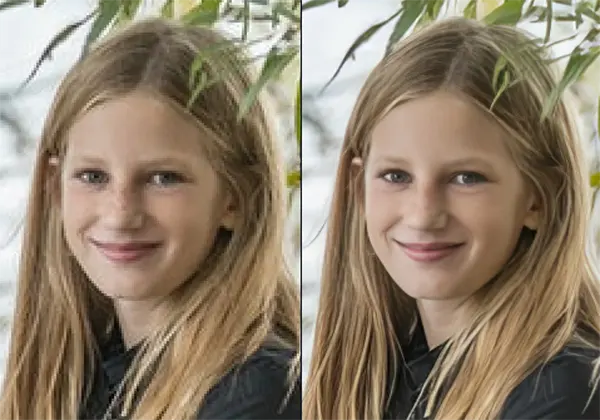
If you’re a wedding photographer who shoots in harsh situations, Topaz Photo AI is the best option to use for image recovery.
Take a look through Topaz before applying your design for clearer, sharper images that will respond to color adjustments. Topaz processing system examines every image and then applies the correct corrections in a timely manner.
6. Retouch4me Specialized Retouching Tools
Retouch4me provides a range of tools that are designed specifically for natural skin refining. Each of the pluginsHeal Dodge & Burn, Eye Brilliance Skin Tone is taught on real professional retouching with results that keep the skin’s texture, while also removing any appearance of blemishes as well as evening tones.
Contrary to presets that just affect hue, Retouch4me addresses the specific issues of editing portraits. It functions in the same way as a Lightroom plugin, processing selected photographs and returning them after the retouching process that is applied.
If you are a photographer and want to streamline the lengthy process that is involved in skin care, Retouch4me can be a great alternative to manually editing.
7. ON1 Photo RAW Complete Editing Ecosystem
A full ecosystem, not just an add-on.
It comes with smart masking to allow sky and subject detection, HDR merging, as well as panorama stitching. It also has vast batch processing capabilities.
Photographers who want to step away from Lightroom or presets altogether, ON1 offers a subscription-free alternative, with advanced AI tools.
The platform’s NoNoise AI handles high-ISO noise, and the Develop module allows for the ability to perform non-destructive RAW processing. Its presets can be adjusted. However, its value is in its selection and masking tools.
8. Photo AI Generative Fill and Scene Expansion
Photo AI (formerly known by many names) provides an array of generative AI capabilities for editing photos. This program’s GenErase, GenSwap, and GenExpand tools let you take out unwanted objects, substitute elements, and expand borders on tasks that presets aren’t able to touch.
To help wedding photographers deal with distracting background elements or composition problems, Photo AI offers creative solutions that surpass the capabilities of any preset. It functions as a plug-in to Lightroom and Photoshop, integrating with the workflows of both.
9. Capture One Tethering and Color Science
Capture One is a complete RAW editor and processor that offers a different approach than Lightroom and presets. Capture One’s color science is widely regarded as the best for skin tones, and its tethering capabilities are among the best in the industry for studio work.
For photographers exploring modern workflows, Capture One provides a complete ecosystem instead of relying on preset-based editing.
Capture One’s style feature works as Lightroom presets, but the system’s greatest benefit is its capability to make custom color profiles. If you shoot with a tethered camera in the studio, or if you value the accuracy of your colors, Capture One offers a professional solution that the presets of Lightroom cannot compete with.
10. AI-Powered LUTs and Profiles
The next evolution of presets.
Smart LUT systems retain the speed and efficiency of single-click applications, but they also have the ability to allow each photo to be adapted to its specific requirements.
Photographers who wish to keep their workflow quick and improve the quality of their images, AI-powered LUTs offer an appealing middle option.
Conclusion
Presets had their moment, but they’re no longer enough. They can’t adapt to the individual image and styles, or learn to adapt, or deal with the retouching process. Smart editing solutions solve these issues. Imagen AI discovers your preferences and then applies them to galleries.
Aftershoot is a combination of culling, editing, and retouching into the same offline workflow. Luminar Neo adds creative effects that other presets can’t achieve. Evoto AI, along with Retouch4me, helps skin care work automatically.
Topaz Photo AI rescues image settings that are not saved. It results in quicker editing, more consistency, and more time in front of the camera. Going beyond presets will be the major shift that will affect photography post-production by 2026.
Leading editing solutions for photographers, including imagen ai editing software, deliver superior results quicker than ever before.
Frequently Asked Questions
Are Lightroom presets still useful in 2026?
What is the best alternative to Lightroom presets?
Imagen AI is one of the best for style-based editing, while Aftershoot is great for an all-in-one workflow.
Do AI editing tools replace manual editing completely?
Not entirely. They handle most of the heavy lifting, but fine-tuning is still useful for perfection.
Can beginners use these AI tools easily?
Yes. Most tools are designed to be user-friendly and require minimal technical knowledge.
Related Posts
Elementor Hosting vs SiteGround: Which is Faster in 2026?
A website’s performance is mainly determined by its Speed. Even a slight delay can reduce conversions by a significant margin.…
10 Best Visual UGC Platforms for eCommerce Brands in 2026
“People influence people. Nothing influences people more than a recommendation from a trusted friend.” — Mark Zuckerberg (Meta CEO) That…

The Data Models Powering the Next Creative Revolution in Video Generation
Artificial intelligence has evolved from a mere tool to the cornerstone of advancements in the new era. Over the years,…
Solar Software Companies: How Platforms Improve Cross Team Collaboration
“If everyone is moving forward together, then success takes care of itself.” — Henry Ford (Industrialist & Business Magnate) Handoffs…

What Healthcare Leaders Expect From Digital Tools
Healthcare executives are under pressure to protect patient safety, clinician time, and data privacy while modernizing the delivery of care.…

How to Reset Android Phone When Locked? (Safe Factory Reset Methods)
Locked out of your Android phone or stuck on the screen? It happens more than you think. A forgotten PIN,…
How to Transfer Contacts from Android to iPhone: 4 Easy Methods
Switching from Android to iPhone should not feel like rebuilding your life from scratch. Restoring contacts on iPhone should be…

White Label Ad Server vs Development From Scratch: What to Choose
Even though the DSP segment is the largest market within AdTech at the moment, an ad server remains a crucial…
How Data Infrastructure Powers Next-Gen Mobile Recognition Apps
Modern digital applications have evolved with time, offering various functionalities to users that weren’t possible or even imaginable before. But…