
Yes, but only after trying a few things first. If uninstalling suspicious apps, updating the system, and running scans do not solve the issue, a factory reset should be the next move.
Will Factory Reset Remove Virus? Complete and Clear Answer
 Kartik Wadhwa
Updated on: Feb 10, 2026
Table of Contents
- What Happens During a Factory Reset?
- Will Factory Reset Remove Viruses?
- When Does Factory Reset Remove Viruses Successfully?
- Can a Virus or Malware Survive a Factory Reset?
- Should You Reset Your Device to Get Rid of Viruses?
- How to Factory Reset Safely to Remove Viruses?
- Final Takeaway
- Frequently Asked Questions
Does a factory reset remove malware? According to Kaspersky, mobile malware threats increased by 29% in the first half of 2025 compared to 2024. The same is the case for most devices.

If your device feels infected, a factory reset might look like the fastest fix, and it works mostly. When you factory reset your iPhone, Android, or computer, it removes apps, settings, and common viruses at the user level.
However, some advanced threats can survive. That’s why I will explain: “When will factory reset remove viruses, when it fails, and how to keep malware away from your devices?”
Quick Answer: Does a Factory Reset Remove Viruses?
Yes, it wipes all apps, files, and settings where common malware hides, then reinstalls a clean version of the system. This clears typical threats like spyware, adware, and malicious apps.
However, advanced viruses that live in firmware, recovery partitions, or infected backups can survive or return after a reset.
What Happens During a Factory Reset?
To understand, “Does a factory reset get rid of viruses?”, it is crucial to learn what happens when you reset your laptop or PC and mobile phones.
A factory reset takes your device back to its original state, the way it was when you first switched it on. Everything you added gets erased, including apps you installed, files you downloaded, and settings you changed.
What stays is the core system software that came from the manufacturer. This option is not limited to phones and laptops. You can factory reset your PlayStation, Chromecast, GPS devices, printers, and even reset your VR headsets like Oculus Quest. This feature is provided to fix deep software issues and remove unwanted changes that include viruses and malware.
Will Factory Reset Remove Viruses?
Let’s answer the big question: Will factory reset remove virus and malware?
In most real-world cases, yes. A factory reset removes common viruses and malware because it wipes the areas where they usually live. This includes downloaded apps, hidden files, and background processes running under your user account.
That means things like spyware, adware, trojans, and fake apps are usually eliminated. It is powerful, but not magical. It works in most situations, but not all.
When Does Factory Reset Remove Viruses Successfully?
A reset successfully removes viruses when:
- The malware is stored in user space, such as apps or files you downloaded.
- It does not infect the system recovery tools or firmware.
- You do a full wipe of the device (not a partial or refresh option).
- You do not restore old backups blindly.
In these cases, the reset clears the entire space where regular malware hides. Once the system reinstalls clean files, the infection will not be able to survive.
Can a Virus or Malware Survive a Factory Reset?
Would factory reset remove viruses completely? Well, not always. It is rare, but real. For example, the xHelper Trojan infected over 45,000 Android devices and continued to reinstall itself even after a factory reset.
Here are the scenarios when a reset won’t help you:
- Firmware or BIOS-level Malware: Some advanced malware hides inside firmware or BIOS (Basic Input Output System). These areas are not touched during a normal reset.
- Rootkits and Bootkits: These are highly advanced threats designed to hide inside protected system partitions. A standard reset cannot always reach them.
- Infected Recovery Partition: Your device uses a recovery partition to reinstall the system. If malware infects this area, the reset can bring the virus back.
- Restoring Infected Backups: This is the most common mistake. People reset their device successfully, then reinstall the same infected apps or files from backup, and unknowingly bring the problem back.
- Reinfecting from Other Devices: If your router, USB drive, or external storage is compromised, reconnecting it after a reset can reintroduce malware.
- Zero-Day or Unpatched System Flaws: If the virus exploits a system vulnerability that is still unpatched, the device can get infected again immediately after booting.
These cases are rare for normal users, but they explain why resets sometimes fail.
Should You Reset Your Device to Get Rid of Viruses?
So, does factory resetting get rid of viruses? Yes, in most cases.
Should you try it? Yes, but only after you try safer options first.
A factory reset should be your last step, not your first reaction. Start with a full malware scan using trusted security tools. Many infections can be removed without deleting your data. If software cleanup works, you can save time and avoid unnecessary loss.
If scans fail, symptoms keep returning, or the device behaves strangely even after cleanup, then a reset makes sense.
How to Factory Reset Safely to Remove Viruses?
A factory reset can clean malware, but only if you do it the right way. Follow these steps so you don’t lose important files or reintroduce infections:
Step 1: Try Safer Fixes First
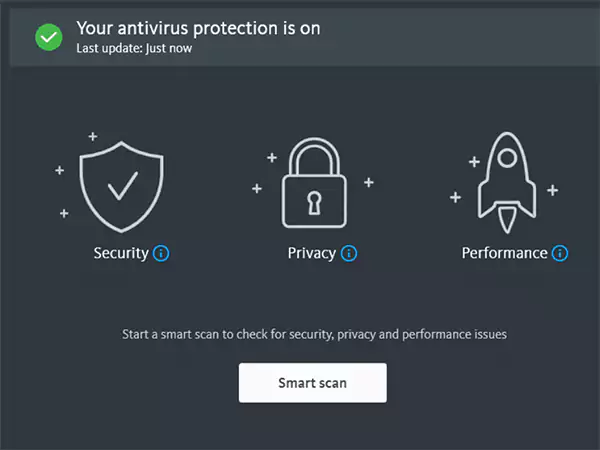
Try to run a full scan using trusted security tools or built-in protections. Uninstall suspicious apps and restart the device in Safe Mode if available, and check if the issue disappears.
Step 2: Back Up Only Essentials
Save photos, contacts, and documents you truly need, but avoid app backups that might carry infections. If possible, scan your files before restoring them later.
Step 3: Disconnect from the Internet
Before starting the reset, turn off Wi-Fi and mobile data. This blocks background malware activity and prevents syncing infected data during the reset process.
Step 4: Use the Full Reset Option
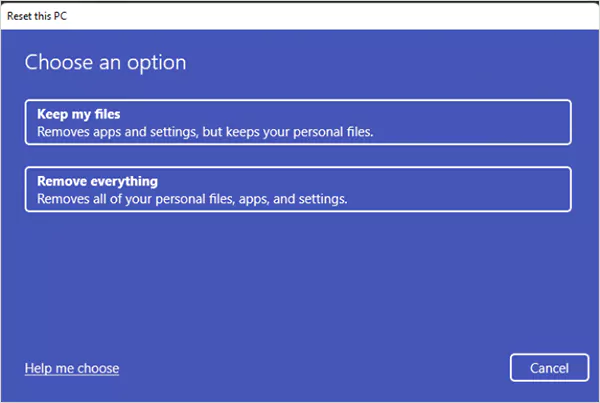
Always choose the option that removes everything. Partial resets often keep the system data where malware can hide. Look for options like “erase all data”, “remove everything”, or “factory reset” on your device.
Step 5: Update Before Installing Anything
Once the device turns on again, do not rush. First, update the operating system completely. Security patches close the loopholes that malware previously used. Also, try to download apps only from the official app stores.
Step 6: Change Passwords After Cleanup
Assume your old passwords may have been exposed. Once the system is clean and updated, change passwords for email, banking, cloud storage, and social accounts.
Final Takeaway
I tried to cover everything to properly answer: Will factory reset remove viruses or malware? A factory reset usually removes common viruses and malware by wiping your device clean and returning it to its original state. But it is not foolproof for the most serious threats or infected backups.
So, reset smart, restore carefully, and build strong security habits so you don’t repeat the same mistakes.
Frequently Asked Questions
Should I reset my phone if I have a virus?
Will resetting the PC remove viruses?
Yes, a full PC reset usually removes viruses. Your PC deletes all user files and reinstalls the operating system, which clears most malware. However, advanced threats like firmware or boot-level malware can survive.
Can a virus stay after a factory reset?
Yes, but in rare cases. Advanced threats such as rootkits or firmware-level infections can survive a reset. You may need to contact professional help for this.
Will a factory reset remove hackers?
A factory reset removes malicious apps, spyware, and access tools hackers use by erasing your device. But it does not protect you if your accounts are still compromised.
Does restarting your phone get rid of viruses?
No, restarting only stops apps temporarily. The virus usually returns once the phone is turned back on because nothing is actually removed.
How do I completely wipe my computer of viruses?
Use a full factory reset option > update the system > reinstall apps manually. Also, avoid restoring old backups that may carry malware.
Related Posts
When is it Time to Consider IT Support Services for Your Business?
Every business needs to ensure smooth operations for a successful business. But despite trying hard to avoid barriers, technical issues…

How to Delete User Profile in Windows 10: Step-by-Step Guide
You don’t notice user profiles until one starts causing problems. A profile gets corrupted, a login error pops up, or…

How AI Can Help Students Take Notes and Check Their Work
Artificial Intelligence is transforming how students learn, study, and manage their academic work. From automating note-taking to checking assignments, AI…
How to Stop Windows Update: Pause, Disable, or Uninstall Safely
Imagine that face when Windows starts updating with a deadline looming and your screen freezes. Frustrating is an understatement, and…

How to Open Control Panel in Windows? (All Methods Explained)
The control panel in Windows is a collection of tiny programs. It is used to configure the various aspects of…
How to Delete Apps on Mac? Safe and Quick Ways to Uninstall Apps
How do you remove applications from a Mac? Most Mac users think there is just one way to delete apps.…
Why Proxy Servers Are Popular
Many tech platforms, ad networks, SaaS tools, and online stores in the world have critical traffic and infrastructure that require…
Data Loss vs. Data Strategy: Why One Conversation Matters More Than the Other
In the corporate conversation around information, most of the firms are scared of losing data. That’s understandable, as most of…
How to Turn Off Touchscreen on Chromebook? Step-by-Step Guide
Touchscreen on a Chromebook sounds great until it starts getting in the way. Accidental taps while typing, smudges, and random…