If financial data had feelings, it would probably be extremely frustrated and exhausted. Why? Well, spreadsheets passed around on email threads, last-minute fixes before reports are due, and numbers that don’t quite match; these are the ultimate cause of it.
According to Newswire reports, 94% of business spreadsheets contain errors, making financial reporting prone to mistakes and delays. That’s huge and partly the reason why many organizations think of managing financial data as a constant game of catch-up.
But it doesn’t have to be that way. Financial data workflow optimization is about letting the
system do the heavy lifting, including collecting, checking, and reconciling data automatically so finance teams can focus on insights that actually matter. And automation tools like NonProfit+ software allow teams to move from reactive firefighting to calm, confident financial management that keeps everyone signed and informed.
Key Takeaways
Automation reduces chaos, not flexibility.
Clean data saves time in ways you don’t even notice until it’s gone.
Finance teams work better when they trust the numbers. Automation supports people; it doesn’t replace them.
Small improvements compound into big efficiency gains.
How Financial Data Workflows Are Evolving in Modern Organizations
Starting from the start, financial workflow used to be a linear and manual process. Data was collected from different sources, entered into spreadsheets, reviewed by teams, and reconciled at the end of a reporting period.
But then the tech made their cameo, and changed the whole process. Modern organizations are moving towards end-to-end automated workflows. Financial data now flows continuously from collection to validation to reporting, and that too in real time.
Which means that the teams do not have to wait until the month end to identify discrepancies; they can now fix errors as they happen. This allows finance teams to spend less time fixing errors and dedicate more time to analyzing data and supporting financial decisions.
Challenges of Manual Financial Data Management
Manual financial data management comes with a certain set of challenges that organizations are forced to deal with.
Human error: Humans make mistake and there is a high risk of those, especially with repetitive data entry.
Delayed reporting: Reports are often delayed, which makes it harder to respond quickly to issues.
Data silos: Where information lives in disconnected systems.
Limited visibility: Teams need to piece together the insights manually and the result is limited visibility.
Staff Burnout: Employees may feel unmotivated, particularly during audits and reporting cycles.
These challenges adversely impact donor trust, compliance, and funding decisions, especially for nonprofits.
Key Areas Where Workflow Automation Improves Financial Data Management
Automation is a powerful weapon in financial data management. It delivers the most value when applied to the core stages:
Data Collection
Automated data collection can help provide information directly from source systems such as accounting tools, donor platforms, and banking systems, removing the need for repeated manual entry and ensuring data is captured consistently and accurately.
Data Validation
Validation rules automatically check data for missing fields, duplicates, or inconsistencies. Errors are flagged early, reducing the time spent correcting issues later in the process and improving overall data quality.
Reconciliation Processes
Reconciliation can be simplified with automation as it matches transactions across systems automatically. Whether it’s bank statements, donor contributions, or expense records, automated reconciliation reduces delays and improves confidence in financial reports.
PRO TIP Before automating anything, ask your team: “What task do you dread the most every month?” Start there. That’s usually where automation delivers the fastest relief.
Automation Technologies Used in Financial Data Workflows
Now that we are aware of the key areas where workflow automation improves financial data management. Let’s shed some light on the technologies used in these workflows.
RPA Tools
Robotic Process Automation or RPA manages repetitive, rule-based tasks such as data entry, report generation, and system updates. These tools mimic human actions and operate faster without fatigue.
Workflow Engines
Workflow engines manage approvals, task routing, and process logic, ensuring that the right data reaches the right audience at the right time. This keeps financial processes moving smoothly and transparently,
AI-Driven Data Processing
AI-driven tools are not only about basic automation. They can now identify patterns, detect anomalies, and predict potential issues. These capabilities help finance teams spot risks early and make more informed decisions.
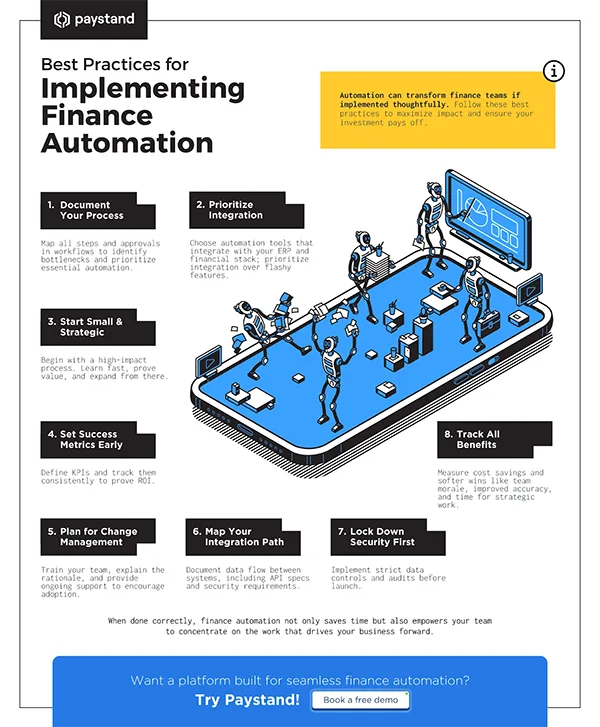
USEFUL INSIGHTS The infographic below represents some best practices for implementing finance automation. Scrutinize and learn what all you should do in order to get the most out of automation.
Benefits of Automating Data Workflows
Automation in financial data workflows brings a series of benefits and delivers clear, measurable benefits such as:
Improved accuracy as there are no chances of human errors
Better compliance and audit readiness since the tools placed makes sure of it
Automation tools significantly reduce reporting time and close cycles faster by speeding up the processes
Real-time visibility into financial performance
More time for strategic analysis instead of data cleanup
Apart from these, automation also supports better donor transparency and financial accountability.
Building a Scalable Automation Strategy for Financial Data Operations
Every business, on the road to success, scales with time. To grow smoothly, organizations should first identify high-impact, repetitive processes that consume the most time, but can be handed over to automation tools. This will reduce the burden on the teams and also boost efficiency.
Scalability also means choosing flexible tools that integrate easily with existing platforms. As financial complexit increase, automated workflows ensure operations remain efficient, accurate, and sustainable.
Wrapping UP
Automating financial data workflows gives the staff some breathing room. When these routine tasks are handled automatically, finance teams can stop chasing numbers and start using them
This shift provides accurate data, faster reporting, and cleaner audits that build trust with donors, boards, and stakeholders. More importantly, they free up time and energy to focus on the mission itself.
A thoughtful automation strategy, supported by the right tools and scalable systems, turns financial data from a daily headache into a reliable data-making partner. And once that happens, everything else runs a little smoother.
Frequently Asked Questions
Will automation take control away from the finance teams?
Nope. It actually gives control back. You spend less time fixing mistakes and more time deciding what the numbers mean.
Is workflow automation only for large organizations?
Not at all. Smaller teams often benefit the most because they don’t have extra staff to absorb inefficiencies.
How long does it take to see results?
Usually faster than expected. Many teams notice improvements in accuracy and turnaround time within the first few reporting cycles.
What is the biggest mistake organizations make when automating?
The biggest mistake organizations make when automating is trying to automate everything at once. That usually leads to frustration and stalled projects.
Can automation handle exceptions and odd cases?
Yes, good systems flag exceptions instead of holding them. Humans still step in where judgment is needed.
Data growth has significantly accelerated beyond what most compliance teams can manage, with personal records, financial details, contracts, and emails…

 Saipansab Nadaf