
Put both AirPods in the case, open the lid, and hold the setup button for 15 seconds or double-tap three times on the front of the case. Your device will reset when the light changes from amber to white.
How to Factory Reset AirPods (All Models Covered)
 Mahima Dave
Updated on: Feb 18, 2026
Why won’t my AirPods connect? How do I factory reset AirPods? If your Apple AirPods are not pairing, throwing errors, or acting strange, don’t panic.
Most issues come down to a quick reset and a clean setup. So, I will show you how to factory reset AirPods (all generations, including Pro models) and AirPods Max in simple steps.
This guide provides you with clear steps for each model. Plus, you will also learn why resets sometimes fail and how to fix that at home so you can pair your AirPods again in minutes.
Cheat Sheet: How to Reset Apple AirPods?
- AirPods 1, 2, 3, AirPods Pro 1 or 2: Open the lid and then press and hold the setup button on the back for about 15 seconds until the light turns amber, then white.
- AirPods 4 or newer models: Open the lid and double-tap the front of the case three times.
- AirPods Max: Press and hold the Digital Crown and Noise Control button together for about 15 seconds. Release when the light changes from amber to white.
When Should You Factory Reset AirPods?
Before I tell you how to factory reset AirPods Pro and standard models, I want you to understand one thing. You reset only when something is clearly wrong or when you are handing them to someone else.
Here are a few common examples:
- They won’t reconnect or keep disconnecting.
- One AirPod is not working, or the sound keeps dropping.
- Audio is low, distorted, or unstable.
- The battery drains fast or won’t charge properly.
- They keep reconnecting to an old device.
- You are selling, gifting, or setting them up for a new user.
- You bought used AirPods, and they won’t pair.
- Firmware or pairing errors refuse to fix themselves.
Resetting AirPods clears pairing history and returns them to default settings. So, try basic troubleshooting first, like cleaning, charging, and reconnecting. And reset only if those steps fail.
How to Factory Reset AirPods (Step-by-Step)?
The reset process is similar across most models. Here’s how to reset AirPods Pro and the standard model of different generations:
Step 1: Prepare the AirPods
- Put both AirPods in the charging case.
- Close the lid and wait for 30 seconds.
Step 2: Remove from Bluetooth
- On your iPhone or iPad, go to Settings > Bluetooth.
- Tap the info icon next to your AirPods.
- Then, tap Forget This Device and confirm.
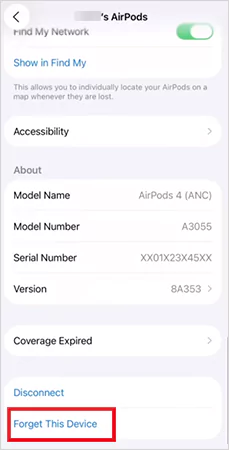
If the AirPods don’t appear in the Bluetooth list, skip this step and move ahead.
Step 3: Reset AirPod Case
For AirPods 1, AirPods 2, AirPods 3, AirPods Pro 1, or AirPods Pro 2:
- Open the case lid.
- Now, press and hold the setup button on the back for 15 seconds.
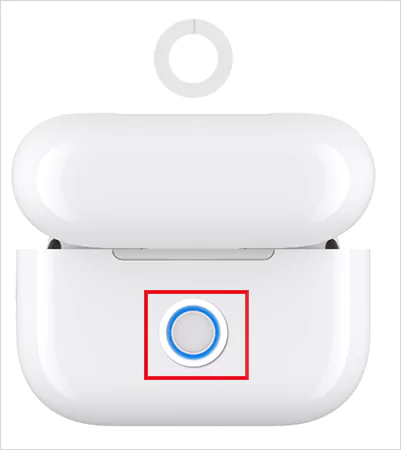
- Wait for the light to flash amber, then white.
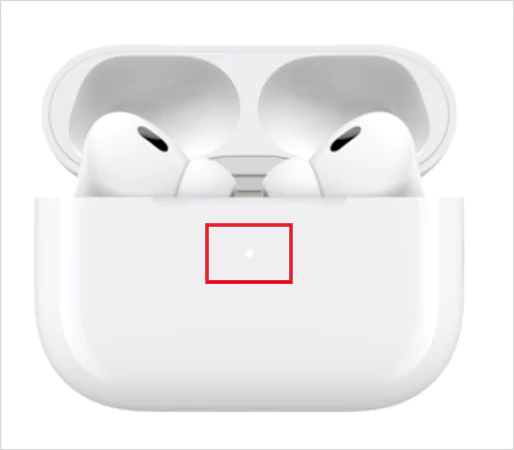
- Release the button, and you are done with the reset.
Now, let’s see how to hard reset AirPods Pro 3 and AirPods 4 (all models):
- Start by opening the lid of the case.
- Next, double-tap the front of the case while the light is on.
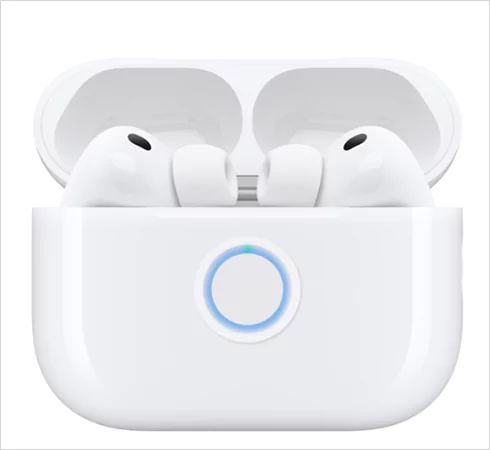
- Double-tap again when it flashes white.
- Double-tap once more when it flashes faster.
- Now just wait for amber, and then white light.
That’s how easy it is to reset them. If you want to reconnect AirPods, just keep the lid open, bring the case near your phone, and follow the on-screen pairing steps.
How to Reset Apple AirPods Max?
Apple also has a big guy in their AirPods lineup. The AirPods Max reset method is different from the above. There is no case button, so the reset happens from the headphones themselves.
Here’s how to fully reset AirPods Max:
- Make sure they have enough battery to survive the process.
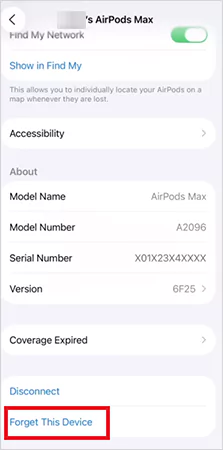
- Go to Bluetooth settings > AirPods Max > Forget This Device.
- Press and hold the Digital Crown and Noise Control button together.
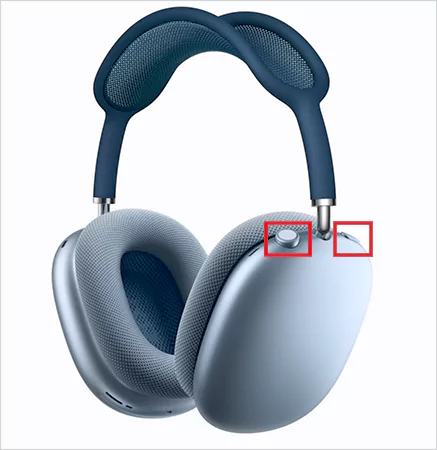
- Hold them for about 15 seconds, until the light flashes amber, then white.
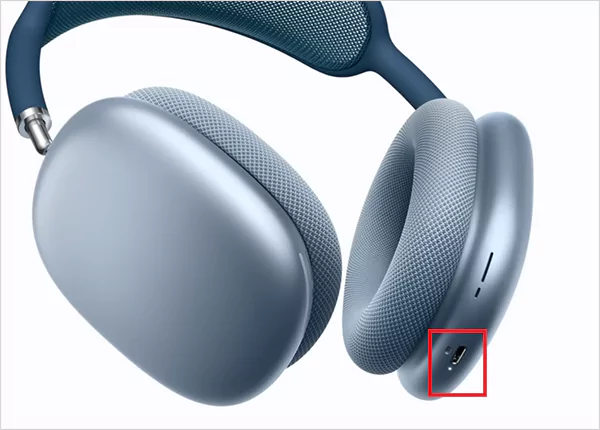
That’s it. Once you release the buttons, they will be reset and ready to pair again.
Why Your AirPods Won’t Reset and How to Fix It?
Why can’t I factory reset my AirPods? This is a frequent question in many online forums. Well, if your AirPods refuse to reset, don’t overthink it. In most cases, the problem is basic. Let’s take a quick look at what usually blocks a reset and how to fix it fast.
- Low Battery: A reset won’t trigger if the case is not charged. So, just plug the case in, wait for 10 to 15 minutes, and try again.
- Closed AirPods Case Lid: The lid must stay open while you hold the setup button. If you don’t see the amber and white light, it means the reset never started.
- One AirPod Not Charging: If one bud is not detected in the case, the reset will stop in the middle. Clean the metal contacts inside the case and on the buds, and retry.
- Still Connected to Devices: Active Bluetooth connections can block a reset. Make sure you forget the device from the settings and try again.
- Dirty Case or Debris: Even a little dirt can stop proper contact. Try to clean the case gently with a dry cotton swab or a microfiber cloth. Also, do not put any liquid while cleaning.
You can also try a different cable or power source. If the light never flashes correctly after you try everything, the hardware might be the issue. At that point, repair or support is the only real fix.
Wrapping Up: AirPods Factory Reset
One thing I want to clear up before wrapping up “how to factory reset AirPods” is that a reset only clears pairing history. It does not remove an Apple ID link. If the AirPods are still linked to someone else’s Find My account, only that owner can remove them (similar to when you hard reset an iPad).
Once you know the right sequence, resetting AirPods takes under a minute. And it can solve most connection and pairing issues instantly. ‘
Frequently Asked Questions
How do I hard factory reset AirPods?
Can you completely wipe your AirPods?
No, you can only wipe the pairing history with a reset. It won’t remove the AirPods from the previous Find My account.
How to factory reset AirPods from a previous owner?
Ask the previous owner to remove AirPods from their Find My app. After removal, do a normal factory reset and pair them with your device.
How to remove AirPods from your Apple ID?
Go to Find My, tap on Devices, select your AirPods, and tap on Remove. Once removed, the new user can pair them with their own Apple ID without issues.
Can I factory reset the AirPods that I found?
Yes, you can reset them the same way you reset any AirPods. However, if they are still linked to someone else’s Apple ID, some features stay locked. Full ownership requires removal from the original account.
Related Posts

10 Best Linux Data Recovery Software in 2026
Linux data recovery software programs allow users to recover deleted, corrupted, and lost files from their Linux storage device(s) (HDD,…
Key Benefits Of Software Designed To Organize Teams And Tasks
Managing teams and operations in an aligned way is much more complex than it seems. However, the use of specialized…
Why WordPress Remains the Best Platform for Modern Websites
In the rapidly evolving digital world, businesses need websites that are flexible, scalable, and easy to manage. With so many…

How to Clear Cache on Android: Easy Steps to Speed Up Your Phone
If your Android phone feels slow, apps lag, or random crashes are becoming normal, cache buildup is usually the real…
How to Restart MacBook?: 8 Methods Explained
A MacBook can be simply restarted with the restart option in the Apple menu. Another way is to hold the…

How Cloud Backup Protects Fleet Camera Data and Business Communications
Having real-time communication between teams, especially when you are managing a fleet, is crucial. That kind of monitoring is only…

Best Higgsfield Alternative in 2026? Why More Creators Are Switching to Loova
Every creator who is serious about their content has alternate good options beyond Hihhsfield. It is a great choice to…

Why Data Recovery Matters in Modern Music Video Production
In today’s technological landscape, music video production is no longer just an entertainment thing but a form of resource for…

How Data Governance Strengthens Corporate Compliance Frameworks?
Data governance is probably one of the most crucial terms for a business to maintain. It ensures required security is…