
No, the Find My app allows you to remove an AirTag from your Apple ID, but it does not reset the hardware. A full reset also requires the manual battery method.
How to Reset AirTag the Right Way?
 Mahima Dave
Updated on: Jan 19, 2026
Resetting an AirTag sounds simple, but most people get it wrong. The problem is not the steps, but the misunderstanding. Removing an AirTag from your Apple ID and resetting the physical AirTag are two different actions. Both are required in the right order.
Apple AirTags are extremely useful, and according to a 2024 Parks Associates report, it is leading the smart tag market share with 69%. So, I am going to share how to reset AirTags the way Apple actually intends it to work, and what you must do before handing it to someone or setting it up again.
Quick Answer: How to Reset an Apple AirTag?
To reset an Apple AirTag, remove and insert the battery five times. You need to press it down until you hear a sound each time. After the fifth round, your AirTag will reset.
Important: This does not remove the AirTag from an Apple ID. That must be done separately in the Find My app. Read the article to know more.
How to Reset an AirTag Using the Find My App?
You cannot fully reset an AirTag using the Find My app alone. What the app does is remove the AirTag from your Apple ID. It is mandatory before anyone else can use it. Here’s how to remove an AirTag from Find My:
- Open the Find My app on your iPhone.
- Go to the Items tab, select the AirTag, and swipe up on the handle.
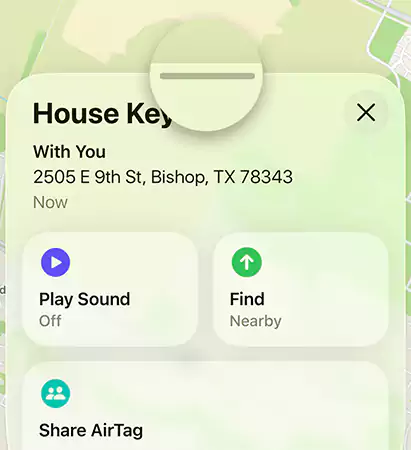
- Here, tap on Remove Item.
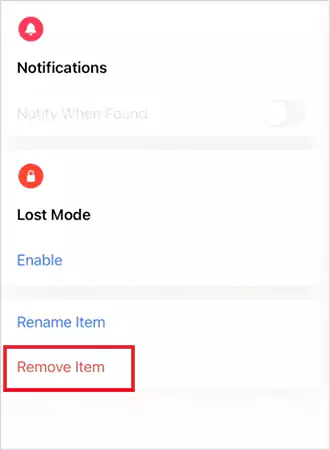
- Now, just confirm the removal.
Once removed, the AirTag is no longer tied to your Apple ID. You need to do this when you are selling or giving it away, or want to pair it again without errors.
How to Reset Airtags Manually (Battery Method)?
This is the actual process of resetting AirTags. Skipping this step is why many people see pairing errors. An AirTag can only belong to one Apple ID at a time. Even after it is removed from Find My, the hardware still remembers the previous setup. Here’s how to reset Apple AirTags to clear that memory:
- Press down on the metal battery cover, and rotate it counterclockwise until it stops.

- Now, remove the cover and battery.
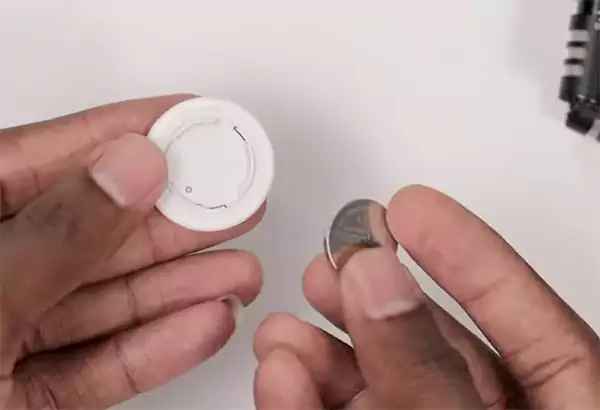
- Then, put the battery in and press down until you hear a sound.

- Repeat the above two steps four more times (removing and putting the battery). You should hear five sounds in total.
- The fifth sound is different. That sound confirms the reset worked.
- Now, just align the cover tabs with the slots, press down, and rotate clockwise until it locks.
If you hear fewer than five sounds, the reset did not complete, and you need to start again.
Why Do You Need to Reset an AirTag?
Resetting an AirTag is not routine maintenance. If it is working fine, resetting does nothing useful. You should only reset when something breaks or changes. You may need to reset an AirTag if:
- You are giving it to someone else.
- You bought a used AirTag.
- Pairing failed or got stuck.
- The AirTag is linked to the wrong Apple ID.
- Find My shows duplicate or inactive AirTags.
Removing from Find My resets ownership, and a manual reset clears the device state. Both are required, and doing only one can cause problems.
How to Pair and Rename an AirTag After Reset?
Once the AirTag is removed from the previous Apple ID and reset manually, pairing is quick.
- Bring the AirTag close to your iPhone.
- Wait for the pairing pop-up to appear.
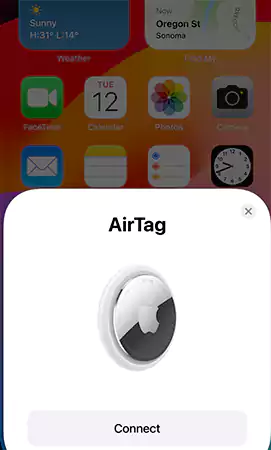
- Now, just follow the on-screen instructions to pair it. You may need to sign in with your Apple ID.
After pairing, renaming AirTags is straightforward. Open Find My, go to items, select the AirTag, scroll down, and tap on Rename Item. Now, you can choose a preset or use a custom name.
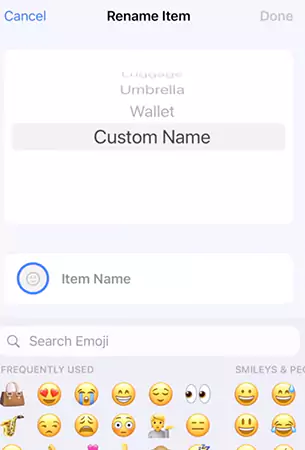
Use clear names like Bike Keys or Backpack to avoid confusion later, especially if you use multiple AirTags.
Common AirTag Reset Problems and Fixes
Most AirTag reset issues fall into a few predictable patterns. If you know what is actually going wrong, fixing it is simple.
- No Sound During Reset: This means that the AirTag is not getting power. In this case, the battery is probably weak, dead, or not making proper contact.
Fix: Replace it with a fresh CR2032 battery and repeat the reset steps carefully.
- Still Linked to Another Apple ID: A manual reset alone cannot override Apple’s ownership lock. Without removing it from the Apple ID, pairing will always fail.
Fix: The previous owner must remove it from their Find My App.
- AirTag Does Not Appear on iPhone While Pairing: This is usually a connection issue, and not a reset failure.
Fix: Toggle Bluetooth and Location Services off and on, restart your iPhone, and keep the AirTag very close to the phone.
- Pairing Keeps Falling: This often happens when the battery is loose or when other Bluetooth devices interfere.
Fix: Insert the battery properly, repeat the full manual reset, and temporarily disconnect other Bluetooth accessories.
If none of these work, the issue is likely hardware-related. At that point, Apple Support is the only solution.
Final Takeaway
Resetting an AirTag is not one action; it is a sequence. There are two separate systems involved: Apple ID ownership and AirTag hardware memory.
To reset an AirTag properly, always follow this order:
- Remove it from the Apple ID using Find My.
- Reset the hardware using the battery method.
- Pair it again and rename it.
If you are selling, gifting, or reusing an AirTag, follow these steps exactly to avoid pairing issues later.
Frequently Asked Questions
Can you reset an AirTag using only the Find My app?
How do you reset an AirTag?
First, remove it using the Find My app. Then, remove and reinsert the battery five times, pressing it down until you hear a sound each time. On the fifth sound, the AirTag will reset.
Can you reset a used or second-hand AirTag?
Yes, but only if the previous owner removes it from their Apple ID first. Resetting alone will not override ownership restrictions.
How long does an AirTag battery last?
Usually, the AirTag lasts for about 1 year. However, it may vary depending on other factors, like usage and settings.
Why is my iPhone not detecting an AirTag?
It may happen due to disabled Bluetooth or Location Services, low battery, outdated software, or other connection glitches.
When will resetting an AirTag not work?
If the AirTag is damaged, permanently locked to another Apple ID, or has internal hardware failure, resetting won’t help.
Related Posts

8 Best AI Presentation Makers for Business-Ready Slides
Making a presentation doesn’t just mean designing slides. It’s about defining a clear structure, using defined logic, useful visuals, and…

Queue Management Software Troubleshooting Guide: 8 Common Faults and Fixes
The long wait times and ineffective management of customer queues can have a significant impact on customer satisfaction and business…

How to Use Similarweb Website Traffic Data for Competitor Research
Competitor research without traffic data is guesswork. You can guess who your rivals are, guess how big they are, guess…

Choosing the Right Hosting Model for Scalable Digital Platforms
The performance of digital business is directly related to website speed, uptime, and scalability. Slow page performance has a negative…

How Data-Driven Performance Tools Are Transforming Employee Recognition in Tech Companies
“People work for money but go the extra mile for recognition, praise, and rewards.” — Dale Carnegie (Writer & Teacher)…

Why Businesses Struggle to Collect Reliable Data from the Web
Almost every company that depends on data runs into the same problem: although they can find the data they need,…

Why Financial Data Recovery Matters for Businesses
Financial data supports every part of a business, directly affecting cash flow, payroll, tax reports, audits, customer billing, and daily…

CMMC Compliance Is Coming for Manufacturers. Here Is What You Need to Do
“Cybersecurity is much more than a matter of IT.” — Stephane Nappo (Cybersecurity Professional) For manufacturers working within the defense…

How Data-Based Tools Influence Learning Performance
Learning has transformed in the modern age with the integration of new technologies to help students and professionals prosper in…