
Factory reset the headset, then remove it from your Meta account on the devices page. This prevents account linking or app-sharing issues.
How to Factory Reset Oculus Quest 2 (Step-by-Step and Updated Guide)
 Prakhar Shivhare
Updated on: Jan 27, 2026
Table of Contents
- What Does a Factory Reset on Oculus Quest 2 Do?
- How to Factory Reset Oculus Quest 2 Using Headset Buttons?
- How Do I Factory Reset My Oculus Quest 2 Using the Meta Horizon App?
- How to Factory Reset Oculus Quest 2 Remotely?
- Common Problems and Troubleshooting Fixes
- Final Checklist (After Resetting Oculus Quest 2)
- Frequently Asked Questions
If you are looking for a factory or hard reset Oculus Quest 2, chances are your headset is glitching, lagging, ready for a new owner, or you just want a clean device.
Whatever the reason, this isn’t a step you want to mess up. A wrong reset can leave your account linked or erase data you wanted to keep.
I am writing this guide to help you learn how to factory reset Oculus Quest 2 safely. You will learn when a reset makes sense, what actually happens after it, and the reset steps for different cases.

Key Takeaways: How to Reset Oculus Quest 2?
- Factory reset deletes everything on the headset and restores it to its new condition. Use it only as a last resort or before selling.
- Reset using headset buttons (no phone needed):
Power off > Hold Power + Volume Down > Select Factory Reset > Confirm.
- Reset using the Meta Horizon app:
Open app > Devices > Quest 2 > Advanced Settings > Factory Reset > Confirm.
- Remote reset (lost or stolen headset):
Log in to your Meta account > Devices > Delete Device Data. The reset happens when the headset comes online.
What Does a Factory Reset on Oculus Quest 2 Do?
First, let’s understand the Oculus Quest 2 Factory Reset (also known as a hard reset). It takes your device back to its out-of-the-box condition. Here’s what actually happens:
- All Local Data Gets Deleted: This includes installed games, apps, saved settings, downloaded files, and your logged-in Meta account on the headset.
- Software Goes Back to Default: Any buggy settings, glitches, or system-level issues caused by updates or experiments are removed.
- Online Purchases Stay Safe: Games and apps you bought are linked to your Meta account, not the headset.
- Setup Starts from Scratch: You will have to reconnect to Wi-Fi and log in again. And pair the headset, just like a brand-new set.
Before I tell you how to hard reset an Oculus Quest 2, you should know that it is not a light measure. Anything not backed up to the cloud will be gone permanently. So, use it only if necessary and when a simple restart (Soft reset) won’t help.
Quick Checklist Before Factory Resetting Oculus Quest 2
Before resetting, make sure you:
- Know your Meta account login. You’ll need it to set the headset up again.
- Turn on your Cloud Backup on Meta Quest.
- Charge the headset to at least 50%. A reset interrupted by a low battery can brick the device.
- Mentally note your installed games and apps. You’ll need to reinstall them manually later.
- Decide on your reason for resetting: troubleshooting or selling.
If you are resetting to sell or give away the headset, also unpair it from your Meta account in the app. This protects your purchase and personal data.
How to Factory Reset Oculus Quest 2 Using Headset Buttons?
Use this method when the headset is frozen, unresponsive, or not pairing with your phone. Here’s how to factory reset Oculus Quest 2 without a phone:
- Make sure the headset is completely turned off (hold the power button until it shuts down).
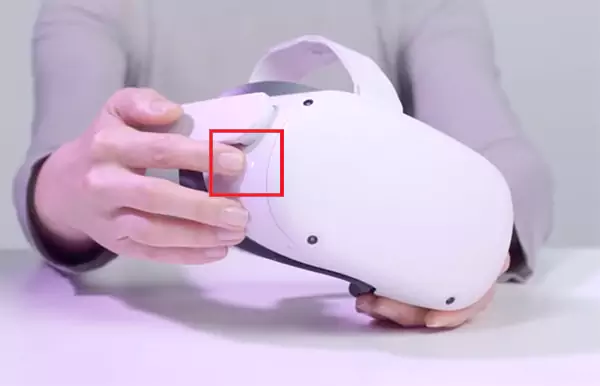
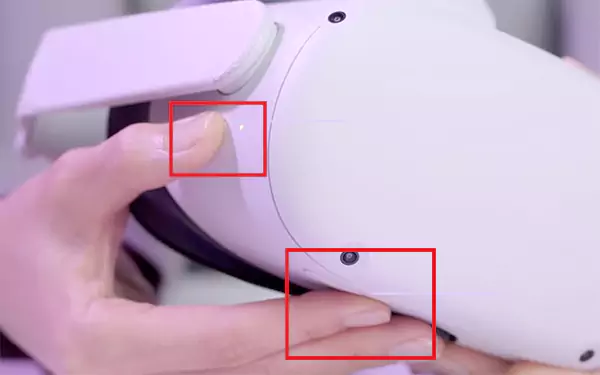
- Press and hold the Power + Volume Down buttons at the same time. Keep holding until the boot menu appears inside the headset.
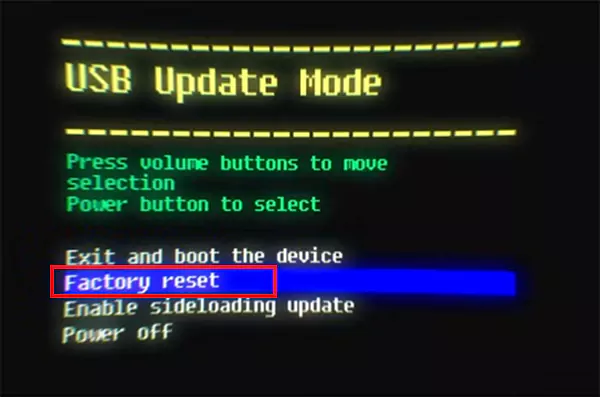
- Now, use the Volume buttons to scroll to Factory Reset and press the Power button to select it.
- Choose “Yes, erase and factory reset”, and press Power again to confirm.
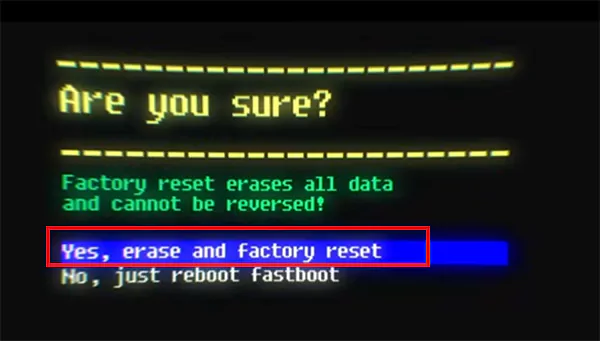
Now just wait while the headset deletes everything and restarts. This is the most reliable method when things go wrong, and you don’t need the app for it.
How Do I Factory Reset My Oculus Quest 2 Using the Meta Horizon App?
This is the easiest option if your VR headset is working normally and paired. Your Quest 2 must already be paired to the Meta Horizon app.
- Open the Meta Horizon app on your phone.
- Next, go to Menu > Devices.
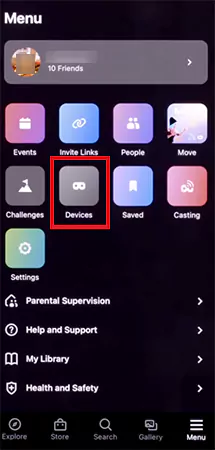
- Here, select your Quest 2 device.
- Go to Headset Settings and then Advanced Settings.
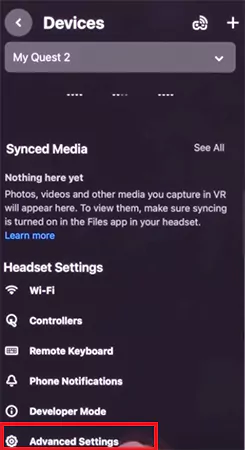
- Tap on the Factory Reset option.
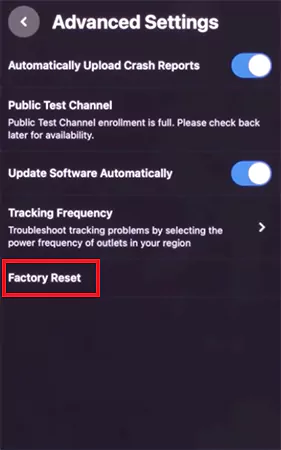
- Finally, confirm by tapping Reset again.
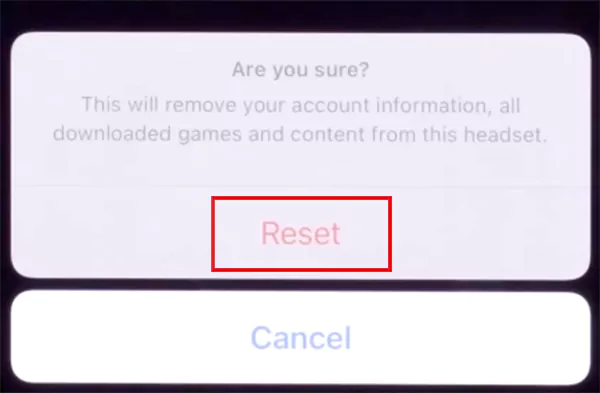
Once done, your Quest 2 will restart and walk you through the setup process again.
How to Factory Reset Oculus Quest 2 Remotely?
If you don’t have physical access to your VR headset, you can still protect your data. This is useful when the headset is lost, stolen, or you forgot to reset it before giving it away.
Here’s how to reset an Oculus Quest 2 remotely:
- Visit https://auth.meta.com/settings/my/devices/ on a computer or smartphone.
- Log in to your Meta account.
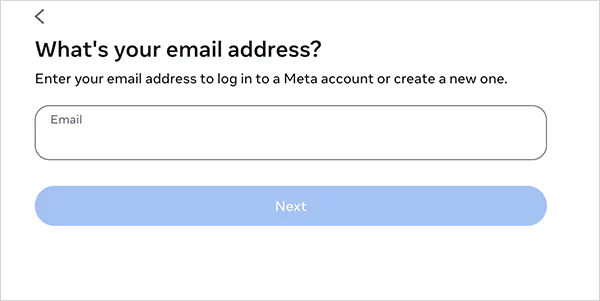
- Next, select your Quest headset.
- Choose the Delete Device Data or Factory Reset option.
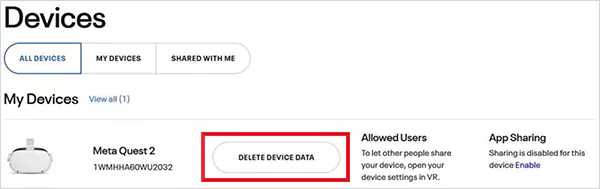
- Finally, complete identity verification to confirm.
Once confirmed, your headset will reset the next time it comes online. At the same time, it will disappear from your device list.
Common Problems and Troubleshooting Fixes
A factory reset works, but it is overkill for most problems. You will lose local data, waste time reinstalling apps, and often fix nothing new. Here’s how to handle the most common Quest 2 issues without jumping straight to a hard reset:
Quest 2 Not Connecting to Wi-Fi
This is usually a network issue, not a headset failure. Try this in order:
- Restart your Wi-Fi router.
- Forget the Wi-Fi network on the headset and reconnect.
- Restart the headset.
- Move closer to the router or try to reset the router to fix Wi-Fi.
If Wi-Fi works on other devices but not on your Quest, then consider deeper fixes like resetting.
Controller Not Pairing or Disconnecting
Most controller issues are power or sync-related. So, try to
- Replace or fully recharge controller batteries.
- Restart the headset.
- Unpair or re-pair controllers using the Meta app.
- Remove nearby Bluetooth devices that may interfere.
9 out of 10 times, fresh batteries will solve your issue.
Battery Draining Too Fast
Try to lower screen brightness, close background apps, disable unused features like hand tracking (when not required), and avoid charging while playing. You can also use a head strap with a battery pack for longer sessions.
Games Lagging, Freezing, or Crashing
Don’t reset the whole headset for one broken app. The better approach is to restart the headset, check for system updates, and update or reinstall the problematic game.
If every app is lagging, then you may need to factory reset your Meta/Oculus Quest 2 to deal with corrupted system data.
If none of this works, one clean reset cycle or Meta support is your final option to fix the issue.
Final Checklist (After Resetting Oculus Quest 2)
At this point, you know exactly how to reset an Oculus Quest 2 safely. However, once the reset finishes, don’t rush. Follow this post-reset checklist:
- Complete initial setup.
- Connect to Wi-Fi and log in to your Meta account.
- Re-download games and apps from your library.
- Turn cloud backup back on.
- If you are selling it, confirm that the headset shows the pairing screen.
Once done, your Quest 2 should behave like a brand new device again.
Frequently Asked Questions
How to reset Oculus Quest 2 for a new owner or resale?
How to reset Oculus Quest 2 without losing games?
When you reset a Quest 2, you won’t lose the ownership of your games linked to the Meta account. However, you will lose local installs and progress. So, make sure you have a cloud backup before resetting.
Can I reset Quest 2 without a phone?
Yes, you can use the headset method to reset it. Power off the headset, hold Power + Volume Down, and select Factory Reset using the buttons.
Does factory resetting Quest 2 remove my Meta account?
It removes the account from the headset, not from Meta servers. Your Meta account will stay intact online.
What is the resale value of an Oculus Quest 2 in 2026?
The resale value of Quest 2 units generally ranges from $100 to $200. It also depends on storage size, condition, and accessories. Always check the live listing before finalizing a price.
Is a factory reset the same as a hard reset on Oculus Quest 2?
Yes, factory reset, and hard reset mean the same thing on a Quest 2 VR headset.
Related Posts
How Poor Contract Visibility Leads to Revenue Leakage in Growing Companies
Growth is an important factor that determines the success rate of any business. When we witness new operations, partnerships and…

Managing Bitcoin Operations? Here’s How Salesforce Automation Helps
“Digital currency is here to stay, and it’s only a matter of how long before governments embrace it.” — Brad…

Why Modern Organizations Depend on Data Privacy Software
Data growth has significantly accelerated beyond what most compliance teams can manage, with personal records, financial details, contracts, and emails…

Converting Chats Into Leads While Maintaining Professionalism
The way marketing teams and businesses approach their potential clients to boost their sales has completely transformed in the last…

How to Delete iCloud Account? Complete Guide for 2026
Thinking, how can I delete iCloud or Apple account? It is not just about removing an account; it is about…

How Different Industries Use Specialized Software to Stay Competitive
In the market we have today, companies are always trying to find ways to work better and get results. The…

What Key Adjustments Enhance Visual Appeal Across Web Pages
Attractive web pages form the roots of any appealing website. For instance, imagine looking for content on Google, and you…

When is it Time to Consider IT Support Services for Your Business?
Every business needs to ensure smooth operations for a successful business. But despite trying hard to avoid barriers, technical issues…
How to Delete User Profile in Windows 10: Step-by-Step Guide
You don’t notice user profiles until one starts causing problems. A profile gets corrupted, a login error pops up, or…