


Backup monitoring tracks whether jobs ran and succeeded. Storage analytics watches capacity, growth, and hardware health on the underlying arrays.
Best Backup & Storage Analytics Tools for IT Teams in 2026
Table of Contents
- What Backup and Storage Analytics Actually Cover
- Vendor-Native Monitoring: Cheap and Narrow
- Vendor-Agnostic Platforms: One View Across Everything
- Storage-Side Capacity and Health Analytics
- The Data Your Dashboard Probably Isn't Watching
- Questions Worth Asking Before You Sign
- Conclusion
- Frequently Asked Questions
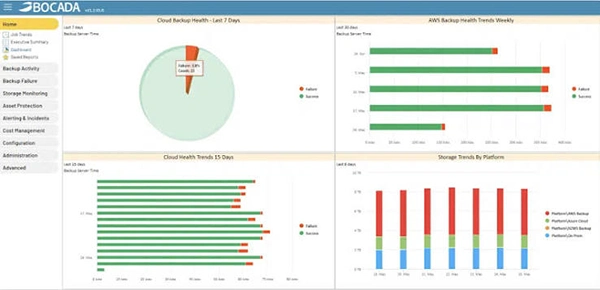
An IT dashboard on a monitor showing backup job status, storage capacity graphs, and failure alerts.
Imagine your backup dashboard is green. Every job is running. Then someone from the finance field asked you for a file version from March, and it isn’t there. Why? Nobody knows.
The job that was supposed to cover that share stopped being scheduled in February, and nothing flagged it. Simply because a job that doesn’t run also doesn’t fail.
Backup and storage analytics tools exist to close this exact gap between “backups are working” and “we can actually restore what we need”.In this article, understand these tools’ working process, know which one is worth evaluating in 2026, and learn about the data most of them ignore.
Key Takeaways
- Always detect missing backups rather than tracking failed ones.
- Vendor-native tools are free or cheap but only see their own products; mixed environments need something vendor-agnostic.
- SaaS platforms hold business-critical data that most backup dashboards never see at all.
What Backup and Storage Analytics Actually Cover
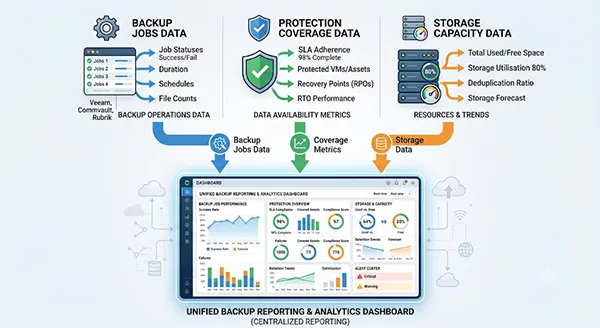
Backup storage and analytics cover three separate jobs. Know about these to decrease your trial time:
- Backup monitoring: Check whether the jobs run. Did they succeed, how long did they take, and what’s trending worse?
- Protection coverage: Which servers, VMs, and workloads have no backup at all.
- Storage analytics: Capacity, growth rate, performance, and hardware health on the arrays and repositories underneath.
Most products do one of these well and the others adequately.
Vendor-Native Monitoring: Cheap and Narrow
If you’re planning to, or standardised on, one backup vendor, start here!
Veeam ONE handles alerting, reporting, capacity planning, and best-practice checks across Veeam Backup & Replication and Veeam agents, and the Community Edition is free for up to 10 workloads. Dell and Veritas offer equivalents with their own stacks.
But the limitations are also expected. Veeam ONE monitors Veeam. Run Commvault in one data center, and Rubrik in another.
You may have to check two consoles using native tools on a spreadsheet.
Vendor-Agnostic Platforms: One View Across Everything
This is where most mixed environments end up.
Bocada is the established pure-play option. It covers backup products such as Veeam, Acronis, AWS Backup, Azure Backup, Datto, Cove, Synology, and many more.
It pulls the storage data from platforms like NetApp and Data Domain as well. Backup Health Score lies somewhere between 0–100, which is genuinely useful when a director asks how protected the business is and doesn’t want a spreadsheet. Bocada Cloud starts at $0.75 per monitored resource per month, with a free tier limited to one connector.
BACKUP EAGLE is also one of the larger and messier estates. It supports IBM Storage Protect, Dell EMC NetWorker, Rubrik, CommVault, and many others.
If you want to find a server where nobody ever added a job, this does it very well by comparing your CMDB with actually backed-up data.
| Vendor-native | Vendor-agnostic | Storage-side | |
|---|---|---|---|
| Best for | Single-vendor shops | Mixed or inherited estates | Capacity and hardware planning |
| Typical cost | Free to low | Per-resource subscription | Usually bundled with the array |
| Blind spot | Other vendors’ products | Deep hardware telemetry | Backup job success |
Storage-Side Capacity and Health Analytics
Array vendors ship their own telemetry. Dell, NetApp, Pure Storage, and HPE run cloud-based analytics that watch capacity trends, predict when you’ll run out, and flag component health before something fails.
They tell you that your repository will fill up in a time period at the current growth rate, which is the kind of warning that prevents the failure in the first place.
The Data Your Dashboard Probably Isn’t Watching
Most backup analytics tools focus only on the infrastructure you own, including servers, VMs, and arrays. In this situation, business-critical data, like growing shares, can be missed or ignored easily.
But this problem can be solved!
For example, Microsoft 365 runs on a shared responsibility model. Microsoft keeps the platform running, but people own the data inside it. Recycle bins, version history, and retention policies are short-term governance features with strict time limits. Experts say this approach is better than managing backups.
Microsoft also sells a separate Microsoft 365 Backup service, which settles the argument about whether the platform protects your data by default.
Interesting Fact
Microsoft’s own backup service covers Exchange Online, SharePoint, and OneDrive. This makes the Teams files work together because they live in both SharePoint and OneDrive. But Teams chat and channel messages are stored outside it.
The same logic applies to the SaaS estate, and it gets less attention. Retention and marketing stacks are the usual blind spot. Tools like a CRM, an email platform, or anything the marketing team settled on as the best customer loyalty software hold customer records outside of the storage array. Reporting tools also work similarly: an answer engine optimization reporting platform, a BI dashboard, and a web analytics account collect months of history that exists only in a vendor’s cloud under the retention rules.
None of it shows up in a backup report scoped to infrastructure. Always ask which SaaS systems the business would struggle without, then check whether anything is actually backing them up or not.
Questions Worth Asking Before You Sign
Ask these 5 questions to differentiate and select the best among vendor demos:
- Does it detect missing backups, not just failed ones?
- Which of my products does it actually support today?
- Can I export the raw data?
- How does pricing scale?
- What’s the ticketing integration?
Consider this companion guide on this site to know how to evaluate an SEO agency’s GEO capabilities before signing a contract. Ask how results get measured, request real examples instead of baseless claims, and treat any guaranteed outcome as a warning sign.
Conclusion
Pick based on your estate, not the feature list. One backup vendor and a small environment? The free native tool probably covers you. Mixed, inherited, or audited? Pay for something vendor-agnostic that reports across all of it.
And whichever you choose, go looking for the data it doesn’t cover. The gap is almost always in the cloud, not the data centre.
Frequently Asked Questions
What’s the difference between backup monitoring and storage analytics?
Is a free tool good enough?
For a single-vendor environment under about 10 workloads, often yes. Beyond that, coverage gaps across multiple products become the real risk.
Do I need a separate tool for Microsoft 365?
Almost certainly. Native retention features aren’t backups, and most infrastructure-focused analytics tools don’t monitor M365 at all.
What’s the most overlooked metric?
Missing backups. A job that was deleted or never scheduled reports nothing, so it never appears in a failure report.
Related Posts
Why Small Businesses Are Moving Payroll Processes Online
Do you know that 82% of small business owners work more than 40 hours a week and most of the…
Ecommerce Competitor Backlink Gap Analysis: A Data-Led Workflow
Ecommerce competitor backlink gap analysis helps a store identify websites that link to competing shops but not to its own.…

Using HeyGen AI for Sales and Customer Onboarding
It’s best to use HeyGen AI to create videos for you that answer a particular question or pain point. You…

Search Console Forgets Everything After 16 Months: How to Back Up Your SEO Data
After completing the period of 16 months, all the data and access are deleted from Google Search Console’s database. After…
Why Digital Transformation Projects Stall: A Resourcing Playbook for Project Managers
Digital transformation projects are on the rise at this time. From government-backed initiatives to enterprise cloud adoption and AI integration.…
How Email Hosting Providers Store and Protect Business Data
Where does your business email go when you click the send button? The impression is that the email just goes…
Best CI/CD Platforms for Coding Agents and AI-Native Development
CI/CD has changed its job because coding agents now write a growing share of the changes that reach a repository.…

Mavlers Agency on Why Global Agencies Are Turning to Offshore SEO Teams
An offshore SEO team in India is becoming more and more an option for great profit for global agencies; it’s…
How to Change Signature in Outlook: A Complete Guide
How do you change signature in Outlook? It sounds simple until you realize that the steps vary across Windows, Mac,…