


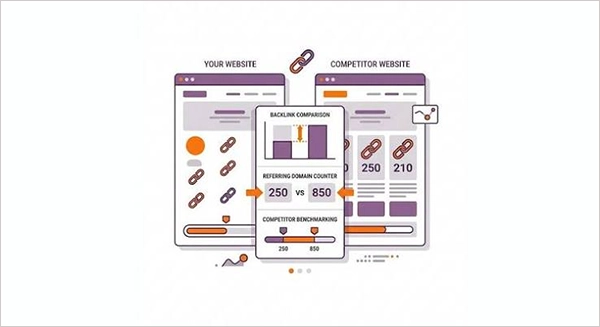
An ecommerce backlink gap analysis identifies websites that link to competing ecommerce stores but not to your own. This helps you discover relevant publishers and content opportunities to earn backlinks.
Ecommerce Competitor Backlink Gap Analysis: A Data-Led Workflow
Ecommerce competitor backlink gap analysis helps a store identify websites that link to competing shops but not to its own. This research task depends on sound data handling; exports from SEO platforms, spreadsheets, crawlers, and analytics tools can quickly become more difficult to compare. But a repeatable workflow makes the findings easier to verify and turn into practical improvements.
Look for relevant publications, useful product resources, and category pages that could reasonably cite your store. This guide explains how to collect and assess the data, then use it to plan outreach without losing track.
What Is a Backlink Gap?
A backlink is a link from another website to a page on your store. A backlink gap is a relevant linking opportunity that appears in a competitor’s backlink profile but not in yours. For example, a specialist homewares blog might link to several retailers’ guides to choosing cookware, while your own buying guide has not been noticed.
Which publishers cover your product category, what kinds of pages attract references, and whether competitors earn links through guidance, research, or resources; such market patterns can be revealed by comparing link profiles. See the guide to ecommerce link building for a broader look at building links to ecommerce product and category pages.
Prepare the Data Before Comparing
Choose a small group of genuine competitors first. These should be stores competing for similar customers and products, not simply the largest retailers in your country. Comparing businesses with very different ranges or audiences can create a long list of irrelevant domains.
Gather similar reports for your own site. Use a reputable backlink analysis tool to export referring domains and specific pages receiving links where applicable, and save the original before editing. This provides you with a clean source if rows are accidentally removed, columns are changed, or you need to repeat the comparison later. Consider learning how to migrate business files without losing anything for a promising workflow.
Backlink indexes are not a complete record of the live web; they are just snapshots, as different tools discover different links. Keep a record of the date, tool, and setting used for each export, because recording the source helps explain why later reports do not match.
How to Run an Ecommerce Competitor Backlink Gap Analysis
1. Standardise the exports
Make the domain names consistent after combining the reports in a spreadsheet or database. To prevent a website from being counted several times, remove URL protocols, common subdomains, and tracking details where appropriate. Preserve the original URL in a separate column, because the linking page and destination page are useful when you investigate an opportunity.
Look for duplicate rows and decide how to treat links from the same domain. A site may link to many competitor pages; for prospecting, it is often more useful to know that the domain has cited a competitor than to count every individual link as a separate opportunity.
2. Find domains that link to competitors but not you
A basic spreadsheet lookup can flag domains that appear in competitor data but are absent from yours, so it is important to compare the competitor domains against your own referring-domain list. Note how many of them each domain links to if you have several competitors.
Do not treat the result as a ready-made outreach list. It is a shortlist for investigation. Some links may be old, removed, automatically generated, or irrelevant to your products.
3. Check relevance and link context
Visit the linking page and ask why the competitor was cited. Was it a useful buying guide, a product feature, original research, or a discount listing?
A relevant editorial mention is generally more useful than a link on a page that exists only to list retailers. Check whether the page is still live and whether the publisher covers your audience.
- Topic fit: Does the site regularly cover your product area?
- Page quality: Is the page helpful and maintained?
- Link context: Does the reference make sense to readers?
- Possible contribution: Can you offer a stronger resource or a distinct product angle?
4. Choose the page you want to improve
A publisher can be more willing to cite an original guide, comparison, sizing chart, or research summary. Readers can navigate to related categories and products from there. Some retailers can earn direct product links through data integration services, but the page must suit the publisher’s format and provide accurate information.
Before outreach, make sure the destination page is useful on desktop and mobile, loads reliably, and clearly explains the product or advice. A broken page, outdated stock information, or confusing navigation can waste the attention generated by a new link.
Keep Your Research Manageable
Use clear filenames and a shared folder with sensible access permissions, as backlink research creates files that may include thousands of rows, multiple versions, and notes from different team members. Avoid relying on someone’s browser history or an unlabelled download folder to preserve campaign knowledge. Keep a master prospect list with fields for the source URL, competitor, relevance, contact status, proposed page, and next action.
Set a review date rather than treating one export as permanent. Competitor pages and referring links change, while your own catalogue and priorities may shift. A monthly or quarterly review is usually easier to act on than constantly re-running reports without a clear question.
Turn Findings Into a Realistic Plan
Do not ask publishers to add links simply because a competitor has one. Outreach works best when it offers something worthwhile: a clear product fact, an expert contribution, a useful resource, or a correction to information that has changed. Prioritize a manageable number of good prospects and record the outcome, including replies and reasons for declining.
Smaller teams may divide the work between technical research, content and outreach. A freelance marketing strategy can help clarify which tasks need specialist support; marketplaces such as Osdire cover marketing alongside technical and creative services. Agree on the data sources, deliverables, and ownership of campaign files before work begins.
Conclusion
Start with comparable competitors, preserve raw reports, check each prospect’s relevance, and connect link opportunities to pages that genuinely help shoppers. The strongest result is a small, well-supported set of actions that improves discovery and gives publishers a good reason to reference your store. Useful backlink gap analysis combines consistent data with human judgement.
Frequently Asked Questions
What is an ecommerce competitor backlink gap analysis?
How do you find backlink gaps between ecommerce competitors?
Export referring-domain reports for your website and selected competitors, standardize the domain data, and compare the lists in a spreadsheet or SEO tool. Review each potential opportunity for relevance and link context.
How often should you perform backlink gap analysis?
A monthly or a quarterly review is a practical starting point for many ecommerce teams. The right frequency depends on how quickly your competitors, product catalogue, and link opportunities change
Related Posts
The Cost of AR: Is It Affordable for Small Businesses in 2026?
If you have a small shop, or a local brand, or a growing e-commerce store, you don’t need the factory…
How to Send a Folder Through Email: A Step-by-Step Guide
When you need to email multiple documents, sending them one by one can be tedious. You might prefer to attach…
Dynamics 365 Integration Debt and How to Reduce It
Business Central and Dataworks are designed to work together, but many organizations still struggle with disconnected data, manual processes, spreadsheet…

AI Strategy at the Doctoral Level: What Changes for IT Leaders
Artificial intelligence is moving from experimental demonstrations into budgets, workflows, and enterprise decision-making, as advanced AI trends are shaping the…

Navigating the Tech Landscape: The Best Software Development Companies for 2026
If you are any kind of modern business, finding a good, reliable developer is essential in 2026. It’s also true…
Why Small Businesses Are Moving Payroll Processes Online
Do you know that 82% of small business owners work more than 40 hours a week and most of the…

Using HeyGen AI for Sales and Customer Onboarding
It’s best to use HeyGen AI to create videos for you that answer a particular question or pain point. You…

Search Console Forgets Everything After 16 Months: How to Back Up Your SEO Data
After completing the period of 16 months, all the data and access are deleted from Google Search Console’s database. After…
Why Digital Transformation Projects Stall: A Resourcing Playbook for Project Managers
Digital transformation projects are on the rise at this time. From government-backed initiatives to enterprise cloud adoption and AI integration.…