


They connect various apps and business systems so that data can be used, collected, and standardized the right way.
Data Integration Services: One View From Many Systems
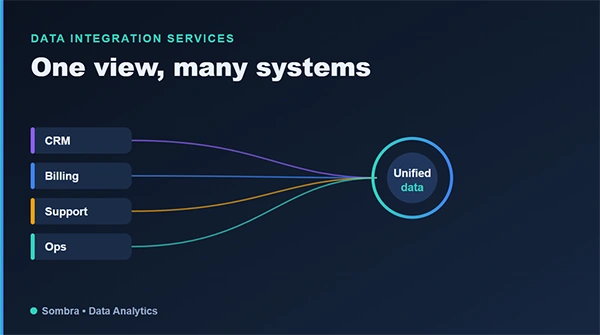
With the expansion of business, data often gets scattered to different places and systems. Customer details are found in a CRM, revenue digits live in billing software, while support teams consider issues in different tools. Collecting this information manually takes a lot of time and effort.
Data integration helps to resolve these issues by unifying these issues and making the data available in a single view. Sounds like a great approach, right?
Keep reading to explore how data integration services allow for one view from many systems.
What Data Integration Actually Means
Data integration means using the scattered data to align and share as a unified dashboard that helps to make better decisions. It simply pulls data from various sources, refines it to make sense, and then provides it as a united one. For instance, a data lakehouse where reporting and analytics can reach all of it at once.
The transformation step is where the real work hides. Two systems rarely describe the same thing the same way. One calls it “customer,” another “account.” Dates are formatted differently. The same person exists in both with slightly different details.
Integrations check all of it to ensure the unified view is really uniform and not a random set of pieces of records put together.
Modern integration leans on a recognizable stack, each piece doing one job well:
- Movement – managed pipelines like Fivetran’s automated connectors or Talend pull data out of each source and land it reliably.
- Transformation – dbt reshapes raw tables into clean, consistent models inside the warehouse, with version control and testing built in.
- Orchestration – schedulers like Airflow or Dagster keep the whole chain running on time and in the right order.
But tools are the easy part. The design decisions underneath them are what determine whether your integration lasts.
What Disconnected Systems Actually Cost
The cost one needs to consider for improper integration is simple to ignore, as it’s spread out:
- Wasted hours: Smart people spend their time copying and reconciling data instead of using it. That manual work is pure overhead, repeated every reporting cycle.
- Slow decisions: When looking for a cross-system answer requires many days, decisions stand in a queue rather for data serving plans.
- Conflicting numbers: Disconnected systems drift apart. Two teams pull two figures and waste a meeting arguing about which is right.
- Errors: Manual exports and copy-paste things always have a great chance of mistakes going unnoticed.
None of these shows up as a line item, which is exactly why they persist. They add up, though: Gartner pegs the cost of poor data quality at millions per organization each year and fragmented, manually stitched data is a major source of it. Add it all up across a year and the cost of not integrating dwarfs the cost of doing it.
The Trap of Brittle Integration
Although integration is not always helpful. Many times it connects systems that seem to be working technically but perform poorly. Small mistakes can lead to major issues when ignored. Very soon, you will be spending more time than you would require even manually.
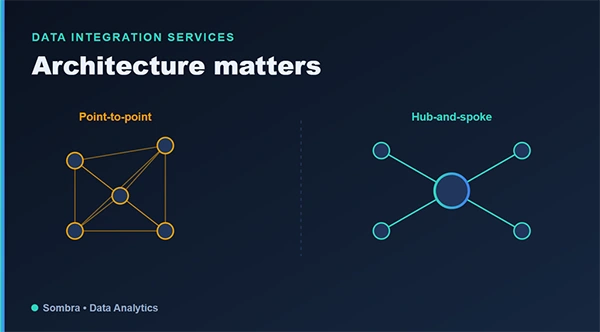
Good integration avoids this with deliberate architecture: a central place where data lands, consistent transformation logic and monitoring that catches failures before users do. This is design work, not just plumbing and it’s where experience pays off. A team that has built and maintained integrations across many projects knows which shortcuts create tomorrow’s headaches.
Collaborating with a colleague who manages data integration and unification services as a huge data practical support there, because the reporting and analytics are kept in mind from the very beginning and the shared data becomes actually useful.
Build It Once, Build It Right
The temptation is to integrate reactively. A new report is needed, so someone wires two systems together quickly. Then another need, another quick connection. Before long you’ve got a web of one-off integrations nobody fully understands, each a potential point of failure. A deliberate approach costs more up front and far less over time.
Rather than connecting systems ad hoc, you create a base: sources feed a central warehouse, transformations are defined once and reused. The starting point might be this way, but every next project will be much better, simpler, and easier.
How to Know It’s Working
Good data integration is invisible, which makes it hard to judge. A few signs it’s done right:
- Reports just work: Cross-system questions get answered quickly because the data is already together. No more manual export-and-stitch.
- Numbers agree: With a single source of truth, teams ignore fighting over the right figures.
- New data sources slot in: Adding a system is a manageable task, not a crisis, because there’s a clear pattern for connecting things.
- Failures get caught early: For instance, to break feed, monitoring shares it before anyone finds an incorrect number in a report.
If integration is constantly breaking, requires heroics to maintain or still leaves people exporting files by hand, it isn’t working – regardless of how much was spent on it.
Where to Start
In case, systems feel scattered and manual tasks are simply loading up, be with a real map of your sources: location of data, their usage, and the most efficient connections. You will possibly need not to integrate all in a single go. Consider the most important connections first, build them on a base defined to grow from there.
Conclusion
In the end, well-thought-out data integration helps businesses move across disconnected systems, irregular reports, and time taking manual tasks. By providing the scattered information and business flaws in the same place, it helps teams make better decisions and spend less time resolving things.
The right trick is to begin with the systems and connections that provide the best value, then go for the base that can help with future growth.
Frequently Asked Questions
What are data integration services?
What are the major elements of data integration?
Common elements include data pipelines for sharing, transformation tools to define information, and aligning systems to manage workflows.
What issues can poor data integration cause?
Poor integration might result in conflicting reports, duplicate entries, manual tasks, and delays in getting the right information.
Related Posts
Protecting Inventory Data: Why Warehouses Need Digital Audit Trails
Sometimes, a warehouse manager opens the inventory spreadsheet on Monday morning and finds that 400 units of a fast-moving product…

How to Delete a File That Won’t Delete in Windows?
Deleting a file should be simple, but sometimes Windows refuses to remove it. You may see messages saying the “folder…
What Should Businesses Do After Recovering From a Major Data Loss?
Businesses nowadays have entered a new level in terms of storing data, leading to a completely new structure. Customer service,…
How to Protect Your Files From Unexpected Data Loss
Imagine you opened your device and suddenly found out that all the important files are not there. Sounds scary, right?…
How to Fix “File Too Large for Destination File System” on Windows?
Have you ever tried copying a large file to a USB drive or external hard disk, and Windows stopped the…
What is a CRC Error? Meaning, Causes, and How to Fix It
A CRC error can appear when you are copying files, opening a folder, extracting an archive, or accessing a storage…
What is an MKV File? Meaning, Uses, and How It Works
You can often identify a video file by its extension. MP4 is the most common, AVI is an older format,…
Symbolic Links in Windows: A Complete Guide to Creating Symlinks
Have you ever wished to keep a file or folder in one location while making Windows think it exists somewhere…
Data Recovery in 2026: How to Restore Lost Files From Phones, PCs, and Cloud…
Alt: Old Hard Disk Drives Nearly one-third of all data loss is caused by accidental deletion, hardware failure, or a…