


Ans. A TIFF file is a raster image that stores pixel data and related information. It is commonly used for high-quality pictures, scanned documents, printing, and archiving.
What is a TIFF File? Definition, Uses, and How to Open It
Table of Contents
Some image formats prioritize small file sizes and quick loading, while others focus on preserving image details for editing, printing, and archiving.
TIFF graphics format belongs to the second category. TIFF (Tagged Image File Format) supports different compression methods, color configurations, and image data, making it useful for professionals.
However, these files can be large, and not every application supports all their features. Understanding what is a TIFF File and how it works can help you decide when to use it and how to open or convert it.
What is a TIFF File Type?
So, what are TIFFs? TIFF file extension is used for a raster image file that stores pixel data along with information describing the image. TIFF stands for Tagged Image File Format and is commonly used for professional photography, document scanning, printing, and image archiving.
Now, what is a TIF file? So, TIFF files typically use the .tif or .tiff extension. Both refer to the same format.

Unlike JPEG, which generally uses compression that discards some image data to reduce file size, TIFF supports several storage methods. Depending on its settings, a TIFF file can store uncompressed image data, use lossless compression, or use lossy compression. Some files can also contain multiple images, such as pages from a scanned document.
TIFF is particularly useful when preserving image information and maintaining editing flexibility matter more than minimizing file size.
How Does the TIFF Image File Format Work?
Now that you know the Tagged Image File Format definition, let’s understand how it works. It stores pixel data alongside tags that describe the image’s dimensions, resolution, color representation, compression, and other properties.
Three features explain how it works:
- Image Data and Metadata
A TIFF file contains image data and structured information describing it. Depending on the file, its metadata may include resolution, color characteristics, and details about the software or device used to create it. - Flexible Compression
It supports several storage methods:- Uncompressed: Stores image data without compression, often producing larger files.
- Lossless Compression: Methods such as LZW and ZIP reduce file size without discarding image information.
- Lossy Compression: Certain configurations support JPEG compression, which discards some image data to reduce file size.
A TIFF file does not automatically guarantee lossless quality. The compression settings matter.
- Different Image Configurations
It supports different color models, bit depths, and image arrangements. Some files can contain multiple images, making the format useful for multipage scans.
However, applications do not support every TIFF feature. A file may open correctly in one program but fail in another if the software does not support its compression method or structure.
What is a TIFF File Used For?

This file format is commonly used when image details, reliable reproduction, or further editing matters more than file size.
- Professional Photography
Photographers use TIFF for detailed retouching and high-quality printing. When saved with appropriate lossless settings, TIFF can preserve image data through repeated edits and saves. - Document and Photo Scanning
It preserves fine details in scanned documents, photographs, artwork, and historical records. Its support for multi-page files also makes it useful for scanning multi-page documents. - Printing and Publishing
Designers and publishing professionals use the format for print-ready photographs and artwork. However, accurate print colors also depend on resolution, color profiles, and export settings. - Long-Term Image Archiving
Libraries, archives, and digitization projects use TIFF to preserve high-quality digital copies. However, for more important files, maintain backups and follow the 3-2-1 Backup Rule and check them periodically. No image format can prevent every form of data loss.
What are the Advantages and Disadvantages of TIFF?
TIFF offers flexibility for professional imaging, but it has some trade-offs. This table will help you understand better:
Pros
- Can preserve image data without compression loss
- Supports multiple compression methods
- Suitable for high-resolution images
- Useful for professional editing and printing
- Supports metadata and multiple images
Cons
- Files can be large
- Some TIFF features have limited application support
- Less convenient for everyday web sharing
- Can require substantial storage
When should you use TIFF? Choose it for high-quality scans, professional editing, print production, or archival copies when preserving image information is important.
When should you choose another format? JPEG is usually more practical for sharing photographs, while PNG is useful for graphics that require transparency or lossless storage.
TIFF vs. JPG vs. PNG: What is the Difference?
TIFF, JPG, and PNG all store raster images, but they serve different purposes. Here’s a quick comparison of all these formats:
| Feature | TIFF | JPG/JPEG | PNG |
| Primary use | Professional imaging, scanning, and archiving | Photographs and online sharing | Graphics, screenshots, and transparent images |
| Compression | Lossless or lossy | Usually lossy | Lossless |
| Image quality | Can preserve image data without loss | Usually discards some image data | Preserves image data without lossy compression |
| Transparency | Supported by some configuration | Not supported in standard JPEG | Supported |
| Typical file size | Often large | Usually small for photographs | Often larger than JPEG for photographs |
| Multiple images in one file | Supported by some TIFF files | Not standard in ordinary JPEG workflows | Not standard in ordinary PNG workflows |
| Web compatibility | Limited native browser support | Broad support | Broad support |
TIFF is not automatically better than JPEG. A TIFF saved with lossy compression may already have discarded image information, so choose the format and settings according to your needs.
How to Open a TIFF File?
You can open many TIFF picture files using your computer’s built-in image viewer. If the file fails to open or displays incorrectly, try another application that supports its particular features.
Here’s how to open a TIFF file on Windows or Mac:
- Open File Explorer on Windows or Finder on Mac and locate the .tif or .tiff file.
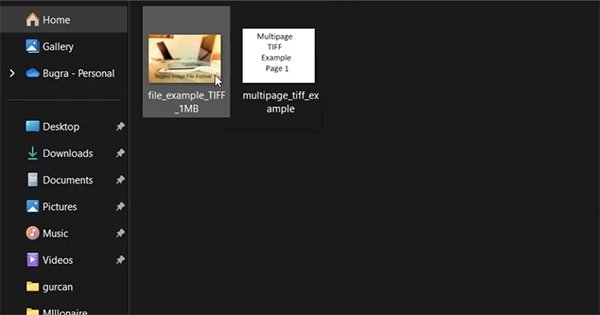
- Double-click it to open it in your default image viewer.
- If it fails to open or does not display correctly, right-click the file and select Open with.
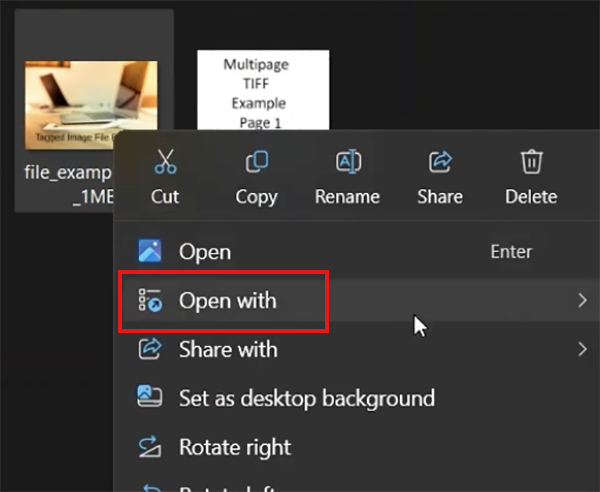
- Then, choose a compatible image viewer or editor, such as Adobe Photoshop.
Applications such as Adobe Photoshop support TIFF and provide more editing and export options. If the file contains multiple pages, layers, or specialized metadata, confirm that your application supports those features before editing or converting it.
How to Convert a TIFF File to JPG or PNG?
Converting TIFF to JPEG or PNG can make an image easier to share or use in applications that do not support TIFF. Keep an untouched copy of the original TIFF before converting, particularly if it contains important scans or professional photographs.
- Open the TIFF image in a compatible image editor.
- Select Save As or Export.
- Choose JPEG or JPG or PNG.
- Adjust the quality settings, like transparency and color settings, if available.
- Finally, save the new file and verify the result.
JPEG uses lossy compression, so conversion can discard image information. A high-quality export can reduce visible quality loss but cannot guarantee preservation of all the original data.
On the other hand, PNG preserves image data without lossy compression, but it may not retain every TIFF feature. Multipage content, layers, and certain metadata may be lost or handled differently.
Conclusion
TIFF is a flexible image format designed for professional photography, scanning, printing, and archiving. It can preserve image data without loss when saved with suitable settings, but its large file sizes and varying application support can make it less convenient for everyday sharing.
JPEG is often better for sharing photographs, while PNG suits graphics that need transparency or lossless storage. Choose the format that fits your workflow, and keep the original TIFF when preserving the source is more important for you.
Frequently Asked Questions
What is a TIFF image file?
Is the TIFF file type better than JPG?
Ans. It is useful for professional editing, scanning, and archiving when preserving image information matters. JPG is usually better for sharing photographs because it produces smaller files.
What is the difference between TIFF and TIF formats?
Ans. There is no fundamental difference between .tiff and .tif. Both file extensions identify the Tagged Image File Format.
How can I open TIF files?
Ans. Just double-click the file or right-click it and select Open with. If the file does not display correctly, use an image editor that supports TIFF features.
Can I convert a TIFF file to JPG without losing quality?
Ans. Not completely with typical JPEG export settings. JPEG compression can discard image information, even at high quality settings. Keep the original file if you need to preserve all available image data.
Related Posts
How to Search for Multiple File Types in Windows Explorer
Finding a specific document in a folder full of mixed files can take longer than expected. You might need PDFs,…
How to Migrate Business Files Without Losing Originals or Version History
Small agencies usually face issues when they move client projects to a new storage platform, and the client requests a…

Protecting Inventory Data: Why Warehouses Need Digital Audit Trails
Sometimes, a warehouse manager opens the inventory spreadsheet on Monday morning and finds that 400 units of a fast-moving product…

Data Integration Services: One View From Many Systems
With the expansion of business, data often gets scattered to different places and systems. Customer details are found in a…
How to Delete a File That Won’t Delete in Windows?
Deleting a file should be simple, but sometimes Windows refuses to remove it. You may see messages saying the “folder…
How to Protect Your Files From Unexpected Data Loss
Imagine you opened your device and suddenly found out that all the important files are not there. Sounds scary, right?…
How to Fix “File Too Large for Destination File System” on Windows?
Have you ever tried copying a large file to a USB drive or external hard disk, and Windows stopped the…
What is a CRC Error? Meaning, Causes, and How to Fix It
A CRC error can appear when you are copying files, opening a folder, extracting an archive, or accessing a storage…
What is an MKV File? Meaning, Uses, and How It Works
You can often identify a video file by its extension. MP4 is the most common, AVI is an older format,…