


A backup creates one or more copies of your data so you can restore files if they are deleted, corrupted, encrypted by ransomware, or lost due to hardware failure or disasters.
What is the 3-2-1 Backup Rule? A Complete Guide to Protecting Your Data
Table of Contents
Losing important files can happen when you least expect it. A hard drive can fail without warning, ransomware can lock your data, or an accidental click can delete years of work. That’s why having a single copy of your files is not enough.
The 3-2-1 backup rule is a simple yet reliable strategy that helps protect your data by storing multiple copies in different places. In this guide, I will explain how 321 rule works and how you can implement it in 2026.
What is the 3-2-1 Backup Rule?
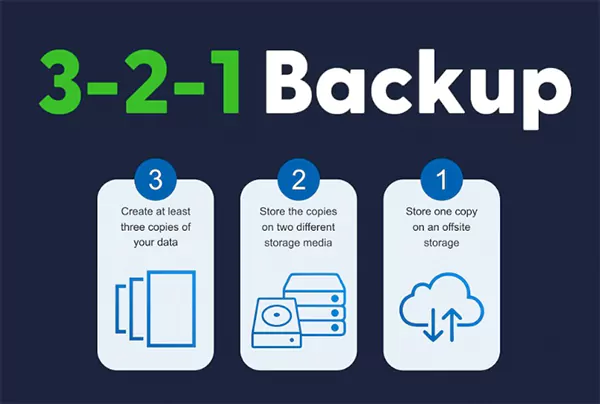
The 321 backup rule is a widely recommended data protection strategy designed to reduce the risk of permanent data loss. It spreads your data across multiple copies and locations, so if one copy becomes unavailable, another is still accessible.
The rule is simple:
| Rule | What It Means |
| 3 Copies | Keep one original file and two backup copies. |
| 2 Storage Media | Store the copies on at least two different types of storage, such as your computer, NAS, cloud storage, hard drives, eMMC, or SSD. |
| 1 Off-Site Copy | Keep one backup in a different physical location, usually in the cloud, to protect against theft, fire, flooding, or other local disasters. |
The goal of backup 3-2-1 is not to create endless backups. It is to eliminate a single point of failure. Although the rule was introduced years ago, it remains one of the most trusted data backup strategies because the biggest causes of data loss, like hardware failure, accidental deletion, and cyberattacks, still exist today.
How Does the 3-2-1 Backup Rule Work in Real Life?
The easiest way to understand the 321 backup strategy is through a simple example. Imagine you are a freelance graphic designer working on clients’ projects.
- Copy 1: Your original project files are stored on your laptop,
- Copy 2: Every evening, your work is automatically backed up to an external SSD.
- Copy 3: The same files are securely backed up to a cloud storage service.
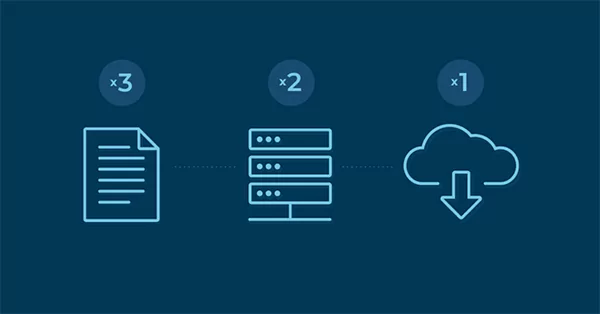
Now, if your laptop suddenly stops working, you can restore your files from the external SSD. If both your laptop and external drive are lost or stolen, your cloud backup still gives you access to your work, without relying on any data recovery software.
The same approach works for almost everyone. Students can protect assignments and research papers. Photographers can preserve large media libraries, and small businesses can safeguard financial records and customer data.
The storage devices may differ, but the idea stays the same. Never keep every copy of your important data in one place.
Why Does the 3-2-1 Backup Strategy Still Matter?
Storage devices have become faster and more reliable, but data loss is still a common problem. The backup 3-2-1 rule reduces these risks by ensuring your data is not dependent on a single device or location.
It also makes recovery easier. A local backup allows you to restore accidentally deleted files quickly, while an off-site backup helps you recover after incidents such as theft, fire, flooding, or ransomware attacks.
Another reason this strategy has stood the test of time is its flexibility. Today, the two storage media can be any combination of internal storage, external hard drives, SSDs, NAS devices, or cloud backup services. The technology has evolved, but the principle remains the same.
For businesses, the 3-2-1 rule also supports business continuity. Having multiple backup sources helps reduce downtime, allowing systems and operations to be restored much faster after an unexpected failure.
How to Implement the 3-2-1 Strategy?
Setting up a 3-2-1 backup system does not require expensive software or enterprise-grade hardware. With the right tools and a consistent routine, you can protect your most valuable data in a few simple steps.
- Step 1: Identify Your Important Data
Start by deciding which files are worth protecting. Focus on data that would be difficult or impossible to replace, such as:
- Personal documents
- Family photos and videos
- Work files
- Financial records
- Business databases
- Source code and creative projects
Prioritizing critical files makes your backup strategy more efficient and easier to manage.
- Step 2: Create a Local Backup
Save a second copy of your data on another storage device. Common options include:
- External HDD
- External SSD
- NAS (Network Attached Storage)
Enable automatic backups whenever possible so your files stay up to date without manual effort.
- Step 3: Keep One Backup Off-Site
Store another copy away from your primary location against theft, fire, flooding, or other local disasters. Popular choices include:
- Cloud backup services
- Remote NAS
- Secondary office or home location
- Secure data centers
- Step 4: Schedule Automatic Backups
A backup is only useful if it is current. Set daily or weekly backup schedules based on how often your files change. Automating the process reduces the chance of forgetting.
- Step 5: Test your Backups
Don’t assume your backups will work when you need them. Regularly restore a few files to verify that your backups are not corrupted, recovery is quick and simple, and you can access your data without issues.
Best Practices for Backing Up Data with the 3-2-1 Rule
Following the 3-2-1 backup strategies is a great start, but a few additional habits can make your backups even more reliable.
- Automate Your Backups: Manual backups are easy to forget. Automatic backups help keep your files protected without requiring regular attention.
- Encrypt Sensitive Data: If your backups contain personal or business information, encrypt them. This helps protect your data if a backup device is lost or stolen.
- Keep Your Off-Site Backup Truly Separate: Avoid storing your external drive next to your computer. If both are in the same place, they could be damaged or stolen together. Keeping one copy in another location is what makes the backup 321 rule effective.
- Review Your Backup Plan: Your storage needs will change over time. Update your data backup plans as you add new devices, folders, or cloud storage so important files don’t go unprotected.
Also, occasionally restore a few files to confirm your backups are complete, accessible, and working as expected.
Is the 3-2-1 Data Backup Plan Right for You?
The 3-2-1 backup strategy is flexible enough to work for both individuals and businesses. It is a good choice if:
- You have important files that you can’t afford to lose.
- You keep data across multiple devices.
- You want protection from hardware failures, accidental deletion, ransomware, or natural disasters.
- You prefer a simple backup strategy that is easy to maintain and recover from.
- You are an organization building a disaster recovery plan.
It is one of the best backup methods for students, freelancers, businesses, and other organizations. If you manage highly sensitive information or critical business systems, consider strengthening the standard approach with offline or immutable backups for added protection.
Ultimately, the best backup strategy is one you can maintain consistently and rely on when recovery is needed.
Conclusion
The 3-2-1 backup has remained the industry standard because it solves a problem that still exists today. It significantly reduces the risk of losing important files.
While advanced strategies like 3-2-1-1-0 offer extra protection against modern cyber threats, the classic 3-2-1 rule is still the right starting point for most individuals and businesses. As your storage needs grow, you can strengthen your backup plan with immutable storage, automated backups, and regular recovery testing.
Frequently Asked Questions
What does a backup do?
Why is the 3-2-1 rule important?
It reduces the risk of data loss by storing multiple copies of your files on different storage media, including one copy in a separate location.
What are examples of 3-2-1 backup implementations?
A common setup is storing your original files on your computer, backing them up to an external drive or NAS, and keeping another copy in a cloud backup solution.
What are the limitations of the 3-2-1 backup strategy?
The traditional rule does not automatically protect against ransomware that targets connected backups. That is why many organizations now include offline or immutable backups as well.
Are 3-2-1 data backup methods still enough for today?
Yes, for most individuals and businesses, the 3-2-1 rule remains a reliable backup strategy; organizations with higher security or compliance requirements can strengthen it with approaches like 3-2-1-1-0.
Related Posts
Best Tools for Recovering Deleted Files on a Mac
A wrong click can leave you sinking in grief and sorrow, just because that accidental click has deleted an important…

What to Back Up Before Migrating Your Business to New Software
Software migration hardly results in data loss during migration. It’s possible that you lose the data after a week or…

How Modern Enterprises Are Scaling Infrastructure with Custom AI
For many businesses, AI works as a collection of tiny experiments such as a chatbot, a coding assistant, or sometimes…

VMware vs. Sangfor aSV vs. Nutanix: Which Hypervisor Actually Saves You Money?
Selecting the right hypervisor isn’t simply an issue of technology; it could end up having a significant effect on your…

SD Card Corruption in IoT Devices: Why It Happens So Often and How to…
IoT devices can have good sensors, robust software, and an excellent housing, but all it takes is one small thing…

5 Best SaaS Platforms for Financial Services and Growing Businesses in 2026
In 2026, SaaS platforms have become essential for businesses that want to build smooth processes, automate routine tasks and clarify…

How Digital Records Support Workplace Injury Claims
An injury in the workplace does not necessarily mean that you have just a physical problem to overcome. It could…

What Happens When Your Office Emergency Plan Is a Drawer?
An office emergency plan should not end with the first aid box sitting in the last drawer. All employees should…

How Data Recovery and Recordkeeping Failures Cost Businesses More Than They Realize
Most businesses file data recovery issues and recordkeeping gaps under different headings, treating one as an IT problem and the…