


It is a copy of data that cannot be modified or deleted during a specified retention period.
What are Immutable Backups? Meaning, Types, Benefits, and Limitations
A backup is only useful if you can still access it when something goes wrong. But what happens when ransomware or an attacker deletes the backup along with the original data?
Immutable backups address this risk by preventing changes or deletion for a specific period. The protection depends on the storage system and its configuration. In this guide, we will understand the immutable backup definition, how it works, where it helps, and what to consider before using them.
What is an Immutable Backup?
An immutable backup is a copy of data that cannot be modified or deleted during a defined retention period. This helps preserve recovery points even if someone gains access to the backup system.
Backup immutability is typically enforced through write-once, read-many (WORM) controls or storage policies that block changes to protected data. The exact protection depends on the technology and its configuration.
One important point to note is that it is not necessarily always a clean backup. If the original data was already corrupted or infected, that problem can carry over into the protected copy.
How Do Immutable Backups Work?
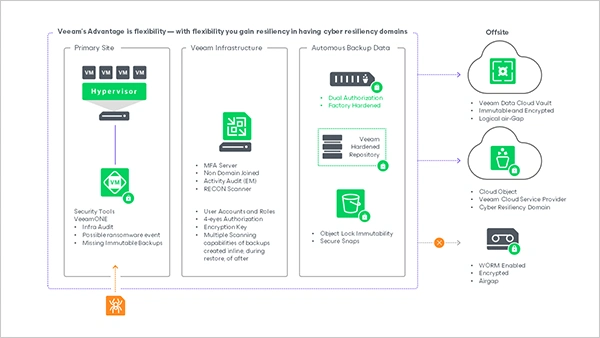
Immutable backups combine a regular backup process with storage controls that prevent changes for a specific period. A typical process of immutable backups for ransomware protection involves the following steps:
- Create a Backup: Copy files, applications, databases, or system data to backup storage.
- Apply an Immutability Policy: Set the retention period and rules governing modification or deletion.
- Enforce Protection: The storage system blocks prohibited changes while the policy remains active.
- Restore When Needed: Recover the required data from a protected backup.
The protection varies by platform. For example, Amazon S3 Object Lock offers two retention modes.
- Governance mode, which authorized users with specific permissions can bypass.
- Compliance mode, which prevents protected object versions from being deleted or overwritten during retention, even by the account root user.
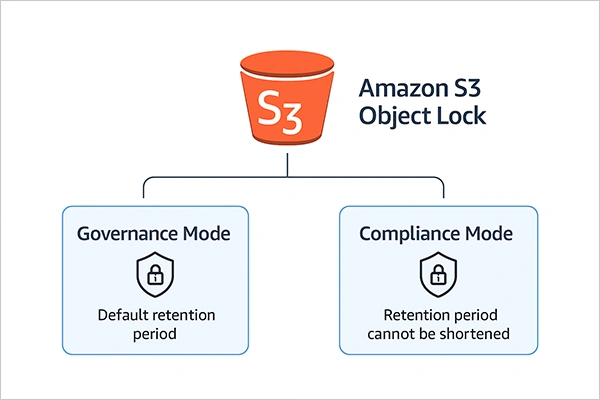
Choosing the right mode depends on how strictly you need to protect backup data and who should be allowed to manage it.
Types of Immutable Backup Storage
Immutable backups can use different storage technologies, depending on your infrastructure, recovery requirements, and budget. There are various types of storage, but here are a few common ones you should know about:
- Immutable Object Storage
Cloud and on-premises object storage can use retention policies to prevent protected data from being modified or deleted. Examples include Amazon S3 Object Lock and Azure Blob immutable storage.
- Hardened Backup Repositories
These are specially configured servers that protect backup files against unauthorized changes and deletion. Veeam immutable backup solutions use hardened Linux repositories and compatible object storage.
- Immutable Snapshots
Snapshots capture data at a specific point in time. When supported by the storage platform, immutability controls prevent them from being changed or deleted during the retention period. However, not all snapshots are immutable or replace a complete backup strategy.
- WORM Media
Write-once, read-many (WORM) media, including certain tape systems, prevents protected data from being overwritten during the specified period. Tapes can also be stored offline to add network isolation.
Organizations can combine these storage methods to maintain multiple protected recovery copies.
Why are Immutable Backup Solutions Important?
Immutable backups help organizations preserve recovery points when data is accidentally deleted, maliciously altered, or targeted by ransomware. Their main benefits include:
- Ransomware Protection: Attackers may be unable to delete or overwrite protected backups, giving organizations another recovery option after an attack.
- Protection Against Accidental Deletion: Retention controls help prevent backup data from being removed prematurely.
- Improved Data Integrity: Protected copies remain unchanged during the retention period.
- Support for Compliance: WORM storage can help organizations meet certain data-retention requirements, depending on the applicable regulations and configurations.
Immutability is only one layer of protection. Maintain multiple recovery points and test restores regularly. Furthermore, offline and encrypted backups can provide an additional layer of protection.
Traditional vs. Immutable Backups
The main difference is whether a backup can be changed or deleted during its retention period.
| Feature | Traditional Backups | Immutable Backups |
| Modification | Depends on access permissions and storage controls | Blocked by the active immutability policy |
| Deletion | May be possible for authorized users | Restricted during the protected period |
| Ransomware resilience | Vulnerable if attackers can access and delete backups | Helps prevent protected copies from being altered or deleted |
| Retention | Governed by the backup policy | Enforced through immutability controls |
| Cost | Depends on storage and retention requirements | May increase with longer retention and additional stored versions |
Immutable and traditional backups are not mutually exclusive. You can make backup copies immutable to strengthen an existing backup strategy. Neither approach guarantees successful recovery on its own.
Limitations of Immutable Backups
These backups reduce certain risks, but they don’t eliminate every cause of data loss.
- Compromised Backups: Malware or corrupted data can be preserved if it enters the backup before protection takes effect.
- Storage Costs: Longer retention periods and multiple recovery copies can increase expenses.
- Limited Flexibility: Protected data generally cannot be deleted early, even when it is no longer needed.
- Recovery Challenges: A protected backup may still be unusable if it is incomplete, inaccessible, or incompatible with the recovery environment.
- Configuration Risks: Incorrect retention settings or weak security outside the storage layer can leave gaps in protection.
Immutability protects data against specified changes. It does not replace malware detection, secure access controls, backup monitoring, or recovery testing.
How to Build an Immutable Backup Strategy?
Simply enabling immutability is not enough. You also need to decide what to protect, how long to retain it, and how to recover it when something goes wrong.
- Identify and prioritize business files, databases, applications, and systems that must be restored after an incident.
- Select an immutable repository or Immutable cloud storage service that meets your recovery and retention requirements.
- Keep backups protected long enough to cover recovery needs, RPO and RTO, and applicable compliance obligations.
- Use separate backup credentials, multifactor authentication (MFA), and least-privilege permissions to restrict administrative access.
- Maintain another protected or offline copy, ideally with separate access controls.
- Review failed jobs, unexpected configuration changes, retention policies, and storage capacity.
- Restore files and systems regularly to verify that backups are intact and recovery procedures work as expected.
These practices complement immutability by ensuring that protected data can actually be recovered. The goal is not simply to make backups immutable. It is to preserve clean recovery points and ensure your team can restore them when needed.
Conclusion
Immutable backups help protect critical data from unauthorized changes and deletion during a defined retention period. They are particularly valuable for protecting backups against ransomware. However, they are not a complete recovery strategy on their own. Combine immutability with secure access controls, the 3-2-1 backup rule, appropriate retention policies, and regular restore testing. That way, you have a better chance of recovering your data when something goes wrong.
Frequently Asked Questions
What is an immutable backup?
How do immutable backups protect against ransomware?
They prevent protected backup data from being overwritten or deleted while the immutability policy is active, helping preserve recovery points after an attack.
What is immutable storage?
Immutable storage uses controls such as WORM policies to prevent data from being modified or deleted for a defined period.
Can an administrator delete an immutable backup?
It depends on the storage system and retention mode. Some configurations allow authorized users to bypass protection, while stricter modes block deletion throughout the retention period.
Are immutable backups the same as air-gapped backups?
No, immutable backups are protected against changes or deletion, while air-gapped backups are isolated from connected systems. A backup can use both types of protection.
Related Posts
What is Cloud Disaster Recovery? How It Works, Strategies, and Plan
When a system outage hits, having your data backed up is only half the battle. You also need a reliable…
What is Bare Metal Recovery? Meaning, Process, and Benefits
When a computer fails, reinstalling its operating system is only the beginning. You may also need to reinstall applications, restore…
How Long Does Backing Up to iCloud Take? Causes and Fixes for Slow Backups
Is your iCloud backup taking ages? When your backup keeps spinning, it can be hard to tell whether it’s making…
How MSPs Package Backup and Recovery as a Subscription That Actually Restores
An MSP technician checks nightly backup job results across several client accounts Some businesses often try to own a backup.…
Best Tools for Recovering Deleted Files on a Mac
A wrong click can leave you sinking in grief and sorrow, just because that accidental click has deleted an important…

What to Back Up Before Migrating Your Business to New Software
Software migration hardly results in data loss during migration. It’s possible that you lose the data after a week or…

How Modern Enterprises Are Scaling Infrastructure with Custom AI
For many businesses, AI works as a collection of tiny experiments such as a chatbot, a coding assistant, or sometimes…
VMware vs. Sangfor aSV vs. Nutanix: Which Hypervisor Actually Saves You Money?
Selecting the right hypervisor isn’t simply an issue of technology; it could end up having a significant effect on your…

SD Card Corruption in IoT Devices: Why It Happens So Often and How to…
IoT devices can have good sensors, robust software, and an excellent housing, but all it takes is one small thing…