


Ans. The three primary types of backups are full, differential, and incremental backups.
Full vs Differential vs Incremental Backup: What’s the Difference?
Table of Contents
- A Quick Comparison of Full vs Incremental vs Differential Backup
- Full vs Differential vs Incremental Backup: Meaning
- Differential Backup vs Incremental Backup
- Differential Backup vs Full Backup
- Full Backup vs Incremental Backup
- Pros and Cons of Each Backup Type
- Which Backup Method Should You Use?
- Frequently Asked Questions
Creating backups is easy, but choosing the right backup method is where most people get confused. Full, incremental, and differential backups differ in how they store changes, how much space they require, and how quickly you can restore files.
Understanding these differences helps you build a backup strategy that’s both efficient and reliable. In this full vs differential vs incremental backup guide, I will explain how each type works, compare them, and help you decide which one best fits your needs.
A Quick Comparison of Full vs Incremental vs Differential Backup
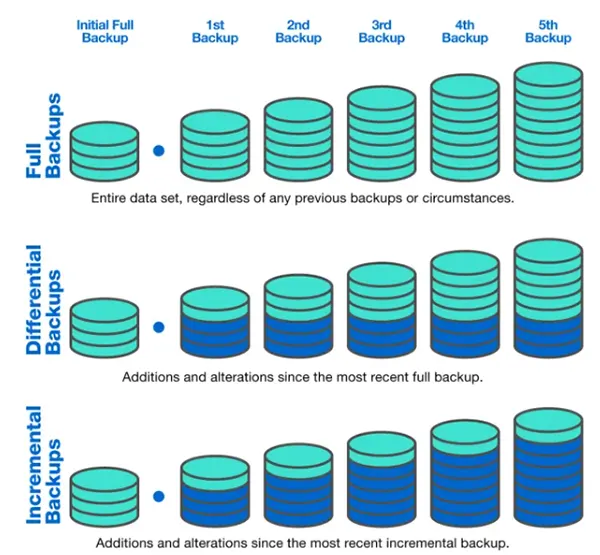
If you are deciding which method to use, this differential vs incremental vs full backup comparison table highlights the key differences at a glance.
| Feature | Full Backup | Differential Backup | Incremental Backup |
| Copies | All selected data | Changes since the last full backup | Changes since the previous backup |
| Backup size | Largest | Medium (grows over time) | Smallest |
| Backup speed | Slowest | Faster than full | Fastest |
| Storage requirement | Highest | Moderate | Lowest |
| Recovery requires | Latest full backup only | Latest full backup and latest differential backup | Latest full backup and every incremental backup in the chain |
| Best for | Creating a backup baseline | Faster and simpler recovery | Frequent automated backups |
Each method solves a different problem. That is why most modern backup solutions combine these methods instead of relying on just one.
Full vs Differential vs Incremental Backup: Meaning
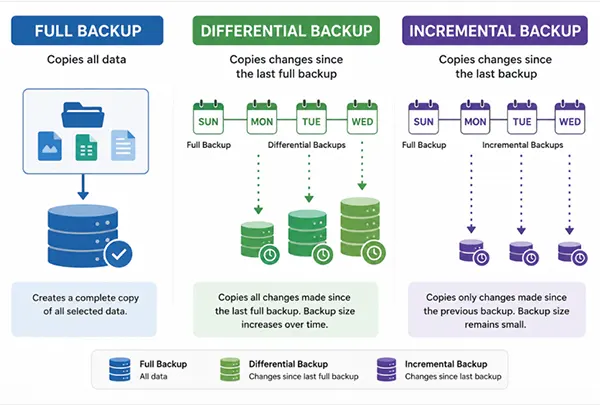
While all three methods protect your files, they vary in storage usage, backup speed, and recovery time. Let’s first understand each method.
What is Full Backup?
A full backup creates a complete copy of all the selected data every time it runs. Since everything is stored in a single backup set, it is the simplest backup type to manage and restore. It is like taking a brand-new snapshot of your entire dataset. Even if only one file changes, the next full backup copies everything again.
Best for: Creating a baseline backup and simplifying data recovery.
What is Differential Backup?
A differential backup copies every file that has changed since the last full backup. For example, if you create a full backup on Sunday, every differential backup during the week will include all changes since that Sunday. As more files change, each new backup becomes larger than the previous one.
Best for: Faster recovery without running full backups every day.
What is Incremental Backup?
An incremental backup copies only the data that has changed since the most recent backup, whether that backup was full or incremental.
Instead of repeatedly saving the same changes, each backup contains only newly modified data. This keeps backup files small and allows backups to finish much faster, although restoring data requires the complete backup chain.
Best for: Frequent backups where storage space and backup time matter most.
In simple terms, a full backup copies everything, a differential backup copies everything changed since the last full backup, and an incremental backup copies only what changes since the previous backup.
Differential Backup vs Incremental Backup
Incremental backups and differential backups both copy only changed data, so they are often confused. The key difference between incremental and differential backup is what they compare your current data against.
A differential backup always tracks changes made since the last full backup. An incremental backup tracks only the changes made since the most recent backup, whether it was full or incremental.
If quick and straightforward recovery is your priority, differential backups are usually the better choice. If you want to minimize storage usage and complete backups as quickly as possible, incremental backups are the better option.
Differential Backup vs Full Backup
A full backup and a differential backup are not competing methods. They are designed to work together.
The full backup creates the initial copy of all your data. Each differential backup saves everything that has changed since the last full backup. This reduces the need to run large, time-consuming full backups every day while still keeping recent changes protected.
Many businesses follow a simple schedule. They perform a weekly full backup and run daily differential backups in between. This approach saves time while keeping recovery relatively simple.
Full Backup vs Incremental Backup
The main difference between a full backup and an incremental backup is how much data is copied during each backup.
A full backup always creates a complete copy of the selected data. An incremental backup copies only the files that have changed since the last backup, making it much faster and more storage-efficient.
Rather than choosing one over the other, most modern backup strategies combine both. A scheduled full backup creates a reliable starting point, while incremental backups capture ongoing changes with minimal storage and backup time.
Pros and Cons of Each Backup Type
Every backup method involves a trade-off between storage space, backup speed, and recovery time. The best choice depends on what matters most to you.
Full Backup
Pros
- Simple to create and manage
- Fastest and easiest recovery
- Does not rely on any other backup files
- Stores a complete copy of your data
Cons
- Uses the most storage space
- Takes the longest to complete
- Not ideal for frequent backups of large datasets
Differential Backup
Pros
- Faster recovery than incremental backups
- Requires only the latest full and differential backup to restore data
- Easier to manage than long backup chains
- Offers a good balance between storage and recovery speed
Cons
- Backup size increases after each backup
- Uses more storage than incremental backups
- Backup time gradually increases until the next full backup
Incremental Backup
Pros
- Smallest backup files
- Fastest backup process
- Ideal for frequent or automated backups
- Saves storage space and bandwidth
Cons
- Recovery depends on the entire backup chain
- A missing or corrupted backup can affect later restore points
- Restoring large datasets usually takes longer than differential backups
No backup method is universally better than the others. The right choice depends on the balance you want between storage efficiency, backup performance, and recovery speed.
Which Backup Method Should You Use?
To sum it up, the right backup method depends on your priorities rather than a single best option.
- Choose a full backup if you want a complete, standalone copy of your data and the simplest recovery process. It is ideal for creating the foundation of any backup strategy.
- Choose a differential backup if you prefer a balance between backup efficiency and easy recovery. It is well-suited for businesses and users who regularly restore data.
- Choose an incremental backup if your data changes frequently and you need regular and automated backups. It is a great choice for cloud environments, virtual machines, and large datasets.
For most users and organizations, a hybrid backup strategy delivers the best results. Schedule a full backup weekly or monthly, use incremental or differential backups in between, and test your backups regularly to ensure they can be restored when needed.
This approach provides reliable protection while balancing storage usage, backup performance, and recovery flexibility.
Frequently Asked Questions
What are the 3 types of backups?
Which backup method is the fastest?
Ans. Incremental backups are the fastest because they copy only newly changed data. Full backups take the longest, while differential backups offer a balance between backup speed and recovery.
How often should I perform a full backup?
Ans. There is no fixed schedule. Many individuals perform full backups weekly, while organizations choose weekly or monthly full backups, depending on how frequently their data changes.
What is the best backup strategy?
Ans. A hybrid backup strategy is the best choice for most users. It combines regular full backups with incremental or differential backups to balance storage efficiency, backup speed, and reliable data recovery.
Is a differential backup better than an incremental backup?
Ans. No, neither is universally better. Differential backups make data recovery simpler, while incremental backups save more storage and complete faster. The better choice depends on whether you prioritize faster recovery or greater storage efficiency.
Related Posts
What is Bare Metal Recovery? Meaning, Process, and Benefits
When a computer fails, reinstalling its operating system is only the beginning. You may also need to reinstall applications, restore…

How Long Does Backing Up to iCloud Take? Causes and Fixes for Slow Backups
Is your iCloud backup taking ages? When your backup keeps spinning, it can be hard to tell whether it’s making…
How MSPs Package Backup and Recovery as a Subscription That Actually Restores
An MSP technician checks nightly backup job results across several client accounts Some businesses often try to own a backup.…
Best Tools for Recovering Deleted Files on a Mac
A wrong click can leave you sinking in grief and sorrow, just because that accidental click has deleted an important…

What to Back Up Before Migrating Your Business to New Software
Software migration hardly results in data loss during migration. It’s possible that you lose the data after a week or…

How Modern Enterprises Are Scaling Infrastructure with Custom AI
For many businesses, AI works as a collection of tiny experiments such as a chatbot, a coding assistant, or sometimes…

VMware vs. Sangfor aSV vs. Nutanix: Which Hypervisor Actually Saves You Money?
Selecting the right hypervisor isn’t simply an issue of technology; it could end up having a significant effect on your…

SD Card Corruption in IoT Devices: Why It Happens So Often and How to…
IoT devices can have good sensors, robust software, and an excellent housing, but all it takes is one small thing…

5 Best SaaS Platforms for Financial Services and Growing Businesses in 2026
In 2026, SaaS platforms have become essential for businesses that want to build smooth processes, automate routine tasks and clarify…