


A checksum file contains checksum values that help in verifying whether a file matches its original version.
What is a Checksum and How Does It Work?
Checksums are one of those technologies most people never notice until something goes wrong. Maybe a software download won’t install, a backup file becomes unreadable, or a transferred document arrives corrupted.
In situations like these, you need a way to verify that the file you received is identical to the original. That’s exactly what a checksum does. In this guide, you will find out “What is a checksum?”, its working, uses, examples, and learn about the verification process.
TL;DR
- A checksum is a unique value generated from a file or data set to verify its integrity.
- Checksums help in detecting file corruption, transfer errors, and unauthorized modifications.
- Common checksum algorithms include CRC, MD5, SHA-256, and SHA-512. SHA-256 is one of the most widely used options today.
- You can compare a file’s checksum with the value published by the source to confirm that the file is complete and unchanged.
What is a Checksum?
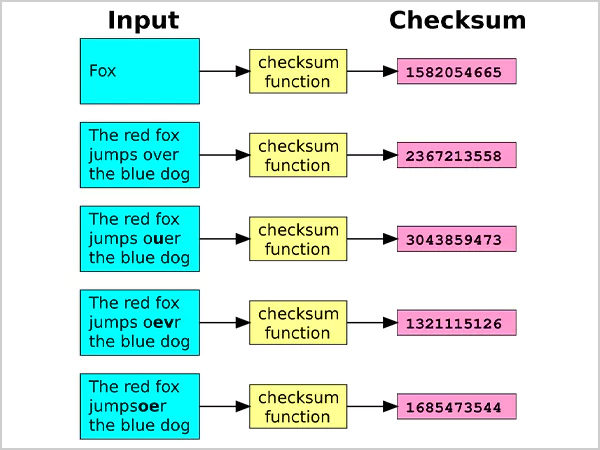
A checksum is a unique value generated from a file, data block, or message using a mathematical algorithm.
Think of it as a digital fingerprint. It helps determine whether data has been altered, corrupted, or tampered with during storage or transmission. When it is generated, the algorithm analyzes the entire file and produces a fixed-length value. If even a single bit changes, the checksum value changes as well.
Commonly, a checksum is used for software downloads, cloud storage, backup systems, network communications, and operating system images. For example, Linux distros (like Linux Mint and Ubuntu) often publish checksum values alongside ISO files so users can verify their downloads before installation.
How Does a Checksum Work?
To understand the checksum meaning clearly, you should know that it works by converting data into a fixed-length value using a checksum algorithm. Here’s the process:
- First, a file or data set is processed by a checksum algorithm.
- Then, the algorithm generates a checksum value.
- The checksum is stored or published alongside the file.
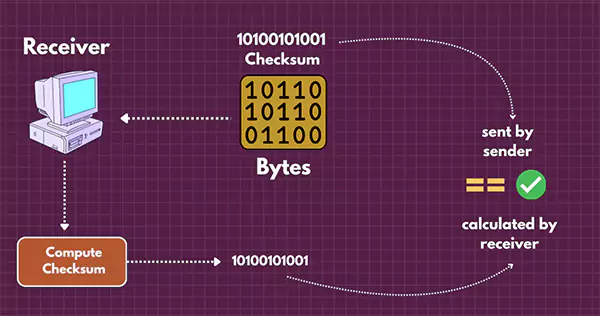
- When the file is downloaded, copied, or transferred, a new checksum is generated.
- Now, both values are compared.
If the checksums match, the file remains unchanged. If they don’t match, the file has likely been modified or corrupted.
Let’s understand with a quick checksum example. A software vendor may publish a SHA-256 checksum for an installer. After downloading the file, you can generate your own SHA-256 checksum and compare the two values. If they match, it means the file is intact.
Why are Checksums Important?
Checksum verification helps ensure that data remains accurate and unchanged. Without them, it would be difficult to know whether a downloaded file, backup, or transferred document matches the original version.
They are commonly used to:
- Detect corruption, transmission errors, and accidental file modifications.
- Verify successful downloads, transfers, and backups.
- Validate software packages, updates, and system images.
- Maintain data integrity during storage and transmission.
- Improve reliability in networking and storage systems.
- Help identify issues within the transferred data.
- Support digital signatures and other security-related verification processes.
For example, a Linux ISO file may download successfully but still contain corrupted data. Comparing its Linux checksum with the value published by the developer confirms that the file is complete and unchanged.
What are the Common Types of Checksum Algorithms?
Different algorithms are designed for different purposes. Some prioritize speed, while others focus on stronger security. Let’s take a look at some common ones:
- CRC (Cyclic Redundancy Check)
CRC is commonly used in networking, storage devices, ZIP files, and communications systems. It is excellent at detecting accidental errors, but it is not intended for security purposes.
- MD5
MD5 generates a 128-bit hash value and was once widely used for file verification. While it remains useful for detecting accidental corruption, it is no longer considered secure because attackers can generate collisions.
- SHA-1
SHA-1 improved on MD5 but is now considered outdated for security-sensitive applications due to known vulnerabilities.
- SHA-256
SHA-256 is currently one of the most trusted checksum algorithms for file verification. It is widely used for software downloads, operating system images, digital certificates, and file integrity checks. Many software vendors publish SHA-256 checksums alongside downloads.
- SHA-512
SHA-512 belongs to the SHA-2 family and produces a longer checksum value. It is often used in environments that require stronger security and data validation.
- SHA-3
SHA-3 is the latest member of the Secure Hash Algorithm family. Built on the Keccak algorithm, it provides strong protection against modern attack methods and is commonly used in high-security environments.
- Adler-32 and Fletcher Checksums
These lightweight algorithms prioritize speed over advanced error detection. They are often used in compression tools and performance-focused applications where quick verification is more important than cryptographic security.
How to Use and Verify Checksum Files?
File checksum verification takes only a few moments and can help prevent problems later. Here’s how you can do that:
- First, download the file and the checksum value provided by the software vendor.
- Then, on Linux, run: “sha256sum filename.iso”. This generates a SHA-256 checksum for the file.
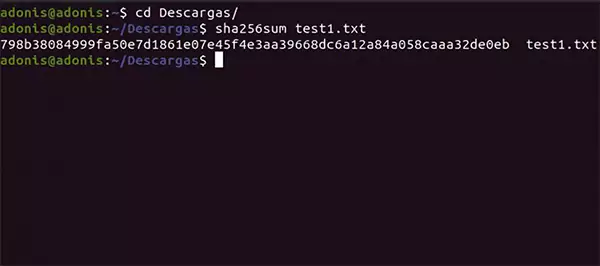
- Now, compare the generated value with the checksum provided by the vendor. If both values match exactly, the file is safe and sound.
- If a checksum file is available, you can also verify it automatically. Just run: “sha256sum -c SHA256SUMS”. The system will automatically verify the file and report whether it passes the integrity check.
That’s all it takes. If both Checksum Linux values match, the file is unchanged. If they don’t, the file is probably corrupted or incomplete and should be downloaded again.
What is a Checksum Error?
A checksum error occurs when the checksum generated from a file does not match the expected checksum value.

In simple terms, it means the file being verified is different from the original version. Since a checksum changes whenever data is modified, even a small alteration can result in a mismatch.
Checksum errors can occur because of incomplete downloads, network interruptions during file transfers, storage device failures, file corruption, accidental modifications, or malicious tampering.
If you encounter a checksum error, do not ignore it. The safest approach is to delete the file and download it again from a trusted source. Once you download the file again, verify the checksum once more to ensure it matches the original value provided by the source.
Best Practices for Using Checksums Effectively
Checksums work best when combined with good security and data management habits. I would recommend that you follow these practices:
- Use SHA-256 or SHA-512 instead of MD5 or SHA-1.
- Try to download checksum values from official sources only.
- Verify large software downloads before installation.
- Check backups regularly for corruption.
- Store checksum files separately from important data.
- Re-verify files after transferring them between systems.
- Use a digital signature whenever available.
One important thing to remember is that checksums verify integrity, not authenticity. A matching checksum confirms that the file has not changed. It does not prove that the file came from a trusted source. That is why digital signatures are often used alongside checksums.
Conclusion
Checksums play an important role in protecting data integrity. Whether you are downloading software, transferring files, managing backups, or maintaining servers, they provide a quick way to verify that data remains unchanged.
While a checksum cannot guarantee that a file is safe, it can confirm that the file you received matches the original version. When combined with trusted sources and digital signatures, it becomes one of the simplest and most effective tools for preventing data corruption and verification issues.
Frequently Asked Questions
What is a checksum file?
What does a checksum do?
A checksum detects changes in data and helps verify file integrity during storage or transfer.
How do I run a checksum?
You can generate a checksum using command-line tools on most operating systems. Then compare the generated value with the checksum provided by the source to verify integrity.
What are the common applications of checksums?
They are used in software downloads, backups, cloud storage, operating system images, and network communications.
Can a checksum guarantee that a file is safe?
No, checksum only verifies file integrity. To verify authenticity, you should also use trusted sources and digital signatures.
Related Posts
How to Protect Business Data From Unwanted Scrapers
Scrapers are a well-known problem for businesses; protecting private records, discouraging unwanted bulk copying, and preserving access are topics one…
Your Email is Data Too: Testing AI Tools That Work Without an Account
People who read about data recovery are most likely to think hard about the place where the files can go.…

UX Design Firm or Full Product Partner: Who Owns the Outcome?
The ownership argument between both kinds of suppliers never ends. The sentence costs nothing to say, but blindly trusting that…

What is BitLocker and How Does It Work?
A stolen laptop can expose far more than the device itself. Your documents, work files, photos, and personal information may…

Beyond the Checkout: 5 Best High-Risk Merchant Account Providers for Online Businesses
Even with polished checkouts, online stores can still have trouble getting secure, suitable payments. The process is more complex than…

The 8 Best Automated Accessibility Testing Tools for Websites
Great copy and sharp design don’t prove that your website is accessible. It’s things like colour contrast, missing alt text,…

Cybersecurity Training for Beginners: 4 Practical Options Compared
Starting in cybersecurity is confusing because most beginner options look similar on the surface. Some are compact awareness courses, some…

The Ultimate Guide to Electronic Signatures for Businesses 2026
Electronic signatures are making modern workflows more convenient and time-saving. This guide to electronic signatures will let you know how…

How Email Authentication Fits Into a Layered Cybersecurity Strategy
One convincing email can be sufficient to pose major problems regarding security for a business. An email that appears to…