


Possible. But you have to know how encryption works in both processes. If the provider confirms the transmission perfectly, then fax leads. It matters only in terms of security and transparency.
Are Online Fax Services Secure? A Practical Guide to Encryption, Storage, and Compliance
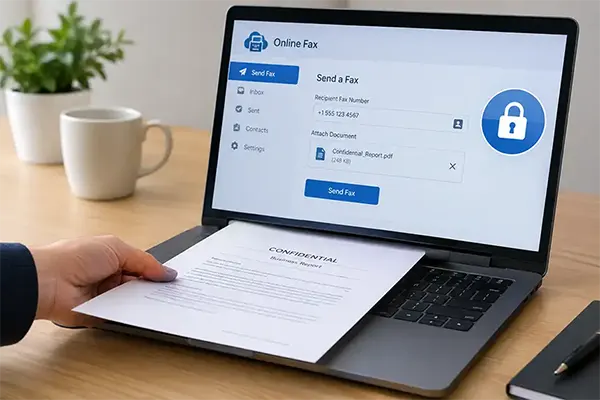
When you use fax to send the document, you have stronger digital control over the online application. It looks outdated and exposed, but it is not what it looks like. People sitting in offices seem less interested, while fax providers do not feel the same.
The major risk involved in the system is when the document is passed through servers, processing systems, and email. You only assume that the system is safe, but it’s not the full picture you know about the fax provider and the system along with it.
When you select the fax provider, check the process when you send the document and whether the security is encrypted, storage, retention, or deletion of the logs provided.
What “Secure” Actually Means for a Fax
When your file is encrypted, this is another fraction of understanding that it means two different things: protection when your file is exchanged between senders and receivers, or when your file remains at the server.
Your file is secured by TLS during upload and delivery, but encryption is important when it is stored behind the bars.
You should know that the encryption is transparent: who has the key to the encryption by AES and how it is controlled, system details carried. All these questions make your service provider a legitimate authority on how they handled your documents.
Saying encrypted doesn’t feel safe when you don’t know the process involved in an authorized account accessing these files. Datarecovee’s employee device data protection session gives you a framework in which encryption is only one part of security compliance; there is a lot more left.
Stat Callout: Data breaches account for a rapid increase year after year by 12% and amount to an average cost of nearly $4.99 million globally.
Where the Document Goes After It’s Sent
What you think about the document when you send it to your provider for delivery. They keep the copy for confirmation and to maintain records with backups. This is the simple procedure followed by all providers.
You have to ask your provider how long the document is saved on their servers, who has access, and what the retention policy is when you delete the records.
For engineers, the deletion is a bigger task than keeping the copies. Business data loss recovery is still only an option when the original is completely deleted, as better explained in Datareovee’s guideline.
What Compliance Frameworks Actually Require
Compliance is required for the security framework. HIPAA also does not completely support encrypting everything. HHS treats encryption under the Security Rule as an addressable specification. This means it can be optional in some situations.
In this situation, addressable compliance allows accepting the condition to encrypt the file. If not, then the organisation has equivalent protection to save the file otherwise. The Government rule HIPAA contains many compliance requirements such as access controls, authentication, audit logs, and security systems in delivery.
HIPAA compliance requires a fax provider to secure the protected health information under a business associate. The vendor enquired about the data controls, activity records, and transmission safety protocols maintained during handling copies.
The Free-Tier Trade-Off
The free fax plans are usually for loose documents, less important, and simple files. But they are limited in security, storage, and deletion systems. When uploading, ensure the encryption rules for the services provided.
A rundown of free online fax services will commonly show a space to approach your requirement for simple and storage-level protection, which covers paying to remove the branding page on it.
Public forms are different from passports, tax logs, legal documents, or bank statements. Relate them to your service providers. Not disclosing the handling information is a bigger issue.
Where Human Error Still Wins
When your data is encrypted, but you mistyped the details before sending to a provider, it is another type of mistake. Because the transaction is completed without any delays to your entered fax number. Technically, it is right, but you sent it to the wrong receiver; that’s the human error I talked about above.
The reason to learn about this procedure of unsending a mail in Outlook is to correct sending the wrong email. The system changed the direction, but not the fault.
Quick Insight: Good fax security combines informed technology with checks; the sender is the main part of the system.
Before You Hand Over a Sensitive Document
Some of the important measures to follow before sending the documents to service providers:
- What encryption means to it: storage, transmission, and security for how long.
- Follow up on the rules mentioned to state the conditions under which your file can be accessed, backup procedures, and deletion protocols.
- Ensure the administration explains who accesses the information and how this is handled.
- How the provider signs the BAA when HIPAA is required for health information.
- Also go through the free plan, where it can leave the thread out with respect to paid plans.
Datarecovee’s data loss guidance supports the habit discussed above.
The Bottom Line
The fax contains some of the sensitive information, such as business documents, legal documents, or bank statements. The simple rule is followed for all the files being transmitted under HIPAA regulation. Questions arise: what is encrypted, how is it handled through servers, and what happened to the copy made during the transaction. All these questions remain as they are. The regulated have some other measures, or the free trial has others.
The Datarecovee’s knowledge base has a wider view of security, access, and recovery in handling. Security only matters when you know what will happen if you send the file forward.
Frequently Asked Questions
Is online fax more secure than email?
Does HIPAA require fax providers to use encryption?
Not sure; HIPAA categorizes encryption under addressable format, which is based on security parameters that are mutable or not, but terms should be followed under security protocols.
How long do online fax services keep copies of documents?
Not a fixed period. It based on providers terms and conditions whether it file is copied or storage and their retention policies varies with their management flexibility on how they are managed.
Is a free fax service safe for sensitive documents?
It generally is not. Check the security of free plans with transit, retention, deletion, access controls, and handling sensitive content before uploading.
Related Posts
How to Protect Business Data From Unwanted Scrapers
Scrapers are a well-known problem for businesses; protecting private records, discouraging unwanted bulk copying, and preserving access are topics one…
Your Email is Data Too: Testing AI Tools That Work Without an Account
People who read about data recovery are most likely to think hard about the place where the files can go.…

UX Design Firm or Full Product Partner: Who Owns the Outcome?
The ownership argument between both kinds of suppliers never ends. The sentence costs nothing to say, but blindly trusting that…
What is BitLocker and How Does It Work?
A stolen laptop can expose far more than the device itself. Your documents, work files, photos, and personal information may…
Beyond the Checkout: 5 Best High-Risk Merchant Account Providers for Online Businesses
Even with polished checkouts, online stores can still have trouble getting secure, suitable payments. The process is more complex than…
The 8 Best Automated Accessibility Testing Tools for Websites
Great copy and sharp design don’t prove that your website is accessible. It’s things like colour contrast, missing alt text,…
Cybersecurity Training for Beginners: 4 Practical Options Compared
Starting in cybersecurity is confusing because most beginner options look similar on the surface. Some are compact awareness courses, some…
The Ultimate Guide to Electronic Signatures for Businesses 2026
Electronic signatures are making modern workflows more convenient and time-saving. This guide to electronic signatures will let you know how…
How Email Authentication Fits Into a Layered Cybersecurity Strategy
One convincing email can be sufficient to pose major problems regarding security for a business. An email that appears to…