
An air-gapped network is physically isolated from other networks, with no direct network connection between them. Data transfers in these networks require a controlled process.
What Does Air Gapped Mean? How It Works and Why It Matters
 Written by Upasna Deewan
An air gapped environment sounds secure simply because it has no internet connection, but keeping data isolated involves more than disconnecting a network cable. Organizations must also control data transfers, updates, maintenance, and backup access to preserve that separation.
Air gapping helps protect sensitive information and critical systems from network-based attacks. This guide explains the air gapped definition, how it works, the different types of air gaps, and how these types of backups can strengthen data protection.
What is an Air Gapped System?
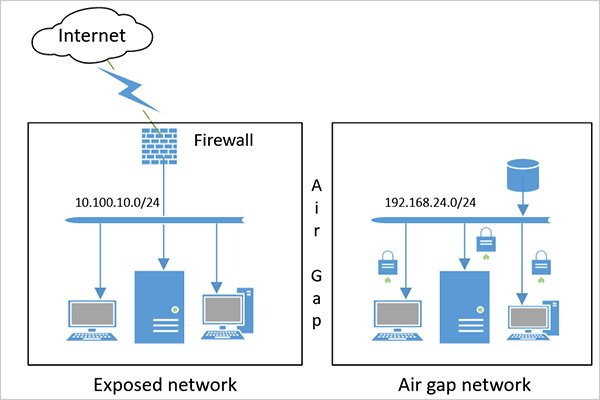
An air gapped system is a computer, network, or storage environment isolated from other networks to reduce the risk of unauthorized access. Under the strict definition, a physical air gap means there is no direct network connection between the protected environment and external systems, and data transfers are not automated.
For example, a computer storing research data might have no connection to the internet or an organization’s regular network. Authorized staff could transfer approved files using removable storage under a controlled procedure.
Air gapped storage is used where network exposure poses serious risks, including sensitive government environments, industrial control systems, and backup storage.
Air-gapping also plays an important role in data protection. Organizations isolate backup copies so attackers who compromise the production network cannot easily access or delete them. However, not every product marketed as an airgapped solution provides a strict physical air gap. The actual level of isolation depends on its design and security controls.
How Does Air Gapping Work?
Air gap networking works by removing or tightly restricting the paths through which external systems can access protected equipment or data.
In a physically air-gapped setup, the protected system has no active network connection to the outside environment. When data needs to move in or out, an authorized person performs a controlled transfer, often using approved removable media.
For instance, an organization might back up critical files to an external drive, verify the backup, disconnect the drive, and store it securely. If ransomware later spreads through the office network, the disconnected drive is much harder for the malware to reach remotely.
Maintaining this separation requires more than disconnecting a network cable once. Teams must control wireless interfaces, removable media, maintenance procedures, and temporary connections used to update or restore the system.
Air gapping reduces network exposure, but it does not eliminate every threat. Infected USB drives, unsafe updates, insider actions, and accidental reconnections can still compromise an isolated environment.
What are the Types of Air Gaps?
Air gaps generally fall into two broad categories: physical and logical. Cloud backup services may also offer isolation features, although cloud storage is not automatically a true air gap. Let’s try to understand these types.
1. Physical Air Gap
A physical air gap separates a system or storage device from network connections. Examples include disconnected backup drives, offline tapes, and standalone computers with no network connectivity.
This approach provides strong protection against remote network attacks, but data transfers and recovery require controlled physical access.
2. Logical Air Gap
A logical air gap uses software and access controls to restrict connections to a system or backup. These controls may include network segmentation, separate credentials, restricted administrative access, and limited backup access windows.
Logical isolation is often easier to manage than physical disconnection, but its effectiveness depends on the controls in place. If an attacker compromises the relevant system or credentials, those protections may be weakened.
Unlike a strict physical air gap, a logical air gap may still rely on network connections.
3. Cloud-Based Isolation
Some cloud backup services offer isolated repositories, restricted access, and immutable storage. These features can help protect backups without requiring an organization to manage all the storage hardware itself.
However, a cloud backup is not necessarily air-gapped. A repository that remains network-accessible differs from a physically disconnected backup.
Before relying on a service, check how the provider manages connectivity, administrative access, and deletion protection.
What is Air Gap Backup?
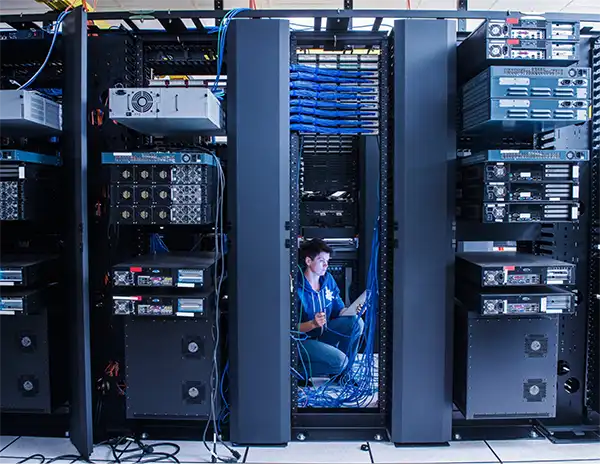
An air gap backup is a copy of important data stored separately from production systems, making it harder for ransomware or unauthorized users to access, modify, or delete it.
A typical process involves backing up critical data, verifying the copy, isolating it, and testing restoration regularly. However, isolation cannot protect a backup that was already corrupted or compromised before disconnection.
Air-gapped backups should therefore complement regular backups, encryption, and recovery testing.
Benefits and Limitations of Air Gapped Backups
Air-gapped backups add a layer of protection by separating recovery copies from production systems. However, they require careful management and do not eliminate every risk.
Pros
- Ransomware protection: Disconnected copies are harder for network-based malware to reach.
- Reduces unauthorized access: Isolation limits access paths to protected data.
- Disaster recovery: Separate copies may survive production system failures.
- Greater control: Access to backup media can be restricted.
Cons
- Slower recovery: Offline media may require manual access and restoration.
- Extra administration: Teams must manage storage, transfers, and schedules.
- Human error: Unsafe media or accidental reconnections can weaken protection.
- Physical risks: Media can still be lost, stolen, or damaged; e.g., an external hard drive not showing up can be an issue in recovery.
- Existing compromise: Isolation cannot remove malware already present in a backup.
To improve protection, encrypt backup copies, restrict access, store copies securely, and test restoration regularly.
How to Build an Air Gapped Backup Strategy
A reliable strategy for the air gap backup solution needs a consistent process for protecting data and restoring it when systems fail.
- Identify Critical Data: Prioritize business files, databases, system images, and other information that would be difficult to replace.
- Choose the Isolation Method: Decide whether disconnected drives, offline tapes, or a suitably isolated backup repository best fits your requirements.
- Schedule Regular Backups: Set the frequency according to how much recent data you can afford to lose. You can figure this out using RTO and RPO.
- Encrypt Backup Copies: Protect sensitive data if storage media is lost or stolen. Keep encryption keys secure but accessible to authorized recovery personnel.
- Restrict Access: Limit who can create, delete, reconnect, or restore backups.
- Keep a Separate Copy: Store backups away from production systems. Consider an offsite copy and use the 3-2-1 backup rule to reduce the risk of one physical disaster destroying everything.
- Test Recovery: Confirm that backups are readable and the essential files and systems can be restored.
Do not wait until a ransomware incident to test the process. A backup is useful only if it contains the data you need and you can restore it successfully.
Conclusion
Air gapped helps protect critical systems and backups by limiting their exposure to external networks. However, it cannot eliminate every threat or guarantee that a backup is clean. Control data transfers, secure isolated copies, restrict access, and test recovery regularly to make air gapping an effective part of your broader data protection strategy.
Frequently Asked Questions
What is an air gapped network?
Why is air gapping important?
It reduces exposure to network-based attacks and helps protect sensitive systems and backups from ransomware and unauthorized access.
Does air gapped mean no internet?
A strict physical air gap means the protected system has no network connection to the internet or other external networks. However, logical isolation may restrict access without completely disconnecting the system.
Is an air gapped computer completely secure?
No, infected USB drives, compromised updates, insider threats, and unauthorized physical access can still compromise an air-gapped computer.
What is the difference between air gapped and immutable backups?
Air-gapped backups are isolated from networks or systems, while immutable backups cannot be modified or deleted during a defined retention period. Using both can provide an additional layer of protection.
Related Posts

Fix the Data Before You Buy a BI Tool
Most of the growing businesses has one spreadsheet that holds the operation together. It might track orders, jobs, inventory, or…

Best Practices for Confirming Data Sanitization After IT Assets Are Resold
Data sanitization is the permanent, irreversible removal or destruction of data stored on IT hardware and memory devices so that…

How to Protect Business Data From Unwanted Scrapers
Scrapers are a well-known problem for businesses; protecting private records, discouraging unwanted bulk copying, and preserving access are topics one…

Your Email is Data Too: Testing AI Tools That Work Without an Account
People who read about data recovery are most likely to think hard about the place where the files can go.…

UX Design Firm or Full Product Partner: Who Owns the Outcome?
The ownership argument between both kinds of suppliers never ends. The sentence costs nothing to say, but blindly trusting that…

What is BitLocker and How Does It Work?
A stolen laptop can expose far more than the device itself. Your documents, work files, photos, and personal information may…

Beyond the Checkout: 5 Best High-Risk Merchant Account Providers for Online Businesses
Even with polished checkouts, online stores can still have trouble getting secure, suitable payments. The process is more complex than…

The 8 Best Automated Accessibility Testing Tools for Websites
Great copy and sharp design don’t prove that your website is accessible. It’s things like colour contrast, missing alt text,…

Cybersecurity Training for Beginners: 4 Practical Options Compared
Starting in cybersecurity is confusing because most beginner options look similar on the surface. Some are compact awareness courses, some…