


RTO stands for Recovery Time Objective. It is the maximum amount of time a business can tolerate a system, application, or service being unavailable after an outage.
RTO vs RPO: Meaning, Key Differences, and Examples
A business disruption does not just put your systems offline; it can also interrupt operations, affect customers, and lead to valuable data loss. Whether it is caused by a cyberattack, hardware failure, or human error, every organization needs a recovery plan.
That’s where Recovery Time Objective (RTO) and Recovery Point Objective (RPO) come in. In this RTO vs RPO guide, you will learn what these metrics mean, how they differ, and why they are essential for building an effective disaster recovery strategy.
TL;DR
- RTO defines the maximum downtime your business can tolerate after a disruption.
- RPO defines the maximum amount of data your business can afford to lose.
- RTO focuses on recovery speed, while RPO determines backup frequency.
- The right RTO and RPO depend on your business needs, risk tolerance, and budget.
- Setting realistic recovery objectives and testing them regularly helps minimize downtime, reduce data loss, and improve business continuity.
What is RTO and RPO?
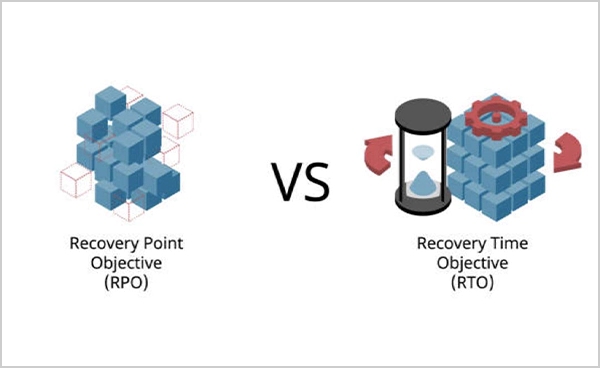
RTO and RPO are two key metrics used in disaster recovery and business continuity planning. While they are often mentioned together, they measure different aspects of recovery.
What is RTO?
Recovery Time Objective is the maximum amount of downtime your business can tolerate after an outage. It defines how quickly a system, application, or service should be restored after an unexpected disruption.
Example: If an online banking platform has an RTO of one hour, the IT team must restore the service within 60 minutes to avoid significant business impact.
What is RPO?
RPO full form is Recovery Point Objective, which is the maximum amount of data your business can afford to lose before operations resume. RPO disaster recovery also determines how frequently backups or data applications should occur.
Example: If your RPO is 15 minutes, your backup strategy should ensure you never lose more than 15 minutes of data.
In simple terms, RTO meaning in business is how quickly you need to recover, while RPO means how much data you can afford to lose.
RTO vs RPO: What’s the Difference?
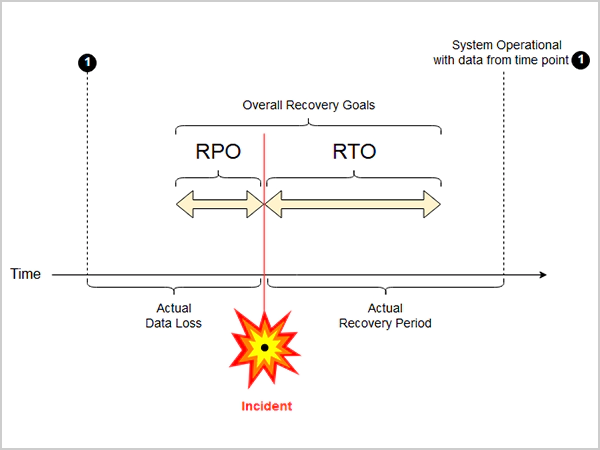
Now that you know about RPO and RTO meaning in business, let’s take a quick look at their key differences.
| Recovery Time Objective (RTO) | Recovery Point Objective (RPO) |
| Measures acceptable downtime | Measures acceptable data loss |
| Focuses on restoring services | Focuses on data recovery |
| Determines recovery speed | Determines backup frequency |
| Usually measured in minutes or hours | Measured in minutes, hours, or days |
| Supports disaster recovery planning | Supports backup and replication planning |
The easiest way to remember the RTO/RPO difference is:
- RTO = Time
- RPO = Data
Together, RTO and RPO in cybersecurity help businesses decide both how quickly systems should be restored and how much recent data must be protected.
How Do RTO and RPO Work in Real Life?
Recovery goals vary depending on how critical a system is. The more important the application, the lower its RTO and RPO usually need to be. Let’s understand this with the help of a few examples.
| System | RTO | RPO | What It Means |
| Online Store | 20 minutes | 5 minutes | The website should be restored within 20 minutes and lose no more than five minutes of order data. |
| Hospital Information System | 5 minutes | Near zero | Patient records must remain available almost immediately, with virtually no data loss. |
| Internal HR Portal | 8 hours | 24 hours | Since the system is not business critical, longer downtime and less frequent backups are acceptable. |
These examples show that recovery objectives should match the importance of each workload. Customer-facing platforms and healthcare systems usually require aggressive recovery windows.
The key takeaway is there isn’t a single RTO or RPO that fits every organization. The right values depend on how much downtime and data loss your business can realistically afford.
Why Do RTO and RPO Matter for Business Continuity?
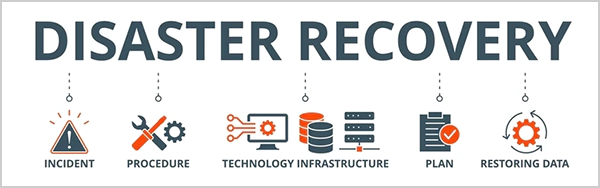
Every minute of downtime can affect productivity, customer trust, and revenue. Similarly, losing important business data can disrupt operations, delay recovery, and even create legal or compliance issues.
That is why organizations define RPO and RTO before a disaster happens. Some of the key benefits include:
- Reduce Downtime: Clear recovery targets help IT teams restore critical systems faster.
- Minimize Data Loss: Appropriate backup schedules ensure important business data can be recovered.
- Improve Disaster Preparedness: Recovery objectives provide a structured response during unexpected disruptions.
- Support Compliance: Many industries require businesses to define and regularly test these recovery objectives
- Optimize IT Spending: Critical applications receive stronger protection, while less important workloads can use more cost-effective recovery solutions.
Without clearly defined goals, organizations often rely on guesswork during an outage, leading to longer recovery times, higher costs, and unnecessary business disruptions.
Best Practices for Recovery Planning
Setting recovery objectives is only the first step. Following a few best practices for RTO and RPO ensures that they can be achieved when a real disaster occurs.
- Prioritize Critical Applications: Focus your recovery efforts on systems that have the greatest impact on business operations. Mission-critical applications should receive faster recovery and more frequent backups than less important workloads.
- Automate Backups: Manual backups increase the risk of human error. Automated backups help in maintaining recovery points and improve reliability.
- Test Your Disaster Recovery Plan: A recovery plan should be tested regularly, not just documented. Recovery drills help verify that your organization can actually meet its RTO and RPO targets.
- Store Backup Copies Off-Site: Keep at least one backup in a different physical location or secure cloud environment. This is a key element of the 3-2-1 backup strategy, and it protects your data from ransomware, hardware failures, fires, floods, and other site-wide disasters.
- Review Recovery Objectives Regularly: Recovery requirements change as businesses grow. Review your RTO and RPO whenever you deploy new applications, expand operations, or update compliance requirements.
RPO vs RTO: Final Thoughts
RPO and RTO are two of the most important metrics in any disaster recovery plan. Rather than choosing one over the other, businesses should use both to build a recovery strategy that matches their operational needs, budget, and risk tolerance.
By identifying critical systems, setting realistic recovery objectives, implementing reliable backups, and testing recovery plans regularly, organizations can reduce downtime, minimize data loss, and recover more confidently from unexpected disruptions.
Frequently Asked Questions
What does RTO stand for?
What does RPO stand for?
RPO stands for Recovery Point Objective. It defines the maximum amount of data loss a business can accept and helps determine how frequently backups should be performed.
How are RTO and RPO calculated?
Organizations typically determine RTO and RPO through a Business Impact Analysis (BIA), evaluating factors such as operational impact, financial losses, compliance requirements, and available recovery technologies.
Which is more important: RTO or RPO?
Neither is more important than the other. RTO focuses on minimizing downtime, while RPO focuses on minimizing data loss. Both are essential for an effective disaster recovery strategy.
What does RTO mean in business?
In business, RTO is the target time within which critical systems, applications, or services must be restored after an unexpected disruption to avoid unacceptable financial, operational, or reputational damage.
Related Posts
How Long Does Backing Up to iCloud Take? Causes and Fixes for Slow Backups
Is your iCloud backup taking ages? When your backup keeps spinning, it can be hard to tell whether it’s making…
How MSPs Package Backup and Recovery as a Subscription That Actually Restores
An MSP technician checks nightly backup job results across several client accounts Some businesses often try to own a backup.…
Best Tools for Recovering Deleted Files on a Mac
A wrong click can leave you sinking in grief and sorrow, just because that accidental click has deleted an important…

What to Back Up Before Migrating Your Business to New Software
Software migration hardly results in data loss during migration. It’s possible that you lose the data after a week or…

How Modern Enterprises Are Scaling Infrastructure with Custom AI
For many businesses, AI works as a collection of tiny experiments such as a chatbot, a coding assistant, or sometimes…
VMware vs. Sangfor aSV vs. Nutanix: Which Hypervisor Actually Saves You Money?
Selecting the right hypervisor isn’t simply an issue of technology; it could end up having a significant effect on your…

SD Card Corruption in IoT Devices: Why It Happens So Often and How to…
IoT devices can have good sensors, robust software, and an excellent housing, but all it takes is one small thing…

5 Best SaaS Platforms for Financial Services and Growing Businesses in 2026
In 2026, SaaS platforms have become essential for businesses that want to build smooth processes, automate routine tasks and clarify…

How Digital Records Support Workplace Injury Claims
An injury in the workplace does not necessarily mean that you have just a physical problem to overcome. It could…