
It is the process of restoring data, applications, and IT systems after a disruption using cloud backups, replicated resources, or standby infrastructure.
What is Cloud Disaster Recovery? How It Works, Strategies, and Plan
 Written by Kartik Wadhwa
Table of Contents
- What is Cloud Disaster Recovery?
- How Does Cloud-Based Disaster Recovery Work?
- What are the Main Cloud Disaster Recovery Strategies?
- Cloud Disaster Recovery vs. Cloud Backup
- Pros and Cons of Cloud Computing Disaster Recovery
- How to Create a Cloud Disaster Recovery Plan?
- Conclusion
- Frequently Asked Questions
When a system outage hits, having your data backed up is only half the battle. You also need a reliable way to restore applications, infrastructure, and essential services before downtime disrupts business operations.
Cloud disaster recovery helps businesses recover using cloud and disaster recovery resources instead of relying entirely on a second physical data center. The right approach depends on how quickly systems must be restored, how much data the business can afford to lose, and the available budget.
What is Cloud Disaster Recovery?
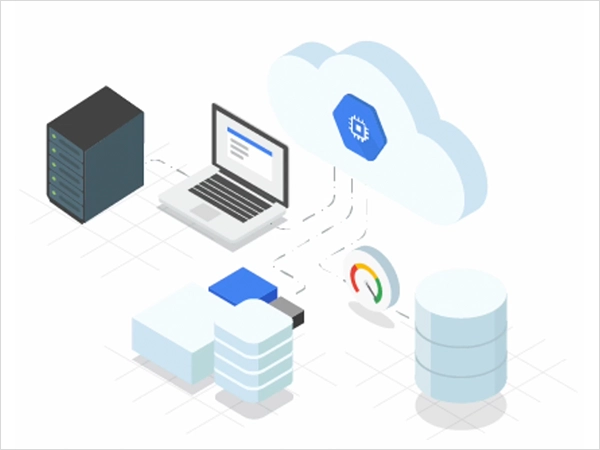
Cloud disaster recovery (Cloud DR) is a strategy for restoring applications, data, and IT infrastructure after an outage, cyberattack, hardware failure, or other disruptive event. Businesses use cloud computing and disaster recovery resources to store recovery copies, replicate workloads, or run replacement systems instead of relying on a secondary physical data center.
It can protect on-premises infrastructure, cloud-hosted applications, and hybrid environments. Organizations can manage recovery themselves or use disaster recovery as a service (DRaaS), in which a provider helps manage the disaster recovery plan, cloud computing, and process.
The goal is to restore critical operations within an acceptable timeframe while limiting data loss. The right setup depends on business priorities, recovery requirements, and budget.
How Does Cloud-Based Disaster Recovery Work?
Cloud-based disaster recovery services use backups, replicated data, and protected recovery resources to restore systems after a disruption. Although the exact process depends on the chosen strategy, it typically follows these steps:
- Back Up or Replicate Data: Copy critical files, databases, configurations, and workloads to a protected cloud environment.
- Prepare Recovery Resources: Configure the infrastructure, software, permissions, and network settings required to restore operations.
- Detect and Assess the Disruption: Identify affected systems and determine whether the disaster recovery plan needs to be activated.
- Restore or Fail Over: Restore systems from a suitable backup or switch workloads to a standby environment.
- Verify Operations: Check data integrity, application functionality, connectivity, and user access.
- Return to Normal Operations: Once the primary environment is safe, move workloads back if the recovery plan requires it.
Two key metrics help determine how quickly systems must recover and how much data loss is acceptable: Recovery Time Objective (RTO) and Recovery Point Objective (RPO).
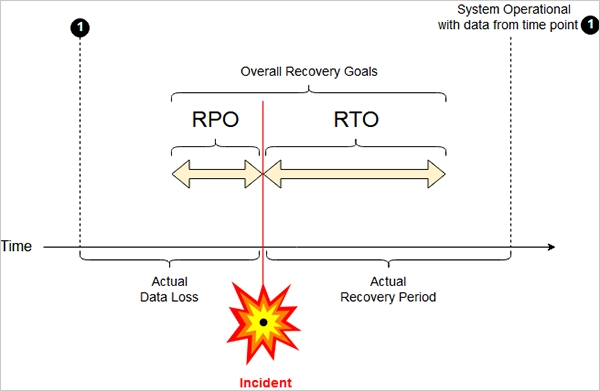
| Metric | What It Means |
| RTO | The target maximum time a business can tolerate before a system is restored. |
| RPO | The target maximum amount of data loss, measured by the time between the latest recoverable data and the disruption. |
For example, an RTO of two hours means the target is to restore the system within two hours. An RPO of 15 minutes means the business aims to limit data loss to changes made during roughly the 15 minutes before the disruption.
These are recovery targets, not guarantees. Regular testing helps determine whether the chosen setup can meet them under realistic conditions.
What are the Main Cloud Disaster Recovery Strategies?
Cloud DR strategies differ in recovery speed, ongoing cost, and how much infrastructure is ready before an incident. Generally, keeping more resources prepared in advance costs more but can reduce downtime.
| Strategy | How It Works | Cost and Recovery |
| Backup and restore | Backups are stored in the cloud. Infrastructure is provisioned, and data is restored after a disruption. | Lowest ongoing infrastructure cost; generally slower recovery. |
| Pilot light | Essential components and data are maintained in the recovery environment, while other resources are started when needed. | Moderate cost and recovery time. |
| Warm standby | A smaller but functional version of the production environment runs in the cloud and can be scaled up during recovery. | Higher cost; faster recovery. |
| Multi-site active/active | Workloads run across multiple locations and serve traffic simultaneously. | Highest complexity and cost; potentially minimal downtime. |
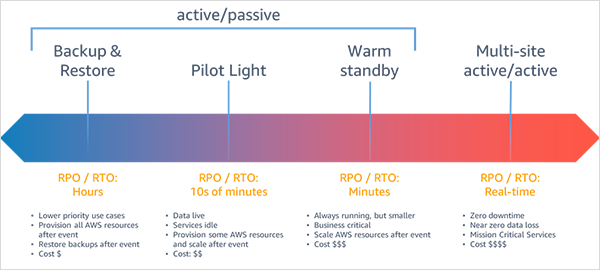
You should choose a strategy based on your recovery requirements:
- Backup and restore suits systems that can tolerate longer outages.
- Pilot light suits workloads that need quicker recovery without keeping the entire environment running.
- Warm standby is appropriate when services need to return online faster.
- Multi-site active/active is generally reserved for critical services where even brief interruptions are costly.
Replication alone is not enough. If corrupted or maliciously modified data is replicated, the recovery environment may be affected too. Maintain protected, point-in-time backups and follow the 3-2-1 backup rule alongside replication so you can recover a clean version of your data.
Cloud Disaster Recovery vs. Cloud Backup
Cloud backup preserves data; a disaster recovery plan for cloud services restores systems and business operations. Here’s a quick comparison of both:
| Feature | Cloud Backup | Cloud Disaster Recovery |
| Primary purpose | Preserve data for recovery. | Restore systems and operations after disruptions. |
| Scope | Files, databases, and stored data. | Data, applications, infrastructure, configurations, and recovery procedures. |
| Recovery method | Retrieve or restore a backup. | Restore backups, start replacement resources, or fail over to standby systems. |
| Main consideration | Backup frequency, retention, and protection. | Recovery speed, acceptable data loss, dependencies, and service restoration. |
Pros and Cons of Cloud Computing Disaster Recovery
Cloud DR solutions offer several advantages, but it also comes with costs and technical challenges. Let’s take a look at its pros and cons:
Pros
- Reduces the need to maintain a separate physical data center.
- Allows businesses to scale cloud resources up during recovery and down afterward.
- Stores recovery copies in separate regions to reduce exposure to local disasters.
- Uses replication and standby environments to help minimize downtime.
- Supports both on-premises and cloud-hosted workloads.
Cons
- Storage, replication, data transfer, and testing can increase costs.
- Applications, networks, and databases require careful configuration.
- Provider outages or account access issues can disrupt recovery.
- Data storage and access must meet security and compliance requirements.
- Large datasets and network limitations can delay restoration.
How to Create a Cloud Disaster Recovery Plan?
Start by identifying critical applications, databases, infrastructure, and their dependencies. Set an RTO and RPO for each workload based on acceptable downtime and data loss. Then, choose a recovery strategy that fits your budget and requirements.
Protect backups with encryption, access controls, separate copies, and enable replication when needed. Document recovery procedures, assign responsibilities, and include steps for restoring services and communicating with stakeholders.
Finally, test the plan regularly to verify backups, measure recovery performance, and fix issues. Update it whenever systems or business requirements change.
Conclusion
Cloud disaster recovery helps businesses restore critical systems without relying on a second physical data center. The right strategy depends on acceptable downtime, potential data loss, budget, and technical requirements.
Choose a strategy that matches the business impact of downtime. Critical services may need faster, more expensive recovery options, while less essential systems may be adequately protected by backup and restore.
Frequently Asked Questions
What is disaster recovery in cloud computing?
What are RTO and RPO in cloud disaster recovery?
RTO is the target time to restore a system, and RPO is the target maximum amount of data loss, measured in time.
Is disaster recovery in the cloud suitable for small businesses?
Yes, small businesses can use cloud resources to protect critical data and restore systems without maintaining a separate physical data center.
What are the key benefits of cloud disaster recovery services?
They offer flexible resources, reduced physical infrastructure needs, geographic separation, and options for faster system recovery.
What is the average recovery time with cloud-based disaster recovery solutions?
Recovery time depends on the strategy, data volume, and system complexity. Backup and restore may take hours or longer, while a prepared standby environment can recover services faster.
Related Posts
What are Immutable Backups? Meaning, Types, Benefits, and Limitations
A backup is only useful if you can still access it when something goes wrong. But what happens when ransomware…
What is Bare Metal Recovery? Meaning, Process, and Benefits
When a computer fails, reinstalling its operating system is only the beginning. You may also need to reinstall applications, restore…
How Long Does Backing Up to iCloud Take? Causes and Fixes for Slow Backups
Is your iCloud backup taking ages? When your backup keeps spinning, it can be hard to tell whether it’s making…
How MSPs Package Backup and Recovery as a Subscription That Actually Restores
An MSP technician checks nightly backup job results across several client accounts Some businesses often try to own a backup.…
Best Tools for Recovering Deleted Files on a Mac
A wrong click can leave you sinking in grief and sorrow, just because that accidental click has deleted an important…

What to Back Up Before Migrating Your Business to New Software
Software migration hardly results in data loss during migration. It’s possible that you lose the data after a week or…

How Modern Enterprises Are Scaling Infrastructure with Custom AI
For many businesses, AI works as a collection of tiny experiments such as a chatbot, a coding assistant, or sometimes…
VMware vs. Sangfor aSV vs. Nutanix: Which Hypervisor Actually Saves You Money?
Selecting the right hypervisor isn’t simply an issue of technology; it could end up having a significant effect on your…

SD Card Corruption in IoT Devices: Why It Happens So Often and How to…
IoT devices can have good sensors, robust software, and an excellent housing, but all it takes is one small thing…