
SSD is generally better than eMMC in terms of speed, lifespan, storage capacity, and overall performance. eMMC is mainly preferred for budget devices where lower cost matters more than speed.
eMMC vs SSD: Which Storage Option is Better for Your Device?
 Upasna Deewan
Updated on: Apr 17, 2026
When choosing a laptop, you will often see two common storage options: eMMC and SSD. Both store your files, apps, and operating system, but they perform differently in real-world use.
eMMC is a compact and budget-friendly storage type mainly found in entry-level laptops and lightweight devices. SSD, on the other hand, offers much faster speeds and smoother performance.
The difference between the two can affect everything from boot time to app loading speed. In this guide, I will break down eMMC vs SSD in detail so you can understand which option better fits your needs.
| Quick Comparison: eMMC vs SSD | ||
|---|---|---|
| Feature | eMMC | SSD |
| Interface | eMMC 5.x (parallel) | SATA / NVMe (PCIe) |
| Controller | Integrated (single chip) | Dedicated controller |
| NAND Channels | Single | Multiple (parallel) |
| Read/Write Speed | ~100–400 MB/s | SATA: ~500 MB/s, NVMe: 1500–3500+ MB/s |
| Upgradeability | No | Yes |
| Capacity Range | 32GB to 256GB | 128GB to multi-TB |
| Endurance (TBW) | Lower | Higher |
| Use Case | Light workloads | Heavy and multitasking workloads |
eMMC vs SSD: A Quick Overview
Both eMMC and SSD are popular flash-based storage technologies in modern devices to store OS (like macOS, Linux, and Windows), and other data. While they perform the same core function, they differ significantly in design, speed, and overall performance.
To compare eMMC memory vs SSD, it is important to first know how each storage type works.
What is eMMC Memory?
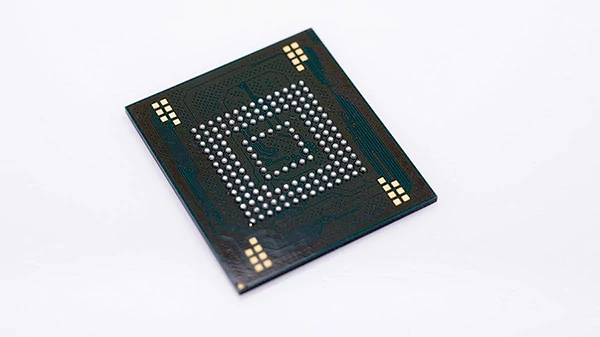
eMMC stands for Embedded Multimedia Card. It is a type of flash storage where the memory and controller are built into one small chip.
Unlike regular storage drives, eMMC is soldered directly onto the motherboard, which means it usually cannot be removed or upgraded later. This helps manufacturers create slimmer and more affordable devices.
eMMC is commonly used in:
- Budget laptops
- Tablets
- Smartphones
- Chromebooks
- Embedded systems
It works well for basic everyday tasks like browsing, streaming, and editing documents. However, it is not ideal for heavy multitasking or demanding software.
What is an SSD?
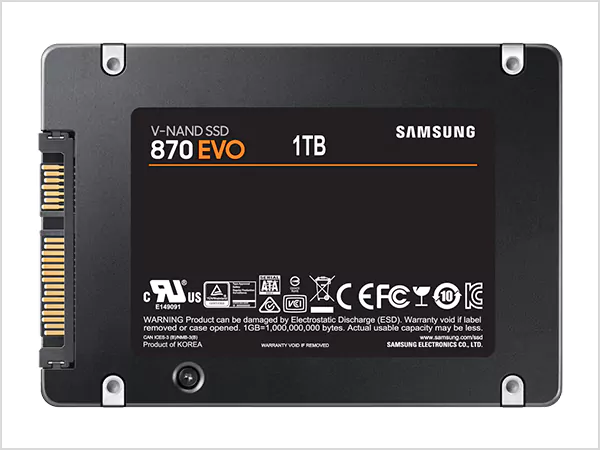
SSD (Solid State Drive) is a high-speed storage device that stores data electronically using flash memory and has no moving parts. Compared to eMMC, SSDs use more advanced controllers and multiple memory chips, which help them read and write data much faster.
This is why devices with SSDs usually feel quicker and more responsive. SSDs are commonly found in:
- Modern laptops
- Desktop PCs
- Gaming consoles
- Workstations
- Servers
Another major advantage is flexibility. Many SSDs can be upgraded or replaced later, depending on the device. Plus, SSD data recovery is much better and more reliable.
eMMC vs SSD: What are the Key Differences?
Even though both use flash memory, the eMMC vs Solid State Drive difference is much bigger than many people assume.
- Design: The biggest difference is in how they are built. eMMC combines storage and controller into one chip attached directly to the motherboard. SSDs are separate storage drives with more advanced hardware.
- Performance: SSDs also handle read and write tasks much faster, making them better for multitasking and demanding applications. eMMC uses a simpler setup, so performance is more limited.
- Upgradeability: Most eMMC storage cannot be upgraded, while many SSDs can be replaced or expanded.
- Pricing: eMMC is made for affordability, while SSD is built for users who need better speed and reliability.
Moving on, let’s understand the speed, storage capacity, and durability of both in detail.
Speed Comparison of eMMC and SSD
When comparing eMMC vs Solid State Drive, speed is one of the biggest deciding factors. Most eMMC offers speeds between 100 MB/s and 400 MB/s, depending on the hardware. While SATA SSDs can reach around 500 MB/s, NVMe SSDs can exceed 3500 MB/s.
The speed difference affects real-world performance in many ways:
- Faster boot times
- Quick app loading
- Faster file transfer
- Smoother multitasking
- Better performance in demanding software
SSD-powered devices feel much faster and smoother. That said, eMMC still performs well enough for lighter activities, like browsing, streaming, online classes, Microsoft Office work, etc.
SSD vs eMMC Storage Capacity and Lifespan
eMMC usually comes in smaller capacities such as 32GB, 64GB, 128GB, and up to 256GB in some cases.
SSDs typically start at 128GB and can go up to several terabytes. This makes SSDs better for users who need more space for large files, heavy software, games, and media libraries.
When it comes to lifespan, SSDs generally last longer because they use better wear management technology and stronger controllers to handle repeated data writing. eMMC is reliable for basic everyday use, but it may wear out faster if used heavily over long periods.
Pros and Cons of SSD and eMMC storage
Both storage types have advantages and drawbacks, and the right choice depends on your needs.
eMMC Storage
Pros
- More affordable than an SSD.
- Uses less power.
- Helps make devices thinner and lighter.
- Good for basic daily tasks
Cons
- Slower than SSD.
- Usually offers less storage space.
- Hard to upgrade.
- Can wear out fast with heavy use.
SSD Storage
Pros
- Much faster boot and loading speeds.
- Better multitasking performance.
- Available in large capacities.
- Longer lifespan.
- Often upgradeable.
Cons
- More expensive than eMMC.
- May use slightly more power in some systems.
- Premium SSDs can increase device cost.
eMMC vs SSD: Which is Better for You?
I have explained everything about eMMC vs SSD that you need to know. The right choice depends on your needs and budget.
If you use your device for basic tasks, eMMC is usually enough and works well for budget users. If you need faster performance for multitasking, large apps, or heavy files, an SSD is the better option. Overall, if you have the budget, SSD is the better choice for most users.
Frequently Asked Questions
Which is better SSD or eMMC?
Can eMMC be replaced with SSD?
In most cases, no. It is usually soldered directly onto the motherboard, which makes replacement or upgrades difficult.
What is the eMMC storage capacity?
eMMC capacity is usually much smaller than SSD. Most eMMC lineup range from 32GB to 256GB.
Is eMMC good enough for a laptop?
Yes, it is good for basic laptop usage such as web browsing, streaming, virtual classes, meetings, and office work. However, it may feel slower during heavy workloads.
Is eMMC faster than SSD?
No, SSDs are generally much faster because they use NAND flash with a controller and often DRAM cache, which improves read and write performance.
Related Posts

8 Best AI Presentation Makers for Business-Ready Slides
Making a presentation doesn’t just mean designing slides. It’s about defining a clear structure, using defined logic, useful visuals, and…

Queue Management Software Troubleshooting Guide: 8 Common Faults and Fixes
The long wait times and ineffective management of customer queues can have a significant impact on customer satisfaction and business…

How to Use Similarweb Website Traffic Data for Competitor Research
Competitor research without traffic data is guesswork. You can guess who your rivals are, guess how big they are, guess…

Choosing the Right Hosting Model for Scalable Digital Platforms
The performance of digital business is directly related to website speed, uptime, and scalability. Slow page performance has a negative…

How Data-Driven Performance Tools Are Transforming Employee Recognition in Tech Companies
“People work for money but go the extra mile for recognition, praise, and rewards.” — Dale Carnegie (Writer & Teacher)…

Why Businesses Struggle to Collect Reliable Data from the Web
Almost every company that depends on data runs into the same problem: although they can find the data they need,…

Why Financial Data Recovery Matters for Businesses
Financial data supports every part of a business, directly affecting cash flow, payroll, tax reports, audits, customer billing, and daily…

CMMC Compliance Is Coming for Manufacturers. Here Is What You Need to Do
“Cybersecurity is much more than a matter of IT.” — Stephane Nappo (Cybersecurity Professional) For manufacturers working within the defense…

How Data-Based Tools Influence Learning Performance
Learning has transformed in the modern age with the integration of new technologies to help students and professionals prosper in…