
Disk Drill, R-Studio, PhotoRec, DMDE, and DiskGenius are some of the best photo recovery software in the market.
Top 10 Photo Recovery for Restoring Deleted Pictures Safely
 Mahima Dave
Updated on: Nov 25, 2025
Table of Contents
- An Overview of Top Photo Data Recovery Software
- 10 Best Photo Recovery Software (Expert Picks)
- How We Tested and Curated Our List of Image Recovery Software?
- How Photo Recovery Software Works?
- How to Pick the Right Photo Recovery Software?
- How to Maximize Recovery and Protect Your Photos?
- Final Takeaway
- Frequently Asked Questions
One photo of your family, pet, or a trip you loved can change your entire mood. Our phones and laptops hold years of memories. But what if a single tap or glitch wipes your digital memories or an important photo?
If you have faced this earlier, I am here to make your day better. With the right photo recovery software, you can bring them back, even from formatted drives.
Most deleted photos can be recovered if you are aware of the solutions. I will show you the 10 best image recovery software, and break down how to actually recover photos smartly.
Quick Glance (If You’re in a Hurry)
- Best overall photo recovery software: Disk Drill
- Best free image recovery software: PhotoRec
- Best for RAW photo recovery: R-Studio and UFS
- Best for SD cards: CardRecovery and Disk Drill
An Overview of Top Photo Data Recovery Software
Whether you are choosing photo recovery software for iPhone, Android, MacBook, or Windows, it is extremely confusing with so many options. So, take a look at this comparison chart to briefly understand our top 10 tools and their offerings:
| Tool | Developer | Pricing | RAW Photo Support | Free Version | Best For |
| Disk Drill | CleverFiles | $89 | String RAW support | Windows: 500 MB; Mac: preview only | Everyday users who want simple and high-quality recovery |
| DMDE (DM Disk Editor and Recovery) | DMDE Software | Starts at $20/year | Yes (with custom signatures) | Yes (limited) | Advanced users who want manual controls |
| PhotoRec | CGSecurity (open-source) | Free | Yes | Yes (unlimited) | Strong recovery on heavily damaged media for free |
| Stellar Data Recovery for Mac | Stellar | $59.99/yr (Standard), $89.99 (Professional), $99.99 (Premium) | Moderate (improves with custom signature) | 1 GB free | Users who need recovery + built-in photo repair |
| R-Studio | R-Tools Technology Inc. | Starting at $79.99 | Very strong | Yes (restricted trial) | Forensics-level recovery and strong RAW performance |
| Wondershare Recoverit | Wondershare | $84.99/month, $114.99/year, and $144.99 for a lifetime | Moderate | Yes (100 MB) | Beginners who want a guided experience |
| UFS Explorer Professional Recovery | SysDev Laboratories | Starts at $679.95 | Good RAW support | Yes (demo only) | NAS/RAID/Linux users |
| CardRecovery | WinRecovery Software | $39.95 USD for a single-user license | Good for common formats | No free recovery | Recovering photos from memory cards |
| DiskGenius | Eassos Technology | Starts from $69.9 | Good for common formats | Limited | Windows users managing partitions and images |
| AnyRecover | iMyFone | Standard License costs $59.95 for one month | Basic | Limited | Everyday users who want a simple process |
10 Best Photo Recovery Software (Expert Picks)
After weeks of testing, we have created a simple list of the 10 best image recovery software programs. All of these platforms will help you in most of the photo recovery scenarios.
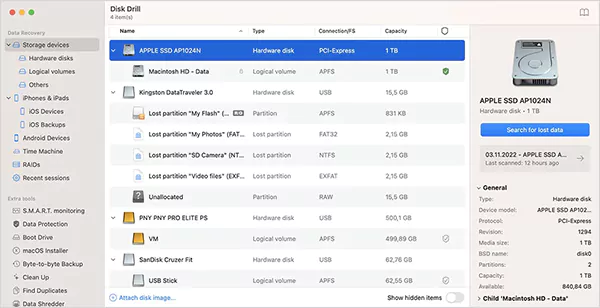
Disk Drill is my number one recommendation for all kinds of data recovery software (including photo recovery). It is the most user-friendly iPhone image recovery software that works well on Android, Mac, and Windows, too.
The tech inside is strong enough for both beginners and professionals. It handles common image formats as well as RAW formats, and it performs especially well on formatted SD cards and deleted folders.
Disk Drill’s preview feature is one of the best on the list. Additionally, features like disk backups, protection modules, and scan-pausing make it a reliable option for everyday recovery needs.
Pros
- Excellent RAW and JPEG recovery
- Intuitive UI with live previews
- Works across all major file systems
- Supports pausing and resuming scans
Cons
- The free picture recovery software is limited to 500 MB
- The macOS free version can only view the preview
- Not ideal for extremely damaged media
Pro Tip: Use the ‘Recovery while scanning’ feature and preview thumbnails to save time and space.

DMDE is a powerful recovery tool built for users who want advanced controls rather than automated one-click recovery. It goes directly into the drive, sector by sector, to recover photos even when the filesystem is partially missing or corrupted.
So, if you ever see error messages, especially on SD cards or hard drives, DMDE will take care of it. While the interface is old-school, the tech is extremely powerful. It also allows you to load or create custom photo signatures, which helps in recovering almost every format that other tools don’t even recognize.
Pros
- Very fast and accurate scans
- Supports custom RAW file signatures
- Great for NTFS, HFS+, and FAT32 file systems
- Precise recovery, even on damaged drives
Cons
- Interface feels technical
- Limited preview options
- Requires some technical know-how
- No built-in session manager
Pro Tip: Create a disk image first, then run your scans on that image. DMDE performs the best when scanning a disk image, not the original device.
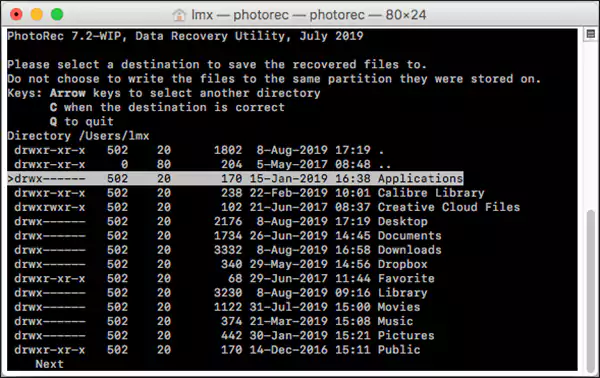
PhotoRec is a free photo recovery software that consistently gives good results (nothing less than a premium solution). It scans the raw data on a device to locate photos by their signatures. This makes it effective on damaged or corrupted sources.
It is a favorite among my colleagues and other tech-savvy users because it can revive images long after the file system has failed. That is why photographers often keep it in their toolkit. The only challenge is its minimal interface. However, the recovery engine is so strong that it makes up for the design.
Pros
- Best freeware photo recovery software
- Open-source and works across all OS and formats
- Amazing with corrupted media
Cons
- No folder structure and built-in imaging
- Command-line user interface
- Requires manual file organization
Pro Tip: After recovery, use an EXIF sorter to organize files because it won’t restore folders and filenames.
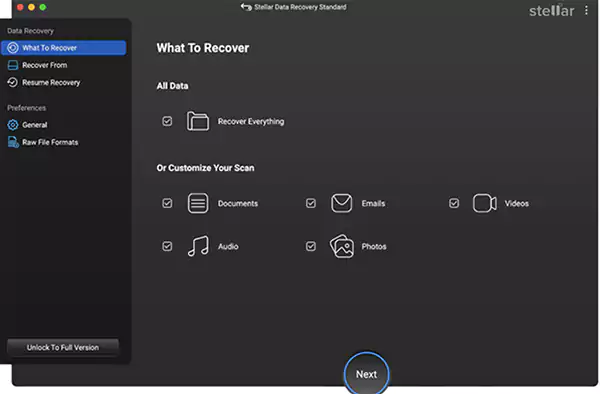
Stellar is one of the best picture recovery software for Mac, especially if you want to repair damaged photos and videos. This makes a huge difference when your recovered photos appear corrupted or partially damaged.
It also supports over 300 file signatures and can even learn new ones by analyzing a simple file. That is rare and extremely useful. Stellar’s interface is clean, simple, and beginner-friendly. Though its RAW success rates vary across camera brands, it is still the best if you want recovery and repair in one solution.
Pros
- Built-in photo and video repair tools
- Learns new file signatures with sample files
- Clean UI and simple workflow
- Byte-to-byte backup feature
- Great customer support
Cons
- Free version limited to 1 GB
- Inconsistent RAW performance
- No lifetime purchase option for personal use
- Occasional scanning crashes
Pro Tip: If a recovered file is showing a broken preview, run the ‘Photo Repair’ option to fix common glitches.

R-Studio is a popular photo retrieval software among advanced users and professionals because it works extremely well on tough recovery cases. It can easily handle RAID arrays, missing partitions, or heavily corrupted storage devices.
It also supports a wide range of RAW formats and provides control over scanning. If you are dealing with a major data loss, this tool offers one of the highest recovery potentials. Once you learn to navigate the interface, you can recover almost every file with the help of R-Studio.
Pros
- Excellent with RAW formats and complex cases
- Works with RAID, NAS, and Linux file systems.
- Predicts recovery chances
- Highly reliable recovery engine
Cons
- High learning curve
- Outdated interface
- Limited preview for some formats
- Free trial limits large file recovery
Pro Tip: Start with a disk image if you are dealing with failing hardware. R-Studio can work safely and effectively with images.

Recoverit is another known and visually clean tool designed for users who prefer a guided recovery experience. It is a strong image recovery software for Android and iOS. Recoverit covers almost every major file type, device, and case, from accidental deletion to deep formatting issues.
The app is easy to navigate, even for non-technical users. While its RAW performance can vary, it consistently performs well with everyday JPEG/PNG and phone images. It is a comfortable option for people who want reliable results without going into technical settings.
Pros
- Clean and easy-to-navigate design
- Good at JPEG/PNG recovery
- Works on all major devices
- The quick scan option is also reliable
Cons
- The free photo retrieval software version is limited to 100 MB
- RAW recovery is inconsistent
- Cannot resume interrupted scans
- Higher pricing for full features
Pro Tip: If the quick scan fails for you, try the deep scan option. It often recovers files not listed in directories.
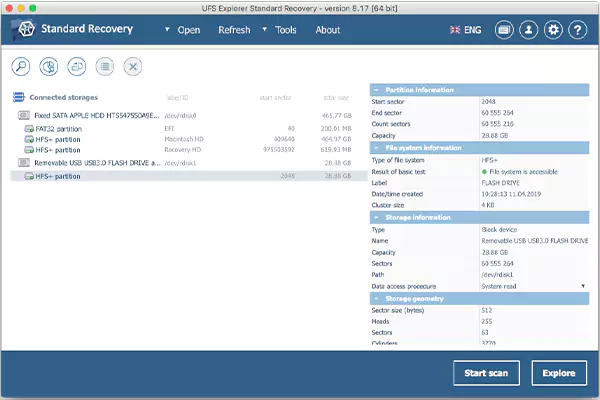
UFS Explorer is built for users who deal with more complex storage environments, like NAS setups, Linux partitions, RAID systems, and other unusual file systems. It reads and interprets structures that many basic tools cannot even detect, making it a go-to choice for IT teams and professionals.
It is extremely powerful, and that is what I like most about this software. However, beginners may need some time to get used to its interface. Despite that, its recovery accuracy, especially for EXT, APFS, and multi-desk setups, is phenomenal.
Pros
- Excellent for complex systems
- Strong option for NAS and RAID repairs
- Customizable scan settings
- Disk imaging is available
Cons
- Interface can feel technical
- Demo version restricts recovery
- Slow image previews
- Recovery starts only after a full scan
Pro Tip: Use the disk imaging feature first, and allow UFS to analyze the image to avoid accidental overwriting.
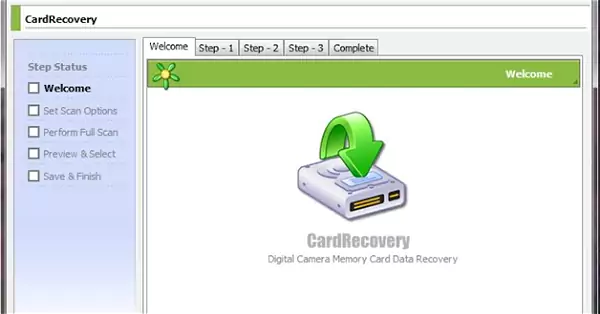
CardRecovery focuses solely on SD, microSD, and CF cards, and I have included this photo data recovery software list for the hardcore photographers who rely on these. It is a special tool, and it understands the structure of memory cards better than many general-purpose tools.
The interface is extremely simple, making it perfect for users who just want to recover images easily. It is a good option for basic Sony and Canon camera SD card recovery.
Pros
- Excellent for recovering photos from an SD card
- Very easy to use
- Good at recovering formatted photos
- Fast and efficient scanning
Cons
- It supports only Windows
- Not suitable for hard drives
- Limited advanced features
Pro Tip: Always stop using your card immediately after losing photos because new data can overwrite recoverable photos.
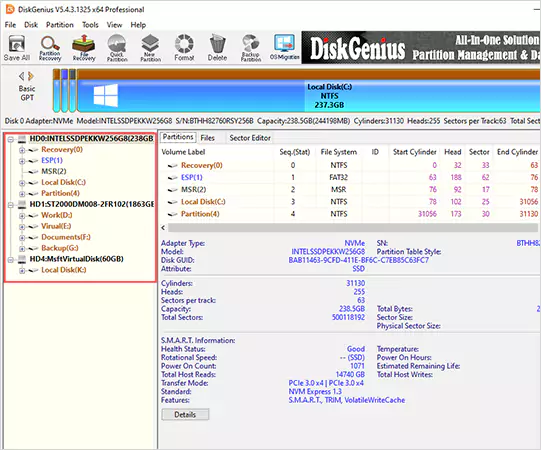
DiskGenius is a combination of a disk repair tool and a photo recovery tool. This makes it extremely helpful when photo loss is linked to partition errors, system crashes, or file system corruption.
DiskGenius can recover images from FAT, exFAT, and NTFS partitions and offers repair features like partition backup and hex-level editing. The interface feels crowded, but the tool itself is very capable for users who want to handle both recovery and system maintenance.
Pros
- Strong NTFS/FAT photo recovery
- Excellent disk utilities
- HEX editor for advanced users
- Good for system-related recovery
Cons
- Outdated interface
- The free version recovers small files only
- The preview feature is limited
Pro Tip: Use partition backup before scanning to protect your files from accidental structural changes.
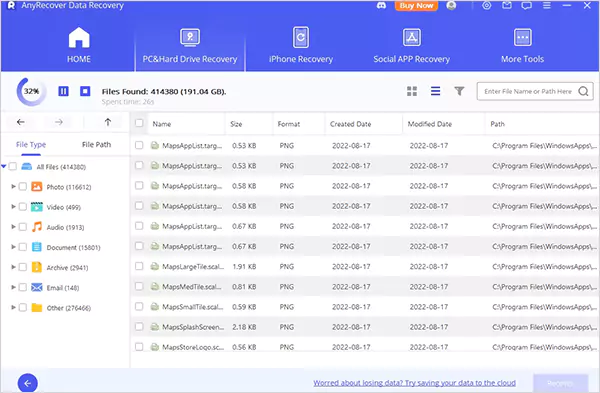
AnyRecover caters to the user who wants simplicity and comfort. It is designed for everyday situations like accidental deletion or forgetting to transfer photos before formatting a drive or card.
The photo retrieval software is clean and organized. It recovers all the common formats well and supports many devices. However, it is not capable of handling extremely damaged drives or highly technical recovery scenarios.
Pros
- Simple and user-friendly
- Good for accidental deletion
- Supports major photo formats
- Works with all major devices
Cons
- Deep scans are not so powerful
- Not ideal for severe corruption
Pro Tip: Start with a quick scan for fast recovery. If you can’t find the desired photo, then switch to the deep scan option.
How We Tested and Curated Our List of Image Recovery Software?
We are not just telling you what is already available on software websites. We test how they behave in real-world chaos. I want to make our testing process completely transparent so that you can judge the reliability of our list. So, here’s the framework we follow:
Step 1: Recreating Real Data-Loss Scenarios
Instead of relying on sample files, we intentionally deleted a mix of images (RAW, edited, corrupted, etc.) across SD cards, USB drives, and internal storage. This showed us how each tool performs beyond easy recoveries.
Step 2: Studying the User Journey
A data recovery tool should feel effortless, even if it is powerful. So, we evaluated each tool on interface clarity, step-by-step flow, and how quickly a beginner can start recovering files.
Step 3: Judging the Software Based on Its Target Audience
We checked if professional tools handle advanced cases like damaged drives and RAW formats. And if general tools are simple and reliable. We don’t expect the same features from both, but we expect each tool to excel at its purpose.
Step 4: Speed and Accuracy Checks
Fast scans are not enough if the results are poor. And the slow scans are not useful if they cannot recover properly. So, we tried to focus on picture recovery tools that can balance both.
Apart from these steps, we prioritized software that can work in complex cases, supports a wide range of file formats, offers a reliable preview feature, and works across devices.
In short, our list was not built on hype. It is built on real testing, real data, and real recovery scenarios.
How Photo Recovery Software Works?
When a photo gets deleted, the file does not vanish immediately. Your device just makes the space available for the system to add new data. Until something new replaces the space, that old photo is still sitting quietly in the background.
Photo recovery tools take advantage of this gap. They scan your device for storage blocks marked as ‘available’, traces of old image data, and file structures that can be reconstructed.
Then, depending on how much of the original data is still in good shape, the image recovery software can help you restore the image file. However, the recovery is not guaranteed in all cases. Even the best platforms cannot retrieve photos that no longer exist on the physical memory blocks.
How to Pick the Right Photo Recovery Software?
Choosing the right recovery software is not about picking the most popular tools. It is about selecting the one that fits your situation. Different tools are built for different issues. So, here’s how you can evaluate your options:
- Look at format support: Basic formats are easily available on almost every tool. The real difference shows up when you need to recover RAW files, TIFFs, or images from DSLRs. So, assess your needs and choose the software that supports your format range.
- Check device compatibility: Not all tools cover everything; many desktop apps don’t support mobile recovery at all. So, pick a tool that matches your setup.
- Prefer tools with photo previews: Previewing images before restoring saves time, storage, and frustration. It can help you avoid recovering corrupted or irrelevant files.
- Assess your comfort level: If you are not tech-savvy, look for guided workflows. But if you are an advanced user, choose a tool that gives you deeper controls.
- Evaluate versatility and safety: A good recovery tool should work on multiple devices, recover more than just images, and be free of malware or viruses. Safety is essential while dealing with important data.
- Check performance and user reviews: Speed is not the only metric to choose from. So, try to evaluate its performance on multiple factors and look for real user reviews to learn from their experiences.
- Consider your usage and budget: If you store large volumes of pictures, premium software is worth the investment. Otherwise, even a free tool might be enough for some of you.
How to Maximize Recovery and Protect Your Photos?
Even the best photo data recovery software cannot help if the device is overwritten. So, here are some best practices that you should follow to improve your recovery rate:
- Immediately stop using the device after you realize your photos are missing. No new downloads, no new photos, and no new files. Every new action risks overwriting the photos you want.
- Never install or run the recovery tool on the same device where your lost photos were saved.
- Saving restored photos back to the same device can overwrite other recoverable files. So, always recover photos to a new location.
Plus, you should also follow these habits to protect your photos and avoid recovery tools in the future:
- Back up regularly on a cloud and an external solution.
- Always eject your external devices safely.
- Protect your gear from moisture and extreme heat.
- Don’t fill storage devices to their full capacity.
- Keep your devices updated for maximum security.
- Use antivirus tools to avoid malware that can corrupt or delete photos.
According to my experience of handling various cases, I feel that most photo loss is preventable. You just need to be consistent with good habits.
Final Takeaway
We have all accidentally deleted photos that meant something to us. Fortunately, photo recovery software today is powerful enough to bring back most of them. I would advise you to start by testing the free trials of a few tools.
I have provided everything you need to know about image recovery in one place. So, choose wisely, act quickly, and take care of those special photos.
Frequently Asked Questions
What is the best photo recovery program?
How to use a photo recovery software?
Most tools have the same process; only the interface layout differs. So, just open the software > pick the location from where the photos were lost > start the scan > preview the images > select the photos you want > and save them to your device again.
What are the key features to look for in recovery tools?
Before you pick a recovery tool, check whether it supports your device, recovery needs, formats, and budget.
Can I recover deleted photos for free?
Yes, PhotoRec is a good free option to recover most of your lost images. You can also use the free trial version of the paid tools to recover images.
Is photo recovery software worth it?
Yes, strong software can help you get back pictures and other media even from formatted drives.
How to recover 3-year-old photos?
It is a bit difficult to get back images from 3 years back. However, you can recover them if you have an active backup from that time.
Is professional photo recovery expensive?
Yes, it can be expensive, especially if the complexity level of your photo recovery is high.
Related Posts
10 Best Lightroom Preset Alternatives in 2026
“Photography is the story I fail to put into words.” — Destin Sparks (Landscape Photographer) For years, Lightroom presets have…
Elementor Hosting vs SiteGround: Which is Faster in 2026?
A website’s performance is mainly determined by its Speed. Even a slight delay can reduce conversions by a significant margin.…
10 Best Visual UGC Platforms for eCommerce Brands in 2026
“People influence people. Nothing influences people more than a recommendation from a trusted friend.” — Mark Zuckerberg (Meta CEO) That…

The Data Models Powering the Next Creative Revolution in Video Generation
Artificial intelligence has evolved from a mere tool to the cornerstone of advancements in the new era. Over the years,…
Solar Software Companies: How Platforms Improve Cross Team Collaboration
“If everyone is moving forward together, then success takes care of itself.” — Henry Ford (Industrialist & Business Magnate) Handoffs…

What Healthcare Leaders Expect From Digital Tools
Healthcare executives are under pressure to protect patient safety, clinician time, and data privacy while modernizing the delivery of care.…

How to Reset Android Phone When Locked? (Safe Factory Reset Methods)
Locked out of your Android phone or stuck on the screen? It happens more than you think. A forgotten PIN,…
How to Transfer Contacts from Android to iPhone: 4 Easy Methods
Switching from Android to iPhone should not feel like rebuilding your life from scratch. Restoring contacts on iPhone should be…

White Label Ad Server vs Development From Scratch: What to Choose
Even though the DSP segment is the largest market within AdTech at the moment, an ad server remains a crucial…