The days of manually editing photos have given way to AI photo editing software, which has revolutionized the creation of visual content by individuals and businesses alike. Features include automatic retouching, replacing backgrounds with alternative images or text prompts, generating portraits by AI, and enhancing photos; faster and more advanced than traditional photo editing software.
As AI’s role in image processing expands, however, there are significant concerns regarding data privacy, consent, and the ethical manipulation of images. As businesses increasingly deal with vast amounts of personal data online, new cybersecurity and privacy challenges are forming, based on AI-driven technologies, according to IBM Security.
To process an image, the majority of the AI editing platforms require the person to upload images of their face or their photos, their business media files to the cloud-based systems. This data can be misused, stored forever, or leaked due to security problems if safeguards are not in place. Considering the growing realism of AI-generated media, the responsibilities of its use and greater privacy awareness are increasingly important.
Key Takeaways
Many AI photo editing tools operate via the cloud.
Uploaded pictures can pose a privacy and information security hazard.
The advent of deepfake technology raises new worries about identity misuse.
The use and transparency of AI are gaining significance.
To minimize risks associated with AI editing platforms, it is important to use strong security measures.
Why AI Photo Editing Raises Data Privacy Concerns
Many AI photo editors depend greatly on machine learning models and cloud-based processing. Unlike traditional offline editing software, many of the AI editing tools heavily leverage cloud processing and machine learning models.
This implies that photos uploaded to the site could be held, examined, or utilized for bettering AI frameworks other than the underlying altering request. When used to share personal or sensitive photos, this raises significant privacy issues related to:
Facial recognition data
Biometric information
Metadata collection
User behavior tracking
Cloud storage exposure
Many users are interested in editing features, but forget about what happens to their pictures after they are uploaded. Platforms that are promoted as creative tools can actually gather large amounts of user data, even though they don’t disclose it.
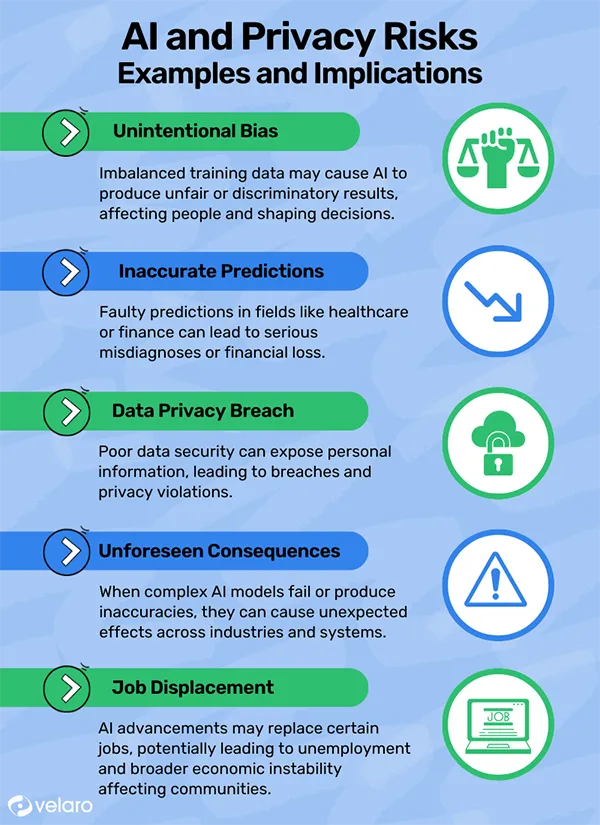
INTRIGUING INSIGHTS AI possesses various privacy risks. The infographic below explains these risks with examples and implications.
How AI Photo Editing Software Collects and Processes Image Data
The images are generally processed by AI editing tools, which are powered by machine learning systems trained on vast amounts of data. The software can analyze when users upload images of facial structures, background details, lighting patterns, image metadata, and editing behavior.
Temporary storage of uploaded images may occur in some platforms, and others may keep them for training their AI models or enhancing their services. Before uploading highly sensitive files, it is important for businesses and creators to check out the privacy policies of thebest lightroom preset alternatives 2026 before making their choices.
Major Privacy Risks Users and Businesses Should Understand
There are a number of privacy and security concerns associated with AI image processing that are typically not taken into account. The more sophisticated AI content gets, the more it has the potential to be misused.
Unauthorized Data Sharing
Others might distribute the information to their parties, such as services, advertisers, or analytics. This can expose personal images, location metadata, user activity patterns, and business media assets.
If the policies are not clear, users may not have a full understanding of how the images they have uploaded will be used, shared, or stored.
Identity Misuse and Deepfake Risks
With the rise of AI-generated media, modifying and creating realistic synthetic content of people’s faces has become more accessible. This raises the risk with regard to;
Deepfake impersonation
Identity fraud
Fake social profiles
Reputation damage
Simple edits and changes, seemingly harmless, may have the potential to be reused in an unauthorized or misleading manner without adequate protection in place. The more realistic the AI-generated visuals get, the more it has become a growing digital security concern for identity protection.
Data Retention and Lack of Transparency
Several AI tools offer short answers to the following questions:
How long are images stored
Whether deleted files remain on servers
How training data is used
Which third parties access uploaded content
The lack of transparency raises questions about the long-term data protection and ownership. People often post pictures of themselves that they think will disappear from the cloud, but these images don’t.
Ethical Considerations Around AI-Generated and Edited Images
AI image editing extends beyond privacy concerns, also posing broader ethical issues. However, it can make it difficult to distinguish between real and altered images, particularly in social media, advertising, and online media.
Editing tools like imagen ai editing software are buzzed about and exemplifying the rapid advancement of AI editing technology. This raises questions of ethics regarding the digital media authenticity, approval to alter images, misleading advertising visuals, unrealistic beauty standards, and synthetic identity creation.
It is important for companies to be aware of the use of AI-generated images and to ensure that they are transparent about any edits or AI-generated images, particularly in marketing and commercial communications. Good use of AI helps curb misinformation issues and builds consumer trust.
Security Best Practices Before Using AI Photo Editing Tools
By exercising caution before uploading images onto AI platforms, users and businesses alike can help mitigate privacy risks. Some basic security best practices can help ensure data security and minimise the risk of misuse.
Some of the most important best practices include:
Be sure to read the platform’s privacy policies thoroughly
Don’t upload images that are very sensitive to your privacy
Shred any unwanted metadata when sharing
Set a robust password for each of your accounts
Use multi-factor authentication
Always use trusted software providers
When possible, delete files that have been uploaded
Companies dealing with customer or employee pictures must also create internal guidelines for the use and storage of AI-generated images. The use of trustworthy platforms that readily disclose their security protocols minimises privacy risks over the longer term.
INTERESTING FACT The term “Deepfake” hit the mainstream in the late 2010s, when face-swapping videos using AI technology quickly circulated on the internet.
Conclusion: Building Responsible AI Photo Editing Practices
While AI photo editing tools present significant privacy, security, and ethical implications, they also hold great creative promise. With the growing adoption of cloud-based AI tools, users are more concerned with how their data is being used and how it is processed.
Whether it’s unauthorized data sharing, deepfakes, or policies and practices that are ambiguous about data retention, these risks have to be dealt with proactively by individuals and businesses alike. Users can leverage AI editing tools without compromising privacy by using trustworthy platforms, implementing more robust security measures, and ensuring transparency in using AI in their content creation.
With the ongoing advancement of AI technology, ethical and responsible image procesing practices will be key to ensuring digital trust and online identity preservation.
Frequently Asked Questions
Why are AI photo editing tools a concern?
Personal image data is gathered and manipulated by means of cloud0based AI systems in many tools.
Do AI editing platforms allow for the upload of photographs?
Yes, some platforms may temporarily or permanently retain uploaded files as per their policies.
What are deepfake risks?
Deepfakes use AI to create realistic fake images or videos that may be used for impersonation or misinformation.
How can users protect image privacy online?
Users should review privacy policies, avoid uploading sensitive images, and use trusted platforms.

 Reviewed By Brijesh Kumar Singh
  Saipansab Nadaf







