Learning Management Systems (LMS) have become central to education, with approximately 73.8 million learners using them globally. (Source: eLearning Industry)
Every click inside an LMS tells a story: who logged in, what they did, how they performed, and sometimes even where they were. That’s a lot of personal data moving quietly in the background. But is it not so hidden in the eyes of cyberattackers lurking behind the screens and waiting to make their move? That’s why secure software development is not just a technical checkbox but the foundation that protects trust, privacy, and continuity.
So, organizations investing in Education software development services, building security and privacy into the LMS from day one, is the difference between a platform that simply functions and one that users genuinely trust.
And in this post, we will uncover what it exactly is, its core data protection principles, and compliance requirements.
Key Takeaways
Security is not something you “add later” without consequences.
Privacy choices affect trust more than users realize.
Most LMS risks come from simple oversights, not advanced attacks.
Learners ntice when platforms feel safe; even if they can’t explain why.
Secure development saves money by preventing fixes afer launch.
What is Secure Software Development?
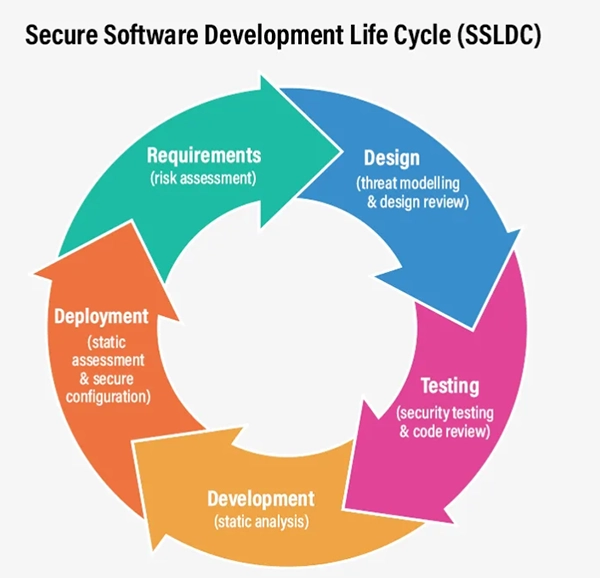
Secure software development means building software with safety in mind from the very beginning. Instead of waiting for problems to show up later in the process, developers think about security at every step: while planning, designing, building, testing, and even after the software is live.
You can imagine it as locking the doors and windows while a house is being built, not just when someone moves in.
In the context of LMS, this approach makes sure that the student and teacher data are protected by default. This keeps the user’s details, such as grades, personal information, and activity history, safe and access-controlled. As a result, we get an LMS people can trust; one that stays secure, stable, and compliant as more users join and the platform grows.
INTRIGUING INSIGHTS The infographic below shows the life cycle of the secure software development process. Have a look to understand better.
Core Data Protection Principles in Secure LMS Development
Learning management systems include a set of principles that help handle user credentials safely. The most important ones are:
Data Encryption
Encryption means making the content unreadable to people who should not have access to it. LMS platforms usually apply encryption when the data is at rest (stored) and when it is in transit (moved). This protects the sensitive details such as login credentials, grades, and personal info from leaking even if intercepted or accessed improperly.
Access Control
Not everyone should have access to every piece of the learner’s credentials. Role-based access controls ensure that only the students, instructors, administrators, and support staff (only the ones who genuinely need it) get to see the information. This significantly reduces the chances of accidental exposure and limits damage if the password is compromised.
Secure Authentication
Secure authentication verifies that users are who they claim to be to prevent any unauthorized logins. Strong passwords, multi-factor authentication (MFA), and session management are some of the strategies that help.
These practices make LMS systems more secure and easier to trust for students, teachers, and all the parties involved.
Privacy-by-Design Practices in LMS Software Architecture
Privacy by design means privacy is already built into the system’s architecture, and not something that is added later just to meet regulations. This approach makes LMS platforms respect user rights and reduce long-term risks.
User Consent Management
Learning platforms often require personal information for enrollment, assessment, and analytics. Clear consent mechanisms give transparent reasoning for why their data is being collected and how it might be used by them. They also give users the freedom to be able to grant, review, and withdraw consent easily, without affecting the core learning functionality.
Data Minimization
Data minimization refers to collecting only what is necessary. This reduces the risk by limiting the amount of personal information stored in the system. If certain data isn’t essential for learning or platform functionality, it should not be collected in the first place.
Audit Logging
Audit logs track system activity, such as logins, data changes, and administrative actions. These logs help detect suspicious behavior, investigate incidents, and demonstrate compliance during audits. In LMS as well, audit trails promote accountability and transparency.
PRO TIP Before launching an LMS, ask one simple question: “Is this data leaked tomorrow, what would hurt most?” Design your security around that answer first.
Compliance Requirements Affecting LMS Data Protection
Compliance becomes an essential consideration in LMS platforms since they serve users across regions and deal with student information. Regulations like GDPR, FERPA, COPPA, and other regional data protection laws influence how educational data should be handled.
Secure LMS development aligns system design with these requirements by enforcing access control, protecting user privacy, enabling data portability, and supporting data deletion requests. Therefore, compliance -ready development reduces legal risk and builds credibility with institutions and learners alike.
Final Thoughts
In conclusion, we can say that LMS is not just software; it is a space where people learn, grow, and share personal progress. And this is why data protection and privacy have become a non-negotiable aspect of it.
Secure software development ensures that learning environments stay safe for learners and teachers. They must also remain compliant and eligible as they grow. Because when learners feel safe, they focus on learning, and that’s what a good LMS should always enable.
Frequently Asked Questions
Is an LMS really a big security risk?
It can be. LMS platforms hold long-term user data, not just temporary files, and that makes them valuable targets if security is weak.
Can small schools or training companies ignore heavy security practices?
In all honesty, no. Smaller organizations are often targeted because their systems are assumed to be less protected.
Will security features make the LMS harder to use?
Not if they’re designed properly. Good security feels invisible to users and obvious only when something goes wrong.
Who is usually responsible for LMS data breaches?
More often than not, it’s configuration mistakes, not some hackers behind the screens.
How often should LMS security be reviewed?
LMS security should be reviewed at least once a year, and every time you add a major feature or integration.
Data growth has significantly accelerated beyond what most compliance teams can manage, with personal records, financial details, contracts, and emails…

 Mahima Dave