
Queue management software helps organize and control customer flow by replacing physical lines with digital queues and real-time updates.
5 Best Software to Streamline Queue Management and Appointment Scheduling
 Mahima Dave
Updated on: Nov 27, 2025
Remember the traditional ways of appointment scheduling, when you had to physically walk into a busy clinic or government office to book an appointment for the future, or worse, wait for hours to get your work done? This can be extremely frustrating, as 75% of customers claim they will abandon a service if they have to wait more than 20 minutes,and 96% report that long wait times negatively impact their overall experience. (Source: Skiplino )
But here’s some good news for you, we’ve moved past this era, and now tech innovations have turned it into a better-organized and systematic process, which means no more long queues and frustrating waiting times. Now, you can just schedule appointments from anywhere with the help of your mobile phone, and that too, in just a few minutes.
The modern queue management and appointment scheduling software evidently reduces wait times, organizes bookings, and keeps customers informed, making the day-to-day operations smoother for the staff as well.
In this post, we will cover 5 such platforms that help streamline appointment scheduling across different industries. So, follow along to find the best option for yourself.
Key Takeaways
- Long wait times hurt customer experience more than most businesses realize.
- Queue management software brings order to busy service environments.
- Online appointment scheduling reduces no-shows and staff workload.
- Tools like QR check-ins and virtual queues make visits smoother for customers.
- The right software improves efficiency for both team and visitors.
Top 5 Software to Streamline Queue Management and Appointment Scheduling
CASE STUDY
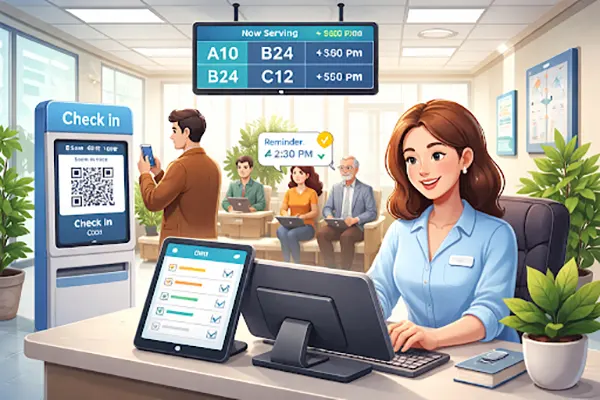
A mid-sized healthcare clinic relied on the conventional methods of managing clients and booking appointments. The client would come in, schedule an appointment, or sometimes they just had to wait for hours to get their turn. This made everything chaotic and frustrating for both the managing staff and the patients.
That’s when they decided to shift to smarter ways and adopted a queue management and appointment scheduling software. Now, their clients can book a slot from anywhere, see real-time virtual queue updates, and also get automated reminders.
This method is far less stressful and more structured. This way, the patients do not need to waste their precious time sitting in the waiting area, and even clinic employees do not get overwhelmed with the sudden flow of clients.
A win-win situation!
As seen in the case study above, appointment scheduling and queue management software can significantly help a business. But the software you choose should be capable enough to handle the workflow and have certain features to work efficiently. To save you from confusion, we have listed down the top 5 software that do the job quite excellently:
1. Qminder
An extremely popular choice, Qminder is designed to reduce physical queues and improve customer flow. It takes the whole “manual waiting lines” concept online with digital check-ins, allowing customers to wait remotely and receive real time updates.
With streamlined appointment scheduling with software like Qminder, businesses can manage their walk-ins and schedule visits from a single dashboard as it allows customers to check in using kiosks, tablets, or QR codes. At the same time, it provides the staff with full visibility into wait times and service performance. An excellent choice for banks, government offices, and service centers where managing customer flow efficiently is important.
2. Noterro
Noterro is the leading software for online medical scheduling, and since it includes more healthcare-related features, it has become a go-to option for the medical field, proving to be a secure, compliant, and reliable scheduling tool. It allows clinics to manage appointments, patient records, billing, and reminders all in a single system.
It allows patients to book appointments as per their convenience, while the automated reminders help reduce no-shows, supporting telehealth scheduling.
3. Juvonno
Again, another great option for the healthcare industry, Juvonno combines appointment scheduling, queue management, billing, and patient communication is a single system. It helps manage both scheduled appointments and walk-in patients without confusion.
It further reduces uncertainty and wait-time frustration by providing the patients with real-time updates and automated notifications.
DO YOU KNOW?
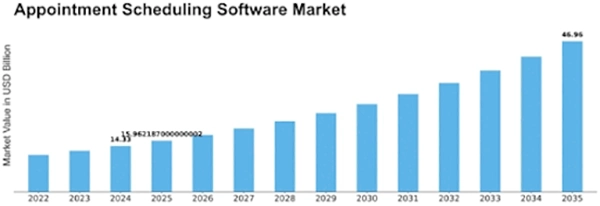
The appointment scheduling software market is on the rise and is expected to be worth $46.96 billion by 2035, from 14.33 billion in 2024.
4. Qtrac
Qtrac is a well-known option for airports, retail spaces, and public service locations where high volumes of visitors are expected. It focuses on intelligent queue management using data and automation, and allows customers to join virtual traffic and receive updates via SMS or display screens, reducing the need to physically stand in line.
A feature that makes it different from others is its use of QR codes, which lets customers check in quickly using their smartphones, making the overall experience faster and more contactless, an ideal situation for a busy service environment.
5. DaySchedule
DaySchedule can be simply explained as a simple yet powerful tool for small or mid-sized organizations. It offers all the basic functions like online booking, calendar management, automated reminders, and team scheduling features; perfect for businesses that want straightforward scheduling without complex systems.
It is easy to set up and works well for salons, consultants, and service providers who wish to reduce manual scheduling tasks. Its clean interface makes it easy to use for both the staff and the customers.
Conclusion
How your business manages rush hours and appointment scheduling plays an important part in customer satisfaction and operational success. This is why, by adopting the right software, they can reduce wait times, prevent overbooking, and create a smoother experience for everyone involved in the process.
By identifying your needs, you can choose a platform that aligns with your goals. Noterro and Juvonno are two excellent choices for healthcare-focused businesses, and on the other hand, Qminder and Qtract offer unique strengths for different industries. So what are you waiting for? Choose the right software for your needs and let it handle the rest!
Frequently Asked Questions
What is queue management software?
How does appointment scheduling software improve efficiency?
It reduces manual work, prevents double bookings, sends reminders, and allows customers to book appointments online at their convenience.
Can these tools handle both walk-ins and appointments?
Yes, many platforms like Qminder and Juvonno are designed to manage both scheduled appointments and walk-in visitors.
Are QR codes useful for queue management?
Yes, QR codes make check-ins faster and more contactless, improving convenience for customers and reducing staff workload.
Related Posts
10 Best SD Card Recovery Software to Recover Deleted, Formatted, and Corrupted Files
The use of SD card recovery software allows you to restore pictures, videos, and document files that have been deleted…
How to Mass Delete Emails on Outlook (Fast and Safe Bulk Cleanup)
Stressed by too many emails in Outlook? Fix that properly by learning how to mass delete emails on Outlook. A…

Why Businesses Use Payroll Outsourcing to Manage W-2 Reporting and Tax Deadlines
Managing payroll is one of the most complex administrative responsibilities for businesses. Beyond calculating wages and issuing paychecks, payroll teams…
10 Best Linux Data Recovery Software in 2026
Linux data recovery software programs allow users to recover deleted, corrupted, and lost files from their Linux storage device(s) (HDD,…

Key Benefits Of Software Designed To Organize Teams And Tasks
Managing teams and operations in an aligned way is much more complex than it seems. However, the use of specialized…

Why WordPress Remains the Best Platform for Modern Websites
In the rapidly evolving digital world, businesses need websites that are flexible, scalable, and easy to manage. With so many…
How to Clear Cache on Android: Easy Steps to Speed Up Your Phone
If your Android phone feels slow, apps lag, or random crashes are becoming normal, cache buildup is usually the real…
How to Restart MacBook?: 8 Methods Explained
A MacBook can be simply restarted with the restart option in the Apple menu. Another way is to hold the…

How Cloud Backup Protects Fleet Camera Data and Business Communications
Having real-time communication between teams, especially when you are managing a fleet, is crucial. That kind of monitoring is only…