
TCO (Total Cost of Ownership) includes all costs, total fees, cloud usage, engineering time, training, and the impact of data failures.
Understanding and Reducing TCO in Data Observability Platforms
 Mahima Dave
Updated on: Dec 08, 2025
Table of Contents
- What Data Observability Means for Modern Enterprises
- Core Cost Components of Data Observability Platforms
- Operational and Hidden Costs Impacting TCO
- Optimizing Data Observability TCO With Scalable Architectures
- Best Practices for Evaluating and Managing Data Observability TCO
- Conclusion
- Frequently Asked Questions
Imagine opening your ERP dashboards expecting clear, reliable answers, but instead, what greets you are numbers that just do not add up and are nothing but chaos. After hours of rework, you finally find the root cause of this issue: a silent data quality problem that went undetected until it disrupted business decisions.
As frustrating as it sounds, it is not a hypothetical situation. And as a result, researches show that over a quarter of organizations estimate theylose more than $5 million annually due to poor data quality, with around 7% reporting losses of $25 million or more each year.
To tackle such issues, data observability platforms provide smarter visibility into data health and offer early detection of issues before they reach decision-makers. But, with this, many organizations miss a bigger question: What is the total cost of ERP ownership of these platforms, and how does it tie into the total cost of ERP ownership?
If you’re also looking for the answer to this, then this article is for you. Here, we will uncover where these costs come from and how to manage them for modern enterprises that want reliable data without spiraling expenses.
Key Takeaways
- Data observability helps you spot data problems before they affect ERP decisions.
- TCO isn’t just tool pricing; it includes time, effort, downtime, and fixes.
- Poor visibility leads to higher ERP costs through rework and delays.
- Scalable, cloud-based setups help control observability costs as data grows.
- Monitoring only what matters saves money without losing important insights.
What Data Observability Means for Modern Enterprises
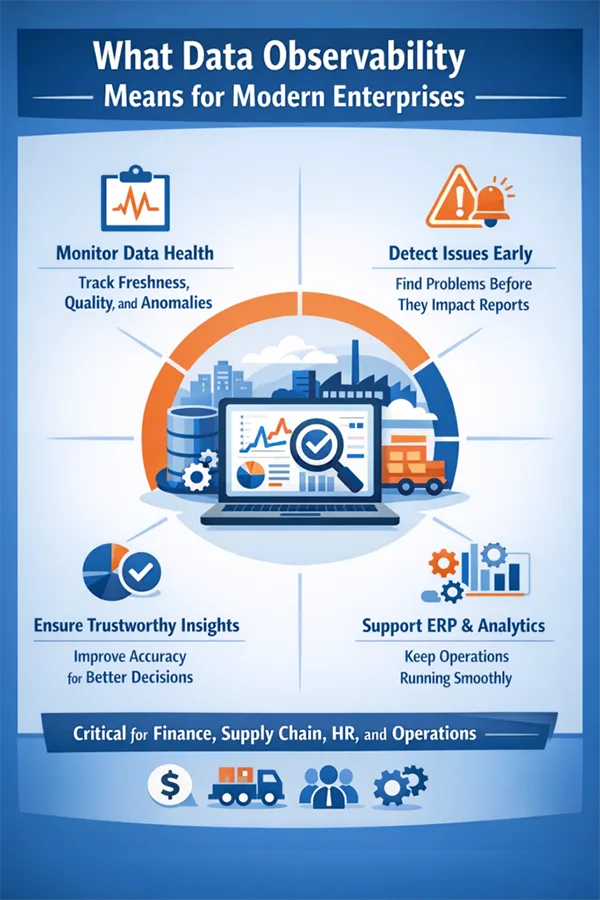
Data observability is the ability to monitor, understand, and troubleshoot the health of data across analytic systems. It goes beyond the traditional ways by tracking freshness, volume, distribution, scheme changes, and data quality issues in near real-time.
Modern enterprises often rely on complex ERP environments in which data observability plays an essential role. Since ERP systems depend on accurate and timely data, it powers these systems to keep the work going without causing breaks or disruptions in the data pipelines.
The infographic below further explains what data observability means for a modern enterprise. Take a look!
Core Cost Components of Data Observability Platforms
There are a few major cost drivers of data observability platforms. Knowing these is important for understanding TCO:
Licensing and Subscription Costs
Different platforms offer different licensing and subscription packages based on the data volume, number of tables monitored, users, or environments. Firms must understand that the pricing may not remain the same as that they paid in the initial phrase as the costs grow rapidly with expanding ERP data footprints.
Infrastructure and Cloud Resource Costs
Such platforms are heavily powered by cloud infrastructure. This includes compute, storage, and networking resources used to analyze data metrics continuously, making it a major contributor to TCO.
Data Ingestion and Storage Costs
Observability tools ingest metadata, logs, and sometimes sampled datasets. Hence, the more pipelines and ERP modules involved, the more data must be ingested and retained. So, longer retention periods can directly increase storage costs over time.
Compute and Query Processing Costs
A certain level of computing power is required for continuous data profiling, anomaly detection, and historical trend analysis, and advanced features like machine learning-based anomaly detection further increase processing demands, impacting its costs.
Integration and Tooling Costs
For a system to work effectively, it must be installed properly. Connecting data observability platforms to ERP systemsinvolve APIs, connectors, or custom engineering. Initial setup is part of the expense; on top of that, ongoing changes to ERP schemas or workflows can drive recurring integration costs.
Operational and Hidden Costs Impacting TCO
There are many operational factors accounting for the total cost; on top of that, some hidden costs are also included:
Engineering and Maintenance Effort
ERP environments do not remain the same forever, and hence, the engineering teams must maintain their observability rules, thresholds, and integrations. This constant tuning exceeds the direct licensing cost of the platform itself.
Alert Fatigue and Operational Overhead
Alert fatigues can overwhelm the teams with false alarms or, worse, do not work at all, even when needed. This can cost them thousands, result in inefficiency, and even increase the labor costs.
Training and Skill Development Costs
Employees are one of the biggest assets for any company, and investing in them surely brings high returns. Since the start, observability tools require analysts and engineers skilled to a certain level; training teams to interpret metrics, troubleshoot issues, and optimize configurations adds to the TCO.
Incident Response and Downtime Costs
ERP systems can suffer a lot due to undetected or unresolved data issues. Reporting delays, incorrect financial data, and disrupted operations all result in significant business losses. These indirect costs show a heavy impact on the total cost of ERP.
DO YOU KNOW?
Most data issues don’t start big. They begin in the form of tiny glitches; something like a delayed file or missing column bt if they aren’t patched on time, they can quietly grow into expensive ERP problems.
Optimizing Data Observability TCO With Scalable Architectures
Systems that are built to scale smartly make it much easier to keep the data observability under control. How, you may ask. Well, the logic is simple. Instead of monitoring every single data point, these help companies focus on only the most important ERP data, such as finance, inventory, or customer records.
Modular observability means you can add monitoring where it is needed and save the costs for systems that you don’t require. This will prevent unnecessary data checks that weigh heavily on the total costs.
Apart from that, cloud native systems also reduce spending. Features like autoscaling and pay-for-what-you-use pricing ensure resources grow only when demand increases.
Best Practices for Evaluating and Managing Data Observability TCO
To manage TCO Better, an enterprise can include the following best practices in its routine:
- Align observability scope with ERP business priorities
- Evaluate pricing models against projected data growth
- Regularly audit infrastructure and compute usage
- Reduce alert noise through smarter thresholds and automation
- Invest in documentation and a standardized process to lower training costs.
Pro Tip: When data observability is evaluated as a part of the total cost of ERP ownership, rather than a standalone tool, organizations earn a more vivid picture of its value and real costs.
Conclusion
Data observability platforms have become a necessity for modern ERP environments, but their TCO extends far beyond licensing fees. By understanding what drives the costs and adopting scalable, disciplined approaches, companies can significantly reduce their operational risks, improve data reliability, and keep ERP ownership costs firmly under control.
Frequently Asked Questions
What does TCO mean in data observability?
How does data observability reduce ERP costs?
It catches data issues early, preventing bad reports, wrong decisions, and emergency fixes that raise ERP expenses.
Is data observability only for large enterprises?
No, even mid-sized teams benefit by avoiding hidden costs and scaling monitoring only as needed.
Why is scalable architecture important?
A scalable architecture lets you pay only for what you use and focus on critical ERP data instead of monitoring everything.
Related Posts
How Poor Contract Visibility Leads to Revenue Leakage in Growing Companies
Growth is an important factor that determines the success rate of any business. When we witness new operations, partnerships and…
Managing Bitcoin Operations? Here’s How Salesforce Automation Helps
“Digital currency is here to stay, and it’s only a matter of how long before governments embrace it.” — Brad…
Why Modern Organizations Depend on Data Privacy Software
Data growth has significantly accelerated beyond what most compliance teams can manage, with personal records, financial details, contracts, and emails…
Converting Chats Into Leads While Maintaining Professionalism
The way marketing teams and businesses approach their potential clients to boost their sales has completely transformed in the last…

How to Delete iCloud Account? Complete Guide for 2026
Thinking, how can I delete iCloud or Apple account? It is not just about removing an account; it is about…

How Different Industries Use Specialized Software to Stay Competitive
In the market we have today, companies are always trying to find ways to work better and get results. The…
What Key Adjustments Enhance Visual Appeal Across Web Pages
Attractive web pages form the roots of any appealing website. For instance, imagine looking for content on Google, and you…
When is it Time to Consider IT Support Services for Your Business?
Every business needs to ensure smooth operations for a successful business. But despite trying hard to avoid barriers, technical issues…

How to Delete User Profile in Windows 10: Step-by-Step Guide
You don’t notice user profiles until one starts causing problems. A profile gets corrupted, a login error pops up, or…