
It is the procedure of integrating the financial data among various systems into a single and consistent platform.
What Is Data Integration? Best Practices for Financial Data Integration in Accounting
 Mahima Dave
Updated on: Jan 27, 2026
Managing financial data can be a literal headache. Anyone who has ever manually matched numbers across spreadsheets, accounting software, and bank statements must already know how messy it can get, and how the smallest of errors can turn into a major setback.
To save their staff from this mess, modern businesses don’t just use one system; they leverage multiple tools for invoicing, payroll, banking, reporting, and tax compliance. The outcome is quicker reporting, reduced mistakes as well as a great deal of less manual labor.
This need is growing fast. According to Deloitte, finance teams spend nearly 40% of their time on manual data collection and processing, rather than analysis and decision making. This colossal gap in efficiency, like that, is what makes data integration a ‘non-negotiable’ for companies.
Key Takeaways
- Data integration links various financial systems together into a single workflow.
- It eliminates a lot of manual labor and enhances accuracy in accounting.
- API and automation are important in modern financial data integration.
- Unified systems allow reporting and financial insights in real-time.
- High integration enhances compliance, auditing, and decision-making.
Data Integration in Modern Accounting Systems
Data integration is a process of integrating information derived from several sources into a single system. This may be related to accounting as bank accounts, payment gateways, payroll systems, tax software, or ERP platforms.
The integration of these systems can automatically transfer data between the systems, lessening the manual input required. Indicatively, as opposed to moving transactions out of your bank and keying them in to accounting software, integration enables those transactions to be automatically synchronized.
This is particularly relevant to companies that are dealing with external vendors such as SMSF accounting services, where real-time financial information is required to be precise and up to date to comply and report.
Why Financial Data Integration Matters for Businesses
Absence of integration can make accounting teams deal with issues like duplicate entries, irregular auditing documents, delayed reporting, and a higher risk of errors. In the long run, it adds workload and decreases trust in financial data.
With an appropriate integration, the business will be able to reduce manual workload, improve data accuracy, get real-time financial intelligence, and streamline audits and compliance. Rather than wasting hours in tallying payments, finance teams can work at analyzing performance and making strategic decisions.
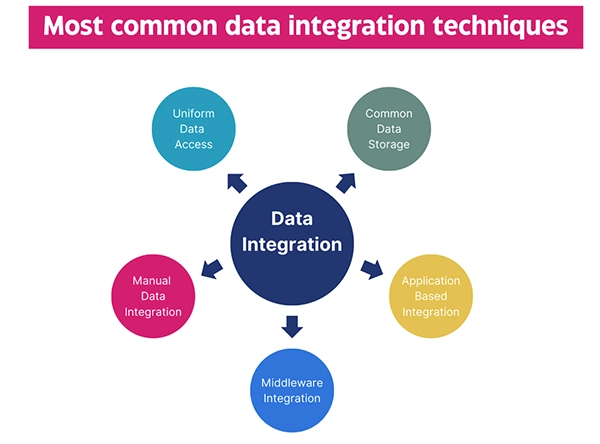
Key Methods of Financial Data Integration
One way of integrating financial data is not universal. The methods usually adopted by businesses are a mixture of strategies based on the complexity and systems of the business.
API-Based Integration
APIs enable communication between the various software systems in real time. It is among the most effective and the most popular techniques.
Batch Data Integration
Information is processed according to a set time (weekly or on a daily basis). This is effective with those businesses that do not need real-time updates.
Middleware Solutions
The middleware is an interface between systems, which translates data between them and transfers it.
Data Warehousing
Reporting and analytics are stored in a central repository with data from numerous systems.
Both approaches have their applications; it is based on the speed at which you need the information and the complexity of your systems.
Pro Tip
Start small, integrate your most critical systems first (like banking and accounting), before expanding to more complex integrations.
Tools and Technologies Used for Accounting Data Integration
The integration of modern accounting is based on the tools that might enable the automation of the data flow and minimize human interventions. Examples of some of the technologies that are in use include:
- Interaction platforms (iPaaS solutions)
- Accounting software as a cloud
- ERP systems
- Data connectors and APIs
- automated data sync tools
The key here is automation. These tools guarantee that the information is automated automatically instead of manually moving data between systems, minimizing errors and wastage of time.
Recurring is also enhanced by automation, where financial information can be inconsistent on all platforms.
Final Considerations
Integrating data in accounting operations has become a necessity today. The more digital tools are used by businesses and the larger the business is, the more complicated financial data management becomes. This complexity becomes inefficient, leading to errors, as well as a waste of time without integration.
However, with the right systems, businesses will be able to change their accounting processes from reactive and manual to reliable and ready-to-use data when they need it the most.
Frequently Asked Questions
What is data integration in accounting?
What is the significance of data integration to the business?
It saves on manpower, enhances precision, and supports businesses to make faster and data-driven decisions.
Is data integration only beneficial for large enterprises?
No. The integration of such tools as accounting software, payment services, and banking systems also benefits small businesses.
Which is the most popular form of integration?
The most popular one is API-based integration since it enables real-time data synchronization across systems.
Related Posts

8 Best AI Presentation Makers for Business-Ready Slides
Making a presentation doesn’t just mean designing slides. It’s about defining a clear structure, using defined logic, useful visuals, and…

Queue Management Software Troubleshooting Guide: 8 Common Faults and Fixes
The long wait times and ineffective management of customer queues can have a significant impact on customer satisfaction and business…

How to Use Similarweb Website Traffic Data for Competitor Research
Competitor research without traffic data is guesswork. You can guess who your rivals are, guess how big they are, guess…

Choosing the Right Hosting Model for Scalable Digital Platforms
The performance of digital business is directly related to website speed, uptime, and scalability. Slow page performance has a negative…

How Data-Driven Performance Tools Are Transforming Employee Recognition in Tech Companies
“People work for money but go the extra mile for recognition, praise, and rewards.” — Dale Carnegie (Writer & Teacher)…

Why Businesses Struggle to Collect Reliable Data from the Web
Almost every company that depends on data runs into the same problem: although they can find the data they need,…

Why Financial Data Recovery Matters for Businesses
Financial data supports every part of a business, directly affecting cash flow, payroll, tax reports, audits, customer billing, and daily…

CMMC Compliance Is Coming for Manufacturers. Here Is What You Need to Do
“Cybersecurity is much more than a matter of IT.” — Stephane Nappo (Cybersecurity Professional) For manufacturers working within the defense…

How Data-Based Tools Influence Learning Performance
Learning has transformed in the modern age with the integration of new technologies to help students and professionals prosper in…