
Important files can easily be backed up online by using cloud storage. One can even secure their files on the cloud using two factor authentication method.
Best Backup Methods for Students to Avoid Losing Important Files
 Kartik Wadhwa
Updated on: Mar 18, 2026
Losing important documents and files just before a deadline is one of the most stressful situations any student can face, with projects, assignments, and notes taking weeks to complete. Losing all of it instantly can seriously affect academic performance.
This is why securing your files with smart backup methods has become essential for students who rely on a single device’s storage to store their copies.
In this guide, we will explore a few reliable ways in which students can safely reinforce their data and prevent the chances of it getting lost during crucial times.
Key Takeaways
- Safely backing up data online with cloud storage
- Tips for a secure online cloud backup
- Keeping more copies of data with external storage backup options
- Smart backup habits every student should follow
Cloud Storage – The Easiest Way to Keep Files Safe
Backing up academic files is important for every student because essays, reports, and projects often take many hours to complete, and losing them due to technical errors or accidental deletion can cause serious problems.
Using reliable backup methods ensures that students’ work is protected, but saving files on different devices alone is not enough. Students should also check grammar before and after creating backups to make sure the stored version is the correct one.
Sometimes a draft with mistakes is saved, and later the wrong file is restored or submitted.
What cloud storage is and why students use it
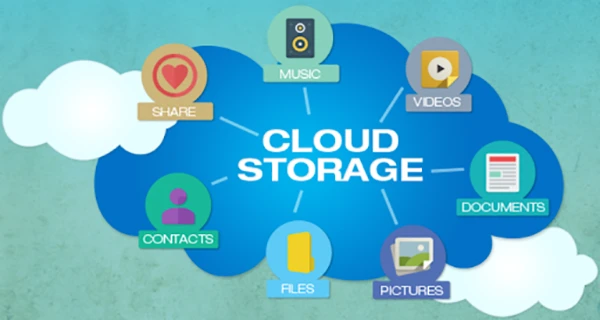
Cloud storage means saving files on internet servers instead of only on your computer. This makes it easier to protect documents, because even if your laptop breaks, the files stay online.
Many students prefer this method as it helps them understand how to safely back up files without the need to carry extra devices just to access files. Most services automatically save changes, which reduces the risk of losing work during writing or editing.
Common benefits of cloud storage include:
- Access files from phone, tablet, or computer
- Automatic synchronization
- Easy sharing with classmates
- Protection from device damage
Popular cloud services students can use
Many platforms allow students to store documents safely. Choosing the right one depends on how much storage you need and how often you work with large files. Below is a comparison of popular options.
Before selecting a service, students should compare storage size, price, and automatic backup features. The table below shows the most common choices used in universities.
| Service | Free Storage | Best For | Key Advantage |
| Google Drive | 15 GB | Essays, notes, and group work | Auto-save with Google Docs |
| Dropbox | 2 GB | Small projects | Easy file sharing |
| OneDrive | 5 GB | Microsoft Office users | Works with Word & Excel |
| iCloud | 5 GB | Apple users | Automatic device backup |
Using cloud services correctly is one of the safest ways to back up important files, but students should still keep another copy somewhere else.
Tips for safe cloud backup
Cloud storage is reliable, but only if used correctly. Students often forget to turn on sync or use weak passwords, which can cause problems later.
Follow these student data backup tips when using cloud storage:
- Turn on automatic synchronization
- Organize folders by subject
- Use strong passwords
- Enable two-factor authentication
- Check storage space regularly
These fundamental steps make cloud storage one of the best methods for students to back up files, especially for daily academic assignments.
Did You Know?
Cloud storage typically saves data across multiple data servers, so even if one server goes down, your data remains safe and accessible
External Backup Options – USB, Hard Drives, and Offline Storage
Cloud storage is convenient, but it should not be the only solution. Offline backup gives extra protection in case of internet problems, account issues, or accidental deletion. In this section, we look at physical ways to back up important files.
Why students should not rely only on cloud storage
Online services are useful, but they are not perfect. Accounts can be locked, files can be deleted, or internet access may not be available. Because of this, experts recommend keeping at least one offline copy.
A combination of online and offline backup methods allows students to reduce the risk of losing work right before an exam or deadlines.
Offline backups are helpful when:
- The Internet is not available
- The file size is very large
- You need long-term storage
- You want extra security
External devices for student backups
Physical storage devices are still widely used because they are simple and reliable. Even one USB drive can save an entire semester of work if used correctly.
Common external backup options include:
- USB flash drives – good for quick copies
- External hard drives – best for large projects
- Memory cards – useful for photos or videos
- Another computer – extra safe copy
These options are among the most practical backup methods for students, especially for those working with design, video, or research files.
Best practices for offline backup
Having an external drive is helpful, but students also need to use it regularly. Many people buy storage devices but forget to update their backups.
Follow these student data backup tips for offline storage:
- Save copies at least once a week
- Keep devices in different places
- Do not store all files on one drive
- Label folders clearly
- Check files after copying
Combining external storage options and cloud database is one of the safest and most secure ways to back up important data because it protects files from both technical failures and human mistakes.
Smart Backup Habits Every Student Should Follow
Good tools are important, but habits matter even more. Many students lose files not because technology failed, but because they forgot to save or update backups.
This section explains daily practices that make the best backup methods for students really work.
The 3-2-1 backup rule explained
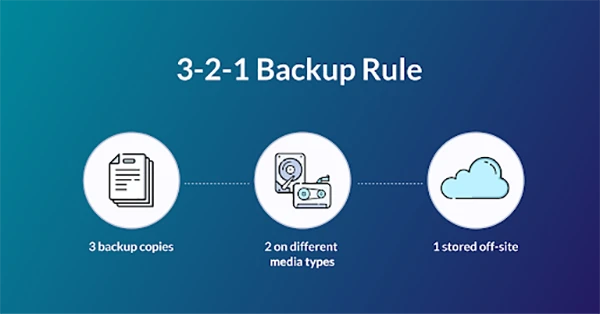
One of the most recommended strategies is the 3-2-1 rule. It is simple and works for almost any student, no matter what device they use.
The rule means:
- Keep 3 copies of your files
- Use 2 different devices
- Store 1 copy in the cloud
This approach is one of the smartest ways to back up important files, because it protects data from accidents, hardware damage, and account problems.
You can quickly remember the 3-2-1 backup rule with this illustration:
Use auto-save and version history
Modern apps include automatic saving, but students sometimes turn it off or ignore it. Learning how to back up files for students using built-in tools can prevent many problems.
Useful habits include:
- Turn on auto-save in writing apps
- Keep previous versions of files
- Save before closing programs
- Backup before deadlines
These small actions are simple but very effective student data backup tips.
Check backups regularly
A backup is not useful if the files cannot be accessed later. Students must ensure to check their copies from time to time to make sure everything works correctly.
Good checking habits:
- Open backup files once a week
- Make sure folders are complete
- Delete old duplicates carefully
- Update backups after big changes
Students who follow these habits usually never worry about losing work, because they always have a safe copy ready.
Bottom Line
Using these backup methods for students is not overly complex, but it requires consistency. The safest approach is to combine cloud storage, external devices, and smart habits.
When students know how to back up files for students correctly, they reduce stress and avoid missed deadlines.
Following simple student data backup tips and using multiple ways to back up important files ensures that important documents stay safe during the entire academic year.
Frequently Asked Questions
How can I back up my files online?
How to secure a backup on cloud storage?
The following are the tips to secure your files on the cloud:
- Turn on automatic synchronization
- Enable two-factor authentication
- Use strong passwords
- Check storage space regularly
Where can I physically back up my files?
You can back up your files physically on USB drives, Hard disk/drives, memory cards, and other devices
What are the best practices for an offline backup?
Remember to create multiple copies, label folders clearly, and check all files after copying them on your devices or drives.
Related Posts
Simple Ways to Clean Audio Data for Better Model Performance
Most of the machine learning teams do not struggle because their processing systems are not capable—they struggle because their audio…

How to Check for Malware on Mac in 2026?
Can Mac computers get viruses? Macs are not as safe as people think. Yes, macOS has built-in tools like XProtect…

10 Best Lightroom Preset Alternatives in 2026
“Photography is the story I fail to put into words.” — Destin Sparks (Landscape Photographer) For years, Lightroom presets have…
Elementor Hosting vs SiteGround: Which is Faster in 2026?
A website’s performance is mainly determined by its Speed. Even a slight delay can reduce conversions by a significant margin.…

10 Best Visual UGC Platforms for eCommerce Brands in 2026
“People influence people. Nothing influences people more than a recommendation from a trusted friend.” — Mark Zuckerberg (Meta CEO) That…

The Data Models Powering the Next Creative Revolution in Video Generation
Artificial intelligence has evolved from a mere tool to the cornerstone of advancements in the new era. Over the years,…

Solar Software Companies: How Platforms Improve Cross Team Collaboration
“If everyone is moving forward together, then success takes care of itself.” — Henry Ford (Industrialist & Business Magnate) Handoffs…

What Healthcare Leaders Expect From Digital Tools
Healthcare executives are under pressure to protect patient safety, clinician time, and data privacy while modernizing the delivery of care.…
How to Reset Android Phone When Locked? (Safe Factory Reset Methods)
Locked out of your Android phone or stuck on the screen? It happens more than you think. A forgotten PIN,…