
Email is poorly organized, lacks backup, and has long-term security solutions for critical business files.
When Critical Documents Outgrow Email: Smarter File Storage & Recovery Solutions
 Reviewed By Brijesh Kumar Singh
  Saipansab Nadaf
Updated on: Apr 20, 2026
Table of Contents
- Why Email Is No Longer Enough for Business Document Storage
- Risks of Managing Critical Files Through Email
- Smarter File Storage Solutions for Secure Document Management
- How Data Recovery Tools Protect Important Business Documents
- Best Practices for Backup, Storage, and File Recovery
- Final Thoughts
- Frequently Asked Questions
For years, businesses have been using e-mail to send and receive contracts, invoices, reports, and confidential files. Although email is a useful tool for communications, it has never been intended to be used as a repository for long-term documents. With growing and expectations, and increasing volume of files, storing important documents inside inboxes is becoming risky for organizations.
According to Statista, every day, billions of emails are sent around the world, making it more likely for files to be duplicated, accidentally deleted, and for security breaches to occur.
Today’s businesses require better storage and recovery solutions that offer increased organization, access, and security from cyber attacks, hardware failures, and human error. Traditional email and fax workflows are becoming a thing of the past and will soon be a necessity for secure handling of documents.
Key Takeaways
- Email isn’t the best place to store business documents for the long haul
- Security and compliance risk increase due to poor file management
- Today’s storage solutions enhance organization and accessibility
- Recovery tools recover lost or corrupted files within a business
- Backup is a key aspect of business continuity
Why Email Is No Longer Enough for Business Document Storage
While email is easy to use with speedy file sharing, there are some drawbacks to storing documents for a long period of time. When companies expand, staff members may find it difficult to look for older attachments, keep track of numerous versions of a document, and keep records organized among inboxes.
The problems with the email storage are worth knowing before employing modern solutions:
- Restrictions on email storage
- Limited storage capacity
- Poor document organization
- Tracking file versions is sometimes difficult
- Higher probability of deleting or misplacing data
- Weak collaboration features
- Unfortunately, there is a lack of long-term support
Email and fax-based communication is also less efficient in the modern digital world for retrieving documents and streamlining workflow. For companies that deal with confidential information or vast quantities of data, dedicated centralized systems for secure data handling are essential.
INTERESTING FACT
The first email attachment standard came in the early 1990s, greatly altering the way digital documents were shared around the world in businesses.
Risks of Managing Critical Files Through Email
Email is the main medium for businesses to store important documents, and this can result in operational and cybersecurity issues. These risks aren’t generally realized by many organizations until they lose access to important files or encounter a security incident.
The common risks include attacks such as phishing and malware, unauthorized file access, lost or damaged attachments, duplicate document versions, difficulties in compliance and audit, and the loss of the account after being compromised is permanent.
Email accounts can also be the target of a ransomware attack or become unavailable due to a server crash or other issues that could cause the loss of important data for a period of time or indefinitely. Without backups, businesses could face difficulties trying to recover critical data in the event of an emergency.
Smarter File Storage Solutions for Secure Document Management
Storage platforms provide businesses with more secure and structured storage solutions for digital data. These systems streamline document management and enhance teamwork, access, and security.
Organizations need to assess the best modern storage options first before choosing a storage strategy. The most popular file storage options are cloud storage platforms, Document Management Systems (DMS), secure network storage, hybrid cloud environments, and enterprise content management systems.
Smart storage systems are a great thing to use as they offer many benefits, including centralised file access, improved team working relationships, faster document retrieval, improved version control, enhanced encryption and security, and automated backup support.
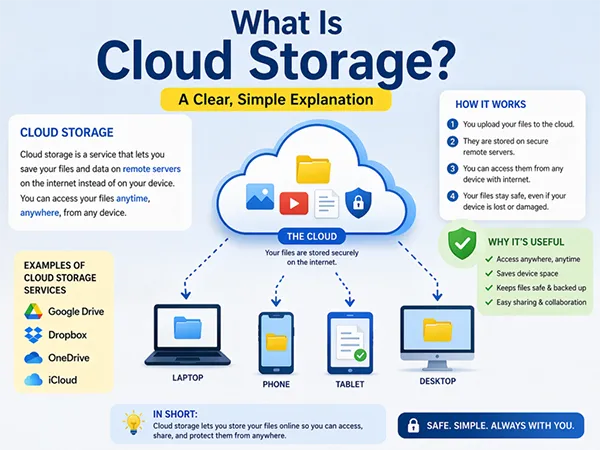
Cloud storage solutions can also enable the remote access of files from various locations, ensuring access controls and monitoring. These systems can help enterprises cut down on reliance on disjointed email processes. Refer to the infographic below to learn how cloud storage helps.
How Data Recovery Tools Protect Important Business Documents
Despite the best of storage technology, businesses can suffer from accidental deletion, hardware malfunction, cyber attack, or file corruption. Data recovery tools can recover lost data and minimize downtime during unforeseen events.
Organizations need to know how recovery tools can help them with business continuity before they begin to develop recovery plan data strategies. Common recovery features:
- Deleted document recovery
- Corrupted file repair
- Email recovery support
- Hard drive recovery
- Backup restoration
- Disaster recovery solutions
It is important to understand the significance of recovery tools.
Businesses can benefit from a data recovery system, including:
- Get back to critical files in a timely fashion
- Minimize downtime
- Avoid data loss for good
- Improve operational continuity
- Support compliance requirements
Automated backups and recovery systems are particularly advantageous for organizations that deal with sensitive information, such as customer data or legal and financial records. Today, cloud storage, external drives, and enterprise servers are also supported by modern recovery solutions.
Best Practices for Backup, Storage, and File Recovery
Securing documents is more than just being stored electronically. Organized storage, automated backups, and recovery plans that have been tested should be used together by businesses. Adhering to best practices ensures security and reliability over the long term. Recommended best practices:
- Implement encrypted storage systems
- Limit needless user access
- Use uniform naming conventions for files
- Test recovery systems on a regular basis
- Have off-site or cloud backups
- Follow the backup rule of 3-2-1 (3 copies of important data, 2 different storage formats, 1 secure offsite backup)
This approach helps avoid permanent data loss due to ransomware, hardware failure, or accidental deletion. A company should also educate workers about phishing and proper document handling procedures to help minimize human error.
Final Thoughts
With increasing volumes of digital data being processed by businesses, email storage and management are no longer enough for secure file handling and management. In today’s digital age, having a centralized storage system, automated backup, and recovery tools is essential to safeguarding valuable data and ensuring uninterrupted operations.
Better storage solutions enhance the ease of collaboration, provide greater security and access to data, and diminish the risks involved with data loss and cyber threats. These systems, when coupled with robust backup and recovery solutions, can assist in protecting their valuable information and enhancing their long-term performance.
Companies that take proactive measures towards secure file storage and data recovery will now be more ready to respond to future data demands and changing cyber threats.
Frequently Asked Questions
Why is email not an appropriate method for storing documents?
What is a document management system?
A site that securely stores, arranges, and handles digital documents.
What are the benefits of recovery tools for businesses?
Restore missing, deleted, or corrupted files following data loss events.
Are cloud-storage systems secure?
Encryption, access controls, and backup systems are used to enhance data security, as trusted cloud platforms do. Like trusted cloud platforms, they employ encryption, access controls, and backup systems to ensure data security.
Related Posts

8 Best AI Presentation Makers for Business-Ready Slides
Making a presentation doesn’t just mean designing slides. It’s about defining a clear structure, using defined logic, useful visuals, and…

Queue Management Software Troubleshooting Guide: 8 Common Faults and Fixes
The long wait times and ineffective management of customer queues can have a significant impact on customer satisfaction and business…

How to Use Similarweb Website Traffic Data for Competitor Research
Competitor research without traffic data is guesswork. You can guess who your rivals are, guess how big they are, guess…

Choosing the Right Hosting Model for Scalable Digital Platforms
The performance of digital business is directly related to website speed, uptime, and scalability. Slow page performance has a negative…

How Data-Driven Performance Tools Are Transforming Employee Recognition in Tech Companies
“People work for money but go the extra mile for recognition, praise, and rewards.” — Dale Carnegie (Writer & Teacher)…

Why Businesses Struggle to Collect Reliable Data from the Web
Almost every company that depends on data runs into the same problem: although they can find the data they need,…

Why Financial Data Recovery Matters for Businesses
Financial data supports every part of a business, directly affecting cash flow, payroll, tax reports, audits, customer billing, and daily…

CMMC Compliance Is Coming for Manufacturers. Here Is What You Need to Do
“Cybersecurity is much more than a matter of IT.” — Stephane Nappo (Cybersecurity Professional) For manufacturers working within the defense…

How Data-Based Tools Influence Learning Performance
Learning has transformed in the modern age with the integration of new technologies to help students and professionals prosper in…