
It simply means converting raw, spoken words from audio to readable text.
Your Most Important Data Is Trapped in Audio. Here’s How to Free It.
 Mahima Dave
Updated on: Feb 05, 2026
KEY TAKEAWAYS
- Learn about why you don’t need to own every wrench
- Discover how to turn audio data into text
- Understand the real cost of “saving money”
We record everything now: meetings, calls, lectures, voice notes, etc. But what do you do when you actually need something from the audio? It’s a painfully irritating process, right? Like you literally have to replay the same clip again and again, trying to catch one important line. Half of the time, you still miss it.
That’s why pulling data out of the audio files is quite important because once it is written down, it’s a lot easier to scan, do research, and actually use it. You can simply save it, share it, or come back to it later without hitting play ten times.
Let’s continue with this article and discover some tools that will help turn your “I’ll listen to it later” into “yes, I can work with this” in minutes.
The “Just-in-Time” Toolkit: Why You Don’t Need to Own Every Wrench
Here’s the modification that changed how I work. I stopped thinking I needed to own a professional-grade tool for every single task. Instead, I began using platforms that work much like a shared, digital toolbox.
Just think about it. You don’t buy a $500 specialized wrench for a one-off plumbing fix; you borrow it or rent it. The same strategy is now being applied to software. Why pay for a full, year-long subscription to a pricey transcription service when you just need to complete three client interviews this quarter?
This is where access beats ownership. A shared platform gives you the key to a whole workshop of utilities. Have to edit an image? It’s there. Need to summarize a PDF? It’s there. And most importantly, when you hit that audio wall, the tool you need is just a click away.
Flipping the Switch on Audio Data
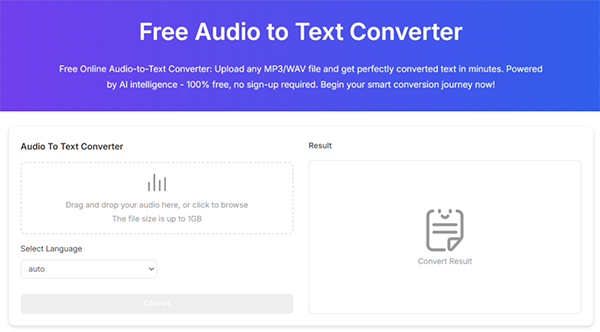
This transforms everything. That daunting task of how to convert audio to text goes from a multi-day effort to a 10-minute process. You find a reliable audio file to text converter on your shared platform, upload the file, and simply get back a clean, timestamped transcript in a few minutes.
Suddenly, you’re not a scribe; you’re an analyst.
- That legal deposition? You can now browse for every mention of a specific clause.
- Those user interviews for your app? You can copy-paste direct quotes into your report almost immediately.
- The recovered voice memos from a device? You have a searchable text log to cross-reference with the other files.
The data is eventually usable. It’s no longer a recording; it’s a document. This isn’t just a convenience; it’s a force booster for your accuracy and efficiency.
The Real Cost of “Saving Money”
We frequently try to save money by wasting time. We’ll manually transcribe because we don’t want another subscription. But what’s the hourly rate of your concentrated effort? What’s the result of a missed detail?
Having these highly efficient tools on tap, without the guilt of an underused subscription, moves out that false economy. It lets you apply the right tool to the appropriate job immediately, preserving your mental power for the actual work that matters the most: interpretation, strategy, and insight.
For anyone in the field of recovering, reviewing, or deriving meaning from information, this isn’t a minor upgrade. It’s a significant change in how you operate. Stop being the bottleneck. Uncover the data you already have, and start working with it, not just on it.
Frequently Asked Questions
What does “freeing data from audio” actually mean?
How does converting audio to text help students?
It helps students by turning lectures and recordings into written notes, making it easier to review, search for key information, and study more efficiently.
Do you need technical knowledge to convert audio into text?
No, you do not need technical knowledge because AI-driven tools make the process straightforward, fast, and accessible for non-technical users.
Related Posts

How to Turn Off Touchscreen on Chromebook? Step-by-Step Guide
Touchscreen on a Chromebook sounds great until it starts getting in the way. Accidental taps while typing, smudges, and random…
How to See Blocked Messages on iPhone? (What Actually Works)
Ever blocked someone on your iPhone and later found yourself wondering if you can see blocked texts on iPhone? It…
The 5 Architecture Decisions That Haunt SaaS Founders Two Years Later
Architecture decisions are fundamental to ensuring steady growth in any business or technical step, especially when the topic is laying…
Database Scaling: How to Manage 10,000+ Political Volunteers
Every small business or growing team needs to deal with a common issue—the database that was working perfectly for the…
What Structured Cabling Systems Include and Why Businesses Still Need Them
Nowadays, IT conversations jump straight to cloud apps, wireless coverage, and cybersecurity tools. While these are visible and easy to…
Top 10 Web Development Companies to Partner with in 2026
In today’s fast-growing digital world, every business needs a strong online presence to stay competitive. A well-designed website not only…

Intelligent Dynamic Pricing with Market Data
Rising fixed costs no longer exist in retail as real-time market volatility and AI-driven shifts reshape the way brands do…
Recovering Lost YouTube Videos from a Corrupted Drive
Losing your videos strikes fear into any YouTuber. One instant everything runs smoothly—crisp footage, clean sound, visuals locked in place—the…
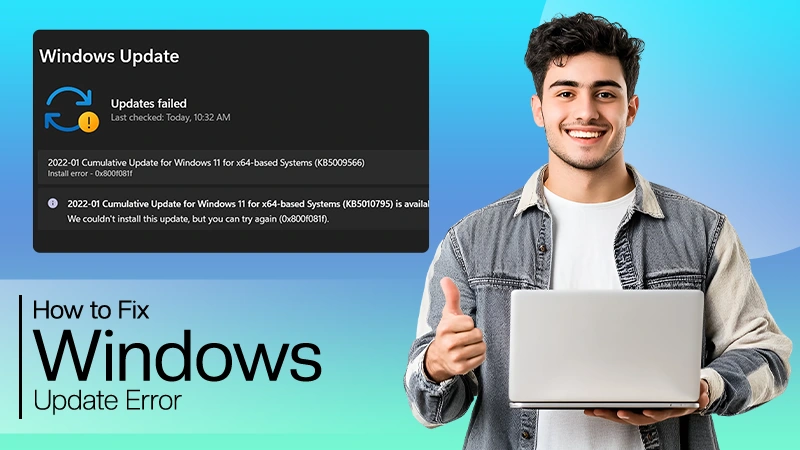
How to Fix Windows Update Error? 10 Reliable Fixes
Windows Update keeps your Windows system secure, fast, and packed with the latest features. But let’s be honest, sometimes Windows…